00 Tools Needed
You will need your own laptop. Please bring one. For anyone who has a genuine financial difficulty, speak to us and we can provide a laptop for you to use at the sessions. But note that you will be working in a more limited way. You won't be able to personalize your project or do the required homework.
Laptop requirements:
- x64 Processor. Recommended Intel Core i5 or better. i3 will struggle, and atom processors just won't cut it.
- Recent Windows or Apple OS
- 8GB RAM. More is better.
- 10GB Free disk space
- Mouse with 3 buttons (pressable scroll wheel counts as a button)
Search Amazon for Laptops with above specs
All of the software we'll use is totally free. To avoid comparability problems, please have the exact versions of the following software installed on your laptop:
-
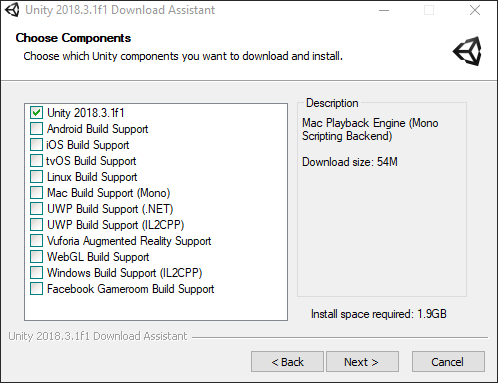
Unity 2018.3.1 Only the first checkbox needs to be selected for this tutorial as seen here
-
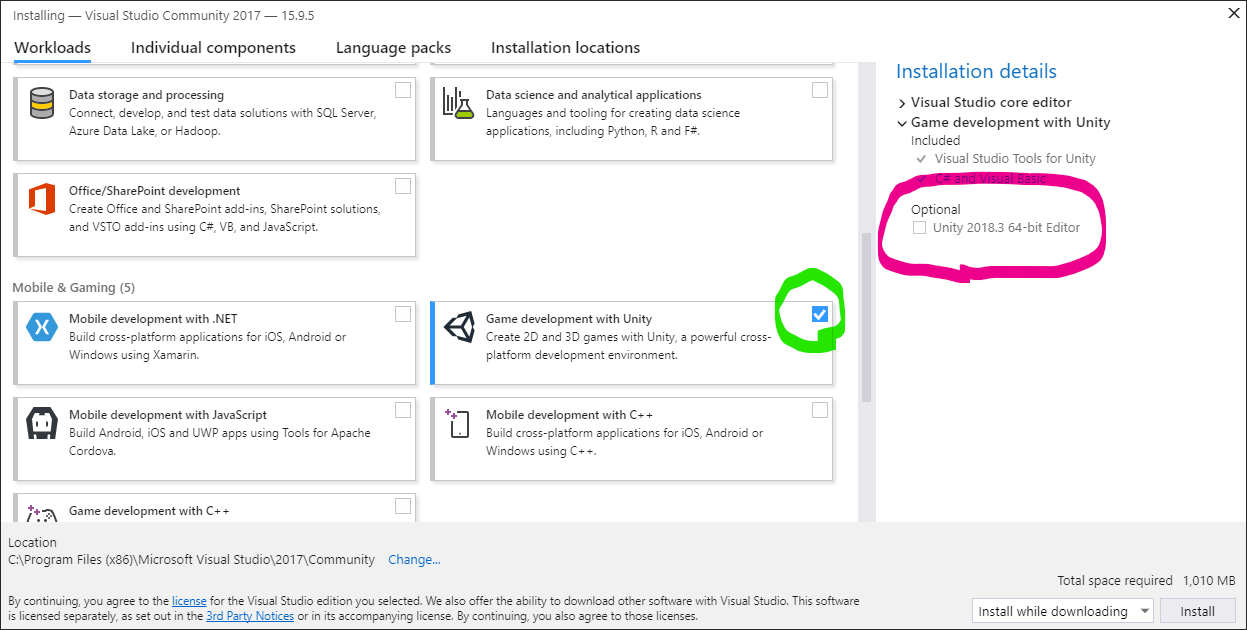
Visual Studio Community 2017 or newer When prompted for what to install DO check "Game Development for Unity" but UN-CHECK "Optional - Unity xxx Editor") as seen here
-
Gimp for 2D graphics editing
-
Blender 2.8 for 3D modelling
-
Audacity for audio editing
-
Fork GIT client for keeping track of changes
-
Open up the Fork program and select File - Clone
-
For the Repository Url paste in this value:
https://github.com/CoderDojo-Ennis/UnityDefender.gitFor Parent Folder select the location on your computer where you like to keep things. This could be your documents folder.
for Name enter UnityDefender
Press the Clone button. This will download the template for the project onto your computer.
-
In the left panel right click on Branches - Master and select Create New Branch. This is where you own work is going to go. Type in your own name as the Branch Name, select the Check Out After Create button and press the Create button.
-
Start up Unity, select Open and select the folder that you chose to clone to above
-
In the Project window inside the Assets - Scenes folder, double-click on GameScene to open that scene.
We're now ready to start building your own version of this amazing game!