This repository was archived by the owner on Mar 28, 2019. It is now read-only.
Setting Runtime Options
In this page you can set options that determine how AMPA works at runtime.
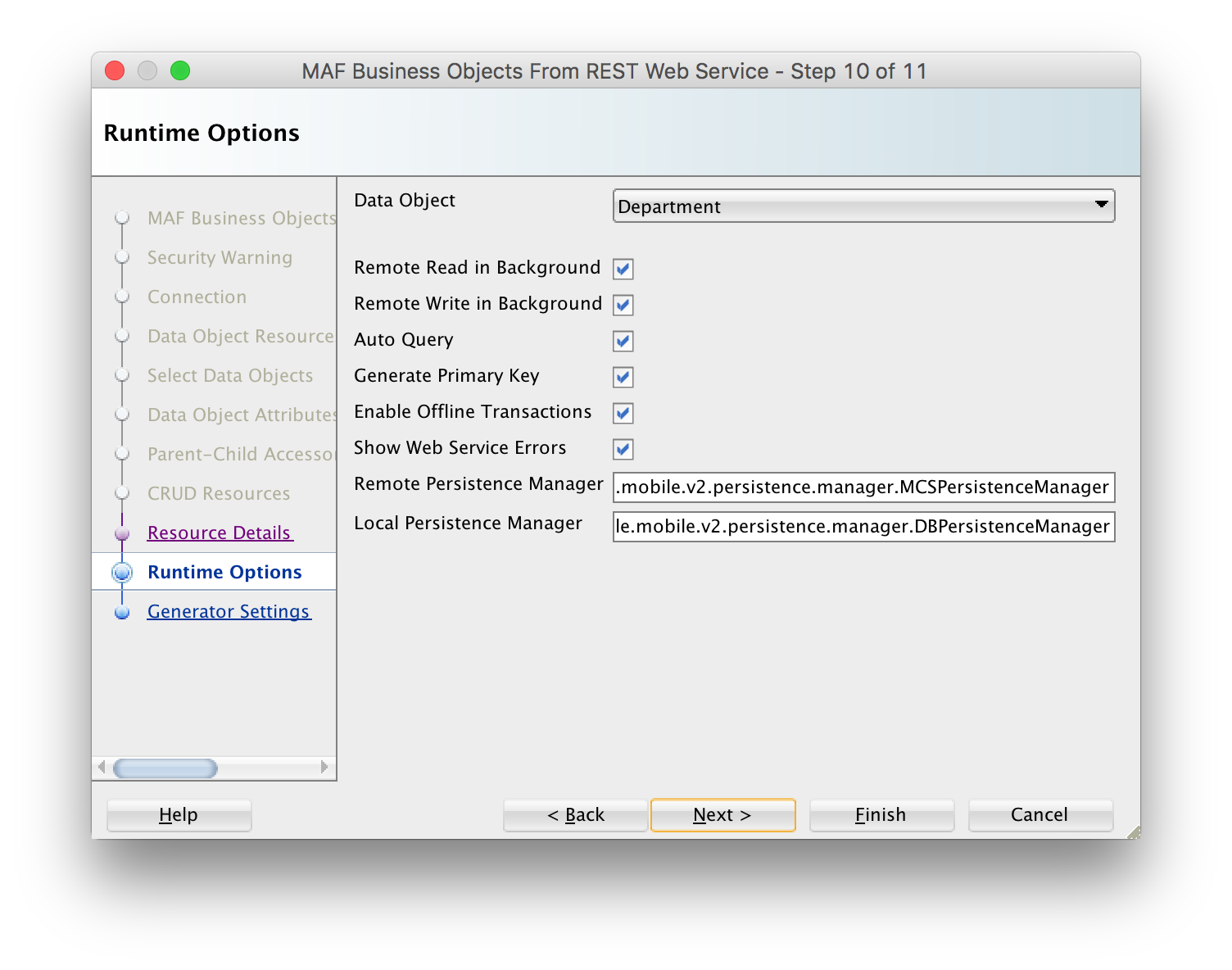
- Remote Read in Background: if this checkbox is checked, the GET requests (typically the Find All, Find and Canonical resources) specified for this data object are executed in a background thread. You will usually leave this checkbox checked as it enhances the user's perceived performance of the mobile app: AMPA will first query the on-device SQLite database and show these results immediately on the screen (assuming you have checked Persist checkbox for the data object), the more time-consuming REST call will be made in the background without blocking the user interface and once the REST response is received, the AMPA runtime will automatically update the user interface.
- Remote Write in Background: if this checkbox is checked, the non-GET requests (typically the Create, Update, Merge, remove resources) specified for this data object are executed in a background thread. You will usually leave this checkbox checked as it enhances the user's perceived performance of the mobile app: after triggering the REST call through some save or remove button int the UI, the user can immediately continue to use the app. The user interface is not blocked for the duration of the REST call. Again, if the REST response includes some attributes with server-updated values, then AMPA will automatically refresh the UI.
- Auto Query: if this checkbox is checked, AMPA will automatically query the on-device database for all rows and/or call the Find All Resource when the Entity CRUD service class for the data object is initialized. This is convenient when building your AMX pages using the bean data control that you create for the Entity CRUD service class. The bean data control will expose a collection element that you can drag and drop onto your page to, for example to create a list view or form view. When auto-query is set to true, this collection element return all data objects, initially what is present in the local DB, and then it will be refreshed with the remote collection once execution of the Find All Resource has completed. If this checkbox is unchecked, you will need to execute a finder method in your task flow before navigating to the AMX page, otherwise the AMX page will show no data.
- Generate Primary Key: if this checkbox is checked, AMPA will automatically generate a primary key when a new data object (entity) is inserted in the local database when the primary key attribute value is still null. This feature only works when the primary key attribute is a numeric attribute: AMPA will query the SQLite DB for the current maximum value and increment this value with 1.
- Enable Offline Transactions: if this checkbox is checked, you can make "write" REST calls in offline mode. AMPA will register the transaction you make (create,update,remove or a custom action) as a so-called pending datasync action and when online again it will synchronize these actions and execute the REST call associated with this action. Note that when you are online, and the REST call fails because the server is not available or the server throws some error when invoking the REST resource, your transaction will also be registered as a pending sync action, and AMPA will retry to execute it the next time you make some REST call. If this checkbox is unchecked, an error will be shown to the user when he is offline or when the REST call fails.
- Show Web Service Errors: if this checkbox is checked, any REST Call failure will be shown as an error message popup in the user interface. This is a useful setting during development so you quickly can see what is going wrong. We recommend to uncheck this checkbox when taking your app in production, you typically do not want to show technical details of why a REST call fails to the end user.
- Remote Persistence Manager: You can use this field to register your own remote persistence manager sub-class. This is useful if you want to override/extend the default behavior of the AMPA remote persistence manager.
- Local Persistence Manager: You can use this field to register your own local persistence manager sub-class. This is useful if you want to override/extend the default behavior of the AMPA local persistence manager.