Defining CRUD REST Resources
In step 8 of the wizard page we can define the REST resources and associated HTTP methods that should be used for the various read and write actions.
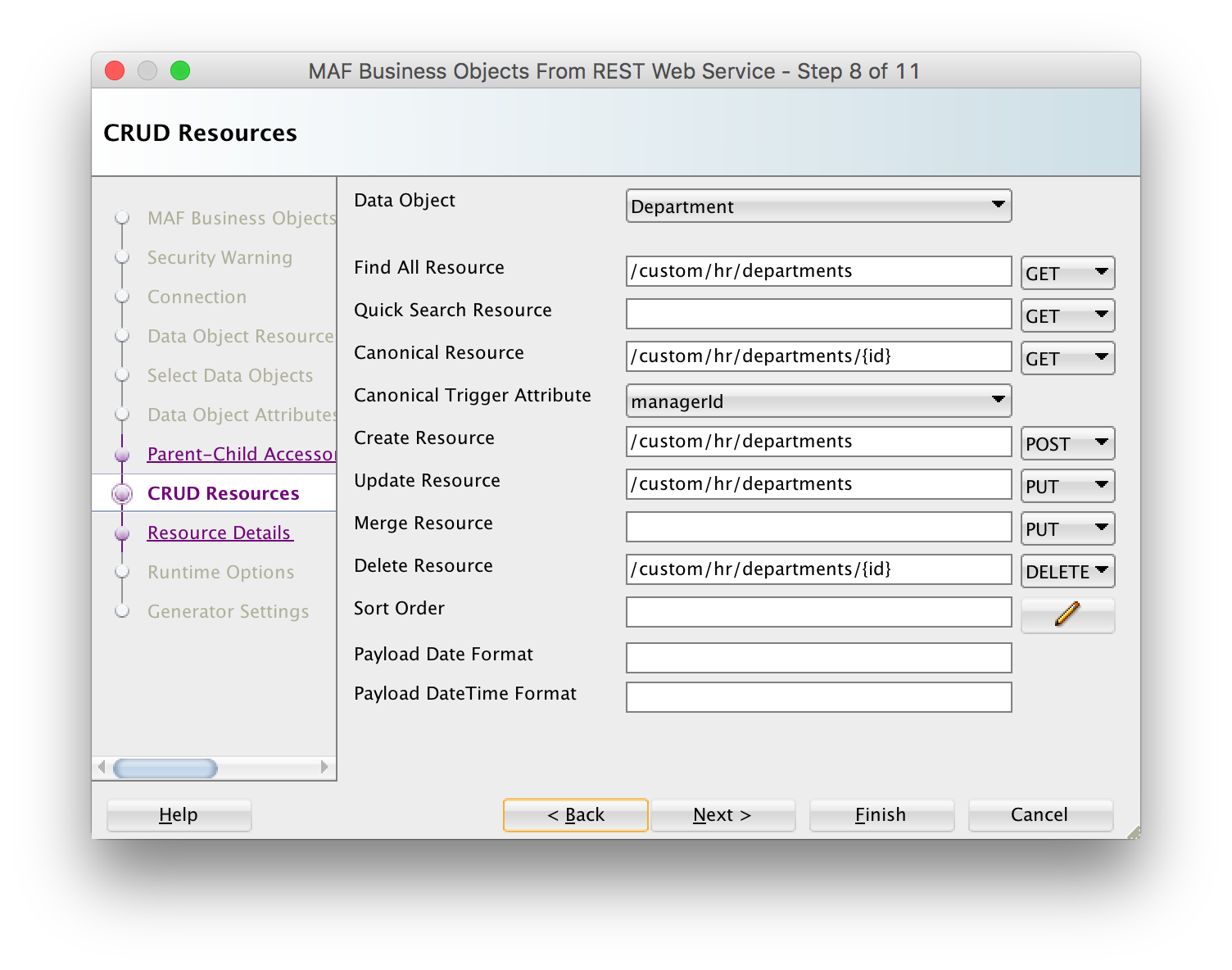
When using a RAML file or ADF BC REST Describe to discover data objects, this page is typically pre-filled with resources based on REST best-practice conventions: a POST resource is typically used for creating a resource, a PUT or PATCH resource for updating/merging, and a DELETE resource for deleting a resource. If you have used sample resource URLs to discover your data objects, the Find All Resource is defaulted to this sample resource.
The Quick Search Resource is useful for large data sets. For a large data set you typically do not want to execute a Find All Resource that brings in all instances, as this might cause your device to go out of memory. In such a situation you define a quick search facility in the user interface that will bring in only the instances that match the search criterium. When your data set is not that big, and you use the Find All Resource to get all instances at once, you can execute a quick search filter directly against the on-device SQLite database which is very fast as no web service needs to be invoked.
The Entity CRUD service class, generated for each data object (entity) that has at least one REST resource specified on this page, includes a save[DataObjectName] method. When you invoke this method (for example, by dragging and dropping it from the data control palette), the AMPA runtime will decide based on the entity state which resource each should call: either the Create Resource, the Update Resource or the Merge Resource:
- if the entity state is New, it will call the Create Resource, if this resource is not specified it will call the Merge Resource. If both resources are not specified, no remote REST call will be made.
- if the entity state is Not New, it will call the Merge Resource, if this resource is not specified it will call the Update Resource. If both resources are not specified, no remote REST call will be made. The entity state is automatically set to New when creating a new data object through the data control Create operation. If you programmatically create a new entity instance, you should call setIsNewState(true) yourself.
As discussed before, the Canonical Resource is useful in a situation where you have a data object with many attributes, and you only want to bring in all the attributes once a specific data object instance has been selected from a list.
If you specify the Canonical trigger Attribute, AMPA will generate code in the Data Object Java class that will automatically invoke the canonical REST resource when the value of this attribute is retrieved through the getter method. For example, if the department Find All Resource returns a list of department id and name, which are shown on a department list page, if you then select a department from the list and go to the detail page which shows all department attributes, then we can set the Canonical Trigger Attribute to locationId, the getLocationId method will fire when we navigate to the detail page, and AMPA has generated code inside this getter method to automatically invoke the conical REST resource.
The Payload Date Format and Payload DateTime Format fields can be used to specify the Java data pattern that should be used to convert the date attribute string values in the payload to a java.util.Date instance.
In the Sort Order field you can define a comma-separated list of attribute names. You can suffix the attribute name with ” desc” to get a descending sort for the attribute. Note that the sort order specified here is the default order in the user interface. The persistence runtime code makes it easy to add UI controls to change the sort order at runtime.