Code History Diff View
The Code History Diff View is a code-compare view with side-by-side panels. You can see how some region of code has evolved over time, or even revert the code to an earlier version.

The left-hand panel always shows the current (i.e., the most recent) version of the code snippet.
The right-hand panel shows some version of the code in the past, where the orange marker in the timeline is pointing at.
The diffs between the two code snippets are marked, as in usual visual diff UIs. The right side code can go all the way back to when the code did not even exist, assuming that this is in the history.
You can select an arbitrary region of code from the code editor, and invoke Launch Code History Diff command to see this view for the specified region.
Click to watch the video ↓
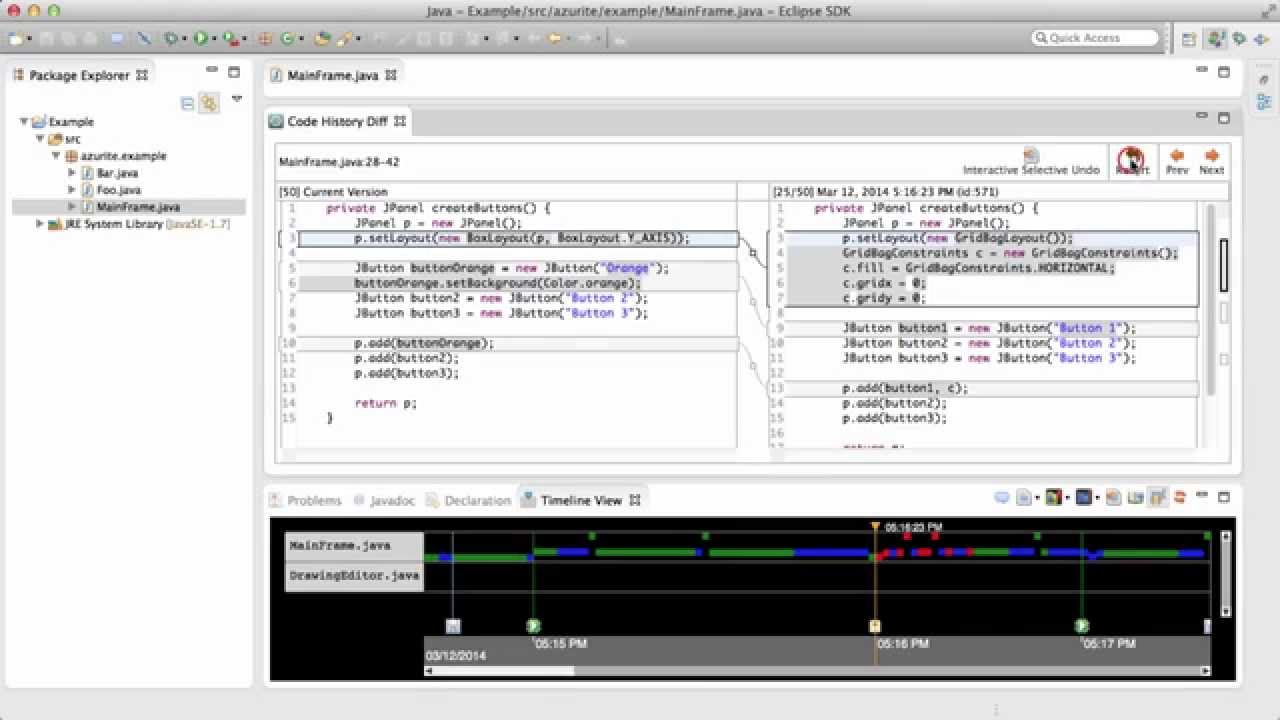
NOTE: In the current version of Azurite, the code history diff view might appear as a hidden tab stacked behind other tabbed views at the bottom of Eclipse screen. You can simply move the view to a desired location.
There are two different ways to move back and forth through the history.
First, you can drag the orange time marker in the Timeline View with mouse to see how the code looked at the time at which the marker is pointing. This is similar to how time markers work in video editors. The code snippet shown on the right panel changes instantaneously as the marker is moved, and diffs are recalculated as well.
Alternatively, you can use the 

When you want to revert the code snippet to the version currently shown in the right panel, you can do it by clicking the 
Sometimes, instead of directly reverting the entire block with the revert button, you might want to fine-tune the selective undo results. In this case, you can use the 
This will automatically select all the rectangles that would have been selectively undone if you clicked the
Azurite allows multiple Code History Diff Views to be launched for different regions of code as separate tabs. These views can be dragged to be side-by-side or even in a window outside of Eclipse. This is useful when there are multiple code snippets coupled together around a certain feature.
In this case, all open Code History Diff Views share the same time marker in the Timeline View, and you can intuitively see how those code snippets as a whole have evolved over time.
- Prev: Time Range Selection
- Next: History Search