Detailed Overview of the Rage Analytics Realtime
The purpose of this document is to highlight the new back-end infrastructure.
The major changes are:
- Having only one Kafka topic per Game Version instead of one Kafka topic per Activity.
- Having only one Storm Topology per type of analysis, e.g. default, thomas-kilmann, mean.
- Preserving the xAPI Statement format of the traces (currently is being flattened) to ensure that no data is being lost in the transformation process.
As a consequence of these changes, the infrastructure of the Analytics Back-end infrastructure has been adapted:
-
Only one kafka topic will be opened per Game Version Id which is where the Storm analysis pulls the data from.
-
Before being sent to the Kafka topic the collected xAPI Statements (from the collector) are being enriched in order to be prepared for the Storm analysis adding several fields. The result is a JSON document with the following fields:
- “statement”: the original statement received from the collector without changes. This is the statement that has been passed from the tracker and validated as correct.
- “gameId”: identifier of the game in case is needed for the analysis, e.g. future aggregations.
- “versionId”: identifier of the version in case is needed for the analysis, e.g. future aggregations.
- “classId”: identifier of the game in case is needed for the analysis, e.g. future aggregations.
- “activityId”: identifier of the game in case is needed for the analysis (such as data for Kibana Dashboards).
- “gameplayId”: identifier of the gameplay session in case is needed for the analysis (such as a results for Alerts and Warnings management).
- “session”: the current attempt count of the gameplay.
- “out”: flattened JSON object from the xAPI Statement
-
One Storm Topology is deployed for each analysis type (default, thomas-kilmann, mean, etc.) that pulls data from the Kafka topic associated to the Version Id. These topologies should be restarted in case of system failure or the server has been restarted. The topology analyzes all the data from the game and writes in the corresponding ElasticSearch indexes correctly formatted for Kibana Dashboards.
-
default: writes on two indexes;
- “activityId”: an index with the enriched traces (as described above) in a list (with the field “statement” not flattened).
- “results-activityId”: one document per “gameplayId” with the aggregated analysis correctly formatted for the Alerts and Warnings management.
-
thomas-kilmann: writed in the index “thomas-kilmann-activityId” the documents received correctly formatted for the Thomas Kilmann Kibana Dashboards.
-
mean: performs mean calculations per different specific fields within the “statement”.
-
A graphic representation of the new Back-end infrastructure is shown below:
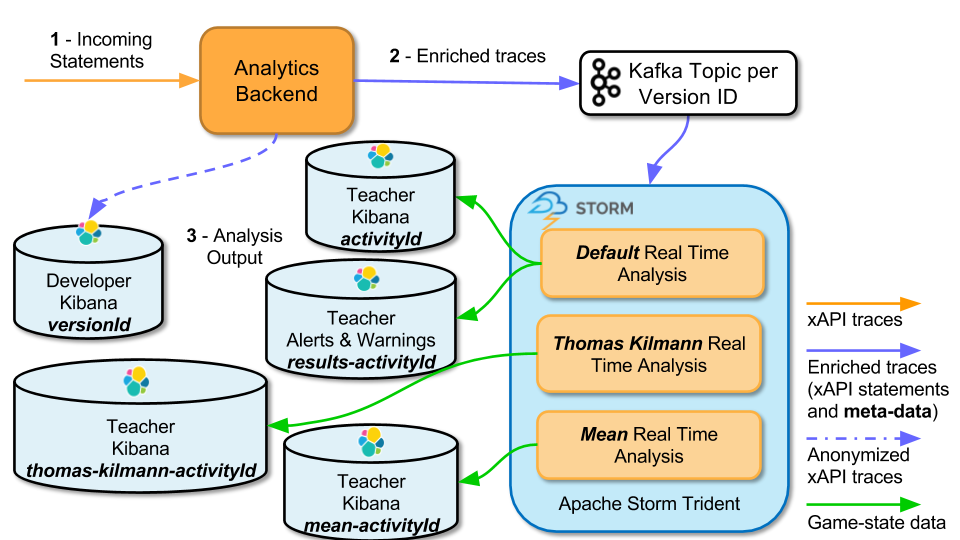
Following the traces flow we can observe three main stages:
-
Incoming Statements: The Collector module from the Analytics Back-end receives sent data from the different clients (xAPI trackers) using the xAPI Serious Games Statements format. For more information check the xAPI Serious Games specification or some of the implemented client-side tracker implementations. The anonymized xAPI traces from the back-end are also stored as a list of documents in an ElasticSearch index named
versionId. These documents have the exact same type as the Enriched traces from stage 2 with the difference that the “actor” field of the “statement” is passed through an anonymization process. This index is used by the developer’s Kibana Dashboard. -
Enriched traces: Before sending traces to the Kafka topics the received Statements are enriched with further meta-data (
gameId,versionId,classId,activityIdandgameplayId) information. The added information is necessary for a correct analysis. This is the input for the analysis:
{
    "statement": "xAPI statement object collected",
    "gameId": "identifier of the game in case is needed for the analysis",
    "versionId": "identifier of the version in case is needed for the analysis",
    "classId": "identifier of the class in case is needed for the analysis",
    "activityId": "identifier of the activity in case is needed for the analysis",
    "gameplayId": "identifier of the player gameplay in case is needed for the analysis",
    "session": "the current attempt count of the gameplay",
    "out": "flattened JSON object from the xAPI Statement"
}-
Analysis Output: The output of the enriched traces analyzed to produce a result. The result may vary depending on the type of analysis. Described below is the output of the three different predefined analysis available at the moment:
-
default: This analysis is available by default, hence the name. It performs two outputs, for the Kibana Dashboard and aggregated traces for the Alerts & Warnings Management:
-
Kibana Dashboards: In order to interpret the data correctly Kibana Dashboards require an ElasticSearch index named by the
activityIdwith a list documents (xAPI Statements). The output is an index named activityId with a list of the enriched documents from stage 2. -
Alerts & Warnings: Triggered when certain conditions are fulfilled. The name of this index is composed of results- prefix and the
activityId, i.e.results-activityId.The index is composed on the current state of each player (identified by agameplayId). An in-depth description about the format of the documents in this index can be viewed at the Compute the real-time gameplay state for the Alerts and Warnings System.
-
Kibana Dashboards: In order to interpret the data correctly Kibana Dashboards require an ElasticSearch index named by the
-
thomas-kilmann: Certain Kibana visualizations require an additional analysis. This analysis is performed by this analysis and is stored in the thomas-kilmann-activityId ElasticSearch index.
-
mean: This analysis computes the mean of certain attributes of the initial xAPI Statement.
-