Personalization Enablers: Training Tools
Target Audience: software developers
Training tools include five tools used for pre-training and fine-tuning models in XR2Learn. Each tool is a modular component with isolated dependencies that can be used independently or as part of an end-to-end pipeline together with the Command-Line Interface – CLI.
The components are separated by modality (audio, bio measurements, body tracking) and are deployed using Docker to ensure reproducibility and cross-platform compatibility (Windows, Linux, macOS).
All enablers are implemented using industry-standard deep learning frameworks (PyTorch, PyTorch Lightning) with GPU acceleration support.
This modular architecture facilitates extension by open-source developers, allowing new emotion recognition enablers to be integrated with minimal coupling.
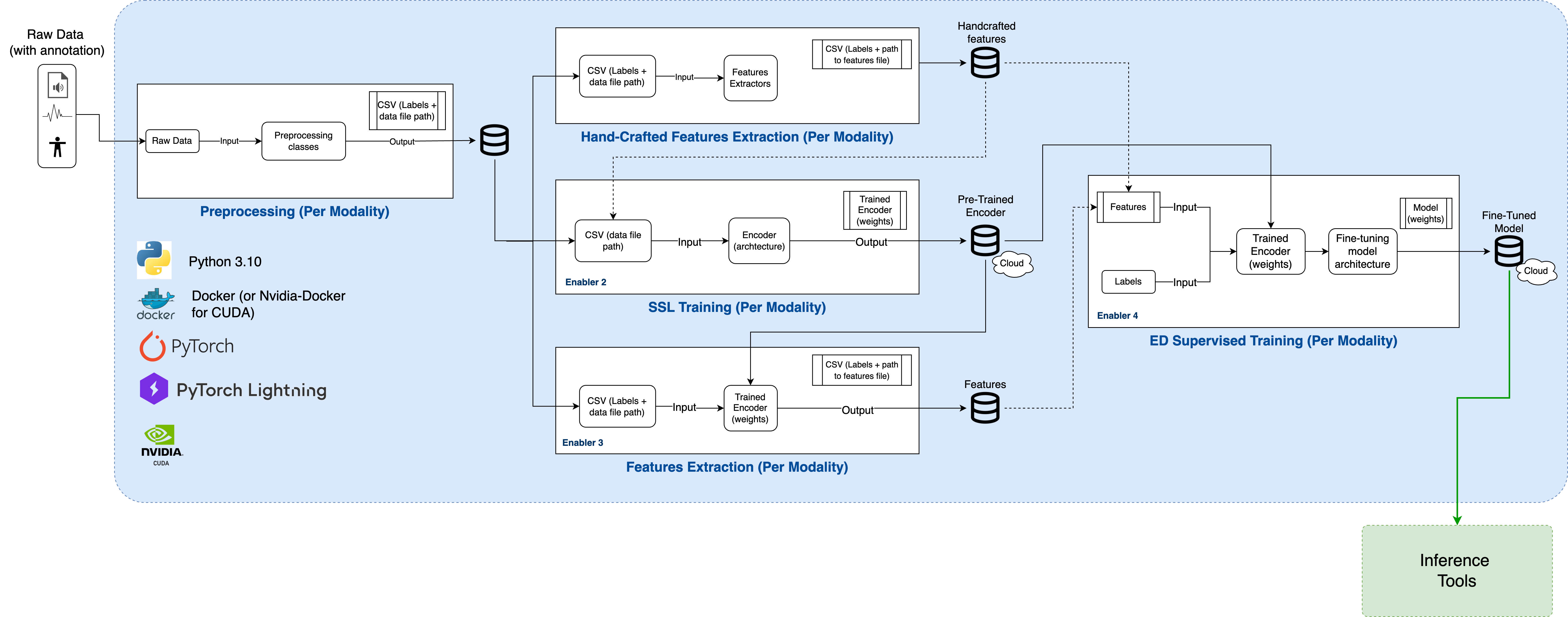
Figure: Overview of the five Training Tools components and their role within the XR2Learn training pipeline.
- Pre-processing: Pre-process raw data into an organized time window of data and labels to be used by the other components.
- Handcrafted Features Extraction: Extracts features derived from the raw data type’s properties instead of using Machine Learning for feature extraction.
- Self-Supervised Learning (SSL) Training (pre-train): Pre-train an encoder with no use of labels.
- SSL Features Extraction: Uses an encoder to generate features.
- Supervised Learning Training (fine-tuning): Trains a classification model (Enabler 4) utilizing labels.
Pre-trained encoder and fine-tuned emotion classification models are also available.
A configuration.json file Configuration File is required to provide the components with the necessary specifications for running. An example example.configuration.json file is provided and can be copied and changed by the user. Alternatively, CLI comes with a configuration.json already in place for an easy-to-use setup.
Personalization Enablers: Training Tools include, by default, three different modalities.
- Audio (speech): Using the data format of an open-source dataset (RAVDESS). All five Training Tools components have an implementation for the audio (RAVDESS) modality.
- Bio measurements: Using the data format of Magic XRoom, which includes bio-signals data recorded using a Shimmer device. For these modalities, the following components have been implemented: pre-processing, self-supervised training and supervised training. The other two modalities were not necessary for the current modality.
- Body Tracking: Using the data format of Magic XRoom, which includes positional data recorded using a VR headset and controlers. For these modalities, the following components have been implemented: pre-processing, self-supervised training and supervised training. The other two modalities were not necessary for the current modality.
Component to pre-process raw data into an organized time window of data and labels to be used by the other components.
Dataset Input files should be in the folder /datasets/<DATASET_NAME>, organized in different folders for each person in the dataset.
For example, for the RAVDESS dataset, the folder structure should be:
.
└── datasets/
    └── RAVDESS/
        ├── Actor_01/
        │   ├── 03-01-01-01-01-01-01.wav
        │   └── (...)
        ├── Actor_02
        ├── (...)
        └── Actor_24
Note: For the audio modality, the Training Tools automatically downloads the RAVDESS dataset into the correct folder structure if RAVDESS folder is not found inside the datasets folder.
An additional example, for the Magic XRoom dataset, the folder structure should be:
.
└── datasets/
    └── XRoom/
        ├── P1/
        │   ├── data_collection_638409268837520607_PROGRESS_EVENT_.csv
        │   ├── data_collection_638409268837520607_SHIMMER_.csv
        │   ├── data_collection_638409268837520607_VR_.csv
        │   └── (...)
        ├── P2
        ├── (...)
        └── P3
Output: CSV files (train.csv, val.csv, and test.csv) and .npy files with numerical representation of each raw data input file.
Produced outputs are saved according to the following directory structure:
.
└── outputs/
    └── <dataset>/
        └── <modality>/
            ├── standardize/
            │   └── <numerical-representation-file>.npy
            ├── └── (...)
            ├── test.csv
            ├── train.csv
            └── val.csv
Example of output directory structure for the audio modality (RAVDESS dataset).
.
└── outputs/
    └── RAVIDESS/
        ├── audio/
            ├── standardize/
            │   └── <numerical-representation-file>.npy
            ├── └── (...)
            ├── test.csv
            ├── train.csv
            └── val.csv
Example of output directory structure for the bio-measurements modality (XRoom dataset).
.
└── outputs/
    └── XRoom/
        ├── shimmer/
            ├── standardize/
            │   └── <numerical-representation-file>.npy
            ├── └── (...)
            ├── test.csv
            ├── train.csv
            └── val.csv
            └── stats_biomeasurements.csv
Biomeasurements (shimmer) modality: the proprocessing component also produces a CSV file with stats about the data used, including information about the participants included and the engagement states present in it.
Inputs: Dataset raw files (inside folder datasets/) and CSV files (train.csv, val.csv, and test.csv)
Outputs: .npy files with numerical representation of each handcrafted feature type, separated into different folders.
Example of output directory structure for the audio modality (RAVDESS dataset) using the feature `eGEMAPs`.
.
└── outputs/
    └── RAVIDESS/
        ├── audio/
            ├── eGeMAPs/
            │   └── <numerical-representation-file>.npy
            ├── └── (...)
            ├── standardize/
            │   └── <numerical-representation-file>.npy
            ├── └── (...)
            ├── test.csv
            ├── train.csv
            └── val.csv
Note: Please note that all components will save their outputs to the outputs/ directory within a subfolder with the appropriate name.
Depending on the feature type used, e.g., eGEMAPs or standardize, defined in the configuration.json file, this component will use the appropriate input from the output folder.
Example of output directory structure for the audio modality (RAVDESS dataset).
.
└── outputs/
    └── RAVDESS/
        ├── audio/
            ├── standardize/
            │   └── <numerical-representation-file>.npy
            ├── └── (...)
            ├── ssl_training/
            │   └── lightning_logs/
            │       └── development-model_RAVDESS_audio_standardize_CNN1D_encoder.pt
            │       └── development-model_RAVDESS_audio_standardize_CNN1Dssl_model.ckpt
            │       └── development-model_RAVDESS_audio_standardize_CNN1Dssl_model_last.ckpt
            ├── test.csv
            ├── train.csv
            └── val.csv
            └── stats_biomeasurements.csv
Depending on the feature type used, e.g., eGEMAPs or standardize, defined in the configuration.json file, this component will use the appropriate input from the output folder. Also, depending on what is defined in the configuration.json file, the SSL-trained models can be used as input.
Example of output directory structure for the audio modality (RAVDESS dataset).
.
└── outputs/
    └── RAVDESS/
        ├── audio/
            ├── standardize/
            │   └── <numerical-representation-file>.npy
            ├── └── (...)
            ├── ssl_training/
            │   └── lightning_logs/
            │       └── development-model_RAVDESS_audio_standardize_CNN1D_encoder.pt
            │       └── development-model_RAVDESS_audio_standardize_CNN1Dssl_model.ckpt
            │       └── development-model_RAVDESS_audio_standardize_CNN1Dssl_model_last.ckpt
            ├── supervised_training/
            │   └── lightning_logs/
            │       └── development-model_RAVDESS_audio_standardize_CNN1D_classifier.pt
            │       └── development-model_RAVDESS_audio_standardize_CNN1D_model.ckpt
            ├── test.csv
            ├── train.csv
            └── val.csv
            └── stats_biomeasurements.csv
Note that after running all the components from the Training Tools pipeline, all the produced outputs can be accessed in the outputs folder.
The outputs generated by the Training Tools (preprocessed data, extracted features, and trained models) are consumed by the Inference Tools for real-time emotion and state prediction. These predictions can then be integrated into XR applications via the Personalization Tool and monitored through the Personalization Dashboard.
Developers can proceed by:
- Running inference pipelines using trained models
- Integrating trained enablers into XR scenarios
- Extending existing training tools to support new modalities or datasets
Note: All file paths, folder names, and configuration files are written using backticks to reflect their exact on-disk representation.
XR2Learn Personalization Enablers - Training Tools

|
Wiki - Immerse yourself in the world of XR2Learn |