Parameter Reference
The test parameters panel has been extended to allow setting of parameters values during runtime by reference to other JSystem components.
Parameters values can refer to:
- RunProperties properties.
- Summary properties.
- Sut file.
- Random value by range (for numerical values).
- Random value from group.
The parameter types that can be referenced are: Strings, File, Date, Integer, Long, Float, Double. Value parameter types such as: enum, or boolean cannot have reference in them.
The general syntax for reference is: ${<Type>:<reference>}
In order to work with parameters values references, perform the following:
- Write a test with parameter.
- In JRunner select the test and add it to the scenario.
- Open the parameters panel of the test.
- Add a reference.
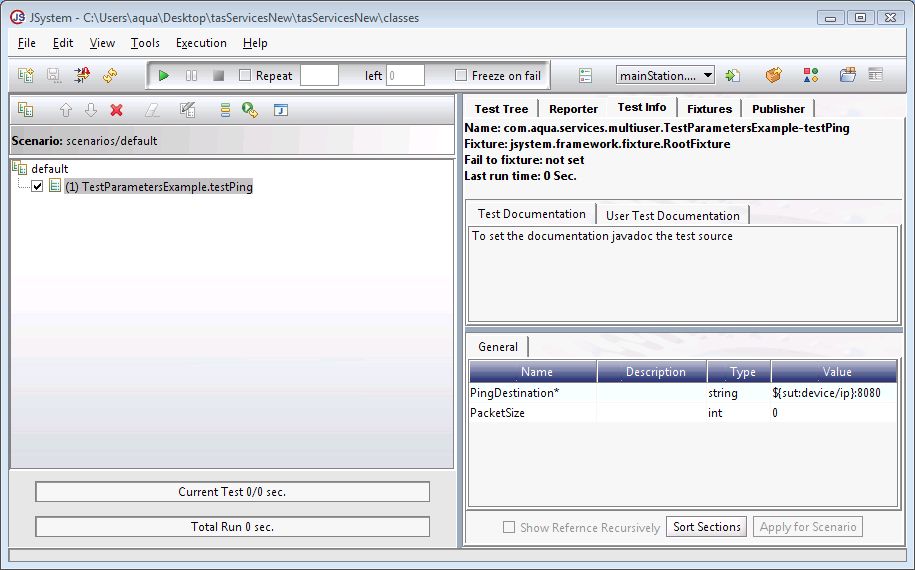
- Zoom in:

- In this example we added a reference to the SUT file
At run time, before test is executed, the system will go to the SUT file, to the Xpath "device1/ip" and will replace "${sut:device1/ip}" with the value found in the SUT file.
"RunProperties" and the "Summary" file can be accessed in the code as follows:
RunProperties.getInstance().setRunProperty(key,value).
Summary.getInstance.setProperty(key,value).**
The values can be gathered later on by using the parameters:
${run:\<key\>} or ${summary:\<key\>} accordingly.
RunProperties.getInstance().setRunProperty("RunKey1","12");
Summary.getInstance.setProperty("SummaryKey1","C:\Program Files\");
JRunner parameter value:
${run:RunKey1} and ${summary: SummaryKey1}
Reference: More information on Run and Summary properties can be found in the Run and Summary Properties section.
The current SUT file tags can be accessed using the correct Xpath. The syntax is ${sut:<xpath>}
<sut>
    <device1>
         <class>sysobj.Device1</class>
         <password>guy</password>
    </device1>
     <obj>enter user name</obj>
</sut>${sut:device1/password}
${sut:obj}
By Range - (for numerical parameters only) A number can be selected randomly within a given range. Syntax: ${random:\<Low Value\>:\<High Value\>}|
${random:1:15}
${random:125.66:130.12}
From Group - (for all parameters) a value will be selected randomly from a given group. Syntax: ${random:(First Value;Second Value;Third Value…)}
${random:(1;2;12;99)}
${random:("C:/Jsystem";"C:/Automation)}