







A production-ready fullstack boilerplate for building SaaS applications — Java 21 + Spring Boot 3.4.1 backend, Angular 21 frontend, MSSQL database, fully containerized with Docker Compose. Clone, configure, and ship.
🌐 Full Features & Live Demo: zukovlabs.com
⭐ Found this useful? Drop a star — it helps other Java developers find this project.
- Upgrade to PRO
- Free vs. PRO Comparison
- Overview
- Tech Stack
- Prerequisites
- Getting Started
- Environment Variables
- Database & Migrations
- API Reference
- Project Structure
- License
Skip 200+ hours of engineering work.
The Community Edition gives you a solid foundation. The PRO version ships everything you need to launch a real, monetized SaaS product — without building it from scratch.
| Area | What PRO Delivers |
|---|---|
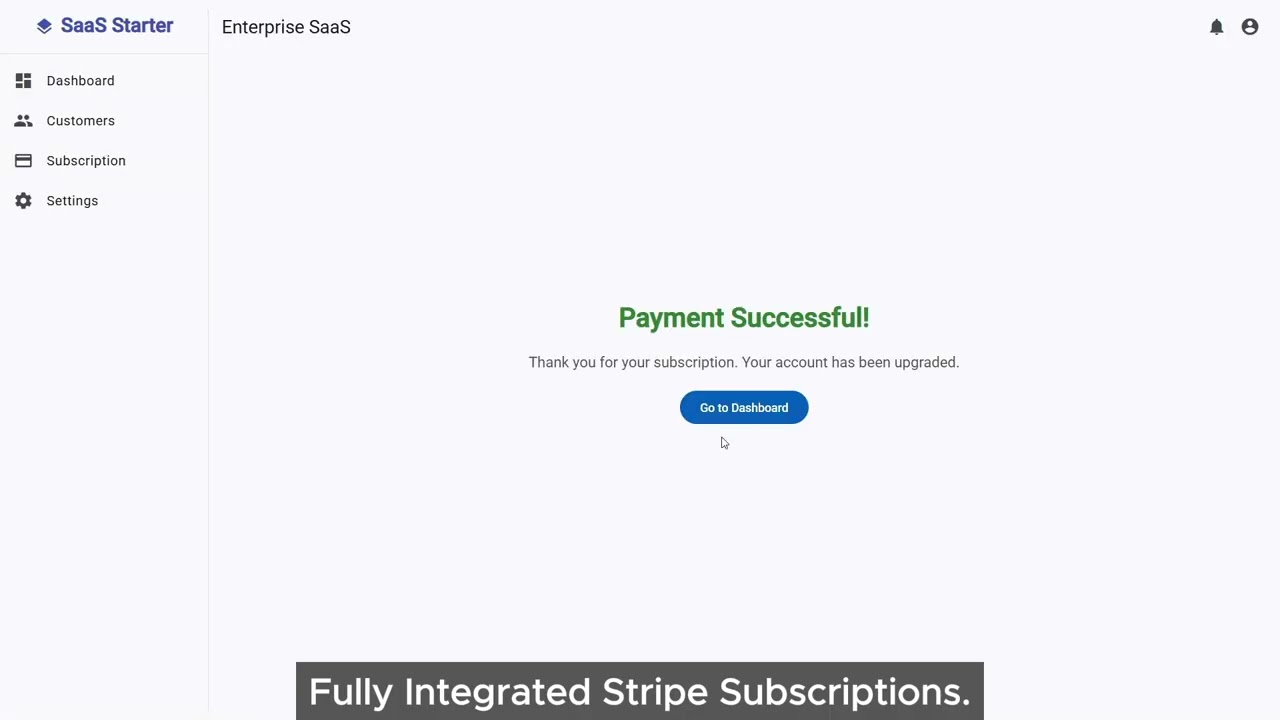
| Payments | Full Stripe integration: Checkout Sessions, Webhook handling with signature verification, Billing Portal, and automatic post-payment login via Magic Link |
| Passwordless Auth | Magic Link (one-time email links, 15-min TTL) — a proven conversion booster for SaaS onboarding |
| Email Service | Thymeleaf HTML email templates: welcome, magic link, payment success — production-ready and styled |
| Security | IP-based sliding-window rate limiter on all auth endpoints — brute-force and flood protection |
| Data Layer | Server-side pagination (Spring Pageable + MatPaginator) — Community Edition loads all rows client-side; PRO paginates at the database level for scale |
| Access Control | Strict RBAC with three roles (ADMIN / MANAGER / USER) enforced via @PreAuthorize at the method level |
| Multi-Tenancy | Entity ownership enforcement — users can only see and delete their own records. 403 FORBIDDEN if violated |
| Signal Caching | Angular signal<T> cache in services — two components, one HTTP request |
| Test Suite | 13 test files, 88 cases: Mockito strict stubs, ArgumentCaptor assertions, Vitest frontend tests, real ObjectMapper for Stripe JSON fallback path |
- Payments: Stripe integration (webhooks, billing portal, edge cases): ~40 hours
- Auth & Comms: Magic Link logic, Email Service, Thymeleaf templates: ~40 hours
- Security & Core: Rate limiting, strict RBAC, data ownership (403): ~40 hours
- Frontend UX: Dashboard charts, Server-side pagination, Signal Cache: ~40 hours
- Quality Assurance: 88 strict test cases, Mockito, Vitest: ~40 hours
- Total: 200+ hours of deep engineering — or one license purchase.
| Feature | Community (Free) | PRO |
|---|---|---|
| Java 21 + Spring Boot 3.4.1 | ✅ | ✅ |
| Angular 21 Standalone Components | ✅ | ✅ |
| MSSQL 2022 + Flyway Migrations | ✅ | ✅ |
| Multi-stage Docker Builds | ✅ | ✅ |
| Nginx SPA Hosting + Security Headers | ✅ | ✅ |
| MSSQL Healthcheck (no startup race) | ✅ | ✅ |
| JWT Auth (Access + Refresh Tokens) | ✅ Basic | ✅ Enhanced |
| Refresh Token Rotation | ✅ | ✅ |
| BCrypt Password Hashing | ✅ | ✅ |
| User Profile Management | ✅ | ✅ |
| Basic Customer CRUD | ✅ | ✅ |
| Dashboard Stats API | ✅ | ✅ |
| Angular Material UI | ✅ | ✅ |
| 401 Race Condition Protection (Interceptor) | ✅ | ✅ |
Auth Guard (JWT exp validation + redirect) |
✅ | ✅ |
| — | — | — |
| Stripe Checkout + Webhook Handling | ❌ | ✅ |
| Stripe Billing Portal (self-service) | ❌ | ✅ |
| Magic Link (Passwordless Auth) | ❌ | ✅ |
| Post-Payment Auto-Login via Magic Link | ❌ | ✅ |
| Email Service (Thymeleaf HTML templates) | ❌ | ✅ |
| IP Rate Limiting (brute-force protection) | ❌ | ✅ |
Server-Side Pagination (Spring Pageable backend + MatPaginator) |
❌ | ✅ |
| Strict RBAC (ADMIN / MANAGER / USER) | ❌ | ✅ |
| Entity Ownership Enforcement (403) | ❌ | ✅ |
| Signal Cache (no duplicate HTTP calls) | ❌ | ✅ |
| Dashboard Charts (Chart.js) | ❌ | ✅ |
| 13 Test Files / 88 Test Cases | ❌ | ✅ |
| Mockito Strict Stubs + ArgumentCaptor | ❌ | ✅ |
| Vitest Frontend Test Suite | ❌ | ✅ |
| Fail-Fast JWT Secret Validation | ❌ | ✅ |
| Commercial Use License | ✅ MIT | ✅ Commercial |
The Community Edition is a clean, runnable fullstack starting point — no toy demo, no half-implemented code. It ships with:
- Stateless JWT authentication with access and refresh token rotation
- Basic Customer CRM — create, list, and delete customer records
- User profile management — update name and change password
- Dashboard stats endpoint — aggregate data from the backend
- One-command Docker deploy —
docker compose up -d --buildstarts the entire stack - Nginx-served Angular SPA with
/api/*proxy to the Spring Boot backend, gzip compression, and security headers - It compiles successfully, passes standard health checks, and provides a secure starting point.
┌────────────────────────────────────────────────────┐
│                   Docker Compose                   │
│                                                    │
│  ┌──────────┐    ┌───────────────┐    ┌─────────┐  │
│  │  MSSQL   │───▶│  Spring Boot  │◀───│  Nginx  │  │
│  │  :1433   │    │    :8080      │    │  :8081  │  │
│  └──────────┘    └───────────────┘    └────┬────┘  │
│   healthcheck      Flyway migrations        │       │
│   passes first     on startup           Angular SPA │
└────────────────────────────────────────────────────┘
                         ▲
                    Browser Client
Request flow:
Request → JwtAuthenticationFilter → SecurityConfig rules → Controller → Service → Repository
| Component | Technology | Version |
|---|---|---|
| Language | Java | 21 LTS |
| Framework | Spring Boot | 3.4.1 |
| Security | Spring Security | 6.x |
| ORM | Hibernate / JPA | — |
| JWT | JJWT | 0.12.3 (HS512) |
| Migrations | Flyway | — |
| Build Tool | Maven | 3.9.6 |
| Frontend | Angular | 21 (Standalone) |
| UI Library | Angular Material | 21 |
| Reactive | RxJS | 7.8 |
| Database | MSSQL Server | 2022 |
| Containerization | Docker + Compose | — |
| Web Server | Nginx | Alpine |
Install these before you start:
| Tool | Purpose | Min Version |
|---|---|---|
| Docker Desktop | Run the full stack | Latest |
| Java 21 JDK | Local backend development | 21 LTS |
| Node.js | Local frontend development | 20+ |
git clone https://github.com/zukovlabs/enterprise-java-saas-starter-kit.git
cd enterprise-java-saas-starter-kitCopy the example file and set your values:
copy .env.example .envOpen .env and set at minimum:
JWT_SECRET=your-256-bit-hex-secret-here
DB_PASSWORD=YourStrongPassword1!
CORS_ALLOWED_ORIGINS=http://localhost:8081
Generate a strong JWT secret:
openssl rand -hex 32
docker compose up -d --buildDocker Compose will:
- Start the MSSQL container and wait for the healthcheck to pass
- Start the Spring Boot backend — Flyway migrations run automatically on startup
- Start the Angular frontend served via Nginx
| Service | URL |
|---|---|
| Frontend | http://localhost:8081 |
| Backend API | http://localhost:8080 |
| Database | localhost:1433 |
Flyway seeds two accounts on first startup:
| Password | Role | |
|---|---|---|
admin@saaskit.com |
Admin1234! |
ADMIN |
user@saaskit.com |
User1234! |
USER |
# Watch backend logs
docker compose logs -f backend

# Stop the stack
docker compose down

# Stop and remove volumes (fresh DB)
docker compose down -v

# Rebuild a single service
docker compose up -d --build backendIf you want to edit the code with full IDE support (IntelliSense, types), you should install the dependencies locally on your host machine:
Frontend:
cd frontend
npm install
npm start # runs Angular dev server on http://localhost:4200All variables are sourced from the .env file (see .env.example for a full template with comments).
| Variable | Required | Default | Description |
|---|---|---|---|
APP_URL |
✅ | http://localhost:8081 |
Base URL of the application |
JWT_SECRET |
✅ | — | 256-bit hex string for HS512 signing |
JWT_EXPIRATION_MS |
— | 86400000 (24h) |
Access token TTL in milliseconds |
JWT_REFRESH_EXPIRATION_MS |
— | 604800000 (7d) |
Refresh token TTL in milliseconds |
DB_PASSWORD |
✅ | StrongP@ssw0rd! |
MSSQL SA account password |
CORS_ALLOWED_ORIGINS |
✅ | http://localhost:4200,http://localhost:8081,http://localhost |
Comma-separated allowed CORS origins |
Schema is managed by Flyway — migrations run automatically on every backend startup.
Migration files: src/main/resources/db/migration/
| File | Description |
|---|---|
V1__init_schema.sql |
Creates users and customers tables. Seeds two demo accounts and sample customers. Refresh tokens are stateless JWTs — no database table required. |
Default development credentials:
| Field | Value |
|---|---|
| Host | localhost:1433 |
| User | sa |
| Password | StrongP@ssw0rd! (override via DB_PASSWORD) |
| Database | master |
Note: Demo accounts seeded by Flyway use
{noop}plain-text passwords for developer convenience. All passwords created via/api/auth/registerare BCrypt-encoded automatically.
| Method | Endpoint | Auth | Description |
|---|---|---|---|
POST |
/api/auth/register |
— | Register a new user |
POST |
/api/auth/login |
— | Login, returns accessToken + refreshToken |
POST |
/api/auth/refresh |
— | Rotate tokens using a valid refresh token |
Login response:
{
  "token": "eyJ...",
  "refreshToken": "eyJ..."
}
All subsequent requests must include:
Authorization: Bearer <token>
| Method | Endpoint | Auth | Description |
|---|---|---|---|
GET |
/api/user/profile |
✅ | Get the authenticated user's profile |
PUT |
/api/user/profile |
✅ | Update first name and last name |
PUT |
/api/user/password |
✅ | Change password (requires current password) |
| Method | Endpoint | Auth | Description |
|---|---|---|---|
GET |
/api/customers |
✅ | List all customers |
POST |
/api/customers |
✅ | Create a new customer |
DELETE |
/api/customers/{id} |
✅ | Delete a customer by ID |
| Method | Endpoint | Auth | Description |
|---|---|---|---|
GET |
/api/dashboard/stats |
✅ | Get aggregate stats (total and active customer counts) |
enterprise-saas-starter-core/
│
├── src/main/java/com/saaskit/starter/
│   ├── SaasApplication.java            # Spring Boot entry point (@SpringBootApplication)
│   ├── config/
│   │   ├── ApplicationConfig.java      # Auth provider, password encoder, UserDetailsService
│   │   └── SecurityConfig.java         # Filter chain, CORS, public vs. protected endpoints
│   │
│   ├── controller/
│   │   ├── AuthController.java         # /api/auth/** (register, login, refresh)
│   │   ├── CustomerController.java     # /api/customers (list, create, delete — calls repository directly)
│   │   ├── DashboardController.java    # /api/dashboard/stats (calls repository directly)
│   │   └── UserController.java         # /api/user/** (profile, password)
│   │
│   ├── service/
│   │   ├── AuthService.java            # Registration, login, JWT refresh logic
│   │   └── UserService.java            # Profile & password management
│   │
│   ├── repository/
│   │   ├── UserRepository.java
│   │   └── CustomerRepository.java
│   │
│   ├── model/
│   │   ├── User.java                   # User entity (email, password, role)
│   │   └── Customer.java               # Customer entity
│   │
│   ├── dto/                            # Java Records — validated request/response DTOs
│   │   ├── LoginRequest.java
│   │   ├── RegisterRequest.java
│   │   ├── AuthResponse.java
│   │   ├── DashboardStats.java
│   │   ├── UpdateProfileRequest.java
│   │   └── ChangePasswordRequest.java
│   │
│   └── security/
│       ├── JwtUtils.java               # HS512 token generation, parsing, expiry check
│       └── JwtAuthenticationFilter.java# Extracts + validates JWT, sets SecurityContext
│
├── src/main/resources/
│   ├── application.yml                 # Full configuration (environment-variable driven)
│   └── db/migration/
│       └── V1__init_schema.sql         # Schema creation + demo data seed
│
├── src/test/java/                      # Backend unit tests (JUnit 5 + Mockito)
│
├── frontend/
│   ├── src/app/
│   │   ├── pages/
│   │   │   ├── landing/                # Public marketing / home page
│   │   │   ├── login/                  # Email + password login form
│   │   │   ├── register/               # Registration form
│   │   │   ├── dashboard/              # Stats overview page
│   │   │   ├── customers/              # Customer list + create/delete
│   │   │   │   └── customer-dialog/    # Add-customer dialog component
│   │   │   └── settings/               # Profile & password management
│   │   │
│   │   ├── services/
│   │   │   ├── auth.service.ts         # Login, register, refresh, logout
│   │   │   ├── user.service.ts         # Profile CRUD
│   │   │   ├── customer.service.ts     # Customer API calls
│   │   │   └── dashboard.service.ts    # Stats API call
│   │   │
│   │   ├── components/
│   │   │   └── confirm-dialog/         # Reusable confirmation dialog
│   │   │
│   │   ├── layout/main-layout/         # App shell: sidebar + header
│   │   ├── models/                     # TypeScript interfaces (customer, dashboard-stats)
│   │   ├── auth.guard.ts               # Checks token presence in localStorage before route activation
│   │   └── auth.interceptor.ts         # Injects Bearer token + handles 401 with token refresh
│   │
│   ├── nginx.conf                      # SPA routing, /api reverse proxy, gzip, security headers
│   └── Dockerfile                      # Multi-stage: Node 20 → Nginx Alpine
│
├── Dockerfile                          # Multi-stage: Maven 3.9.6 + JDK 21 → JRE 21 Alpine
├── compose.yaml                        # DB (healthcheck) → Backend → Frontend
├── .env.example                        # All variables with descriptions
└── pom.xml                             # Maven dependencies
The Community Edition is intentionally minimal. The PRO version is what you actually ship to customers.
PRO adds:
- Stripe payments (Checkout, Webhooks, Billing Portal)
- Magic Link passwordless authentication
- HTML email service with Thymeleaf templates
- IP rate limiting on auth endpoints
- Server-side pagination (no full-table loads)
- Strict three-tier RBAC (
ADMIN/MANAGER/USER) - Entity ownership enforcement with
403responses - Angular Signal cache (zero duplicate HTTP calls)
- Dashboard charts with Chart.js
- 13 test files, 88 cases — Mockito strict stubs, Vitest frontend,
ArgumentCaptorassertions
Contributions, bug reports, and feature requests are welcome. Open an issue or submit a pull request.
This project is licensed under the MIT License — free to use, modify, and distribute. See LICENSE for details.
Enterprise SaaS Starter PRO is a separate commercial product with its own license terms.
Built by ZukovLabs
