MapNGo - ROS-based project on path planning for mobile robots. This project implements A*, Dijkstra and RRT algorithms for finding optimal paths through occupancy grid maps generated by SLAM (Simultaneous Localization and Mapping).
- Multiple Path Planning Algorithms: Includes A* and Dijkstra, RRT implementations (PRM support will be added soon).
- Docker Support: Run the entire system in containers with no ROS installation required - No more "waiting for a lucky day" to get this project running!
- TurtleBot3 Support: Currently configured and tested for the popular TurtleBot3 robot platform.🐢
utils.hpp- Common utilitiesa_star_planner.cpp- A* algorithm implementationdijkstra_planner.cpp- Dijkstra's algorithm implementationrrt_planner.cpp- RRT algorithm implementationpath_planner_node.cpp- ROS node for path planningpath_follower.cpp- Path following controller
simulation.launch- Launches the simulation environmentslam.launch- Starts the SLAM mapping processnavigation.launch- Initiates path planning navigation
Dockerfile- Building the Docker imagedocker-compose.yml- Container orchestration configuration
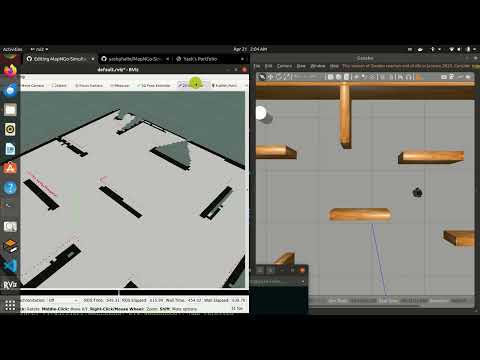

The easiest way to use MapNGo is with Docker:
# Pull the Docker image
docker pull yashphalle/mapngo:latest2

# Allow GUI applications
xhost +local:

# Run each component in separate terminals
# Terminal 1: ROS Master
sudo docker run -it --rm --network=host yashphalle/mapngo:latest2 roscore

# Terminal 2: Simulation
sudo docker run -it --rm --network=host --privileged --env="DISPLAY" --env="QT_X11_NO_MITSHM=1" --volume="/tmp/.X11-unix:/tmp/.X11-unix:rw" yashphalle/mapngo:latest2 roslaunch turtlebot_slam_navigation simulation.launch

# Terminal 3: SLAM
sudo docker run -it --rm --network=host --privileged --env="DISPLAY" --env="QT_X11_NO_MITSHM=1" --volume="/tmp/.X11-unix:/tmp/.X11-unix:rw" yashphalle/mapngo:latest2 roslaunch turtlebot_slam_navigation slam.launch

# Terminal 4: Navigation
sudo docker run -it --rm --network=host --privileged --env="DISPLAY" --env="QT_X11_NO_MITSHM=1" --volume="/tmp/.X11-unix:/tmp/.X11-unix:rw" yashphalle/mapngo:latest2 roslaunch turtlebot_slam_navigation navigation.launch algorithm:=astar

# Terminal 5: Keyboard Control
sudo docker run -it --rm --network=host --privileged --env="DISPLAY" --env="QT_X11_NO_MITSHM=1" --volume="/tmp/.X11-unix:/tmp/.X11-unix:rw" --name mapngo-teleop yashphalle/mapngo:latest2 rosrun teleop_twist_keyboard teleop_twist_keyboard.py
To select the path planning algorithm (astar, dijkstra, rrt), set the algorithm argument when launching navigation(Command No. 4):
roslaunch turtlebot_slam_navigation navigation.launch algorithm:=astarReplace astar with desired algorithm)
If you prefer to install and run without Docker:
Prerequisites:
ROS Noetic on Ubuntu 20.04 TurtleBot3 packages SLAM packages
# Clone this repository into your catkin workspace
cd ~/catkin_ws/src
git clone https://github.com/yashphalle/MapNGo-Simultaneous-Localization-Mapping-and-Optimized-Path-Planning.git

# Build
cd ~/catkin_ws
catkin_make

# Source the workspace
source ~/catkin_ws/devel/setup.bash-
More Robot Friends! 🤖 Extend beyond TurtleBot3 to support various robot platforms including custom robots, other commercial platforms, and simulated robots in different environments.
-
Multi-Goal Point Navigation 🎯 Implement waypoint navigation capability allowing robots to navigate through a sequence of goal points, enabling complex missions and tasks.
-
Multi-Agent Coordination System 👥 Develop coordination mechanisms for multiple robots to navigate simultaneously while avoiding collisions and optimizing overall fleet efficiency.
🤝 Team up? Wondering if it’s your code or your robot’s mood swings? Let’s team up and sort this out.
LinkedIn: https://www.linkedin.com/in/yash-phalle-3b596b192/