Request Confirmation Networks for neuro‑symbolic script execution — a faithful, production‑grade implementation of Bach & Herger (2015) with a modern visualization UI and live ARC‑AGI agent demos.
• Paper: "Request Confirmation Networks for Neuro‑Symbolic Script Execution" (Bach & Herger, 2015)
Portability Notice: This codebase currently contains path-related dependencies that limit portability across different environments. These issues are being actively addressed and include:
- Hardcoded absolute paths (e.g.,
/workspace/recon-platform) in agents and tests - Working directory assumptions for relative paths in the API
- Linux-specific path conventions that may not work on macOS/Windows without POSIX shell/WSL
For detailed information about these limitations, see the Code Caveats section below. We recommend running this code in a Linux environment with the expected directory structure until these portability improvements are complete.
Current workarounds:
- Run from the repository root directory
- Ensure
/workspace/recon-platformor/workspace/repo-update/recon-platformstructure or update hardcoded paths - Use Docker containers with appropriate bind mounts and permissions
- Complete ReCoN engine with exact 8‑state semantics and Table 1 message passing
- Dynamic React Flow UI for building and executing ReCoN graphs
- Live demos of ReCoN solving ARC representation problems via the
ARCONandReCoN ARC Angelagents - Bonus components: hybrid nodes, neural terminals, continuous messages, rich exporters
🚀 Live Web Demo: https://melodic-chaja-8295bd.netlify.app/
Video Walkthrough:
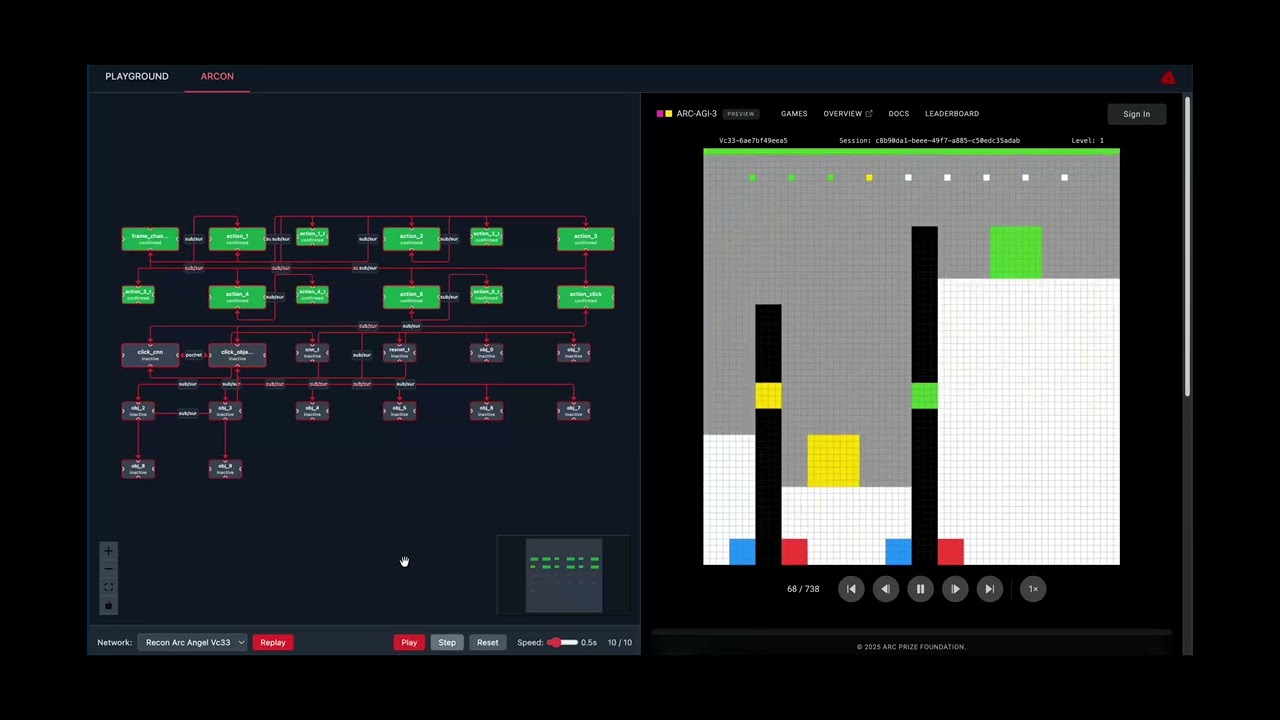
Solving ARC on ReCoN:

ReCoN Platform in action: Dynamic network visualization with live ARC-AGI task execution, showing hierarchical node states and real-time confirmation propagation. Agent: ReCoN ARC Angel.
- Working implementation + dynamic visualization
- Core engine implements all paper semantics; 132 tests pass (including hypothesis tests to catch randomized edge cases)
- UI provides live execution, state coloring, import/export, and auto‑layout
- Demonstrate ReCoN solving a representation problem
- ARCON reframes “which object to click” as a ReCoN hypothesis: perceive → select → verify; with
exploration_rate=0, decisions come from the ReCoN script - ReCoN ARC Angel uses a CNN terminal to drive
sub/surlink weights in a hierarchical hypothesis (withpor/retsequencing for ACTION6), yielding mask‑aware coordinate selection and background suppression
- Bonus components
- Hybrid nodes (explicit/implicit/neural), PyTorch neural terminals, continuous message protocol, multi‑format exporters, ARC mappings, production UI
The scope of this repository is deliberately constrained to deliver a high‑signal implementation and visualization of a Request Confirmation Network (ReCoN), plus a concrete representation demo on ARC‑like tasks. We explicitly prioritize:
- Correctness of the 8‑state semantics and Table 1 message passing
- Dynamic, inspectable visualization of execution over completeness of editor features
- A grounded representation demo (ARC) over broad task coverage
- Visualization of previously run ARC AGI 3 challenges on 2 separate ReCoN networks
Out of scope for this iteration:
- Full MicroPsi2 parity or feature completeness
- Large‑scale model training; terminals use compact CNNs or stubs adequate for demonstrations
- Production multi‑user backend; API is single‑process and file‑backed for simplicity
- Real time ARC AGI 3 visualization synchronized with the ReCoN agents message propagation
These boundaries keep iteration fast and evaluation clear, matching the challenge’s emphasis on translating a novel representation into a working system and UI.
The build process follows a research‑engineer workflow:
- Stage‑2 mini‑projects cadence: implement in 1–2 day slices with tight feedback loops (write → run → visualize → refine)
- Exploration → Understanding loop: instrument the engine to falsify hypotheses about state transitions, inhibition, and confirmation propagation; add visual probes first
- Pragmatic LLM use: generate drafts for boilerplate and schema wiring; hand‑verify core semantics and tests
- Post‑mortems per slice: capture mistakes and fixes directly in tests (e.g., por/ret timing, terminal constraints)
Design choices derived from the paper and platform goals:
- Dual node styles: explicit 8‑state nodes and compact/continuous integration for neural terminals and activation‑weighted flows
- Strict link constraints and por/ret sequence inhibition to preserve script faithfulness
- Exporters that bridge engine ↔ UI to keep instrumentation and debugging frictionless
- Core engine from scratch: Build a paper‑faithful backend rather than forking legacy code. Implement
ReCoNNodewith the 8 states (inactive, requested, active, waiting, suppressed, true, confirmed, failed) and typed gates/links (sub/surhierarchy,por/retsequence). ImplementReCoNGraphfor propagation and history. Validate on toy graphs thatporenforces order and terminals are only targeted bysub. If propagation proves unstable, temporarily pivot to discrete‑only nodes before re‑introducing tensors. - Subsymbolic integration + ARC demo: Add PyTorch hooks in terminal nodes. Use compact CNN/autoencoder stubs for features on 64×64 ARC‑like grids. Map BlindSquirrel/ARCON structures into ReCoN: rules become
por/retchains, valid‑action checks become terminals, and value models plug into terminals. Create import/export helpers (JSON ↔ engine) so the same graphs drive both engine tests and the UI. - Backend API for user‑created networks: Expose minimal endpoints to create nodes/links, request roots, step/execute with history, and import/export JSON. Return snapshots for visualization with states, messages, and step counters. Keep the API intentionally small to reduce complexity and encourage rapid iteration.
- React Flow visual editor: Provide a canvas to add
script/terminal/hybridnodes, connect typed links, and trigger execution. Color by state, animate requests/confirmations, and surface link weights. Integrate live snapshots from the API; add a simple import/export panel to round‑trip engine graphs. Prefer auto‑layout and instrumented visuals over advanced editor affordances in the MVP. - Bonuses and polish: Add lightweight learning hooks (e.g., SGD on link weights after failure), and additional exporters (DOT/Graphviz) only if time permits. Produce a short video walkthrough showing build‑edit‑execute of a small ARC‑like task. Harden error messages for invalid links and missing nodes.
- Distillation & submission: Write up the approach, include screenshots/GIF, and capture “beliefs we think are true” backed by tests and logs. Package a reproducible demo path.
- Problem framing: Treat an ARC grid as a scene. A root hypothesis (e.g., “frame change causes score increase”) branches into sub‑hypotheses. The click pathway is a
porsequence perceive → select → verify, where object terminals measure quality scores andsurbrings bottom‑up evidence to parents. Link weights bias bottom‑up confirmations; thresholds control terminal confirmations. - ARCON mapping: Set
exploration_rate=0so selection is scripted by ReCoN. Each candidate object has a terminal;por/retpaces the selection/verification. This demonstrates how discrete scripts arbitrate actions using terminal measurements and link weights. - ReCoN ARC Angel mapping: Use a CNN terminal to produce both action logits and 64×64 coordinate probabilities. Convert these into
subweights to bias bottom‑up confirmation. Respect the ACTION6 order viapor/ret:action_click → click_cnn → click_objects. Add mask‑aware selection to suppress background coordinates and encourage picks within object masks. Export per‑step traces torecon_log/for inspection.
- Dual computation modes: Support explicit scripts with discrete states alongside compact nodes carrying continuous activations for probability flows. Allow hybrid nodes to switch modes while preserving state/activation where appropriate.
- Flexible message protocol: Carry both discrete messages (confirm/fail/wait) and tensors, with auto‑conversion (thresholding/embedding) where senders and receivers differ. This enables clean integration of CNN/ResNet terminals without sacrificing script clarity.
- Visual debugging first: Color nodes by state for explicit mode; render activation heatmaps for implicit mode; scale edge thickness by message magnitude. Prioritize observability to accelerate the exploration→understanding cycle.
- Model integration ergonomics: Treat terminals as plugins (CNN, ResNet, custom
.pt), provide a small “model zoo,” and enable upload where feasible. Keep training knobs minimal for demos; focus on predictable inference paths. - Import/export for reuse: Standardize JSON graphs with structure + weights and provide code generation hooks for standalone agents when needed. This makes it easy to share library templates and compare agent variants.
- Mapping prior winners: BlindSquirrel aligns with explicit scripts + value terminals; StochasticGoose aligns with compact/continuous activations and hierarchical sampling over actions and coordinates. The platform accommodates both within one orchestration framework.
- Fast feedback loops: Before any >30‑minute experiment, brainstorm alternatives. Instrument tests and visuals to falsify semantics bugs (e.g., incorrect inhibition, illegal terminal targets). Keep changes small and observable.
- Getting unstuck: Use 5‑minute idea sprints and “gain surface area” techniques—vary prompts, switch inputs, probe states/activations, or create small synthetic cases. Prefer breadth over premature optimization early on.
- LLM‑assisted coding: Use AI to draft boilerplate or adapters; rewrite and tighten core semantics and tests by hand. If a draft accumulates subtle bugs, restart from a simpler, verified core.
- I used many throwaway networks/architectures and pivoted aggressively to find good working solutions. Towards the end, around 5 in the morning, I was about to delete an entire network but realized that it was solving many ARC levels better than winning solutions. This was a breakthrough moment for me. I tested them across other levels and scenarios with an adversarial/red-teaming approach.
- Propagation correctness: If activation‑based propagation yields ambiguous outcomes, fall back to discrete‑only nodes and reintroduce tensors behind clear thresholds and tests.
- UI complexity: If React Flow customization stalls, bias toward simpler visuals first (state colors, edge labels), and postpone advanced editing affordances.
- Performance: Prefer numpy fallbacks for demos if PyTorch overhead becomes a bottleneck; add top‑K pruning and caching in click arbitration in future work.
- Scope creep: Keep API/editor minimal; defer multi‑user and heavy learning to later phases.
- End‑to‑end: A user can build/edit/execute a small ReCoN for an ARC‑like task and observe faithful state/message dynamics.
- Representation: ReCoN improves decision quality over a baselines’ naive selection (e.g., via masked coordinates and confirmation‑driven arbitration).
- Reliability: Semantics are exercised by tests; demos produce readable logs and visual traces suitable for debugging and explanation.
ReCoNs execute hierarchical, sequential scripts distributively via stateful nodes and typed links:
- States: inactive, requested, active, suppressed, waiting, true, confirmed, failed
- Links: sub/sur (hierarchy), por/ret (sequence)
- Terminals confirm based on measurements; confirmations aggregate bottom‑up through
sur
This implementation matches the paper’s Table 1 semantics and supports the compact arithmetic rules for neural integration.
node.py: 8‑state ReCoN node and message processinggraph.py: Network execution, propagation, execution history, and exporters (React Flow, Cytoscape, D3, Graphviz)messages.py: Discrete/continuous message handlinghybrid_node.py: Hybrid nodes (explicit/implicit/neural) with mode switchingneural_terminal.py: Wrap PyTorch models as terminals (value, probability, classification, embedding)
Key properties
- Exact link constraints (terminals: only target by
sub, sourcesur) - por/ret sequence inhibition and timing; sub/sur hierarchy
- Bottom‑up confirmation scaled by link weights and sender activation
- Execution history and export for visualization
The FastAPI service in api/app.py exposes endpoints for constructing, executing, and visualizing networks. It is intentionally minimal for single‑user development and UI integration:
- Create/list/delete networks
- Add nodes and links with typed constraints
- Request roots, step propagation, execute with full history
- Import/export network JSON and serve parsed demo networks
Run locally:
uvicorn api.app:app --host 0.0.0.0 --port 5001Paths:
- Agent:
recon_agents/arcon/agent.py - State graph + ReCoN hypothesis:
recon_agents/arcon/state_graph.py - Harness adapter:
ARC-AGI-3-Agents/agents/arcon_harness.py
What’s demonstrated
- Hypothesis node
score_increase_hypothesiswith two branches: basic actions and click - Click branch is a 3‑step script: perceive → select (terminals per object) → verify
- Object terminals confirm using quality measures; link weights bias bottom‑up confirmation
Recommended demo config
- Set
exploration_rate=0.0inarcon_harness.pyto ensure decisions are made by the ReCoN script
Paths:
- Production agent:
recon_agents/recon_arc_angel/improved_production_agent.py - Improved hierarchy + sequence and mask‑aware coupling:
recon_agents/recon_arc_angel/improved_hierarchy_manager.py - Learning loop (CNN + optional ResNet value):
recon_agents/recon_arc_angel/learning_manager.py - Harness adapter:
ARC-AGI-3-Agents/agents/recon_arc_angel.py
What’s demonstrated
- CNN terminal (
CNNValidActionTerminal) produces action and 64×64 coordinate probabilities that becomesublink weights - Proper ACTION6 sequence:
action_click → click_cnn → click_objectswithpor/ret - Mask‑aware coordinate selection within object masks; background suppression and comprehensive object scoring; stickiness for frame‑change persistence
- Step‑by‑step execution traces and link snapshots exported to
recon_log/
Runner note
- Use the ARC harness with agent
recon_arc_angel(see adapter above). The agent returnsGameActiondirectly.
pip install -r requirements.txt
pytest -q
Status: 132 tests passing (state machine, message passing, hierarchy, sequence, hybrid integration, exporters)
Prereq (uv):
pip install --user uv # or: curl -LsSf https://astral.sh/uv/install.sh | shFrom inside recon-platform/ARC-AGI-3-Agents:
# ReCoN ARC Angel (improved production agent)
export PATH="$HOME/.local/bin:$PATH" && uv run python main.py -a reconarcangel

# ARCON (ReCoN-backed adapter)
export PATH="$HOME/.local/bin:$PATH" && uv run python main.py -a arconrecon
Notes:
- If running as root, use
/root/.local/binin PATH as you did. - For ARCON, set
exploration_rate=0.0inARC-AGI-3-Agents/agents/arcon_harness.pyto force pure ReCoN selection. - ReCoN execution traces are written to
recon_log/(per game/level step JSON).
- React Flow network canvas with state coloring and live updates
- Node inspectors (script, terminal, hybrid) and control panel for execution
- Import/export JSON; supports engine exporters out of the box
Build and run
cd ui
npm install
npm run dev   # or: npm run build && npx serve -s dist
You can import demo_export.json via the UI’s Import panel to browse the pre‑built graphs.
- Tests act as executable documentation of semantics and trade‑offs (see
tests/) - UI and engine evolve in lock‑step: exporters are extended before UI features to ensure consistent ground truth
- Logs in
recon_log/are used to validate step‑by‑step execution and feed the UI’s history view
from recon_engine import ReCoNGraph

graph = ReCoNGraph()
graph.add_node("root", "script")
graph.add_node("sensor", "terminal")
graph.add_link("root", "sensor", "sub")

graph.request_root("root")
result = graph.execute_script("root")
print(result) # 'confirmed' or 'failed'- Hybrid Node Architecture: explicit ↔ implicit ↔ neural, with state‑preserving mode switches
- Neural Terminals: ResNet/CNN integration, value/probability/classification/embedding outputs
- Enhanced Message Protocol: auto conversion between discrete messages and tensor activations
- Exporters: React Flow, Cytoscape, D3, Graphviz; JSON serialization with auto‑layout helpers
- Integrate learned affordance directly into object terminals in ARCON
- Graph caching and top‑K object pruning for faster click arbitration
- WebSocket streaming of execution traces to the UI
- Template library and debugging tools (breakpoints, step‑through)
- Absolute paths in agents/tests: Several agents and tests assume
/workspace/recon-platformas the project root and write logs to/workspace/recon-platform/recon_log. If you run from a different working directory or inside a container with a different app path (e.g.,/app), adjust paths or set up compatible bind mounts and permissions. - Working directory assumptions in API: Endpoints serving parsed networks and logs use relative paths like
ui/parsed_networksandrecon_log. Run the API from the repo root or ensure the working directory contains these folders; otherwise, configure your process manager tocdinto the repo before launching. - CORS configuration: The API enables
allow_credentials=Trueand lists explicit origins plus*. In production, browsers disallow*with credentials. Prefer explicit origins only and remove the wildcard to avoid subtle CORS failures. - Symlinks in toolchains: The UI relies on standard
node_modules/.binsymlinks, and the ARC harness uses auv-managed Python with symlinked interpreters. Some packaging environments that strip or fail to preserve symlinks can break dev workflows; use Node/NPM anduvas documented. - OS portability: Paths and scripts assume a Linux environment (e.g.,
/root/.local/bin,/workspace/...). On macOS/Windows, use a POSIX shell or WSL, and verify write permissions forrecon_log. - Single‑process storage: The API stores networks in memory and reads files from disk without authentication or sandboxing. It is not multi‑tenant or hardened; use behind a trusted front end for demos only.
- Log growth:
recon_log/can grow quickly during ARC runs. Prune periodically or mount it to a volume with sufficient space.
Bach, J., & Herger, P. (2015). Request Confirmation Networks for Neuro‑Symbolic Script Execution. Cognitive Architectures Conference.
—
Built for neuro‑symbolic research and practical demos of ReCoN in action.