Traffic-Aware Autonomous Driving with Differentiable Traffic Simulation
Laura Zheng, Sanghyun Son, Ming Lin
International Conference on Robotics and Automation (ICRA 2023)
Please cite our work if you find this repo useful:
@INPROCEEDINGS{zheng2023trafficdriving,
  author={Zheng, Laura Y. and Son, Sanghyun and Lin, Ming C.},
  booktitle={2023 International Conference on Robotics and Automation (ICRA)},
  title={Traffic-Aware Autonomous Driving with Differentiable Traffic Simulation},
  year={2023},
}
The code has only been tested on Ubuntu 20.04.
- Python 3.8
- [Install] PyTorch 1.11.0
- [Install] SUMO 1.10.0 (~1.2GB)
- [Install] CARLA 0.9.10.1 (~12.3GB)
Install SUMO and CARLA from the above, and make sure to know the installation location. This is important later on for modifying scripts for use on your local computer.
git clone https://github.com/laurayuzheng/traffic_aware_AD.git --recursive

conda create -f environment.yml

conda activate traad

pip install --upgrade pip

pip install -e external/stable-baselines3
pip install -e external/stable-baselines3-contrib
Then, install Pytorch accordingly with your system using the link in the subsection above.
Lastly, modify the paths in scripts/path_config.sh and config.py to your local system.
You can manually extract the datasets to the ./data folder, or alternatively run the commands below.
cd TrAAD

curl -L  https://umd.box.com/shared/static/t2rz8m9phrl1mnrkg683476uz897z026 --output traffic_trainval.zip

curl -L https://umd.box.com/shared/static/qq2fikyihl991hrhn8b967uczf4tan1d --output traffic_test.zip

unzip traffic_trainval.zip -d ./data/
unzip traffic_test.zip -d ./data/
bash collect_data.sh [train/test]
Collected data will be stored in ./data folder. Modify the DISPLAY variable to turn off visualization (0 == OFF, 1 == ON).
TODO: Work on this section
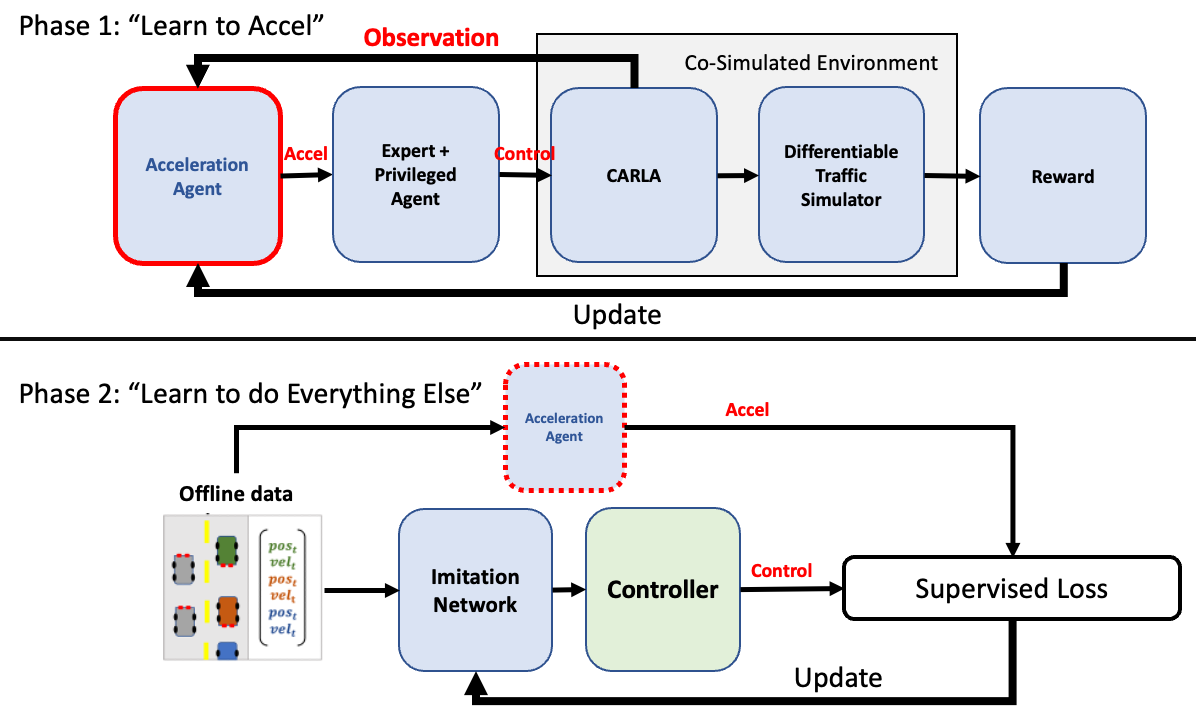
bash scripts/train_phase1.sh
Note: The repo for DiffPPO and DiffTRPO is a WIP, so only PPO and TRPO are supported right now.
Training the map (cheating) agent:
bash scripts/train_phase2.sh
To train the image (student) agent, modify the train_phase2.sh file. The lower half should have a section (commented out) for running the training of phase 2. You will need to find the checkpoint model produced by phase 1 in the checkpoints folder.
Much of this repository is built based off of previously released code; thank you to the authors who made them available!