Editing files on your server without the need for creating a local project. It is not necassary to download all files of your project. Simply connect and edit your remote files. The files will be automatically updated to the server on saving.
- Feature request: Configuration view - Duplicate Server (issue-77)
- Feature request: Option "Sort Servers By Name" (issue-106)
- Feature request: Fuzzy finder for remote files (issue-109)
- Feature request: Support for file-icons package (issue-125)
- Feature request: Change permissions of a file"(issue-137)
- Feature request: Add suppport for agent based authentication (issue-143)
- Feature request: Option "Auto Reveal Active File" (issue-158)
- Feature request: Open from command line (issue-165)
- Feature request: Option "Toggle on atom startup" (issue-168)
- Feature request: Stop bottom pane from opening on upload (issue-199) more...
- Toggle the view with "ftp-remote-edit:toggle" or use keybinding
ctrl-space - Enter the master password. If not allready set, enter the firsttime. All information about your server settings will be encrypted with this password.
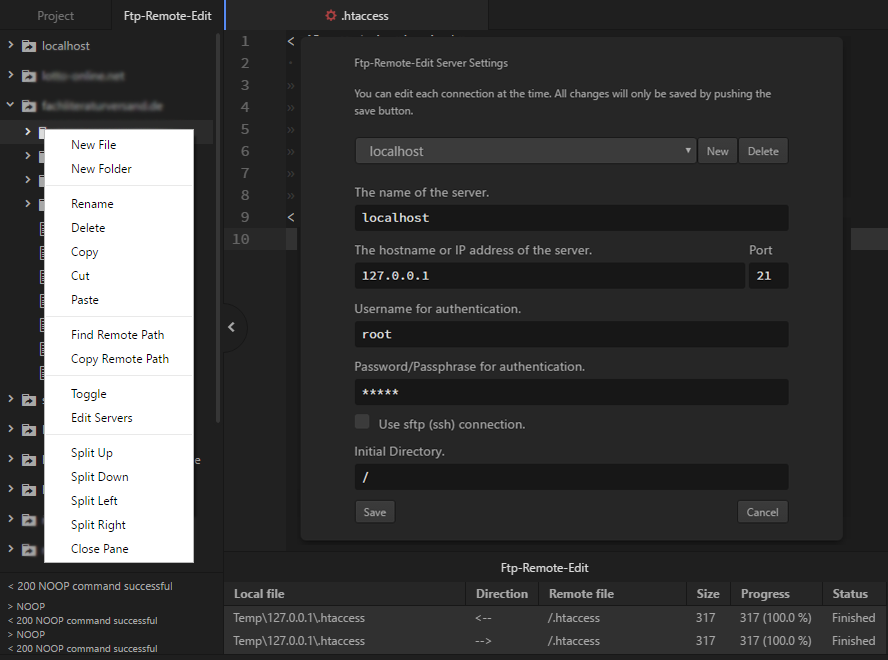
- Right click and select "Edit Servers" to open the configuration view. Here you can add, edit and delete your (s)ftp server settings.
- Toggle the view with
ctrl-space - Toggle the fuzzy finder with
ctrl-alt-p(item must be selected in the tree view)
- Toggle the view with "ftp-remote-edit:toggle"
- Change master password with "ftp-remote-edit:change-password"
- Toggle the fuzzy finder with "ftp-remote-edit:finder"
- Reindex the fuzzy finder cache with "ftp-remote-edit:finder-reindex-cache"
Add temporary server for ftp/sftp by using uri. It is possible to use it with/without username, password and port.
- atom://ftp-remote-edit/sftp://username:password@host:port
- atom://ftp-remote-edit/ftp://username:password@host:port
Tree View-Open On Startup- Open the view automatically when atom starts.Tree View-Open In Atom Dock- Open the view as tab in atom dock instead of panel. Only available from Atom 1.17.0Tree View-Show On Right Side- Show the view on the right side of the editor instead of the left.Tree View-Allow Pending Pane Items- Allow items to be previewed without adding them to a pane permanently.Tree View-Hide Ignored Files- Don't show items matched by theIgnored Namescore config setting.Tree View-Show Hidden Files- Force FTP Server to show hidden files (e.g. htaccess)Tree View-Sort Folders Before Files- When listing directory items, list subdirectories before listing files.Tree View-Sort Servers By Name- When listing servers items, list servers by name rather than by host.Tree View-Auto Reveal Active File- Auto reveal the current active file on the tree view.Tree View Finder-Key For Search- Specifies the key at which the search is to be used.Tree View Finder-Ignored Names- Files and directories matching these patterns and theIgnored Namescore config setting will be ignored during indexing.Notification-Successful Upload- Show notification on successful uploadNotification-Failed Upload- Open protocol view in case of failed upload.Development-Debug Mode- Output debug messages to the console.
Help us bring this project to the moon! Atom's rocket needs to get somewhere, right?
- Contribute! I'll be happy to accept pull requests!
- Bug hunting! Report them!
- Feature request? Please let me know by filling an issue!
- Star this project on Atom, Github
- Donate for this project -


- @miles-collier PR-38 Keybinding for toggling
- @dustinparker PR-112 Sort servers by name
- @Me1onRind PR-124 Fuzzy finder for remote files
- @wacki4 PR-169 Open from command line
- @FabrizioCaldarelli PR-178, PR-174 Help fix some errors
- @pfitzseb PR-228, PR-229 Add providers for better Juno integration, PR-241 Add suppport for agent based authentication