An Autonomous Mobile Robot (AMR) project designed for warehouse logistics. Built on ROS 2 Humble, utilizing a strictly containerized swarm architecture to guarantee reproducibility and scalability.


MONA (Modular Open Navigating AMR) is a scalable robot fleet management architecture. The primary focus is on safety-critical operations, hardware redundancy, and fault tolerance (FDIR concept) in compliance with industrial standards.
Within its microservice architecture, MONA functions as an Edge Agent in the distributed LISA (Logistics Intelligence & Swarm API) ecosystem. LISA acts as the central fleet orchestrator, while MONA provides hardware abstraction, local navigation, and sensory data processing.
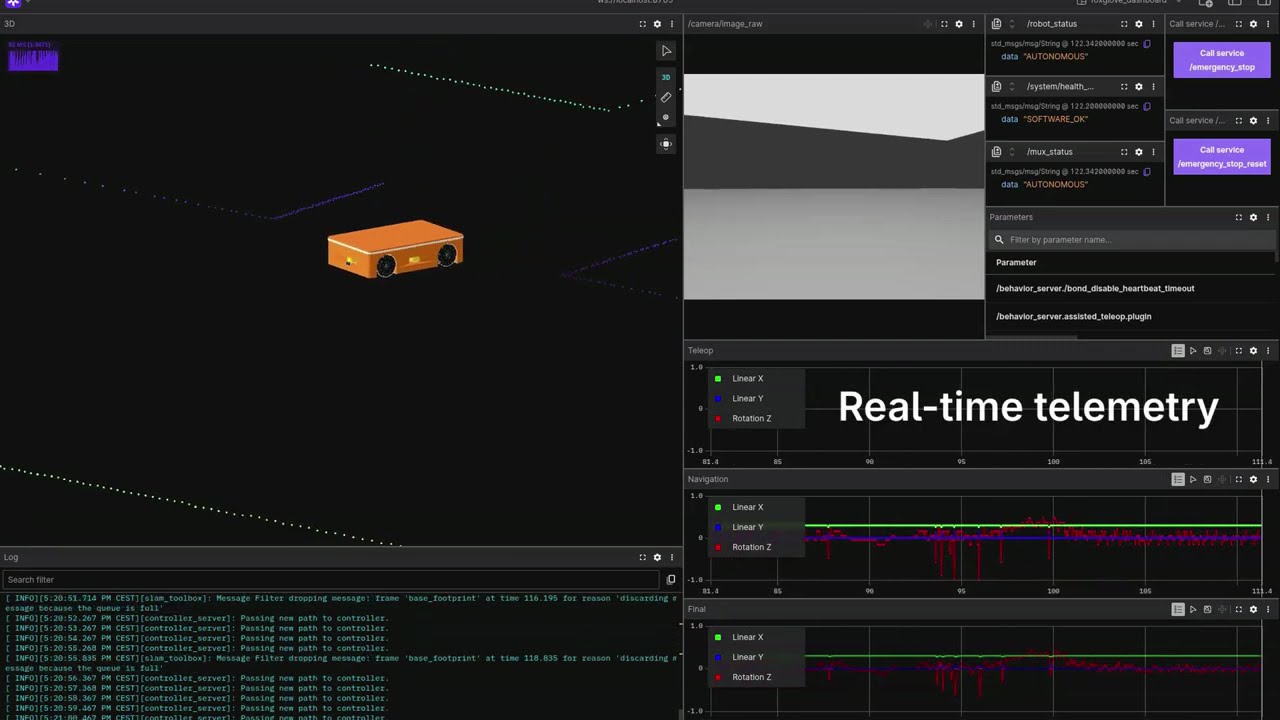
- Industrial Safety (ISO 13849-1 / IEC 61508): Hybrid FDIR (Fault Detection, Isolation, and Recovery) architecture. Includes hardware redundancy for contactor cutoff circuits, Watchdog timers, and EMA (Exponential Moving Average) smoothing for heavy chassis peak loads during teleoperation.
- Network Stack and DDS: Direct host network access (
network_mode: host) with flexible visibility control (ROS_LOCALHOST_ONLY) and strict DDS implementation enforcement (rmw_fastrtps_cpp). - Fleet Management Ready: The architecture lays the foundation for future integration with VDA 5050 and Open-RMF fleet management standards (LISA).
- Strict CI/CD: Comprehensive code coverage utilizing static analyzers (Clang-Tidy, CPPCheck, Uncrustify, Black, Flake8) and unit testing (GTest).
The project is built upon the ROS 2 component architecture (Zero-copy IPC), divided into the following logical domains:
mona_core/— Main orchestrator package (Bringup). Contains unified.launch.pyfiles, global parameters (.yaml), maps, and FDIR Lifecycle Manager.mona_description/— Visual and physical robot representation (URDF, Xacro, 3D meshes).mona_safety/— Hardware sentinel (SafetyNode). Handles Emergency Stops (E-Stop), controls hardware contactors, limits velocities during system degradation, and escalates faults upon unauthorized movement via odometry validation.mona_control/— Dispatch module (Twist Mux). Responsible for routing commands from the gamepad and Nav2, EMA smoothing, velocity interpolation at 100 Hz, and preempting autonomous tasks during manual overrides.mona_perception/— Perception module. Contains theLidarMergerNodefor fusing data from multiple laser scanners into a single, unified point cloud.
The project utilizes strict environment isolation and a microservice architecture via Docker Compose.
# Clone the repository
git clone git@github.com:vladubase/mona_robot.git ~/MONA_ws
cd ~/MONA_ws

# Build the base image
make rebuild
The system supports multiple operational modes depending on your objective, utilizing our dedicated bash scripts:
Used for verifying collisions in Gazebo, wheel physics, and sensor outputs with full GUI support and gamepad teleoperation.
./scripts/start_1_robot.bashUsed for testing the DDS network, fleet planners, and telemetry via Foxglove Studio. Physics are simulated without the graphical overhead.
# 1. Start the simulation infrastructure in the background (World & Clock Bridge)
./scripts/start_world.bash

# 2. Deploy a swarm of robots (e.g., 5 agents) in a separate terminal.
# Each will receive a unique namespace (mona_001 ... mona_005)
./scripts/start_fleet.bash 5

# 3. Monitor the fleet through Foxglove Studio.For manual package compilation (colcon build), ROS CLI utilities, and linters, a dedicated development container is provided:
# Enter the isolated development environment
docker compose up -d dev
docker compose exec dev bash

# Gracefully stop all robots, the simulation, and clean up networks
make downThe primary robot launch file (robot.launch.py) supports flexible configuration via ROS 2 command-line arguments. In the Docker infrastructure, these parameters are handled automatically by the launch scripts.
| Argument | Default Value | Description & System Impact |
|---|---|---|
namespace |
mona_001 |
Agent Isolation. Defines the prefix for all topics, nodes, and parameters (e.g., /mona_001/odom). Critically important for Swarm deployment. |
headless |
true |
Console Mode. When true, disables RViz2 and Gazebo GUI to conserve CPU/GPU resources. Used for server deployments and massive multi-agent simulations. |
use_sim_time |
true |
Time Synchronization. When true, nodes utilize the simulation clock (/clock topic). Must be true for Gazebo simulation and false for real hardware. |
use_gamepad |
false |
Teleoperation. When true, activates joy_node and teleop_twist_joy to process gamepad commands (DualSense/Xbox). This input has the highest multiplexer priority over Nav2. |
If you need to bypass the bash scripts and launch a robot manually with specific arguments (e.g., enabling the GUI and gamepad support):
docker compose run --rm mona-robot ros2 launch mona_core robot.launch.py headless:=false use_gamepad:=true use_sim_time:=trueAll technical documentation is located in the docs/ directory.
| Category | Document | Description |
|---|---|---|
| Getting Started | 01_SETUP | Instructions for Docker container deployment, hardware passthrough, and base simulation parameters. |
| 02_WORKFLOW | Describes the Git-flow branching strategy and local package build steps. | |
| CONTRIBUTING | Guidelines for contributing, naming conventions, and commit formatting standards. | |
| Architecture | networking_and_fleet | Docker host mode network configuration, DDS settings, and VDA 5050 architecture preparation. |
| mapping_and_odometry | Sensor fusion diagram (EKF), TF tree description, and base navigation stack nodes. | |
| nodes_and_topics | Documentation on node interfaces and topics, specifically detailing Lifecycle and FDIR routing. | |
| safety_and_fdir | Overview of the Fault Detection, Isolation, and Recovery system and hardware redundancy principles. | |
| Guides | cpp_guide | Automatic formatting rules (Uncrustify), linter settings, and ROS 2 Component development requirements. |
| foxglove_guide | Instructions for configuring the Foxglove WebSocket bridge, importing custom dashboard layouts, and monitoring real-time fleet telemetry and FDIR health. | |
| gamepad_setup | Principles for discovering and configuring input gamepads. | |
| teleoperation_guide | Deadman Switch operation, DualSense axis mapping, and velocity command routing logic. | |
| mapping_guide | Instructions for using slam_toolbox and differences between static maps and dynamic local costmaps. |
|
| testing_guide | Comprehensive guidelines for executing the local CI pipeline, writing C++ GTest suites for Lifecycle nodes, and adhering to strict static analysis standards. |