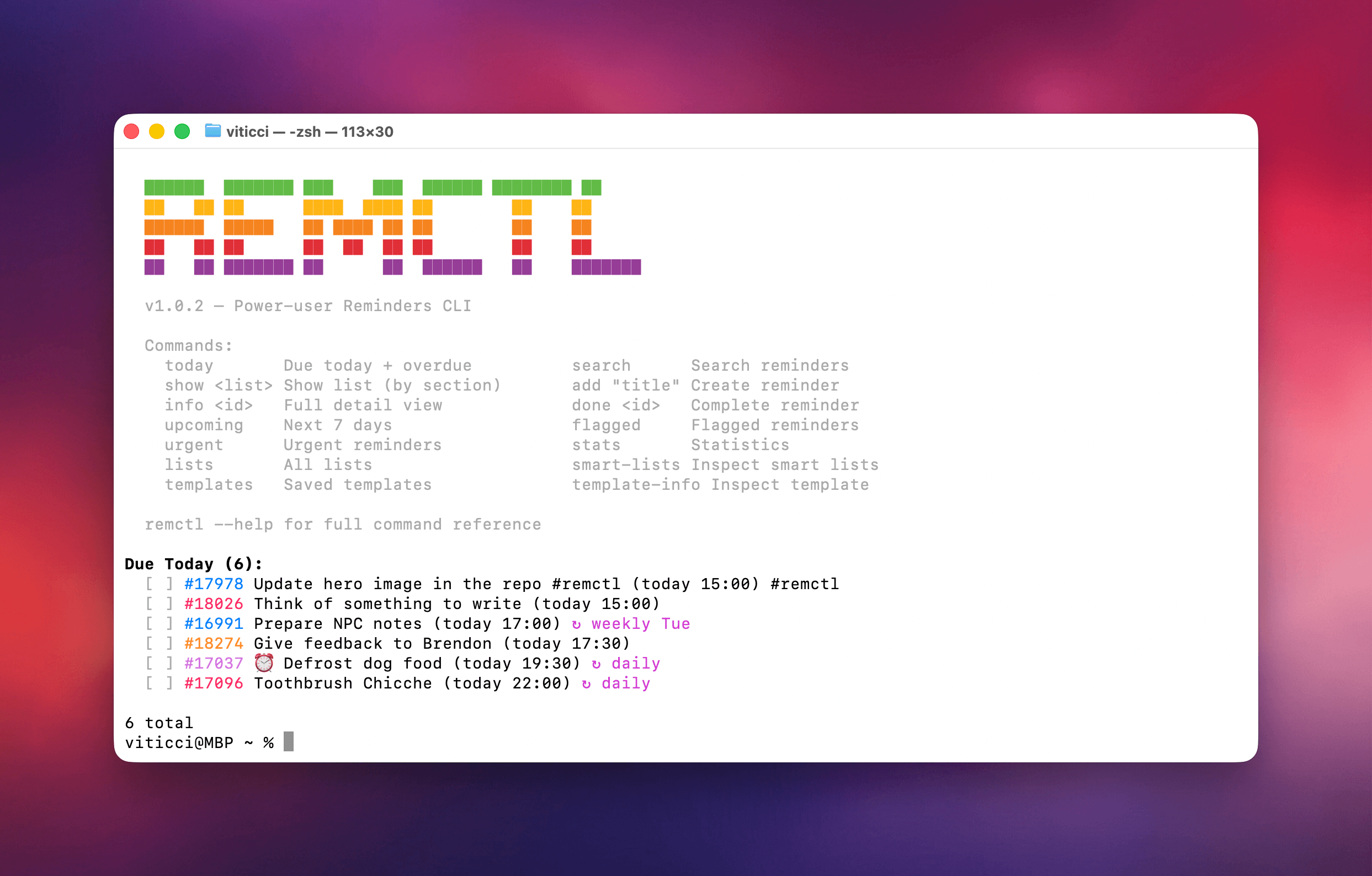
RemCTL is a fast, scriptable Reminders CLI for macOS designed for power users and AI agents.
RemCTL reads the user's local iCloud Reminders database directly (with native macOS permission access) for speed and detail, then writes through Apple's public EventKit APIs so changes sync normally to other devices.
Unlike other Reminders CLIs, RemCTL offers a special, optional integration with Reminders' Private API on macOS. This allows RemCTL to write proprietary metadata such as sections, shared-list assignments, subtasks, tags, image attachments, urgent state, Early Reminders, list appearance metadata, Groceries list metadata, list groups, custom smart lists, and Reminders templates by using the native ReminderKit framework. Location-based alarms are guarded by the same --private command surface, but are saved through the public EventKit bridge because that path materializes reliably on current macOS.
As a result, RemCTL is the only Reminders CLI that truly replicates the modern Reminders experience on macOS 26 and early macOS 27 Golden Gate builds without breaking iCloud sync.
remctl
  reads:  ~/Library/Group Containers/group.com.apple.reminders/.../Data-*.sqlite
  fallback reads: remctl-bridge -> EventKit (--via-eventkit, limited)
  writes: remctl-bridge -> EventKit
  private: remctl-private -> private ReminderKit APIs (--private only)
Why this architecture exists:
- Direct SQLite reads expose sections, subtasks, tags, attachments, deep links, list colors and badges, recurrence metadata, normal alarms, location alarms, and Early Reminder metadata in tens of milliseconds.
- Limited EventKit reads are available only with
--via-eventkitonshow,search,today, andupcoming. This is a fallback for automation hosts that cannot get Full Disk Access. It is never the default and does not return RemCTL numeric IDs. - EventKit writes keep Reminders and iCloud in charge of mutations. RemCTL does not write directly to the database.
- Private metadata writes are unsupported and explicitly opt-in with
--private. They use Apple's private ReminderKit APIs, not direct SQLite mutation, and should be treated as experimental power-user functionality.
The easiest experience is to ask your agent (Claude Code or Codex) to set up RemCTL for you by pointing it at this repo. Alternatively:
git clone https://github.com/viticci/remctl.git
cd remctl
./install.sh --bootstrap
remctl onboard
remctl permissions full-disk-access
remctl doctor
remctl today
--bootstrap copies the CLI and helpers, compiles the Swift helpers when swiftc is available, creates RemCTL's config directory, and installs shell completion when supported. For zsh, setup prints the fpath lines to add to ~/.zshrc when your config does not already load the completion directory.
If the installer says PATH action required, add the printed PATH line and open a new Terminal window before typing remctl.
If you install to ~/.local/bin, use the same prefix every time:
PREFIX="$HOME/.local" ./install.sh --bootstrapFull setup details live in docs/installation.md.
| Task | Commands |
|---|---|
| See what is due | today, upcoming, overdue |
| Browse reminders | lists, groups, group-info, smart-lists, templates, template-info, show, search, flagged, urgent, info, subtasks, sharees |
| Create and edit | add, edit, done, undone, delete, flag, unflag |
| Organize | list-symbols, list-create, list-edit, list-pin, list-unpin, list-rename, list-delete, group-create, group-edit, group-delete, smart-list-create, smart-list-edit, smart-list-delete, template-create, template-apply, template-delete, sections, tags |
| Share data | export, import, link, open, --json, --format table on tabular read commands |
| Set up the Mac | onboard, permissions, doctor, setup, completion |
Common examples:
remctl today
remctl groups
remctl show Work --format table
remctl show --list-id 153 --json
remctl today --via-eventkit --json
remctl show Work --via-eventkit
remctl add "Review PR" -l Work -d "tomorrow 10:00" -p high
remctl add "Pay rent" -d "2026-06-01" --recurrence monthly
remctl done 23880 --date "2026-05-27 09:30"
remctl edit 23880 -d clear
remctl edit 23880 -l Work
remctl add "Research" -l Projects --private --url "https://example.com" -t remctl --new-section "Research"
remctl sharees Shopping --json
remctl add "Pick up groceries" -l Shopping --private --assign Alex
remctl add "Leave early" -l Work -d "today 14:00" --private --early-reminder 15m
remctl add "Launch assets" -l Projects --private --subtask '{"title":"Export PNG","notes":"Use final crop","due":"tomorrow","url":"https://example.com","tags":["media"]}'
remctl list-symbols
remctl list-symbols --preview
remctl list-create "Research" --color orange --private --symbol education3
remctl list-create "Cold Ideas" --color cyan --private --emoji 🥶
remctl list-create "Groceries" --private --groceries --grocery-locale en_US
remctl list-create "Ideas" --private --group Writing
remctl group-info "Writing" --json
remctl group-create "Writing" --private --add-list Editorial
remctl group-edit "Writing" --private --new-name "Drafts" --add-list Ideas
remctl group-edit "Writing" --private --move-list Ideas --before-list Editorial
remctl group-delete "Drafts" --private --force
remctl add "Milk" -l Groceries --private --grocery
remctl smart-lists --json
remctl smart-list-create "Flagged Review" --private --flagged
remctl smart-list-create "Priority or Today" --private --match any --priority high,medium --date today
remctl smart-list-create "Due Before June 1" --private --date-range 2026-05-16,2026-05-31 --color red --emoji 📆
remctl smart-list-edit "Priority or Today" --private --priority high
remctl smart-list-delete "Flagged Review" --private --force
remctl templates --json
remctl template-info "Rome: Things To See" --json
remctl template-create "Packing Template" --from-list Packing --private --json
remctl template-apply "Packing Template" --private --json
remctl template-delete "Packing Template" --private --force
remctl list-edit Projects --private --color orange --symbol education3
remctl list-pin "Project X" --private
remctl list-rename --list-id 123 --new-name "Project X Archive"
remctl info 23880 --json
The full command guide is in docs/commands.md. For smart lists specifically, start with Smart Lists in the command guide, then read Private Metadata Writes: Smart List Examples for the ReminderKit write path, guardrails, and implementation notes. Template commands are covered in docs/commands.md#templates and docs/private-metadata.md#template-examples.
--via-eventkit is a limited read-only fallback, not an alternate primary mode. It works only for show, search, today, and upcoming when a host cannot read the Reminders database. JSON output is a wrapper object with source: "eventkit", fidelity: "limited", and items; each item has eventKitId, not RemCTL's numeric id. Never pass eventKitId to info, edit, done, delete, link, open, subtasks, or any command that expects a numeric RemCTL ID. This mode also cannot show sections, synced tags, private rich links, urgent state, template internals, smart-list internals, numeric list IDs, or table output.
Due dates are atomic. If -d/--due is present and RemCTL cannot parse it, the command fails before creating or editing anything. Supported deterministic forms include YYYY-MM-DD, YYYY-MM-DD HH:MM, today at 3pm, tomorrow 09:30, tonight at 11, Friday at 15:00, next friday at 3pm, +3d, eod, and eow. In create mode, date-only forms such as today, tomorrow, YYYY-MM-DD, +3d, and next friday create all-day reminders; forms with explicit times create timed reminders.
Recurrence, normal alarm, and priority inputs are also validated before writes. Supported recurrence forms are daily, weekly, weekly mon,wed,fri, monthly, monthly 1,15, and yearly; upcoming DAYS requires a positive range from 1 to 3650 days.
Assignment is for shared Reminders lists only and requires --private. You do not need a person's email if their name is unique in the shared list, but email/phone address or ID is safer for scripts and agents.
remctl sharees Shopping
remctl sharees Shopping --json
remctl add "Pick up groceries" -l Shopping --private --assign Alex
remctl edit 23880 --private --assign alex@example.com
remctl edit 23880 --private --assign me
remctl edit 23880 --private --unassign
--assign USER resolves USER against the target list's sharees by display name, first/last name, email or phone address, numeric sharee ID, object UUID, or me. Names are convenient for humans; agents should call remctl sharees LIST --json first and prefer the returned address, numeric id, or objectUUID when duplicate names are possible. --unassign clears the current assignment. Verify the result with remctl info ID --json; assignment data appears under assignment.
Reminders stores list groups as list rows with listType: "group" and child lists linked by parent-list columns. remctl groups shows only groups with active/completed/total reminder counts, while remctl lists --json includes group rows with children and child list rows with group metadata. remctl group-info <group> prints the group ID, object UUID, child lists, counts, and suggested follow-up commands. remctl show <group> reads reminders from the group's child lists. In table mode, group output is split by child list and section; with --completed, the date column shows completion timestamps instead of due status.
Group writes use private ReminderKit and require --private. group-create creates a group and can immediately move existing lists into it. list-create --private --group <group> creates a new list and assigns it to the group. group-edit renames a group, adds/removes child lists, and can reorder a child list with --move-list plus --before-list, --after-list, --first, or --last. group-delete first moves child lists back to the top level before deleting the empty group. These operations change list containers only; reminders stay in their lists.
Reminders stores Groceries lists as normal lists with private grocery metadata. RemCTL reads those fields directly: lists --json reports listType, isGroceries, and the grocery locale flags, while human lists and show output mark detected Groceries lists with 🥕. When show prints Groceries sections, known Reminders grocery categories get matching leading emoji such as 🥛 Dairy, Eggs & Cheese, 🥬 Produce, and 🧻 Household Items; show --json includes sectionEmoji for the same categories.
remctl lists --json
remctl show Groceries
remctl list-create "Groceries" --private --groceries --grocery-locale en_US
remctl list-edit "Shopping" --private --groceries --grocery-locale it_IT
remctl list-edit "Shopping" --private --standard
remctl add "Milk" -l Groceries --private --grocery
remctl edit 23880 --private --grocery
Groceries writes require --private because Apple exposes the list type, locale, and item categorization through ReminderKit, not EventKit. add --private --grocery creates the reminder normally, waits for Reminders' automatic grocery sorter, verifies the resulting section membership from the local database, and only falls back to ReminderKit's explicit categorizer if the item is not sorted yet.
RemCTL can inspect built-in and custom smart lists with smart-lists. It can also create, edit, and delete custom smart lists with the Reminders.app filters that currently materialize reliably through the private ReminderKit write path: any tag, selected tags, date, time, priority, flag, vehicle-connected, specific location, one included list, and --match all|any across those reliable families.
remctl smart-lists --json
remctl smart-list-create "Any Tag" --private --any-tag
remctl smart-list-create "#remctl Today" --private --tags remctl --date today
remctl smart-list-create "Projects Today" --private --include-list Projects --date today --date-today-include-past-due
remctl smart-list-create "Priority or Today" --private --match any --priority high,medium --date today
remctl smart-list-create "Due Before June 1" --private --date-range 2026-05-16,2026-05-31 --color red --emoji 📆
remctl smart-list-edit --smart-list-id 170 --private --priority high
remctl smart-list-delete "Priority or Today" --private --force
Smart-list writes are private ReminderKit writes and always require --private; RemCTL rejects unknown filter shapes and known zero-filter shapes before saving. Smart lists support the same private appearance flags as lists: --color, --symbol, and --emoji. Reminders.app currently materializes only one included-list filter at a time. Do not create multi-list aggregate smart lists through a list filter; use one included list, or a different reliable filter family. Use:
- docs/commands.md#smart-lists for command syntax and supported filters.
- docs/private-metadata.md#smart-list-examples for private API behavior, safety notes, and reverse-engineered filter storage details.
- SKILL.md for the concise agent contract.
Reminders templates are saved lists with saved reminders inside them. RemCTL reads them from the local template tables and can create, apply, and delete templates through private ReminderKit APIs. Template support is intentionally list-level: RemCTL can save an entire source list as a template and apply a template to create a new list. It does not append individual reminders to existing templates or strip subtasks/due dates while saving. Existing public template links are reported as read-only metadata; RemCTL does not create iCloud sharing links.
remctl templates --json
remctl template-info "Rome: Things To See" --json
remctl template-create "Packing Template" --from-list Packing --private --json
remctl template-create "Archive Template" --from-list-id 144 --include-completed --private
remctl template-apply "Packing Template" --private --json
remctl template-delete "Packing Template" --private --forcetemplate-create, template-apply, and template-delete require --private. template-create takes one source list; --include-completed is the only content-selection flag. Verify template writes with templates --json and template-info; verify applied templates with lists --json and show <new list> --json.
RemCTL's default writes use EventKit. For metadata Apple does not expose publicly, RemCTL has an explicit --private mode backed by remctl-private, an Objective-C helper that uses Apple's private ReminderKit framework and saves through the Reminders stack. RemCTL never writes directly to SQLite (which would break iCloud sync and cause database corruption issues).
Private writes are opt-in and power-user only:
remctl add "Research" -l Projects --private --url "https://example.com" -t remctl --section "Research"
remctl edit 23880 --private --section-id DCD255E2-7CF5-4B45-9566-3F9A5D84AFA8
remctl edit 23880 --private --assign Alex
remctl edit 23880 --private --unassign
remctl add "Launch assets" -l Projects --private --subtask '{"title":"Export PNG","notes":"Use final crop","due":"tomorrow","url":"https://example.com","tags":["media"]}'
remctl add "Leave now" -l Work --private --urgent
remctl add "Leave early" -l Work -d "today 14:00" --private --early-reminder 15m
remctl edit 23880 --private --early-reminder 1h
remctl edit 23880 --private --early-reminder clear
remctl edit 23880 --private --image ~/Desktop/mockup.png --flagged --urgent
remctl edit 23880 --private --location-title "Apple Park" --latitude 37.3349 --longitude -122.0090 --radius 200
remctl list-edit Projects --private --color '#FF8D28' --symbol education3
remctl list-edit Projects --private --emoji 📌
remctl list-create "Groceries" --private --groceries --grocery-locale en_US
remctl add "Milk" -l Groceries --private --grocery
remctl list-pin "Project X" --private
remctl list-pin "Flagged" --private
remctl list-unpin --list-id 144 --private
remctl list-unpin --smart-list-id 4 --private
remctl group-create "Writing" --private --add-list Editorial
remctl group-edit "Writing" --private --new-name "Drafts" --add-list Ideas --remove-list Socials
remctl group-edit "Writing" --private --move-list Ideas --last
remctl group-delete "Drafts" --private --force
remctl smart-list-create "Flagged Review" --private --flagged
remctl smart-list-create "Priority or Today" --private --match any --priority high,medium --date today
remctl smart-list-create "Projects Today" --private --include-list Projects --date today --date-today-include-past-due
remctl smart-list-create "Near Home" --private --location-title Home --latitude 41.9 --longitude 12.5 --proximity enter
remctl smart-list-edit "Priority or Today" --private --priority high --color red --emoji 📆
remctl smart-list-delete "Flagged Review" --private --force
remctl template-create "Packing Template" --from-list Packing --private --json
remctl template-apply "Packing Template" --private --json
remctl template-delete "Packing Template" --private --force
Private mode covers the parts of Reminders that EventKit does not expose:
- Reminder metadata: synced web rich links, synced tags, sections, shared-list assignments, rich subtasks, image attachments, real flag state, urgent state, Early Reminders, and location alarms.
- List metadata: exact
#RRGGBBcolors, official list symbols, emoji badges, Groceries list conversion/locale metadata, regular or smart-list pin state, and list group create/edit/delete. - Smart lists: custom smart-list create/edit/delete for the Reminders filters that RemCTL has verified to materialize correctly.
- Templates: whole-list template create/apply/delete. Existing public template links can be read, but RemCTL does not create iCloud sharing links.
A few rules keep this safe and predictable:
edit -l/--listandedit --list-idare normal EventKit moves for ordinary reminders. Parent reminders with subtasks use a verified ReminderKit clone-delete fallback because EventKit rejects moving only the parent.- Shared-list assignment uses
--private --assign USER;USERmay be a unique name, email/phone address, numeric sharee ID, object UUID, orme. Useremctl sharees LIST --jsonbefore assigning when scripting. - Location alarms still require the
--privateguardrail, but RemCTL saves them throughremctl-bridgebecause EventKit structured-location alarms persist correctly on current macOS. --private --urland rich subtask URLs must be publichttporhttpshosts. Loopback,.local, private, link-local, multicast, reserved, and unresolved hosts are rejected before writing.- Rich-link and image edit operations are additive. RemCTL can add them, but it does not remove or replace existing rich links/images.
--early-reminderaccepts values such as15m,1h,2d,1w,1mo, orclear. Non-clear values require a due date.list-create --coloruses public EventKit for normal color names. Add--privatefor exact colors, official symbols, or emoji badges.list-symbolsprints the 71 official Reminders emblem names. Uselist-symbols --previewfor the native badge contact sheet. Use--emojifor custom emoji badges.- Groceries writes verify Reminders' automatic sorter first, then use the private categorizer only if needed.
- Group writes move list containers, not reminders.
group-deletedetaches child lists before deleting the group so their reminders are preserved. - If a section name is duplicated in the same list, RemCTL uses the single non-empty match when possible. Otherwise, pass
--section-id.
Verify with:
remctl info ID --jsonfor reminder metadata.remctl sharees LIST --jsonbefore assignment, thenremctl info ID --jsonfor the resultingassignment.lists --jsonfor listcolor,badge,badgeEmblem, and Groceries metadata.smart-lists --jsonfor smart-list filters and pin state.templates --jsonortemplate-infofor templates.
This is the major difference from ordinary EventKit-only Reminders CLIs, but it is still unsupported by Apple:
- Private-only flags fail before writing unless
--privateis present. - Generic file/PDF attachments are intentionally rejected.
- Smart-list and template writes should get a UI/device check when sync behavior matters.
RemCTL output is designed for both humans and agents:
- reminder IDs are shown as
#ID - normal JSON read commands return RemCTL numeric
idvalues that can be used withinfo,edit,done,delete,link,open, andsubtasks --via-eventkitJSON returnseventKitIdvalues instead; they are EventKit calendar item identifiers and cannot be chained into numeric-ID commands--via-eventkitJSON includessource: "eventkit",fidelity: "limited", andidWarningso automation can reject accidental ID chaining#IDis colored with the reminder list color when RemCTL can read list colors- flagged reminders show
⚑ - macOS 26 urgent reminders show
⏰ info --jsonreports the actual due date asdueDate; if Reminders stores a separate display/alert date, it appears asdisplayDateadd -dcreates all-day reminders when the input names a date without a time, such astoday,tomorrow,2026-06-01,+3d, ornext fridayedit -dcarries a single absolute alarm forward when it matches the old due/display time, keeping Reminders.app's visible time aligned for ordinary reschedulesedit -d clearremoves a single matching absolute alarm/display time;edit --alarm clearremoves normal alarms explicitly- normal EventKit alarms and location alarms appear in
info --jsonasalarms - shared-list assignments appear in human output as
@Nameand ininfo --jsonasassignment - Early Reminders appear in verbose/info JSON as labels such as
15 minutes before - recurring reminders show a repeat badge such as
↻ weekly Mon, Wed - Groceries lists show
🥕in list headings and list summaries - table output keeps a dedicated
Repeatcolumn when any row is recurring - human output strips terminal control characters from Reminders text before printing
- every read command supports JSON output
remctl today --json
remctl --format table upcoming 14
NO_COLOR=1 remctl todayRemCTL may need three macOS permission grants:
- Reminders access for EventKit writes
- Automation access for AppleScript fallback operations
- Full Disk Access for direct database reads
Run:
remctl onboard
remctl permissions full-disk-access
remctl doctor
The visual permission helper opens System Settings, copies the first target path, shows draggable targets for the current CLI process, and marks verified targets with a green check.
Full Disk Access is scoped to the process context. A Terminal session can pass remctl doctor while Codex, another agent runner, or a different host app fails. Run remctl doctor from the same context that will run RemCTL commands; for agent setup, use remctl doctor --for-agent. When a terminal embeds another engine, RemCTL prefers the real host .app bundle over inherited terminal variables so the printed FDA target matches the app macOS will authorize.
Manual fallback: run remctl doctor --for-agent, then add the printed target in System Settings > Privacy & Security > Full Disk Access. In the file picker, press Command-Shift-G, paste the path, press Return, then click Open.
If Full Disk Access cannot be granted to an automation host, show, search, today, and upcoming support --via-eventkit as a limited read-only fallback through the EventKit bridge. This does not replace normal setup: it omits RemCTL numeric IDs, sections, synced tags, private metadata, smart-list/template internals, numeric list targeting, and table output.
Use JSON when scripting:
remctl today --json
remctl show Work --json
remctl search "query" --completed --json
remctl info 23880 --json
remctl doctor --for-agent --json
search matches reminder titles and notes. By default it searches active reminders; pass --completed to include completed reminders too.
Do not use --via-eventkit by default. Use it only when a supported basic read command is blocked by Full Disk Access and the task can tolerate limited EventKit fidelity. In this mode JSON returns a wrapper with source: "eventkit", fidelity: "limited", and items; item identifiers are eventKitId, not RemCTL numeric id. Never pass eventKitId to info, edit, done, delete, link, open, subtasks, or any other numeric-ID command. If the task needs sections, tags, rich links, urgent state, templates, smart-list internals, or chainable IDs, fix Full Disk Access instead.
For fast agent writes, call remctl add ... --json, use the returned numericId when present, then verify with remctl info <numericId> --json. info includes private rich-link URLs, parent and subtask image attachments, EventKit alarms, location alarms, Early Reminders, and recurrence metadata, so agents should not need raw SQLite checks for ordinary reminder metadata verification.
Use JSON for automation when exact raw text matters. Human output is terminal-safe and strips control characters; JSON preserves the underlying Reminders values.
For smart-list automation, use smart-list-create, smart-list-edit, and smart-list-delete with --private, prefer --smart-list-id when editing or deleting an existing custom smart list, and verify with remctl smart-lists --json. smart-lists --json also reports smart-list pin state; on macOS 26, smart-list pinning is verified from pinnedDate because the regular-list boolean can stay empty. Reminders.app currently materializes only one included-list filter at a time; RemCTL rejects repeated included lists and list exclusions before writing. The smart-list command surface and examples are documented in docs/commands.md#smart-lists; the private ReminderKit behavior and filter storage details are in docs/private-metadata.md#smart-list-examples.
For template automation, use templates --json and template-info to inspect saved templates. Use template-create, template-apply, and template-delete with --private; verify template rows with templates --json or template-info, and verify applied lists with show <list> --json. Template writes are list-level only: do not assume support for appending individual reminders to a template or excluding subtasks/due dates. Existing iCloud template links are read-only metadata.
For Groceries automation, use lists --json to detect listType: "groceries" and grocery.locale, then use add --private --grocery or edit --private --grocery only against an existing Groceries list. Verify with show <list> --json and check the reminder's section after categorization.
For shared-list assignments, call remctl sharees LIST --json first. --assign accepts a unique name, email/phone address, numeric sharee ID, object UUID, or me; prefer address, id, or objectUUID in automation because names can collide. Assignment writes require --private and a known target shared list, then verify with remctl info ID --json and inspect assignment.assignee.
Agents should pass deterministic due dates, using YYYY-MM-DD for all-day reminders and YYYY-MM-DD HH:MM for timed reminders after resolving the user's request in their timezone. If a due date is invalid, RemCTL exits before writing and emits a structured invalid_due_date JSON error on stderr with examples. Retry with a corrected date; do not create a reminder first and patch the due date afterward.
List names are resolved conservatively: exact match first, then case-insensitive match, then a normalized fallback that can handle decorative prefixes such as emoji. If more than one list matches, RemCTL fails before writing and asks for --list-id. Commands that target lists use the same rule: pass a name, or use --list-id for exact agent-safe targeting on show, add, edit, link, export, list-edit, list-pin, list-unpin, list-rename, list-delete, group membership/order edits, and smart-list list filters. Group commands target groups by name or --group-id; write commands that need a real list reject groups and name the child lists you can target. list-create --private --group-id is available when group names collide. list-pin and list-unpin can also target smart lists by name or --smart-list-id.
Do not mutate the Reminders SQLite database. Use RemCTL commands or EventKit.
For troubleshooting, trust the context object in doctor --for-agent --json. If Terminal is green but the agent runner is red, the install is not necessarily broken; grant Full Disk Access to the app or interpreter reported by the agent context, or run a one-off command through an already-authorized Terminal session.
After a repo update, reinstall the copied CLI before testing:
git pull
./install.sh
hash -r
remctl --version
remctl doctor- Installation and onboarding
- Command guide
- Smart-list command syntax
- Template command syntax
- Private metadata writes
- Smart-list private API notes
- Template private API notes
- Architecture
| Path | Purpose |
|---|---|
remctl |
Main Python CLI |
remctl-bridge.swift |
Swift/EventKit write helper source |
remctl-private.m |
Unsupported private ReminderKit metadata helper source |
remctl-permissions.swift |
Swift/AppKit guided Full Disk Access helper source |
remctl_runtime.py |
Shared paths, config, date windows, safety helpers |
remctl_serialization.py |
Shared reminder JSON serialization |
remctl_smart_lists.py |
Smart-list filter decoding and safe v1 encoding |
scripts/live_edit_matrix.py |
Opt-in live edit-mode matrix for due/display/alarm regressions |
scripts/live_private_matrix.py |
Opt-in live private command matrix using disposable Reminders data |
install.sh |
Copy-based installer and bootstrap script |
MIT. See LICENSE.