In-memory, labeled directed multigraph with powerful and performant Cypher-inspired pattern queries







In-memory, labeled directed multigraph with:
- Labeled node types (e.g.,
Person,Team,Project,Resource) - Labeled relationship types (e.g.,
WORKS_FOR,MANAGES,ASSIGNED_TO,DEPENDS_ON) - Relationship properties for weights, timestamps, metadata, and inline filtering
- Multiple relationships between the same nodes
- Graph mutations for removing, moving, replacing, and clearing graph data
- Read-only storage views to prevent accidental graph index corruption
- Advanced Cypher queries with WHERE clauses, RETURN projection, logical operators, variable-length paths, and edge variable comparison
- Ordering and Pagination with ORDER BY, SKIP, and LIMIT
- Complete path results with Neo4j-style edge information
- Graph algorithms for analysis (shortest path, connected components, topological sort, reachability)
- 1. Quick Preview
- 2. Complete Usage Examples
- 3. Graph Algorithms
- 4. Generic Traversal Utilities
- 5. Pattern Query Examples
- 6. Mini-Cypher Reference
- 7. Comparison with Cypher
- 8. Design and performance
- 9. JSON Serialization
- 10. Graph Layout for Visualizations
- 11. Examples index
- License
GraphKit supports a powerful subset of Cypher - the query language used by Neo4j. For comprehensive documentation on all query features including advanced WHERE clauses, edge variable comparison, logical operators, and complex filtering:
The guide covers:
- Edge Variable Comparison -
WHERE type(r2) = type(r)for multi-hop path consistency - Complex WHERE Clauses - Parentheses, logical operators, property filtering
- Variable-Length Paths -
[:TYPE*1..3]for flexible hop ranges - Multiple Edge Types -
[:TYPE1|TYPE2]for OR matching - RETURN Projection - Property access with AS aliases
- Real-World Examples - HR queries, project management, organizational analysis
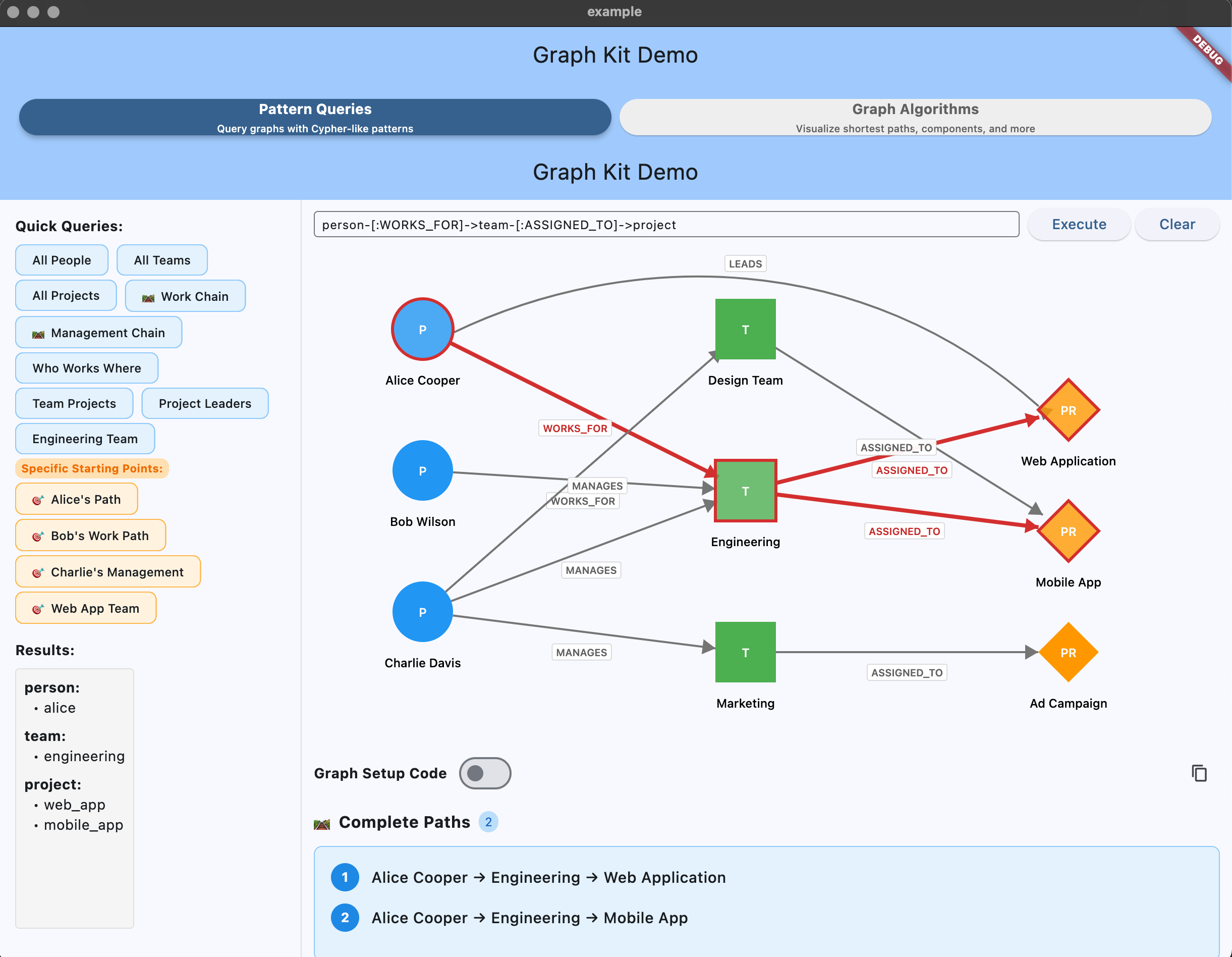
Interactive graph algorithms demo showing centrality analysis in the Flutter app.
This section provides copy-paste ready examples demonstrating all major query methods with a sample graph. Each example can be run as a standalone Dart script.
import 'package:graph_kit/graph_kit.dart';

void main() {
  // Create graph and add sample data
  final graph = Graph<Node>();

  // Add people
  graph.addNode(Node(id: 'alice', type: 'Person', label: 'Alice Cooper'));
  graph.addNode(Node(id: 'bob', type: 'Person', label: 'Bob Wilson'));
  graph.addNode(Node(id: 'charlie', type: 'Person', label: 'Charlie Davis'));

  // Add teams
  graph.addNode(Node(id: 'engineering', type: 'Team', label: 'Engineering'));
  graph.addNode(Node(id: 'design', type: 'Team', label: 'Design Team'));
  graph.addNode(Node(id: 'marketing', type: 'Team', label: 'Marketing'));

  // Add projects
  graph.addNode(Node(id: 'web_app', type: 'Project', label: 'Web Application'));
  graph.addNode(Node(id: 'mobile_app', type: 'Project', label: 'Mobile App'));
  graph.addNode(Node(id: 'campaign', type: 'Project', label: 'Ad Campaign'));

  // Add relationships
  graph.addEdge('alice', 'WORKS_FOR', 'engineering');
  graph.addEdge('bob', 'WORKS_FOR', 'engineering');
  graph.addEdge('charlie', 'MANAGES', 'engineering');
  graph.addEdge('charlie', 'MANAGES', 'design');
  graph.addEdge('charlie', 'MANAGES', 'marketing');
  graph.addEdge('engineering', 'ASSIGNED_TO', 'web_app');
  graph.addEdge('engineering', 'ASSIGNED_TO', 'mobile_app');
  graph.addEdge('design', 'ASSIGNED_TO', 'mobile_app');
  graph.addEdge('marketing', 'ASSIGNED_TO', 'campaign');
  graph.addEdge('alice', 'LEADS', 'web_app');

  final query = PatternQuery(graph);

  // Run examples below...
}// Get all people, query.match returns Map<String, Set<String>>
final people = query.match('person:Person');
print(people); // {person: {alice, bob, charlie}}
// Get all teams, query.match returns Map<String, Set<String>>
final teams = query.match('team:Team');
print(teams); // {team: {engineering, design, marketing}}
// Get all projects, query.match returns Map<String, Set<String>>
final projects = query.match('project:Project');
print(projects); // {project: {web_app, mobile_app, campaign}}// Find who works for teams, query.match returns Map<String, Set<String>>
final workers = query.match('person:Person-[:WORKS_FOR]->team:Team');
print(workers); // {person: {alice, bob}, team: {engineering}}
// Find who manages teams, query.match returns Map<String, Set<String>>
final managers = query.match('person:Person-[:MANAGES]->team:Team');
print(managers); // {person: {charlie}, team: {engineering, design, marketing}}
// Find team assignments to projects, query.match returns Map<String, Set<String>>
final assignments = query.match('team:Team-[:ASSIGNED_TO]->project:Project');
print(assignments); // {team: {engineering, design, marketing}, project: {web_app, mobile_app, campaign}}Query from multiple starting nodes simultaneously. Perfect for search results or filtering by multiple IDs:
// Search returns multiple matching users - query from all of them
final searchResults = ['alice', 'bob', 'charlie'];
final projects = query.match(
  'person-[:WORKS_FOR]->team-[:ASSIGNED_TO]->project',
  startIds: searchResults
);
// Returns all projects connected to any of the matched users

// Query from multiple teams
final multiTeamView = query.match(
  'team-[:ASSIGNED_TO]->project',
  startIds: ['engineering', 'design']
);
print(multiTeamView); // {team: {engineering, design}, project: {web_app, mobile_app, landing_page}}

// Automatically deduplicates when multiple starts find the same path
final paths = query.matchPaths(
  'person-[:WORKS_FOR]->team',
  startIds: ['alice', 'bob']  // Both in same team
);
// Returns unique paths (deduplicated)Note:
startIdwill be deprecated in 0.9.0 in favor ofstartIdsfor API consistency. UsestartIds: ['single_node']for new code.
// What does Alice work on?
final aliceWork = query.match(
  'person-[:WORKS_FOR]->team-[:ASSIGNED_TO]->project',
  startId: 'alice'  // Deprecated: use startIds: ['alice']
);
print(aliceWork); // {person: {alice}, team: {engineering}, project: {web_app, mobile_app}}

// Who works on the web app project?
final webAppTeam = query.match(
  'project<-[:ASSIGNED_TO]-team<-[:WORKS_FOR]-person',
  startId: 'web_app'  // Deprecated: use startIds: ['web_app']
);
print(webAppTeam); // {project: {web_app}, team: {engineering}, person: {alice, bob}}Start parameters can match any position in the pattern, not just the first element:
// Start from middle element (team)
final teamConnections = query.matchPaths(
  'person-[:WORKS_FOR]->team-[:ASSIGNED_TO]->project',
  startIds: ['engineering']  // team is in the middle!
);
// Returns paths where 'team' variable = 'engineering'

// Start from last element (project)
final projectPaths = query.matchPaths(
  'person-[:WORKS_FOR]->team-[:ASSIGNED_TO]->project',
  startIds: ['web_app']  // project is last!
);
// Returns paths where 'project' variable = 'web_app'

// Multiple middle starts
final middleChain = query.matchPaths(
  'a->b->c->d->e',
  startIds: ['node_c', 'node_d']  // Start from multiple middle elements
);When starting from middle/last elements, use startType to skip unnecessary position checks:
// Without startType: checks all 3 positions (person, team, project)
final paths = query.matchPaths(
  'person-[:WORKS_FOR]->team-[:ASSIGNED_TO]->project',
  startIds: ['engineering']
);

// With startType: ONLY checks 'team' position (faster!)
final paths = query.matchPaths(
  'person-[:WORKS_FOR]->team-[:ASSIGNED_TO]->project',
  startIds: ['engineering'],
  startType: 'Team'  // Optimization hint
);
When to use startType:
- Starting from middle or last positions
- Large patterns (4+ elements)
- Performance-critical queries
- You know the node type of your starting nodes
// Get specific person-team-project combinations, query.matchRows returns List<Map<String, dynamic>>
final rows = query.matchRows('person-[:WORKS_FOR]->team-[:ASSIGNED_TO]->project');
print(rows);
// [
//   {person: alice, team: engineering, project: web_app},
//   {person: alice, team: engineering, project: mobile_app},
//   {person: bob, team: engineering, project: web_app},
//   {person: bob, team: engineering, project: mobile_app}
// ]

// Access individual path data
print(rows.first); // {person: alice, team: engineering, project: web_app}
print(rows.first['person']); // alice
print(rows.first['team']); // engineering// Get complete path information, query.matchPaths returns List<PathMatch>
final paths = query.matchPaths('person-[:WORKS_FOR]->team-[:ASSIGNED_TO]->project');
print(paths.length); // 4
// Print all paths with edges
for (final path in paths) {
print(path.nodes); // {person: alice, team: engineering, project: web_app}
for (final edge in path.edges) {
print(' ${edge.from} -[:${edge.type}]-> ${edge.to}'); // alice -[:WORKS_FOR]-> engineering
}
}// Get all of Alice's connections, query.matchMany returns Map<String, Set<String>>
final aliceConnections = query.matchMany([
'person-[:WORKS_FOR]->team',
'person-[:LEADS]->project'
], startIds: ['alice']);
print(aliceConnections); // {person: {alice}, team: {engineering}, project: {web_app}}
// Combine multiple relationship types, query.matchMany returns Map<String, Set<String>>
final allConnections = query.matchMany([
'person:Person-[:WORKS_FOR]->team:Team',
'person:Person-[:MANAGES]->team:Team',
'person:Person-[:LEADS]->project:Project'
]);
print(allConnections); // {person: {alice, bob, charlie}, team: {engineering, design, marketing}, project: {web_app}}// Add people with properties for filtering examples
graph.addNode(Node(
id: 'alice',
type: 'Person',
label: 'Alice Cooper',
properties: {'age': 28, 'department': 'Engineering', 'salary': 85000}
));
graph.addNode(Node(
id: 'bob',
type: 'Person',
label: 'Bob Wilson',
properties: {'age': 35, 'department': 'Engineering', 'salary': 95000}
));
// Filter by age - query.matchRows returns List<Map<String, dynamic>>
final seniors = query.matchRows('MATCH person:Person WHERE person.age > 30');
print(seniors); // [{person: bob}]
// Filter by department - query.matchRows returns List<Map<String, dynamic>>
final engineers = query.matchRows('MATCH person:Person WHERE person.department = "Engineering"');
print(engineers); // [{person: alice}, {person: bob}]
// Combine conditions with AND - query.matchRows returns List<Map<String, dynamic>>
final seniorEngineers = query.matchRows('MATCH person:Person WHERE person.age > 30 AND person.department = "Engineering"');
print(seniorEngineers); // [{person: bob}]
// Use OR conditions - query.matchRows returns List<Map<String, dynamic>>
final youngOrWellPaid = query.matchRows('MATCH person:Person WHERE person.age < 30 OR person.salary > 90000');
print(youngOrWellPaid); // [{person: alice}, {person: bob}]
// Complex filtering with relationships - query.matchRows returns List<Map<String, dynamic>>
final seniorWorkers = query.matchRows('MATCH person:Person-[:WORKS_FOR]->team:Team WHERE person.age > 30');
print(seniorWorkers); // [{person: bob, team: engineering}]
// Edge variable comparison for multi-hop path consistency
// Add nodes with edge type prefixes
graph.addNode(Node(id: 'hub', type: 'Hub', label: 'Hub1'));
graph.addNode(Node(id: 'dest1', type: 'Dest', label: 'Dest1'));
graph.addNode(Node(id: 'dest2', type: 'Dest', label: 'Dest2'));
graph.addEdge('alice', 'ROUTE_alice', 'hub');
graph.addEdge('hub', 'ROUTE_alice', 'dest1'); // Same type as alice's edge
graph.addEdge('hub', 'ROUTE_bob', 'dest2'); // Different type
// Enforce same edge type across both hops - query.match returns Map<String, Set<String>>
final consistentPaths = query.match(
'person-[r]->hub-[r2]->dest WHERE type(r) STARTS WITH "ROUTE_" AND type(r2) = type(r)'
);
print(consistentPaths); // {person: {alice}, hub: {hub}, dest: {dest1}}
// Only dest1 is returned because its edge type (ROUTE_alice) matches alice's edge type
// Find paths with DIFFERENT edge types - query.match returns Map<String, Set<String>>
final mixedPaths = query.match(
'person-[r]->hub-[r2]->dest WHERE type(r2) != type(r)'
);
print(mixedPaths); // {person: {alice}, hub: {hub}, dest: {dest2}}The RETURN clause lets you project specific variables and properties, creating clean, production-ready result sets instead of raw node IDs.
Why use RETURN?
- Clean data: Get only what you need (no extra lookups)
- Custom names: Use AS aliases for readable column names
- Type-safe patterns: Combine with Dart 3 destructuring
- Performance: Reduces data transfer and processing
// Without RETURN: Get node IDs (requires separate lookups)
final rawResults = query.matchRows('MATCH person:Person-[:WORKS_FOR]->team:Team');
print(rawResults); // [{person: alice, team: engineering}, ...]

// With RETURN: Get only what you need
final results = query.matchRows('MATCH person:Person-[:WORKS_FOR]->team:Team RETURN person, team');
print(results); // [{person: alice, team: engineering}, ...]
// Same format, but explicitly controlled// RETURN properties directly from nodes
final employeeData = query.matchRows(
'MATCH person:Person-[:WORKS_FOR]->team:Team RETURN person.name, person.salary, team.name'
);
print(employeeData);
// [
// {'person.name': 'Alice Cooper', 'person.salary': 85000, 'team.name': 'Engineering'},
// {'person.name': 'Bob Wilson', 'person.salary': 95000, 'team.name': 'Engineering'}
// ]
// Access values
print(employeeData.first['person.name']); // Alice Cooper
print(employeeData.first['person.salary']); // 85000// Use AS to create readable column names
final cleanResults = query.matchRows(
'MATCH person:Person-[:WORKS_FOR]->team:Team '
'RETURN person.name AS employee, person.salary AS pay, team.name AS department'
);
print(cleanResults);
// [
// {employee: 'Alice Cooper', pay: 85000, department: 'Engineering'},
// {employee: 'Bob Wilson', pay: 95000, department: 'Engineering'}
// ]
// Much cleaner access!
print(cleanResults.first['employee']); // Alice Cooper
print(cleanResults.first['department']); // EngineeringUse Dart's pattern matching to destructure results type-safely:
// Destructure in a loop
final results = query.matchRows(
  'MATCH person:Person WHERE person.salary > 90000 '
  'RETURN person.name AS name, person.salary AS salary, person.department AS dept'
);

for (var {'name': employeeName, 'salary': pay, 'dept': department} in results) {
  print('$employeeName earns \$$pay in $department');
}
// Output:
// Bob Wilson earns $95000 in Engineering
Shorter syntax for single result:
final topEarner = query.matchRows(
  'MATCH person:Person RETURN person.name AS name, person.salary AS salary'
).first;

var {'name': name, 'salary': salary} = topEarner;
print('$name: \$$salary'); // Uses destructured variables directly// Filter with WHERE, then project with RETURN
final seniorEngineers = query.matchRows(
'MATCH person:Person-[:WORKS_FOR]->team:Team '
'WHERE person.age > 30 AND team.name = "Engineering" '
'RETURN person.name AS engineer, person.age AS yearsOld, team.name AS teamName'
);
for (var {'engineer': name, 'yearsOld': age} in seniorEngineers) {
print('$name ($age years old)');
}// Complete employee report query
final report = query.matchRows(
'MATCH person:Person-[:WORKS_FOR]->team:Team-[:WORKS_ON]->project:Project '
'WHERE person.salary >= 85000 '
'RETURN person.name AS employee, '
' person.role AS title, '
' person.salary AS compensation, '
' team.name AS department, '
' project.name AS currentProject'
);
// Use destructuring for clean output
for (var {
'employee': name,
'title': role,
'compensation': salary,
'department': dept,
'currentProject': project
} in report) {
print('$name ($role) - $dept - \$$salary - Working on: $project');
}
// Output:
// Alice Cooper (Senior Engineer) - Engineering - $85000 - Working on: Web Application
// Bob Wilson (Staff Engineer) - Engineering - $95000 - Working on: Mobile App| Approach | Result Format | Use Case |
|---|---|---|
| No RETURN | Node IDs only | When you need to hydrate objects elsewhere |
| RETURN variables | {person: 'alice', team: 'engineering'} |
ID-based hydration pattern |
| RETURN properties | {'person.name': 'Alice', 'team.name': 'Engineering'} |
Direct property access |
| RETURN with AS | {employee: 'Alice', dept: 'Engineering'} |
Clean, production-ready data |
Try the interactive demo:
cd example
flutter run
# Select "RETURN Clause Projection" to see live examplesEdges can store weights, timestamps, or workflow metadata via the optional properties parameter on graph.addEdge:
graph.addEdge(
  'alice',
  'KNOWS',
  'bob',
  properties: {'since': 2020, 'strength': 90},
);

graph.addEdge(
  'alice',
  'KNOWS',
  'carol',
  properties: {'since': 2018, 'strength': 50},
);
Use relationship properties the same way you use node fields:
// Inline filters on relationship metadata (forward/backward)
final peers = query.matchRows(
  'MATCH person-[r:KNOWS {since: 2020}]->friend',
);
final mentorships = query.matchRows(
  'MATCH mentee<-[:MENTORS {since: 2021}]-mentor',
);

// WHERE clause targeting relationship properties
final strongConnections = query.matchRows(
  'MATCH person-[r:KNOWS]->friend WHERE r.strength >= 80',
);

// RETURN clause projecting relationship properties
final enriched = query.matchRows(
  'MATCH person-[r:KNOWS]->friend '
  'RETURN person, friend, r.since AS since, r.strength',
);

// matchPaths includes edge metadata in PathEdge.properties
final paths = query.matchPaths(
  'mentor<-[:MENTORS {since: 2021}]-mentee'
  '         -[:COACHES*1..2 {focus: "onboarding"}]->apprentice',
);
print(paths.first.edges.first.properties); // {since: 2021}
Heads up: Variable-length edge variables now support inline
{...}filters,WHERE r.prop,type(r)comparisons, andRETURN r.propprojections (returned as per-hop lists). The only remaining limitation ismatchPaths()withRETURNclauses that exclude edge variables—you still get full path metadata, but edges omitted from the RETURN projection won’t appear inPathMatch.nodes.
// Find by type, query.findByType returns Set<String>
final allPeople = query.findByType('Person');
print(allPeople); // {alice, bob, charlie}

// Find by exact label, query.findByLabelEquals returns Set<String>
final aliceIds = query.findByLabelEquals('Alice Cooper');
print(aliceIds); // {alice}

// Find by label substring, query.findByLabelContains returns Set<String>
final bobUsers = query.findByLabelContains('bob');
print(bobUsers); // {bob}

// Direct edge traversal, query.outFrom returns Set<String>
final aliceTeams = query.outFrom('alice', 'WORKS_FOR');
print(aliceTeams); // {engineering}

// Reverse edge traversal, query.inTo returns Set<String>
final engineeringWorkers = query.inTo('engineering', 'WORKS_FOR');
print(engineeringWorkers); // {alice, bob}| Method | Returns | Use Case |
|---|---|---|
match() |
Map<String, Set<String>> |
Get grouped node IDs by variable |
matchMany() |
Map<String, Set<String>> |
Combine multiple patterns |
matchRows() |
List<Map<String, dynamic>> |
Preserve path relationships |
matchPaths() |
List<PathMatch> |
Complete path + edge information |
findByType() |
Set<String> |
All nodes of specific type |
findByLabelEquals() |
Set<String> |
Nodes by exact label match |
findByLabelContains() |
Set<String> |
Nodes by label substring |
outFrom()/inTo() |
Set<String> |
Direct edge traversal |
GraphKit supports in-place graph mutation for app and game state:
// Move a person from one department to another
graph.moveEdge(
  oldSrc: 'alice',
  edgeType: 'WORKS_FOR',
  oldDst: 'engineering',
  newDst: 'design',
);

// Reparent a game piece from one cell to another
graph.moveEdge(
  oldSrc: 'cell_1',
  edgeType: 'CONTAINS',
  oldDst: 'piece_7',
  newSrc: 'cell_2',
);

// Update immutable node data while preserving connected edges
graph.replaceNode(Node(
  id: 'piece_7',
  type: 'Piece',
  label: 'Piece 7',
  properties: {'mode': 'dragging'},
));

// Set exactly one relationship without looking up the old endpoint first
graph.setOutgoingEdge('alice', 'WORKS_FOR', 'design');
graph.setIncomingEdge('piece_7', 'CONTAINS', 'cell_2');

// Remove graph data
graph.removeEdge('cell_2', 'CONTAINS', 'piece_7');
graph.removeNode('piece_7'); // also removes connected edges
graph.clearEdgesFrom('cell_2', edgeType: 'CONTAINS');
graph.clearEdgesTo('piece_7');
graph.clear();Graph storage views are read-only. Use graph methods to mutate nodes and edges:
final alice = graph.getNode('alice');
final hasAlice = graph.containsNode('alice');
final nodeCount = graph.nodeCount;
final edgeCount = graph.edgeCount;

for (final node in graph.nodes) {
  print('${node.id}: ${node.label}');
}

for (final id in graph.nodeIds) {
  print(id);
}

// These are safe for inspection but cannot be mutated directly.
final byId = graph.nodesById;
final outgoing = graph.out;
final incoming = graph.inn;Graph Kit includes efficient implementations of common graph algorithms for analysis and pathfinding:
- Shortest Path - Find optimal routes between nodes using BFS (counts hops)
- Path Enumeration - Find all possible routes between nodes within hop limits
- Connected Components - Identify groups of interconnected nodes
- Reachability Analysis - Discover all nodes reachable from a starting point
- Topological Sort - Order nodes by dependencies (useful for build systems, task scheduling)
- Centrality Analysis - Identify important nodes (betweenness and closeness centrality)
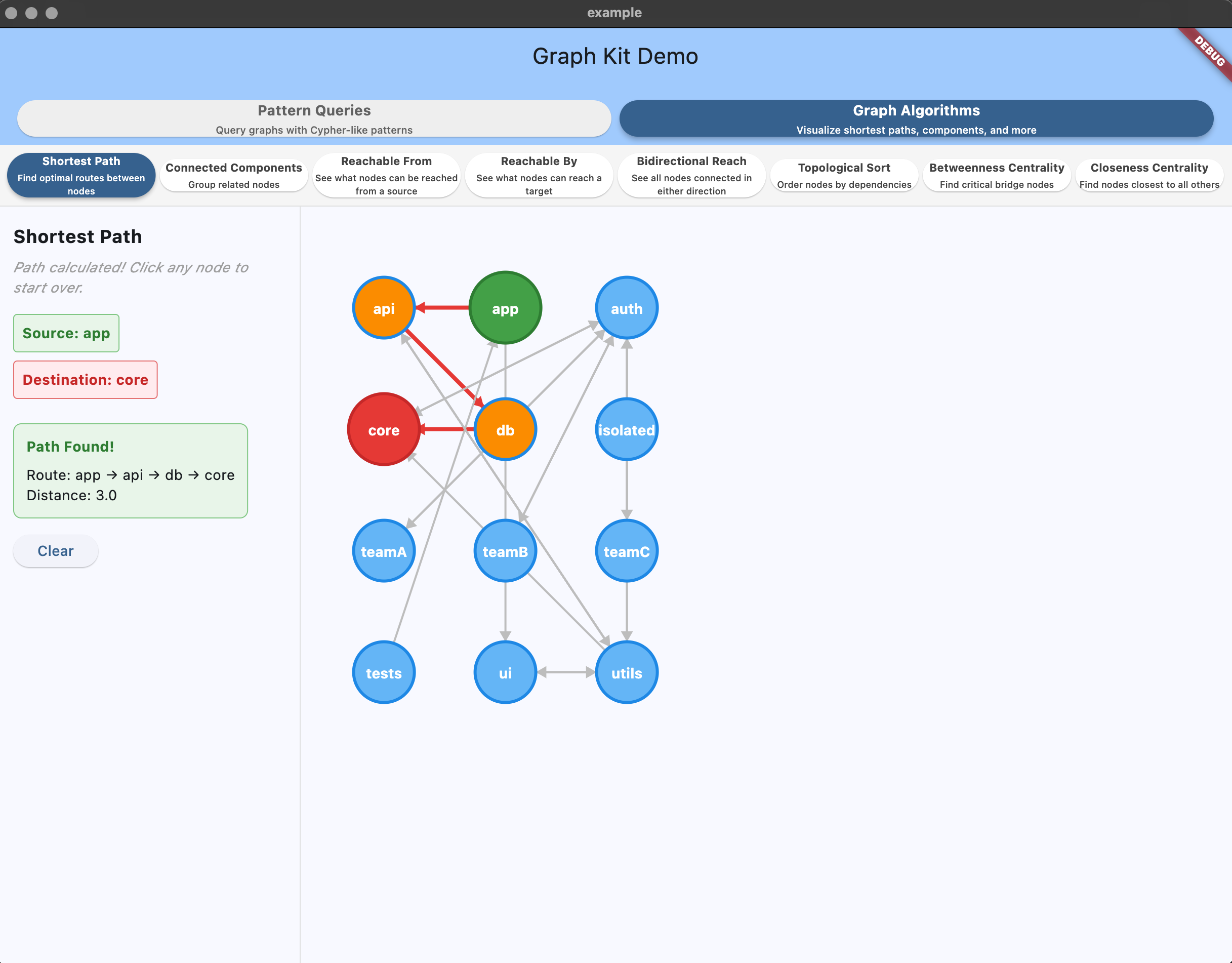
Shortest path visualization highlighting the optimal route between selected nodes.
import 'package:graph_kit/graph_kit.dart';

// Create a dependency graph
final graph = Graph<Node>();
graph.addNode(Node(id: 'core', type: 'Package', label: 'Core'));
graph.addNode(Node(id: 'utils', type: 'Package', label: 'Utils'));
graph.addNode(Node(id: 'app', type: 'Package', label: 'App'));

// Add dependencies (app depends on utils, utils depends on core)
graph.addEdge('utils', 'DEPENDS_ON', 'core');
graph.addEdge('app', 'DEPENDS_ON', 'utils');

// Use graph algorithms
final algorithms = GraphAlgorithms(graph);

// Find shortest path (counts hops)
final path = algorithms.shortestPath('app', 'core');
print('Path: ${path.path}'); // [app, utils, core]
print('Distance: ${path.distance}'); // 2

// Find all possible paths
final allPaths = enumeratePaths(graph, 'app', 'core', maxHops: 4);
print('Routes: ${allPaths.paths.length}'); // All alternative routes

// Get build order (topological sort)
final buildOrder = algorithms.topologicalSort();
print('Build order: $buildOrder'); // [core, utils, app]

// Find connected components
final components = algorithms.connectedComponents();
print('Components: $components'); // [{core, utils, app}]

// Check reachability
final reachable = algorithms.reachableFrom('app');
print('App can reach: $reachable'); // {app, utils, core}

// Check what can reach a target
final reachableBy = algorithms.reachableBy('core');
print('Can reach core: $reachableBy'); // {app, utils, core}

// Check all connected nodes (bidirectional)
final reachableAll = algorithms.reachableAll('utils');
print('Connected to utils: $reachableAll'); // {app, utils, core}

// Find critical bridge nodes
final betweenness = algorithms.betweennessCentrality();
print('Bridge nodes: ${betweenness.entries.where((e) => e.value > 0.3).map((e) => e.key)}');

// Find communication hubs
final closeness = algorithms.closenessCentrality();
print('Most central: ${closeness.entries.reduce((a, b) => a.value > b.value ? a : b).key}');Run the interactive Flutter demo to see graph algorithms in action:
cd example
flutter run- Switch to "Graph Algorithms" tab
- Click nodes to see shortest paths
- View connected components with color coding
- See topological sort with dependency levels
- Explore reachability analysis
For a focused algorithms demonstration:
dart run bin/algorithms_demo.dartThis shows practical examples of:
- Package dependency analysis
- Build order optimization
- Component isolation detection
- Shortest path finding
For BFS-style subgraph exploration around nodes within hop limits. Unlike pattern queries that follow specific paths, this explores neighborhoods in all directions using specified edge types.
// Using the same graph setup from section 2...
// Add this to your existing code:

// Explore everything within 2 hops from Alice, expandSubgraph returns SubgraphResult
final aliceSubgraph = expandSubgraph(
  graph,
  seeds: {'alice'},
  edgeTypesRightward: {'WORKS_FOR', 'MANAGES', 'ASSIGNED_TO', 'LEADS'},
  forwardHops: 2,
  backwardHops: 0,
);
print(aliceSubgraph.nodes); // {alice, engineering, web_app, mobile_app}
print(aliceSubgraph.edges.length); // 4

// Explore everything connected to engineering team, expandSubgraph returns SubgraphResult
final engineeringSubgraph = expandSubgraph(
  graph,
  seeds: {'engineering'},
  edgeTypesRightward: {'ASSIGNED_TO'},
  edgeTypesLeftward: {'WORKS_FOR', 'MANAGES'},
  forwardHops: 1,
  backwardHops: 1,
);
print(engineeringSubgraph.nodes); // {engineering, web_app, mobile_app, alice, bob, charlie}
print(engineeringSubgraph.edges.length); // 5

// Find everyone within 2 hops of projects, expandSubgraph returns SubgraphResult
final projectEcosystem = expandSubgraph(
  graph,
  seeds: {'web_app', 'mobile_app', 'campaign'},
  edgeTypesRightward: {'WORKS_FOR', 'MANAGES'},
  edgeTypesLeftward: {'ASSIGNED_TO', 'LEADS'},
  forwardHops: 0,
  backwardHops: 2,
);
print(projectEcosystem.nodes); // {web_app, mobile_app, campaign, engineering, alice, design, marketing}
print(projectEcosystem.edges.length); // 7| Use Case | Pattern Queries | expandSubgraph |
|---|---|---|
| Specific paths | person-[:WORKS_FOR]->team-[:ASSIGNED_TO]->project |
No |
| Neighborhood exploration | No | Yes - "Everything around Alice" |
| Impact analysis | No | Yes - "What's affected by this change?" |
| Subgraph extraction | No | Yes - For visualization/analysis |
| Known relationships | Yes - Clear path patterns | No |
| Unknown structure | No | Yes - Explore what's connected |
- Simple patterns:
"user:User"→{alice, bob, charlie} - Forward patterns:
"user-[:MEMBER_OF]->group" - Backward patterns:
"resource<-[:CAN_ACCESS]-group<-[:MEMBER_OF]-user"→{alice, bob} - Label filtering:
"user:User{label~Admin}"→{bob} - Multiple edge types:
"person-[:WORKS_FOR|VOLUNTEERS_AT]->org"→ matches ANY of the specified relationship types - Mixed directions:
"person1-[:WORKS_FOR]->team<-[:MANAGES]-manager"→ finds common connections and shared relationships - Variable-length paths:
"manager-[:MANAGES*1..3]->subordinate"→ finds direct and indirect reports
GraphKit uses a simplified version of Cypher - the query language used by Neo4j (the most popular graph database). Think of it like SQL for graphs.
Cypher is a language designed to describe patterns in graphs. Instead of writing complex code to traverse relationships, you draw the path with text:
- SQL:
SELECT * FROM users WHERE department = 'engineering' - Cypher:
person:Person-[:WORKS_FOR]->team:Team{label=Engineering}
GraphKit supports a subset of Cypher - the most useful parts without the complexity:
Supported: Basic patterns, node types, relationships, label filters, variable-length paths, WHERE clauses with logical operators, parentheses, CONTAINS operator for substring matching Not supported: Aggregations, complex subqueries
This gives you the power of graph queries without learning the full Cypher language.
Think of pattern queries like giving directions. Instead of "turn left at the store", you're saying "follow this relationship to that type of thing".
When you want to find all people in your company, you write:
query.match('person:Person')This breaks down into:
person= What you want to call them in your results (like a nickname):= "that are of type"Person= The actual type of thing you're looking for
Think of it like: "Find me all things of type Person, and I'll call them 'person' in my results"
Now say you want to know "who works where". You connect person to team:
query.match('person:Person-[:WORKS_FOR]->team:Team')Reading left to right:
person:Person= "Start with a person"-[= "who has a connection":WORKS_FOR= "of type WORKS_FOR"]->= "that points to"team:Team= "a team"
Like saying: "Show me people who have a WORKS_FOR arrow pointing to teams"
Right arrow -> means "going out from":
person-[:WORKS_FOR]->team // Person points to team (person works FOR the team)Left arrow <- means "coming in to":
team<-[:WORKS_FOR]-person // Person points to team (team is worked for BY person)Same relationship, different starting point!
Want to follow a longer path? Just keep adding arrows:
person-[:WORKS_FOR]->team-[:ASSIGNED_TO]->projectThis means:
- Start with a person
- Follow their WORKS_FOR connection to a team
- Follow that team's ASSIGNED_TO connection to a project
Like following a trail: person → team → project
Want to find a specific person? Add their name in curly braces:
person:Person{label=Alice Cooper}     // Find exactly "Alice Cooper"
person:Person{label~alice}            // Find anyone with "alice" in their name
The ~ means "contains" (like a fuzzy search)
// Simple: Find all people
query.match('person:Person')
// Returns: {person: {alice, bob, charlie}}

// Connection: Who works where?
query.match('person-[:WORKS_FOR]->team')
// Returns: {person: {alice, bob}, team: {engineering}}

// Chain: Follow a path through the graph
query.match('person-[:WORKS_FOR]->team-[:ASSIGNED_TO]->project')
// Returns: {person: {alice, bob}, team: {engineering}, project: {web_app, mobile_app}}

// Backwards: What teams work on this project?
query.match('project<-[:ASSIGNED_TO]-team', startIds: ['web_app'])
// Returns: {project: {web_app}, team: {engineering}}

// Filter: Find specific person
query.match('person:Person{label~Alice}')
// Returns: {person: {alice}}
Remember: The names you pick (person, team, etc.) become the keys in your results!
Variable-length paths let you find connections across multiple hops without specifying the exact number of steps:
// Use the unified PatternQuery (includes all advanced features)
final query = PatternQuery(graph);

// Find all direct and indirect reports (1-3 management levels)
query.match('manager-[:MANAGES*1..3]->subordinate')

// Find anyone at least 2 levels down the hierarchy
query.match('manager-[:MANAGES*2..]->subordinate')

// Find dependencies up to 4 steps away
query.match('component-[:DEPENDS_ON*..4]->dependency')

// Find all reachable dependencies (unlimited hops)
query.match('component-[:DEPENDS_ON*]->dependency')
Variable-length syntax:
[:TYPE*]- Unlimited hops[:TYPE*1..3]- Between 1 and 3 hops[:TYPE*2..]- 2 or more hops[:TYPE*..4]- Up to 4 hops[:TYPE*2]- Exactly 2 hops
Note: Variable-length paths are fully supported in the unified PatternQuery implementation.
For sophisticated filtering beyond basic patterns, GraphKit supports full WHERE clause syntax with logical operators and parentheses.
Complete Cypher Query Language Guide
The comprehensive guide covers:
- Complex logical expressions with parentheses:
(A AND B) OR (C AND D) - Multiple comparison operators:
>,<,>=,<=,=,!= - Real-world query examples for HR, project management, and organizational analysis
- Property filtering best practices and performance tips
- Error handling and troubleshooting
Quick examples:
// Complex filtering with parentheses
MATCH person:Person WHERE (person.age > 40 AND person.salary > 100000) OR person.department = "Management"

// Multi-hop with filtering
MATCH person:Person-[:WORKS_FOR]->team:Team-[:WORKS_ON]->project:Project WHERE person.salary > 80000 AND project.status = "active"
Try the Interactive WHERE Demo:
cd example
flutter run -t lib/where_demo.dart
The demo includes sample queries, real-time query execution, and a comprehensive dataset for testing complex WHERE clauses.
| Feature | Real Cypher | graph_kit |
|---|---|---|
| Mixed directions | Yes | Yes |
| Variable length paths | Yes | Yes |
| Multiple edge types | [:TYPE1|TYPE2] |
Yes |
| Multiple patterns | pattern1, pattern2 |
No |
| Optional matches | Yes | Via matchMany |
| WHERE clauses | Yes | Yes |
| Logical operators | Yes | Yes (AND, OR) |
| Parentheses | Yes | Yes |
- Traversal from known IDs (
startIds) is fast:- Each hop uses adjacency maps; cost is proportional to the edges visited.
- Multiple start points are processed independently and deduplicated.
- Seeding by type (
alias:Type) does a one-time node scan to find initial seeds.- For small/medium graphs, this is effectively instant; indexing can be added later if needed.
matchMany([...])mirrors "multiple MATCH/OPTIONAL MATCH" lines in Cypher by running several independent chains from the same start and unioning results.
Save and load graphs to/from JSON for persistence and data exchange:
import 'dart:io';
import 'package:graph_kit/graph_kit.dart';

// Build your graph
final graph = Graph<Node>();
graph.addNode(Node(id: 'alice', type: 'User', label: 'Alice',
  properties: {'email': 'alice@example.com', 'active': true}));
graph.addNode(Node(id: 'team1', type: 'Team', label: 'Engineering'));
graph.addEdge('alice', 'MEMBER_OF', 'team1');

// Serialize to JSON
final json = graph.toJson();
final jsonString = graph.toJsonString(pretty: true);

// Save to file
await File('graph.json').writeAsString(jsonString);

// Load from file
final loadedJson = await File('graph.json').readAsString();
final restoredGraph = GraphSerializer.fromJsonString(loadedJson, Node.fromJson);

// Graph is fully restored - queries work immediately
final query = PatternQuery(restoredGraph);
final members = query.match('team<-[:MEMBER_OF]-user', startIds: ['team1']);
print(members['user']); // {alice}Automatically compute layer/column positions for graph visualizations, eliminating brittle hardcoded positioning logic.
Hardcoding column positions breaks when graph structure changes:
// BAD: Hardcoded switch statement - breaks when patterns change
final column = switch (nodeType) {
  'Group' => 0,
  'Policy' => 1,
  'Asset' => 2,
  'Virtual' => 3,
  _ => 0,
};final paths = query.matchPaths('group->policy->asset->virtual');
final layout = paths.computeLayout();
// Column positions computed automatically!
final groupColumn = layout.variableLayer('group'); // 0
final policyColumn = layout.variableLayer('policy'); // 1
final assetColumn = layout.variableLayer('asset'); // 2
final virtualColumn = layout.variableLayer('virtual'); // 3Automatic positioning: Computes layer/column for every node based on graph structure
Two positioning modes:
nodeDepths- Exact structural position for each node IDvariableDepths- Typical position for grouping by variable name (uses median to handle outliers)
Handles edge cases gracefully:
- Orphan nodes (disconnected from roots)
- Cycles
- Multiple disconnected components
- Nodes reachable via multiple paths
// Get path results
final paths = query.matchPaths('group-[:HAS_POLICY]->policy-[:GRANTS_ACCESS]->asset');
final layout = paths.computeLayout();

// Get column for pattern variables
final policyColumn = layout.variableLayer('policy');

// Get column for specific node ID
final nodeColumn = layout.layerFor('node_123');

// Render by column
for (var layer = 0; layer <= layout.maxDepth; layer++) {
  final nodesInColumn = layout.nodesInLayer(layer);
  renderColumn(layer, nodesInColumn);
}Two strategies available (default: longestPath):
// Pattern order (fast, predictable - follows query left-to-right)
final layout = paths.computeLayout(strategy: LayerStrategy.pattern);

// Longest path (best for complex graphs with diamonds, minimizes crossings)
final layout = paths.computeLayout(strategy: LayerStrategy.longestPath);layout.maxDepth // Number of layers - 1
layout.roots // Root nodes (layer 0 entry points)
layout.allNodes // All unique node IDs in paths
layout.allEdges // All unique edges in paths
layout.nodeDepths // Map<String, int> of node ID → layer
layout.variableDepths // Map<String, int> of variable → typical layer
layout.nodesByLayer // Map<int, Set<String>> of layer → node IDsSee bin/layout_demo.dart for a comprehensive before/after comparison showing how GraphLayout eliminates hardcoded positioning.
Why use GraphLayout?
- ✓ No hardcoded column positions
- ✓ Automatically adapts to graph structure changes
- ✓ Handles orphan nodes, cycles, disconnected components
- ✓ Works with any pattern, any node types
- ✓ Both structural and grouped positioning available
bin/showcase.dart– comprehensive graph demo with multiple query examplesbin/access_control.dart– access control patterns with users, groups, and resourcesbin/project_dependencies.dart– project dependency analysis and traversalbin/social_network.dart– social network relationships and friend recommendationsbin/serialization_demo.dart– JSON serialization and persistencebin/algorithms_demo.dart– graph algorithms demonstration with dependency analysis
Run any example:
dart run bin/showcase.dart
dart run bin/access_control.dartInteractive graph visualization with pattern queries:
cd example

# Main demo - visual graph with pattern queries
flutter run

# WHERE clause demo - interactive Cypher query testing
flutter run -t lib/where_demo.dart

# RETURN clause demo - property projection and destructuring
flutter run -t lib/return_demo.dart

# Features:
# - Visual graph with nodes and edges
# - Live pattern query execution
# - WHERE clause testing with sample data
# - RETURN clause with before/after comparison
# - Destructuring examples
# - Path highlighting and visualization
# - Example queries with one-click executionSee LICENSE.