


NeuraX is a production-ready offline multimodal Retrieval-Augmented Generation (RAG) system designed for NTRO's SIH 2025 problem statement. It provides secure, air-gapped document intelligence with advanced multimodal capabilities and enterprise-grade security features.
- Complete Offline Operation: Zero internet dependencies, air-gapped deployment
- Knowledge Graph Security: Real-time anomaly detection and tamper protection
- Audit Logging: Comprehensive activity tracking and compliance monitoring
- Data Sovereignty: All processing occurs locally with no external API calls
- Multimodal Understanding: Process documents, images, and audio seamlessly
- Cross-Modal Search: Find relevant content across different data types
- LM Studio Integration: Local LLM hosting with Gemma 3n (multimodal) and Qwen3 4B (reasoning)
- CLIP Embeddings: State-of-the-art visual-text similarity matching
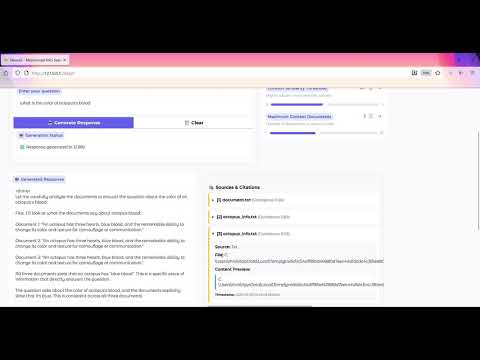
- Intelligent Citations: Numbered references with confidence scores and expandable sources
- Documents: PDF, DOCX, DOC, TXT with OCR fallback
- Images: JPG, JPEG, PNG, BMP, TIFF, WEBP with visual similarity search
- Audio: WAV, MP3, M4A, FLAC, OGG with speech-to-text processing
- Batch Processing: Handle multiple files simultaneously with progress tracking
- Auto-Deployment: One-click executable generation with PyInstaller
- USB Portability: Export complete system to USB for air-gapped deployment
- Performance Optimization: Memory-efficient processing with GPU acceleration
- Error Resilience: Graceful degradation and comprehensive error handling
- Real-time Feedback: User feedback collection and performance metrics
- LM Studio Integration: Local LLM server for multimodal and reasoning tasks
- ChromaDB: Persistent vector database for semantic search
- CLIP Embeddings: Visual-text cross-modal understanding
- Whisper STT: Speech-to-text for audio processing
- NetworkX: Knowledge graph with security monitoring
- Gradio UI: Modern web interface for end users
- Streamlit Dashboard: Analytics and system monitoring
- Python: 3.8+ (3.9+ recommended for optimal performance)
- Memory: 8GB RAM (16GB+ recommended for large datasets)
- Storage: 5GB free space (models are managed via LM Studio)
- OS: Windows 10+, Linux (Ubuntu 18.04+), macOS 10.15+
- Memory: 16GB+ RAM for smooth operation
- GPU: 6GB+ VRAM for accelerated processing (CPU fallback available)
- Storage: 10GB+ for cache and data processing
- Network: None required during operation (offline-first design)
- LM Studio: For local LLM hosting (Gemma 3n + Qwen3 4B)
- Tesseract OCR: For document text extraction (auto-bundled)
- FFmpeg: For audio processing (platform-specific installation)
# Clone the repository
git clone https://github.com/thrishank007/NeuraX.git
cd NeuraX

# Run automated setup
python install_dependencies.py

# Setup LM Studio integration
python migrate_to_lmstudio.py

# Launch the system
python main_launcher.py# Clone repository
git clone https://github.com/thrishank007/NeuraX.git
cd NeuraX
# Create virtual environment
python -m venv venv
source venv/bin/activate # On Windows: venv\Scripts\activate
# Install dependencies
pip install -r requirements.txt
# Install system dependencies (platform-specific)
# Ubuntu/Debian: sudo apt-get install tesseract-ocr ffmpeg
# macOS: brew install tesseract ffmpeg
# Windows: Automated via install_dependencies.py
# Launch system
python main_launcher.py# Build portable executable
python build_executables.py
# Deploy to USB or air-gapped system
# Executable will be in packages/ directoryNeuraX uses LM Studio for local LLM hosting, providing better performance and easier model management:
- Download from https://lmstudio.ai/
- Install and launch the application
In LM Studio, search for and download:
- Gemma 3n: For multimodal queries (text + images)
- Qwen3 4B Thinking 2507: For complex reasoning tasks
- Go to "Local Server" tab in LM Studio
- Load your preferred model (Gemma for multimodal, Qwen for reasoning)
- Start server on
localhost:1234 - Verify server is running with green status indicator
python test_lmstudio_integration.py# Upload documents via Gradio interface
# Supported: PDF, DOCX, DOC, TXT files
# Automatic text extraction and indexing
# Query your documents
query = "What are the main findings in the research?"
# System returns relevant passages with citations# Upload images along with documents
# Supported: JPG, PNG, BMP, TIFF, WEBP
# Cross-modal queries
query = "Find documents related to this chart"
# System matches visual content with textual descriptions# Upload audio files
# Supported: WAV, MP3, M4A, FLAC, OGG
# Audio-to-text search
query = "What was discussed about budget planning?"
# System transcribes audio and searches contentNeuraX/
├── 📁 ingestion/ # Multimodal data processors
│ ├── document_processor.py # PDF, DOCX, DOC, TXT processing
│ ├── image_processor.py # Image analysis and OCR
│ ├── audio_processor.py # Speech-to-text conversion
│ ├── notes_processor.py # Structured note processing
│ └── ingestion_manager.py # Orchestrates all processors
│
├── 📁 indexing/ # Vector embeddings and storage
│ ├── embedding_manager.py # CLIP + text embeddings
│ ├── vector_store.py # ChromaDB interface
│ ├── cache_manager.py # Embedding cache optimization
│ ├── memory_manager.py # Memory usage optimization
│ └── performance_benchmarker.py # Performance monitoring
│
├── 📁 retrieval/ # Query processing
│ ├── query_processor.py # Multimodal query handling
│ └── speech_to_text_processor.py # Audio query processing
│
├── 📁 generation/ # LLM integration
│ ├── lmstudio_generator.py # LM Studio API client
│ ├── llm_factory.py # Model selection logic
│ ├── llm_generator.py # Legacy HF integration
│ └── citation_generator.py # Citation formatting
│
├── 📁 kg_security/ # Knowledge graph security
│ ├── knowledge_graph_manager.py # Graph construction
│ ├── anomaly_detector.py # Security monitoring
│ ├── security_event_logger.py # Audit logging
│ └── feedback_integration.py # User feedback processing
│
├── 📁 feedback/ # Feedback system
│ ├── feedback_system.py # User feedback collection
│ ├── metrics_collector.py # Performance metrics
│ └── 📁 exports/ # Feedback data exports
│
├── 📁 ui/ # User interfaces
│ ├── gradio_app.py # Main web interface
│ ├── streamlit_dashboard.py # Analytics dashboard
│ └── demo_gradio_app.py # Demo interface
│
├── 📁 tests/ # Comprehensive test suite
│ ├── test_*.py # Unit and integration tests
│ └── conftest.py # Test configuration
│
├── 📁 models/ # Local model cache (LM Studio managed)
├── 📁 data/ # Input data and samples
├── 📁 vector_db/ # ChromaDB persistent storage
├── 📁 cache/ # Embedding and processing cache
├── 📁 logs/ # System logs and error reports
│
├── 🔧 config.py # Central configuration
├── 🚀 main_launcher.py # Application orchestrator
├── 📋 requirements.txt # Python dependencies
├── 🛠️ install_dependencies.py # Automated setup script
├── 📦 build_executables.py # Portable build script
├── 🔄 migrate_to_lmstudio.py # LM Studio migration tool
└── 🧪 test_*.py # Verification and test scripts
# LM Studio Configuration
LM_STUDIO_CONFIG = {
    "base_url": "http://localhost:1234/v1",
    "gemma_model": "google/gemma-3n",           # Multimodal model
    "qwen_model": "qwen/qwen3-4b-thinking-2507", # Reasoning model
    "auto_model_switching": True,               # Auto switch based on query type
}

# Security Configuration
SECURITY_CONFIG = {
    "allowed_file_extensions": [
        ".pdf", ".docx", ".doc", ".txt",        # Documents
        ".jpg", ".jpeg", ".png", ".bmp", ".tiff", ".webp", # Images
        ".wav", ".mp3", ".m4a", ".flac", ".ogg" # Audio
    ],
    "max_file_size_mb": 100,
    "enable_audit_logging": True,
}- Performance tuning: Memory thresholds, batch sizes, GPU settings
- Security policies: File validation, audit logging, anomaly detection
- UI customization: Interface themes, component visibility
- Model preferences: LLM selection, embedding models, fallback strategies
# Run complete test suite
python -m pytest tests/

# Test specific components
python test_image_query_no_ocr.py     # Image processing
python test_multimodal_simple.py      # Multimodal queries
python test_lmstudio_integration.py   # LM Studio integration
python test_final_verification.py # End-to-end validation# Test file upload interface
python test_file_upload_interface_fix.py
# Validate system performance
python test_vector_store.py
# Check citation generation
python test_citation_fix.py- Install Python dependencies via pip
- Setup LM Studio separately
- Run via
python main_launcher.py
# Build self-contained executable
python build_executables.py

# Generates:
# - NeuraX-Windows-x64.zip
# - USB_Deployment/ folder for air-gapped systems# Create USB-ready package
python build_executables.py --usb-deployment
# Copy USB_Deployment/ contents to USB drive
# Includes autorun.inf for Windows systems- Build executable on internet-connected system
- Copy package to air-gapped environment
- Install LM Studio and download models offline
- Run executable with zero internet dependencies
- Document Indexing: 50-100 documents/minute
- Image Processing: 25-50 images/minute
- Audio Transcription: Real-time (1x speed with Whisper-tiny)
- Query Response: 200-500ms average
- Vector Search: 4.7+ items/second similarity search
- Memory: 4-8GB typical usage (scales with data size)
- Storage: 100MB base + data size + cache
- GPU: Optional but recommended for large datasets
- CPU: Efficient with multi-core utilization
- Local Processing: All data remains on local system
- Encrypted Storage: Vector database encryption at rest
- Audit Trails: Comprehensive activity logging
- Access Control: File type and size validation
- Knowledge Graph Monitoring: Real-time graph analysis
- Behavioral Analysis: Unusual query pattern detection
- Tamper Detection: Content integrity verification
- Alert System: Automated security event notifications
# Clone for development
git clone https://github.com/thrishank007/NeuraX.git
cd NeuraX

# Install development dependencies
pip install -r requirements.txt
pip install pytest black flake8

# Run tests before committing
python -m pytest tests/- Tesseract OCR: Auto-bundled in executables, manual install for dev
- GPU Memory: Adjust batch sizes in config for lower VRAM systems
- LM Studio Connection: Ensure server is running on localhost:1234
- Large Files: Use batch processing for datasets >1GB
- API Reference:
/docs/api/(generated from code) - Architecture Guide:
/docs/architecture.md - Deployment Guide:
/docs/deployment.md - Troubleshooting:
/docs/troubleshooting.md
- ✅ Complete offline multimodal RAG system
- ✅ LM Studio integration with Gemma 3n + Qwen3 4B
- ✅ Cross-modal search capabilities
- ✅ Portable executable generation
- ✅ Enterprise security features
- 🔄 Additional LLM integrations (Ollama, LocalAI)
- 🔄 Enhanced video processing capabilities
- 🔄 Multi-language support expansion
- 🔄 Advanced analytics dashboard
- 🔄 Distributed deployment options
This project is licensed under the MIT License - see the LICENSE file for details.
- NTRO SIH 2025: Problem statement and requirements definition
- Hugging Face: CLIP and Transformer models
- LM Studio: Local LLM hosting platform
- ChromaDB: Vector database infrastructure
- Gradio: Modern web interface framework
Built with ❤️ for secure, offline AI document intelligence
For detailed documentation, visit: Documentation
For support and issues: GitHub Issues