
The MCP Gateway for Enterprise
Bridge the gap between AI agents and your data.
Secure, scalable, production-grade.
Features • Quick Start • Deployment • Configuration • Use Cases • API • Contributing


Note: This is an incubating project maintained by TM Dev Lab. While functional, it may contain bugs or incomplete features. If you encounter issues, please report them via GitHub Issues or consider contributing a fix following our Contributing Guidelines.
mcpx is a self-hosted gateway for the Model Context Protocol (MCP). It enables organizations to securely connect AI agents to MCP servers while maintaining full control over access, credentials, and observability.
Scope: mcpx focuses exclusively on MCP Tools, which represent the majority of protocol usage. Resources and Prompts are not currently supported.
| Capability | Description |
|---|---|
| Proxy Layer | Route MCP traffic through a central gateway with credential injection |
| Tool Governance | Allowlist or blocklist specific tools per server |
| Virtual Gateways | Aggregate multiple servers into a single endpoint |
| Observability | Audit logs, real-time metrics, and alerting |
| Authentication | OAuth, API Keys, Bearer Tokens, and Service Accounts |
| Multi-tenancy | Isolated organizations with role-based access control |
For detailed workflows with sequence diagrams and RBAC matrix, see Use Cases.
flowchart LR
    subgraph Clients
        CD["Claude Desktop"]
        VS["VS Code"]
        Agent["AI Agents"]
    end

    subgraph mcpx["mcpx Gateway"]
        Proxy["MCP Proxy"]
        Auth["Auth"]
        Gov["Governance"]
        Audit["Audit Log"]
    end

    subgraph Servers["MCP Servers"]
        S1["Finance MCP"]
        S2["HR MCP"]
        S3["External MCP"]
    end

    CD --> Proxy
    VS --> Proxy
    Agent --> Proxy
    Proxy --> Auth
    Auth --> Gov
    Gov --> S1
    Gov --> S2
    Gov --> S3
    Proxy --> Audit

    style Proxy fill:#6366f1,stroke:#4f46e5,color:#fff
    style Auth fill:#8b5cf6,stroke:#7c3aed,color:#fff
    style Gov fill:#8b5cf6,stroke:#7c3aed,color:#fff
    style Audit fill:#06b6d4,stroke:#0891b2,color:#fff
Point to any MCP server via URL. mcpx handles credential injection and protocol compliance automatically.
Control which tools AI agents can access. Define allowlists or blocklists per server, and apply prefixes to tool names for namespace isolation.
Every MCP request is logged with timestamps, latency, tool names, and full request/response payloads. Query metrics by time range, server, or tool.
Protect your MCP servers with per-server rate limits. Configurable requests per minute with automatic 429 responses.
Support for multiple authentication methods:
| Method | Use Case |
|---|---|
| OAuth | User authentication via Google, GitHub, or Microsoft |
| Personal Access Tokens | Programmatic access for users |
| Service Accounts | Machine-to-machine communication |
| API Keys and Bearer Tokens | Credential injection to upstream servers |
Combine multiple MCP servers into a single endpoint. Connect Claude Desktop to one URL and access all your tools seamlessly.
Watch some of the key features in action:
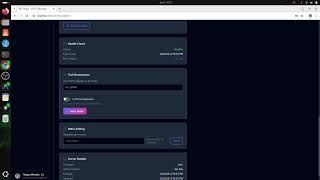 01. Create Server |
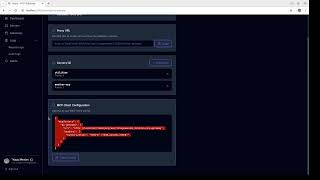 02. Create Gateway |
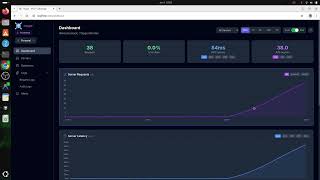 03. Observability |
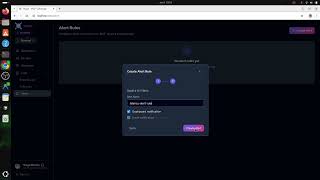 04. Alerts |
The project includes example MCP servers in the mcp-servers-examples/ directory for testing different authentication methods. These servers start automatically with Docker Compose.
| Server | Auth Method | Internal URL |
|---|---|---|
| weather-mcp | API Key | http://weather-mcp:8000/mcp |
| utilities-mcp | Bearer Token | http://utilities-mcp:8000/mcp |
| filesystem-mcp | OAuth Client Credentials | http://filesystem-mcp:8000/mcp |
| Server | Credential |
|---|---|
| weather-mcp | Header: X-API-Key: weather-api-key-12345 |
| utilities-mcp | Header: Authorization: Bearer utilities-token-secret-67890 |
| filesystem-mcp | Client ID: filesystem-client, Secret: filesystem-secret-abc123 |
| Software | Version |
|---|---|
| Docker | 24.x or later |
| Docker Compose | 2.20 or later |
git clone https://github.com/thiagomendes/mcpx.git
cd mcpx

cp .env.example .env
Edit .env with your OAuth credentials. At minimum, configure one OAuth provider:
JWT_SECRET=your-32-character-secret-here

GOOGLE_CLIENT_ID=your-client-id
GOOGLE_CLIENT_SECRET=your-client-secret

FRONTEND_URL=http://localhost:3000
BASE_URL=http://localhost:8080docker compose build
docker compose up -dNote: First build may take a few minutes. Subsequent builds are cached.
docker compose ps

curl http://localhost:8080/api/health
Open http://localhost:3000 to access the dashboard.
mcpx supports multiple deployment options:
| Environment | Method | Documentation |
|---|---|---|
| Local Development | Docker Compose | Quick Start |
| Local Kubernetes | Kind with HTTPS | Kubernetes Local |
| Production | Kubernetes with managed services | Production Deployment |
For testing Kubernetes deployments locally with HTTPS support.
| Software | Version |
|---|---|
| kubectl | 1.28 or later |
| kind | 0.20 or later |
cat <<EOF | kind create cluster --name local --config=-
kind: Cluster
apiVersion: kind.x-k8s.io/v1alpha4
nodes:
- role: control-plane
  kubeadmConfigPatches:
  - |
    kind: InitConfiguration
    nodeRegistration:
      kubeletExtraArgs:
        node-labels: "ingress-ready=true"
  extraPortMappings:
  - containerPort: 80
    hostPort: 80
    protocol: TCP
  - containerPort: 443
    hostPort: 443
    protocol: TCP
EOFkubectl apply -f https://raw.githubusercontent.com/kubernetes/ingress-nginx/main/deploy/static/provider/kind/deploy.yaml
kubectl wait --namespace ingress-nginx \
--for=condition=ready pod \
--selector=app.kubernetes.io/component=controller \
--timeout=120s
kubectl apply -f https://github.com/cert-manager/cert-manager/releases/download/v1.14.0/cert-manager.yaml
kubectl wait --for=condition=Available deployment --all -n cert-manager --timeout=120sdocker build --target web -t mcpx-backend:latest ./backend
docker build --target worker -t mcpx-worker:latest ./backend
docker build -t mcpx-frontend:latest ./frontend
kind load docker-image mcpx-backend:latest --name local
kind load docker-image mcpx-worker:latest --name local
kind load docker-image mcpx-frontend:latest --name localcp k8s/base/secrets.yaml k8s/overlays/local-https/secrets.local.yamlEdit k8s/overlays/local-https/secrets.local.yaml with your credentials.
kubectl apply -k k8s/overlays/local-httpsAccess the application at https://mcpx.127.0.0.1.nip.io
The domain
mcpx.127.0.0.1.nip.ioresolves to 127.0.0.1 automatically. No hosts file modification required.
For production environments on cloud providers (AWS, GCP, Azure).
flowchart TB
    subgraph Internet
        LB["Load Balancer + TLS"]
    end

    subgraph K8s["Kubernetes Cluster"]
        direction TB
        subgraph Services
            Web["Web<br/>3+ replicas"]
            Worker["Worker<br/>2+ replicas"]
        end
    end

    subgraph Data["Managed Services"]
        DB[("PostgreSQL<br/>TimescaleDB")]
    end

    LB --> Web
    LB --> Worker
    Web --> DB
    Worker --> DB

    style LB fill:#6366f1,stroke:#4f46e5,color:#fff
    style Web fill:#8b5cf6,stroke:#7c3aed,color:#fff
    style Worker fill:#8b5cf6,stroke:#7c3aed,color:#fff
    style DB fill:#06b6d4,stroke:#0891b2,color:#fff
mcpx requires PostgreSQL with the TimescaleDB extension.
| Provider | Managed PostgreSQL | TimescaleDB Support |
|---|---|---|
| AWS | RDS for PostgreSQL | Not available |
| GCP | Cloud SQL | Not available |
| Azure | Flexible Server | Available |
For AWS and GCP, use Timescale Cloud or run TimescaleDB in Kubernetes.
Use your cloud provider's secrets management service:
| Provider | Service |
|---|---|
| AWS | Secrets Manager |
| GCP | Secret Manager |
| Azure | Key Vault |
Integrate with Kubernetes using External Secrets Operator.
kubectl apply -k k8s/overlays/production| Item | Status |
|---|---|
| Managed database with backups | Required |
| Secrets in vault (not in git) | Required |
| TLS via cloud provider | Required |
| Horizontal Pod Autoscaler | Recommended |
| Resource limits configured | Recommended |
| Network policies | Recommended |
Note: When using Docker Compose, most variables have sensible defaults. Only OAuth credentials and JWT_SECRET are required.
| Variable | Required | Description |
|---|---|---|
JWT_SECRET |
Yes | Secret for JWT signing (32+ characters) |
GOOGLE_CLIENT_ID |
* | Google OAuth client ID |
GOOGLE_CLIENT_SECRET |
* | Google OAuth client secret |
GITHUB_CLIENT_ID |
* | GitHub OAuth client ID |
GITHUB_CLIENT_SECRET |
* | GitHub OAuth client secret |
MICROSOFT_CLIENT_ID |
* | Microsoft OAuth client ID |
MICROSOFT_CLIENT_SECRET |
* | Microsoft OAuth client secret |
DATABASE_URL |
** | PostgreSQL connection string |
FRONTEND_URL |
No | Frontend URL (default: http://localhost:3000) |
BASE_URL |
No | Backend URL for OAuth callbacks |
RUST_LOG |
No | Log level (default: info) |
ENCRYPTION_KEY |
No | AES encryption key (defaults to JWT_SECRET) |
* At least one OAuth provider is required.
** Required for standalone deployment. Docker Compose sets this automatically.
- Go to Google Cloud Console
- Create OAuth Client ID
- Configure redirect URI:
{BASE_URL}/api/auth/google/callback
- Go to GitHub Developer Settings
- Create new OAuth App
- Configure callback URL:
{BASE_URL}/api/auth/github/callback
- Go to Azure Portal App Registrations
- Create new registration
- Add redirect URI:
{BASE_URL}/api/auth/microsoft/callback
| Method | Endpoint | Description |
|---|---|---|
| GET | /api/auth/{provider} |
Initiate OAuth flow |
| GET | /api/auth/{provider}/callback |
OAuth callback |
| POST | /api/auth/logout |
End session |
| GET | /api/auth/me |
Current user info |
| Method | Endpoint | Description |
|---|---|---|
| GET | /api/servers |
List servers |
| POST | /api/servers |
Create server |
| GET | /api/servers/{name} |
Get server |
| PUT | /api/servers/{name} |
Update server |
| DELETE | /api/servers/{name} |
Delete server |
| Method | Endpoint | Description |
|---|---|---|
| GET | /api/gateways |
List gateways |
| POST | /api/gateways |
Create gateway |
| GET | /api/gateways/{slug} |
Get gateway |
| PUT | /api/gateways/{slug} |
Update gateway |
| DELETE | /api/gateways/{slug} |
Delete gateway |
| Method | Endpoint | Description |
|---|---|---|
| POST | /mcp/{org_slug}/{server} |
Proxy MCP request to server |
| POST | /mcp/{org_slug}/gw/{gateway} |
Proxy MCP request to gateway |
| Method | Endpoint | Description |
|---|---|---|
| GET | /api/metrics/query |
Query time-series metrics |
| GET | /api/metrics/summary |
Percentile summary |
| GET | /api/audit |
List audit logs |
| GET | /api/audit/{id} |
Audit log details |
| Component | Technology |
|---|---|
| Backend | Rust with Axum |
| Frontend | Vue 3 with TypeScript |
| Database | PostgreSQL 15 with TimescaleDB |
| Authentication | OAuth with JWT |
| Container Runtime | Docker |
| Orchestration | Kubernetes |
Contributions are welcome. Please read CONTRIBUTING.md for guidelines on:
- Fork and clone the repository
- Create a feature branch
- Make changes following coding standards
- Submit a pull request
For AI-assisted development guidelines, see AGENT.md.
This project is licensed under the Apache License 2.0. See LICENSE for details.
For questions or issues, contact mail.thiagomendes@gmail.com or open an issue on GitHub.
Copyright 2025 TM Dev Lab