






picows is an ultra-fast, lightweight Python WebSockets client and server library for asyncio. Originally developed as part of an algorithmic trading project, it features a very efficient C implementation, a zero-copy interface and all possible speedups for the common modern CPU architectures.
With picows, you get unmatched, best-in-class latency and throughput!
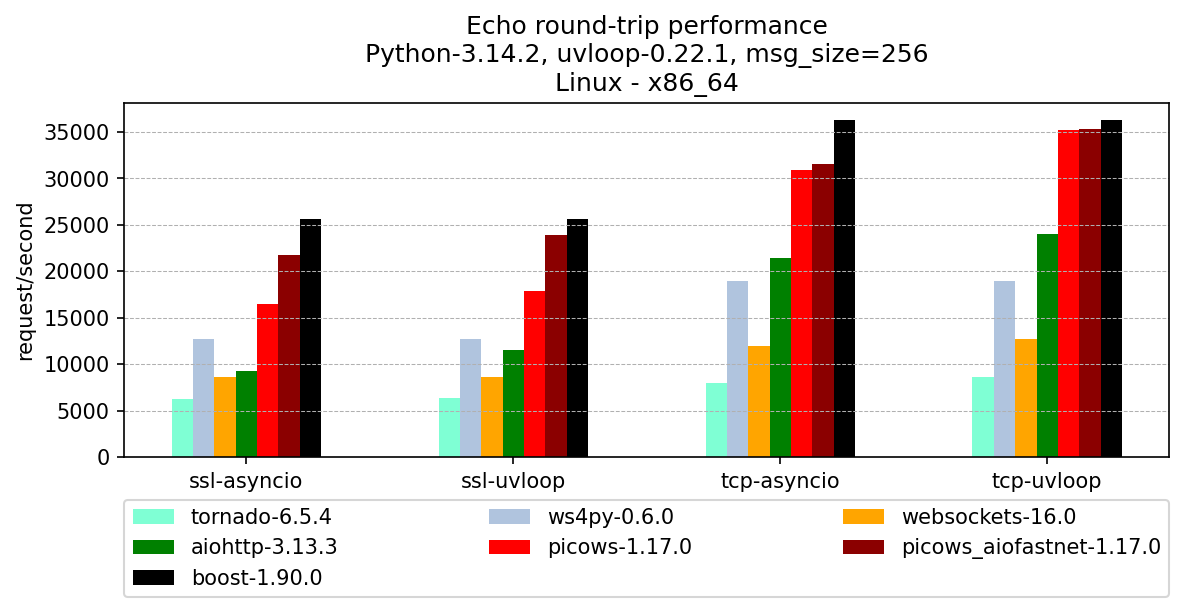
The above chart shows the performance of various echo clients communicating with the same high-peformance C++ server through a loopback interface. boost.beast client is also included for reference. You can find benchmark sources and more results here.
- Maximally efficient WebSocket frame parser and builder implemented in C/Cython
- Reuse memory as much as possible, avoid reallocations, and avoid unnecessary Python object creation
- Use aiofastnet to achieve excellent TCP/TLS performance regardless of the event loop used
- Provide a Cython
.pxdfor efficient integration of user Cythonized code with picows - Ability to check if a frame is the last one in the receiving buffer
- Auto ping-pong with an option to customize ping/pong messages
- Convenient method to measure websocket roundtrip time using ping/pong messages
picows requires Python 3.9 or greater and is available on PyPI:
pip install picowsConnects to an echo server, sends a message, and disconnects after receiving a reply.
import asyncio
from picows import ws_connect, WSFrame, WSTransport, WSListener, WSMsgType, WSCloseCode


class ClientListener(WSListener):
    def on_ws_connected(self, transport: WSTransport):
        transport.send(WSMsgType.TEXT, b"Hello world")

    def on_ws_frame(self, transport: WSTransport, frame: WSFrame):
        print(f"Echo reply: {frame.get_payload_as_ascii_text()}")
        transport.send_close(WSCloseCode.OK)
        transport.disconnect()


async def main():
    transport, client = await ws_connect(ClientListener, "ws://127.0.0.1:9001")
    await transport.wait_disconnected()


if __name__ == "__main__":
    asyncio.run(main())
This prints:
Echo reply: Hello world
import asyncio
from picows import ws_create_server, WSFrame, WSTransport, WSListener, WSMsgType, WSUpgradeRequest


class ServerClientListener(WSListener):
    def on_ws_connected(self, transport: WSTransport):
        print("New client connected")

    def on_ws_frame(self, transport: WSTransport, frame: WSFrame):
        if frame.msg_type == WSMsgType.CLOSE:
            transport.send_close(frame.get_close_code(), frame.get_close_message())
            transport.disconnect()
        else:
            transport.send(frame.msg_type, frame.get_payload_as_memoryview())


async def main():
    def listener_factory(r: WSUpgradeRequest):
        # Routing can be implemented here by analyzing request content
        return ServerClientListener()

    server: asyncio.Server = await ws_create_server(listener_factory, "127.0.0.1", 9001)
    for s in server.sockets:
        print(f"Server started on {s.getsockname()}")

    await server.serve_forever()


if __name__ == "__main__":
asyncio.run(main())The library achieves superior performance by offering an efficient, non-async data path, similar to the transport/protocol design from asyncio.
The user handler receives WebSocket frame objects instead of complete messages. Since a message can span multiple frames, it is up to the user to decide the most effective strategy for concatenating them. Each frame object includes additional low-level details about the current parser state, which may help to further optimize the behavior of the user's application.
picows doesn't offer high-level features like permessage-deflate extension support and async iter interface for reading. This features are often not required in the real world, significantly slow down the data path and make impossible to do the actual zero-copy interface.
High-level features like these can be easily implemented on top of picows API in the most suitable way. Check out topic guides and examples for the most common usage patterns.
Contributions are welcome!
- Fork and clone the repository:
git clone git@github.com:tarasko/picows.git
cd picows- Create a virtual environment and activate it:
python3 -m venv picows-dev
source picows-dev/bin/activate- Install development dependencies:
# To run tests
pip install -r requirements-test.txt- Build in place and run tests:
python setup.py build_ext --inplace --dev
pytest -s -v

# Run specific test with picows debug logs enabled
pytest -s -v -k test_client_handshake_timeout[uvloop-plain] --log-cli-level 9- Run perf, see call graph
$ perf record -F 999 -g --call-graph lbr --user-callchains -- python -m examples.perf_test --msg-size 8192 --ssl
$ perf report -G -n --stdio- Build coverage report:
Building for coverage testing requires enabling line tracing in cython, which significantly slows down extension modules. It is disabled by default. You would need to rebuild specifically with coverage support.
python setup.py build_ext --inplace --dev --with-coverage
pytest -s -v --cov=picows --cov-report=html- Build docs:
pip install -r docs/requirements.txt
make -C docs clean html