Upasak is a flexible, mindful to privacy, no-code/low-code framework for fine-tuning large language models, built around Hugging Face Transformers. It features an easy-to-use Streamlit-based interface, multi-format dataset support, built-in PII and sensitive information sanitization, and a customizable training process. Whether you're experimenting, researching, or performing internal fine-tuning tasks, Upasak makes it easily accessible and compliant.



- Developed on top of Hugging Face's Transformers library.
- Supports Text-only models of Gemma-3 LLM family for instruction-tuning or domain adaptation.
- Full-parameter fine-tuning or LoRA (Parameter-Efficient Fine-Tuning).
- Future support planned for image-text-to-text Gemma-3 models, LLaMA, Qwen, Phi, Mixtral.
Upload or import datasets in multiple file formats:
.json.jsonl.csv.zip(containing.txt)
Or select datasets directly from the Hugging Face Hub.
Upasak intelligently identifies and structures your dataset into training-ready format. Supported schemas:
| Schema | Format | Notes |
|---|---|---|
| DAPT | [{"text":"..."}] or text column |
Document Adaptation / continued pretraining |
| ALPACA | [{"instruction":"...", "output":"..."}] (+ optional "input") or instruction, output, input (optional) columns |
Converted to user → assistant turns |
| CHATML | [{"messages":[{"role":"...", "content":"..."}]}] or messages column |
Supports role/content pairs |
| SHARE_GPT | [{"conversations":[{"from":"...", "value":"..."}]}] or conversations column |
Converts human ↔ model to user ↔ assistant |
| PROMPT_RESPONSE | [{"prompt":"...", "response":"..."}] or prompt, response columns |
Simple instruction → answer |
| QA | [{"question":"", "answer":""}] or question, answer columns |
Q&A format |
| QLA | [{"question":"...", "long_answer":"..."}] or question, long_answer columns |
Long-form generation |
Upasak ensures privacy compliance by:
- Automatically detecting and redacting/masking PII
- Using placeholder tokens to preserve dataset utility
- Offering AI-assisted detection with manual review loops, which uses GLiNER (Named Entity Recognition) model.
- Logging sanitization results for auditability
Upasak automatically detects and redacts:
- Personal names
- Emails / phone numbers
- IP addresses, IMEI
- Credit card / bank details
- National IDs (Aadhaar, PAN, Voter ID)
- API keys
- GitHub/GitLab tokens
- Database credentials
- Residential & workplace addresses
Two sanitization modes:
-
Rule-Based (default)
-
Hybrid (Rule-Based + NER-based)
- Optional human review
- Configure HITL ratio & max samples for human review
- Accept/reject uncertain detections directly in the UI
- Preview sanitized sample before training
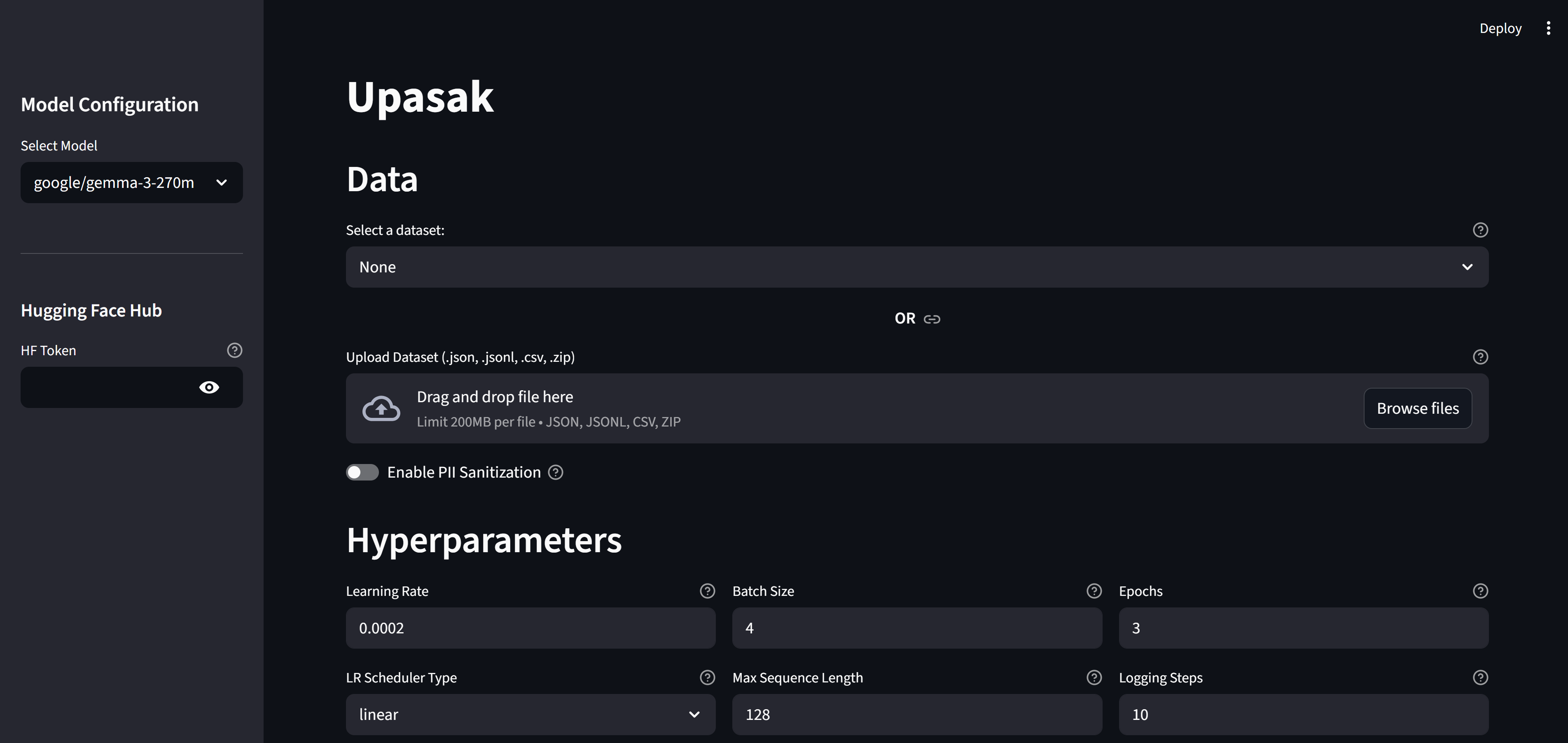
The visual interface provides fully interactive control:
Choose supported base models (currently Gemma-3 text-only). Future updates will include LLaMA, Mixtral, Phi, Qwen and multimodal variants.
- Read token for pulling models
- Write token for pushing fine-tuned models back to HF Hub
- Upload dataset files
- Or load from Hugging Face dataset list
- Enable/disable sanitization
- Select detection method (rule-based / hybrid)
- Enable Human Review & configure ratios
- View uncertain detections and choose actions
- Preview sanitized sample before training
- Learning rate
- Batch size
- Epochs
- Max sequence length
- Logging steps
- LR scheduler
- Gradient accumulation
- Gradient clipping
- LR warmup ratio
- Weight decay
- Checkpoint save strategy
- Evaluation strategy + steps
- Validation split
- Model tracker platform (Comet / WandB / none)
- Tracker API keys
- LoRA rank
- LoRA alpha
- LoRA dropout
- Target modules
- Optional merging of LoRA adapters
-
Start / Stop training
-
Live training metrics inside the app:
- Training loss
- Validation loss
- Token-level curves
-
Optional external tracking (Comet / WandB)
After training completes, Upasak automatically generates a customized inference.py script tailored to your training configuration.
- LoRA support – Handles both scenarios:
- LoRA + merged adapters – Loads the fully merged model.
- LoRA + unmerged adapters – Loads base model + applies LoRA adapters at runtime.
- Full fine-tune – Standard model loading
- Ready to use - Access it in your output directory
Usage
cd path_to_output_dir
python inference.py- Output directory for checkpoints, final model, and merged model
- Push to HF Hub (when write-enabled token is provided)
pip install upasak# Clone this repo
git clone https://github.com/shrut2702/upasak
cd upasak# optional
## For Windows
python -m venv vir_env
./vir_env/scripts/activate
## For macOS
python -m venv vir_env
source vir_env/bin/activate# Install required dependencies
pip install -r requirements.txtUpasak is used as a Python-triggered Streamlit app.
For example: run_upasak.py
from upasak import main

if __name__ == "__main__":
main()streamlit run run_upasak.pyor
streamlit run run_upasak.py --server.maxUploadSize=1024 # for configuring upload file size limit in MBThis opens the Upasak UI in your browser.
streamlit run app.pyor
streamlit run app.py --server.maxUploadSize=1024 # for configuring upload file size limit in MBAlthough Upasak provides a full end-to-end UI, every internal component is designed to be reusable in isolation. You can import and use modules such as:
TokenizerWrapper→ standalone tokenizationTrainingEngine+TrainerConfig→ run full or LoRA fine-tuning programmaticallyPIISanitizer→ rule-based or hybrid PII detection/sanitization
You can refer to examples to more details.
This allows you to integrate Upasak directly into custom pipelines, backend services, notebooks, or data-processing workflows — without launching the Streamlit UI.
- Educational fine-tuning demonstrations
- Rapid prototyping in quick-shipping environments
- Dataset preparation and anonymization workflows
- Internal LLM finetuning on sensitive or regulated data
- Developers with no domain expertise who wants LLM in their application
Contributions are welcome! Please open an issue or submit a pull request for bug fixes, features, documentation, or dataset schema support.
For issues, questions, or feature requests: Create a GitHub issue in this repository.