We can add a Stretchy Hader view for collection view simply using "SupplementaryView". we can achieve this using custom "UICollectionViewFlowLayout" and use the "layoutAttributesForElements" method to update attribute frames base on scroll content offset y.
  override func layoutAttributesForElements(in rect: CGRect) -> [UICollectionViewLayoutAttributes]? {
        guard let layoutAttributes = super.layoutAttributesForElements(in: rect),
              let collectionView = collectionView else { return nil }
        layoutAttributes.forEach({ (attribute) in
            if attribute.representedElementKind == UICollectionView.elementKindSectionHeader {
                let contentOffsetY = collectionView.contentOffset.y
                if contentOffsetY < 0 {
                    let width = collectionView.frame.width
                    // as contentOffsetY is -ve, the height will increase based on contentOffsetY
                    let height = attribute.frame.height - contentOffsetY
                    attribute.frame = CGRect(x: 0, y: contentOffsetY, width: width, height: height)
                }
            }
        })
        return layoutAttributes
}But what if we need to add a collection view inside the header view?
The client wants to replace the fixed product image with an array of products images, so we need to remove the image view and add a collection view with images cells
    lazy var collectionView: UICollectionView = {
        let layout = UICollectionViewFlowLayout()
        layout.scrollDirection = .horizontal
        let view = UICollectionView(frame: frame, collectionViewLayout: layout)
        view.isPagingEnabled = true
        return view
    }()

    override init(frame: CGRect) {
        super.init(frame: frame)
        addSubview(collectionView)
        collectionView.translatesAutoresizingMaskIntoConstraints = false
        collectionView.backgroundColor = .blue
        NSLayoutConstraint.activate([
            collectionView.leadingAnchor.constraint(equalTo: leadingAnchor),
            collectionView.topAnchor.constraint(equalTo: topAnchor),
            collectionView.trailingAnchor.constraint(equalTo: trailingAnchor),
            collectionView.bottomAnchor.constraint(equalTo: bottomAnchor)
        ])
        collectionView.dataSource = self
        collectionView.delegate = self
        collectionView.register(AttributeCell.self, forCellWithReuseIdentifier: AttributeCell.cellId)
    }
extension PDPHeaderView: UICollectionViewDataSource {
func collectionView(_ collectionView: UICollectionView, numberOfItemsInSection section: Int) -> Int {
20
}
func collectionView(_ collectionView: UICollectionView, cellForItemAt indexPath: IndexPath) -> UICollectionViewCell {
let cell = collectionView.dequeueReusableCell(withReuseIdentifier: AttributeCell.cellId, for: indexPath)
cell.backgroundColor = UIColor(hue: CGFloat(drand48()), saturation: 1, brightness: 1, alpha: 1)
return cell
}
} extension PDPHeaderView: UICollectionViewDelegateFlowLayout {
func collectionView(_ collectionView: UICollectionView, layout collectionViewLayout: UICollectionViewLayout, minimumLineSpacingForSectionAt section: Int) -> CGFloat {
.zero
}
func collectionView(_ collectionView: UICollectionView, layout collectionViewLayout: UICollectionViewLayout, minimumInteritemSpacingForSectionAt section: Int) -> CGFloat {
.zero
}
func collectionView(_ collectionView: UICollectionView, layout collectionViewLayout: UICollectionViewLayout, insetForSectionAt section: Int) -> UIEdgeInsets {
.zero
}
func collectionView(_ collectionView: UICollectionView, layout collectionViewLayout: UICollectionViewLayout, sizeForItemAt indexPath: IndexPath) -> CGSize {
collectionView.frame.size
}
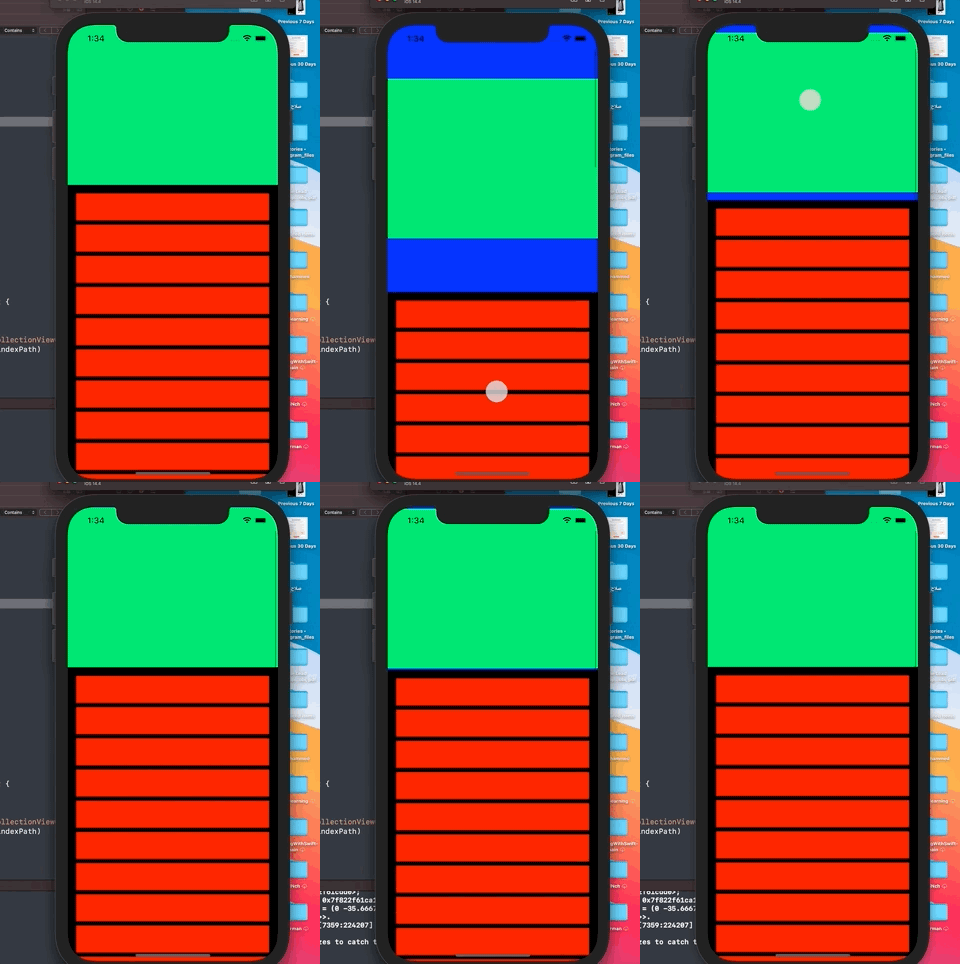
}If you try that unfortunately you will end up with this weird behavior
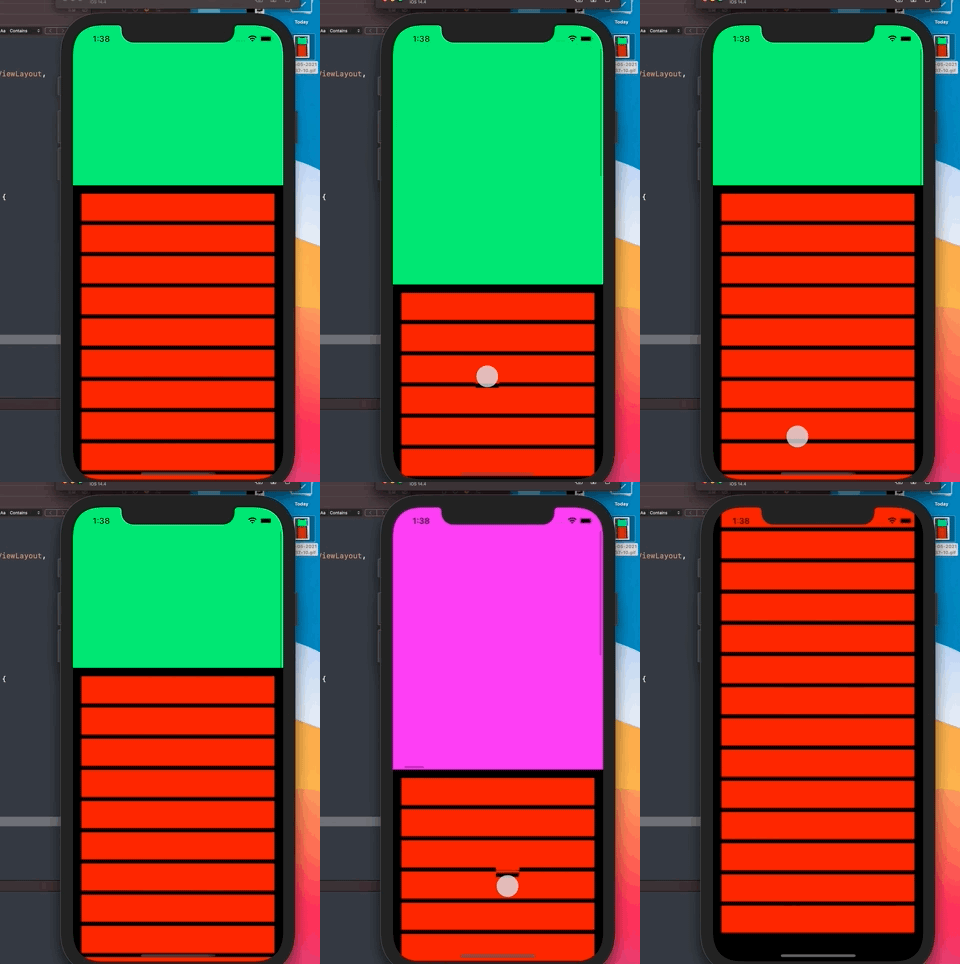
Instead of this normal one
And of course, you will find the console start screaming with warnings.
The problem is when we update the layout attribute frame for the header view this will update the collection view frame (the one inside the header view), but not the image cells.
so when we are scrolling we see the blue color (the background color for the collection view inside the header view) and not the image cell color.
we need to notify the header collection view to update the size for his cells at the same time when we update the layout attribute frame for the header view itself. and we can do that simply using
headerView.collectionView.collectionViewLayout.invalidateLayout()this will invoke all the "UICollectionViewDelegateFlowLayout" methodes and the size will be updated.
So one solution we can do is have closure on our custom flow layout class and we can invoke this closure when we update the header layout attribute frame.
    typealias UpdateLayoutAttributesObserver = (() -> Void)

    var onUpdateLayoutAttributesForSectionHeader: UpdateLayoutAttributesObserver?

        override func layoutAttributesForElements(in rect: CGRect) -> [UICollectionViewLayoutAttributes]? {
        guard let layoutAttributes = super.layoutAttributesForElements(in: rect),
              let collectionView = collectionView else { return nil }
        layoutAttributes.forEach({ (attribute) in
            if attribute.representedElementKind == UICollectionView.elementKindSectionHeader {
                let contentOffsetY = collectionView.contentOffset.y
                if contentOffsetY < 0 {
                    let width = collectionView.frame.width
                    // as contentOffsetY is -ve, the height will increase based on contentOffsetY
                    let height = attribute.frame.height - contentOffsetY
                    attribute.frame = CGRect(x: 0, y: contentOffsetY, width: width, height: height)
                }
                onUpdateLayoutAttributesForSectionHeader?()
            }
        })
        return layoutAttributes
    }
The client (the view controller on our case) can use this closure like this:
        if let layout = collectionViewLayout as? CustomPDPLayout {
            layout.onUpdateLayoutAttributesForSectionHeader = updateHeaderViewLayout()
        }
private func updateHeaderViewLayout () -> CustomPDPLayout.UpdateLayoutAttributesObserver {
{ [weak self] in
guard let self = self else { return }
let firstSection = IndexPath(item: .zero, section: .zero)
guard let headerView = self.collectionView.supplementaryView(forElementKind: UICollectionView.elementKindSectionHeader, at: firstSection) as? PDPHeaderView else { return }
headerView.collectionView.collectionViewLayout.invalidateLayout()
}
}Now everything will work smoothly.