This Terraform script deploys a dockerized WordPress application on AWS with an EC2 instance, an RDS MySQL instance,
and an Elastic IP. Attaches your custom domain to the wordpress application with an SSL certificate.
Installs phpmyadmin to access the MySQL Database.
- Terraform
- AWS Account
- AWS CLI
The user account authenticated with AWS CLI should have administrative privilleges inorder create the resources on AWS.

-> Create a secrets.tfvars file in root directory based on the secrets.tfvars.template provided.
Else you can input them when prompted by terraform apply
Initialize Terraform
terraform initRun the script to install wordpress and phpmyadmin
terraform apply --var-file=secrets.tfvarsHere I gave my domain as rogdex.co and subdomain as www.
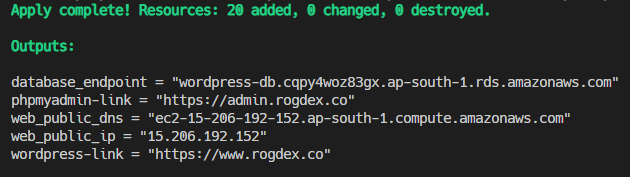
Now you can access your wordpress page through wordpress-link and the phpmyadmin through phpmyadmin-link.
- If porkbun is not your domain name registrar you can Ignore the
api_keyand thesecret_api_keyin thesecrets.tfvarsfile. - But then you should manually update your DNS record of your domain with the
web_public_ipof the EC2 instance from the output received.
What if terraform apply paritally fails ?
This is a current problem with terraform at the moment which is yet to be fixed.
Case I : Due to any wrong configuration of resources the script breaks and terraforms exits itself.
- The state is persisted till that point
- And the created resources can be removed by terraform destroy
- For this case we can use the script terraform-run.sh
which runs terraform destroy whenever terraform apply fails
Case II: If the terraform process is abruptly killed for any reason, rather than exiting itself.
- The state is not persisted
- Manually findout and cleanup the resources created.
- A PR has been merged to periodically persist intermediate state snaspshots
and is anitcipated to be realeased in Terraform v1.5