A self-hosted personal document management system. Upload files, tag, and search by text, set reminders, and export bundled items in a zip.
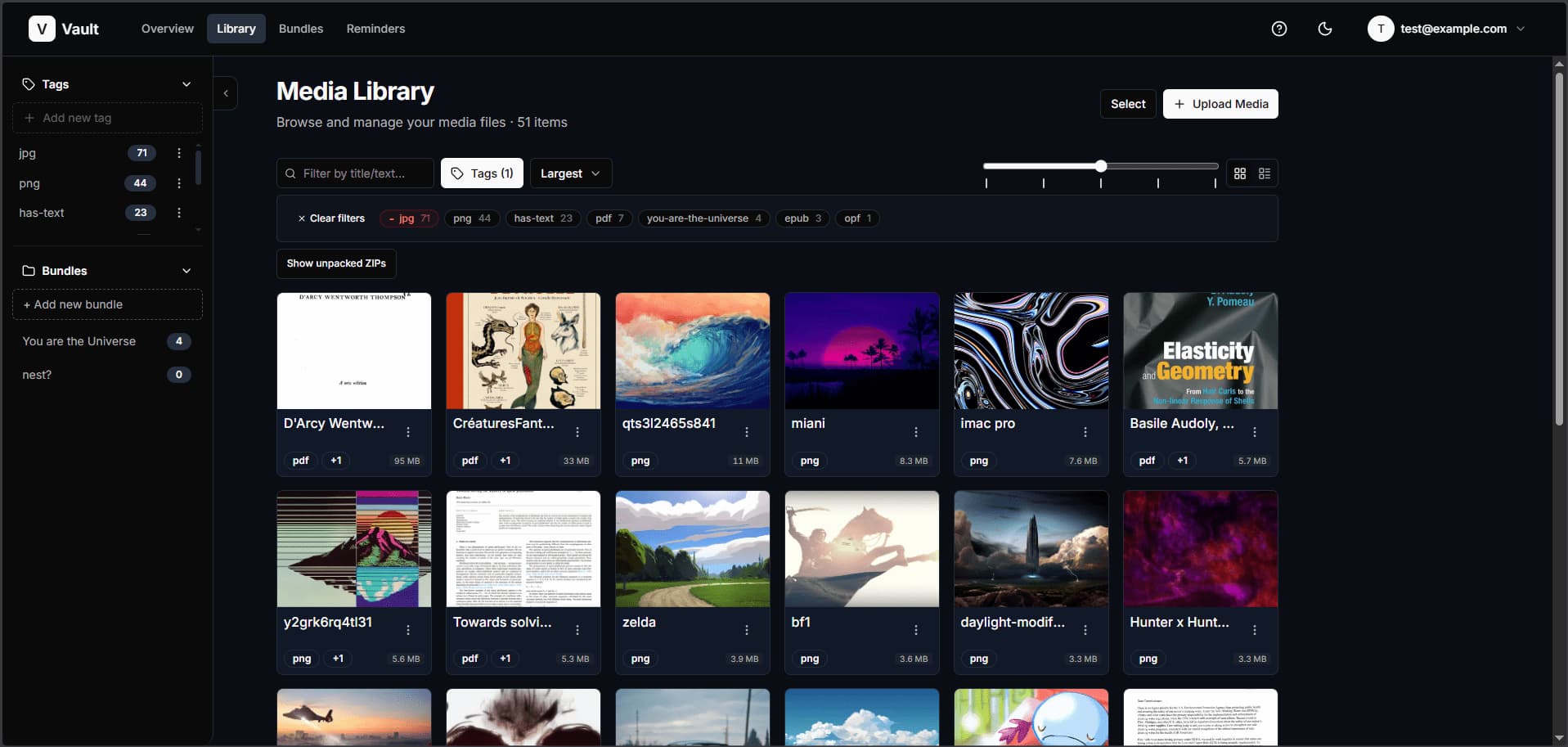 |
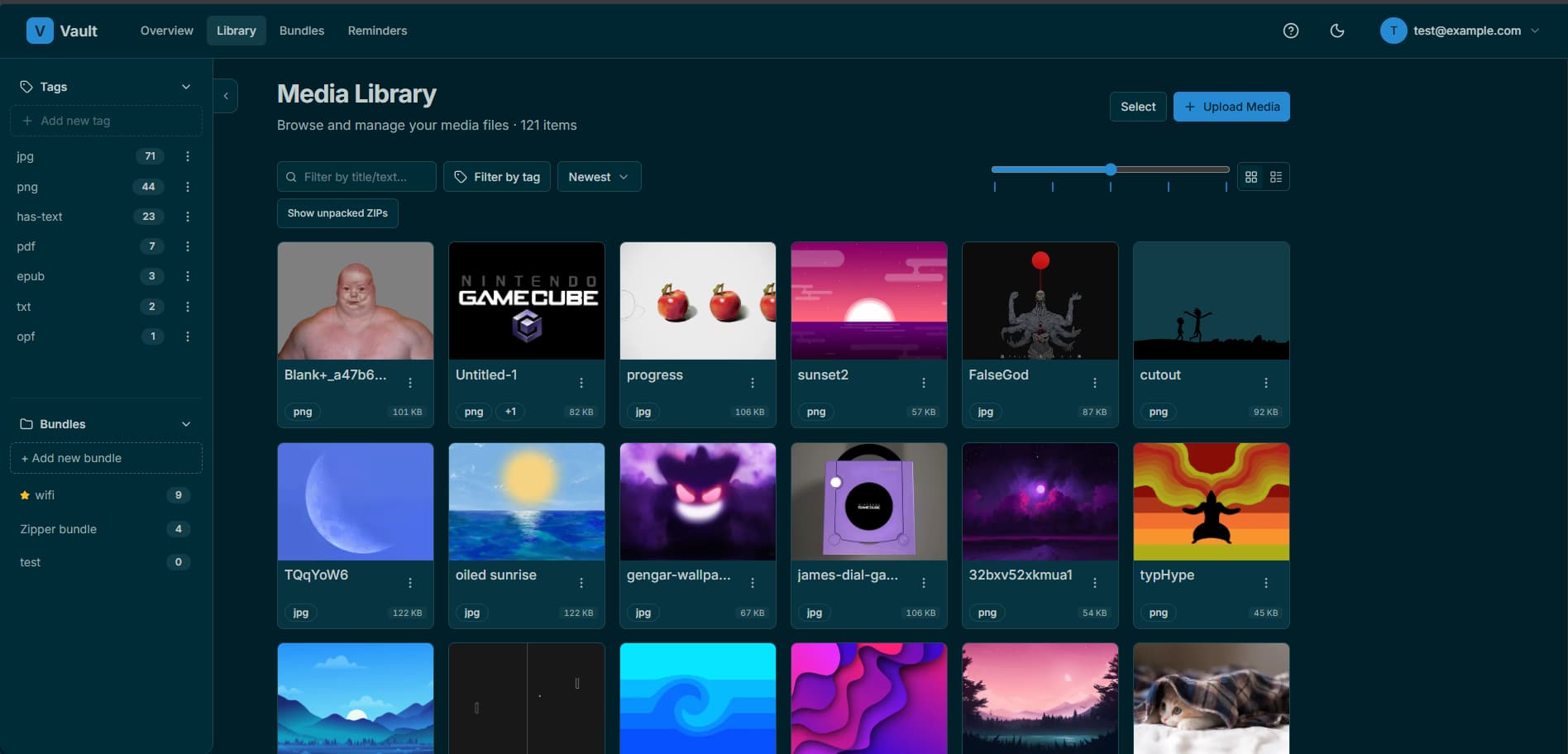 |
|
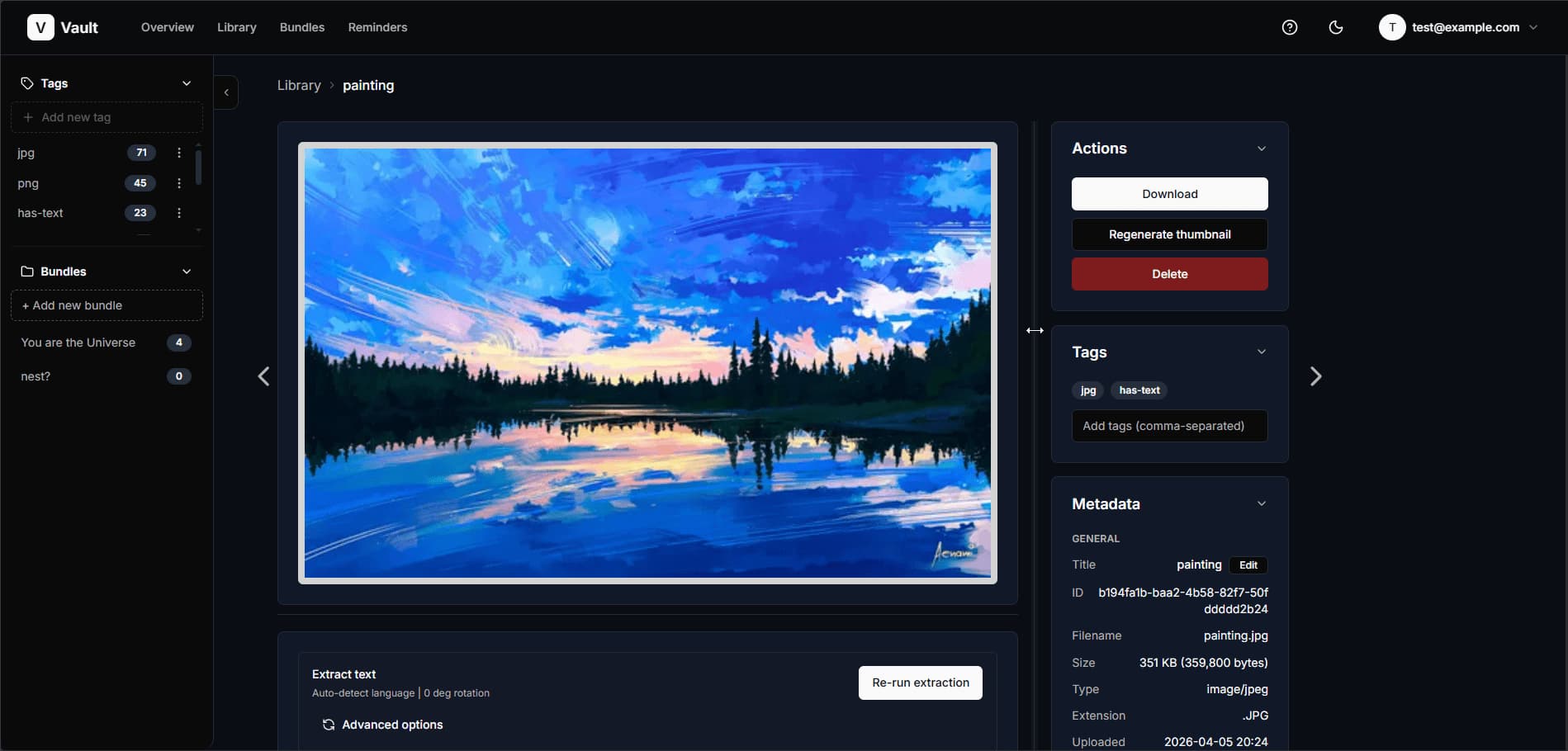 |
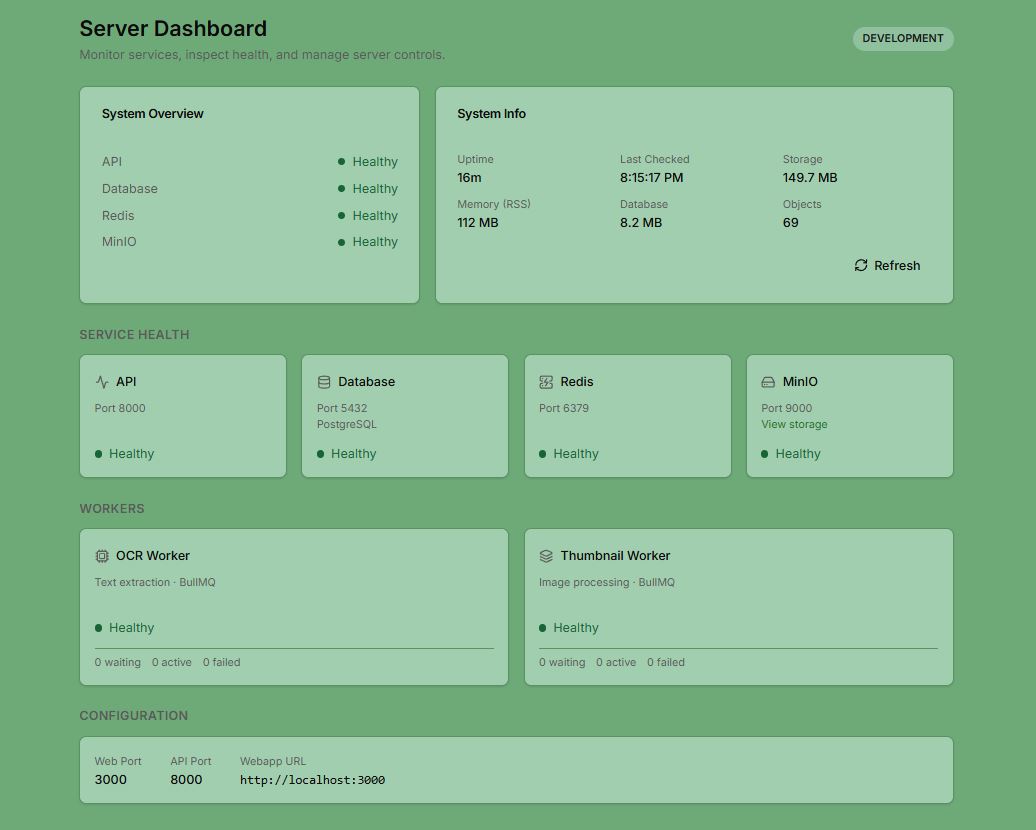 |
|
- File management — Upload PDFs, images, scans, and receipts. Files are automatically tagged on upload with their filetype.
- OCR & text extraction — Automatic text extraction from images and PDFs via
ocrmypdf+ Tesseract - Full-text search — PostgreSQL native full-text search with GIN-indexed tag filtering
- Thumbnails — Spawns async workers
- Bundles — Bundle your files
- Reminders —
- Self-hosted — No subscriptions
- Server dashboard — Monitor service health from a built-in dashboard
| Layer | Technology |
|---|---|
| Frontend | Next.js 16, React 18, TypeScript, Tailwind CSS 4, Radix UI |
| Backend | Fastify 4, Node.js ≥18.18, TypeScript |
| Database | PostgreSQL 16 (Prisma ORM) |
| Queue | BullMQ + Redis 7 |
| Storage | MinIO (S3-compatible) |
| OCR | ocrmypdf, Tesseract, Ghostscript, qpdf |
| Image processing | Sharp, heic-convert, @napi-rs/canvas |
| Auth | JWT (access + refresh tokens), Argon2 password hashing |
vault/
├── apps/
│   ├── api/          # Fastify REST API + BullMQ workers
│   └── web/          # Next.js frontend
├── packages/
│   ├── db/           # Prisma schema and client
│   └── types/        # Shared TypeScript types
├── infra/
│   └── docker/       # Dockerfiles and Compose configs
├── docs/             # OpenAPI spec, README screenshots
├── test-results/     # Generated HTML test reports
└── scripts/          # Install and run Docker containers on linux and windows
git clone https://github.com/rkcabell/vault.git
cd vault
vault-windows.bat
Double-click vault-windows.bat from the repo folder at any time — installs on first run, starts Vault on subsequent runs. Docker Desktop does not need to be pre-installed. If it was just installed, the script will ask you to restart and re-run.
git clone https://github.com/rkcabell/vault.git
cd vault
bash vault.sh
Run bash vault.sh at any time — installs on first run, starts Vault on subsequent runs. Requires Docker to be installed (Docker Desktop or Docker Engine).
pnpm installpnpm run localdocker
# or: docker compose -f infra/docker/docker-minimal.yml up -d| Service | URL | Credentials |
|---|---|---|
| PostgreSQL | localhost:5432 |
see docker-minimal.yml |
| Redis | localhost:6379 |
— |
| MinIO API | http://localhost:9000 |
see docker-minimal.yml |
| MinIO Console | http://localhost:9001 |
see docker-minimal.yml |
MinIO bucket: Log into the console at
http://localhost:9001and create a bucket namedvault-media.
Create apps/api/.env:
NODE_ENV=development
HOST=127.0.0.1
PORT=8000
CORS_ORIGIN=http://localhost:3000

POSTGRES_URL=postgresql://<user>:<password>@localhost:5432/vault?schema=public

# Generate with: openssl rand -hex 32
JWT_SECRET=<your-secret>
JWT_REFRESH_SECRET=<your-refresh-secret>

S3_ENDPOINT=http://localhost:9000
S3_PUBLIC_ENDPOINT=http://localhost:9000
S3_REGION=us-east-1
S3_ACCESS_KEY_ID=<minio-access-key>
S3_SECRET_ACCESS_KEY=<minio-secret-key>
S3_BUCKET=<your-bucket-name>

REDIS_URL=redis://localhost:6379pnpm run prismagen # Generate Prisma client
pnpm run prismigrate # Apply migrationspnpm run bootAlternatively, run each process in a separate terminal:
pnpm run api:dev              # API server   → http://localhost:8000
pnpm run web:dev              # Web app      → http://localhost:3000
pnpm -F api run worker:dev # OCR + thumbnail workers| Command | Description |
|---|---|
pnpm run boot |
Start API + web + worker in dev mode (hot reload) |
pnpm run start |
Build, start infrastructure, and run API + web + worker |
pnpm run api:dev |
Start API server only (hot reload) |
pnpm run web:dev |
Start web app only (hot reload) |
pnpm -F api run worker:dev |
Start background workers only (hot reload) |
| Command | Description |
|---|---|
pnpm run build |
Build all packages |
pnpm run lint |
Run ESLint across API and web |
pnpm run sweep |
Clean, lint, and build all packages |
pnpm run clean |
Remove Next.js build output |
| Command | Description |
|---|---|
pnpm run test |
Run full test suite (API + web) |
pnpm run test:api |
Run API tests and generate HTML report |
pnpm run test:web |
Run web tests |
pnpm run coverage |
Run tests with coverage report |
| Command | Description |
|---|---|
pnpm run prismagen |
Regenerate Prisma client |
pnpm run prismigrate |
Apply database migrations |
pnpm run prismareset |
Reset database — destructive |
| Command | Description |
|---|---|
pnpm run localdocker |
Start local infrastructure (Postgres, Redis, MinIO) |
pnpm run docker:build |
Build images and start full Docker stack |
pnpm run docker:rebuild-clean |
Rebuild images without cache and start stack |
pnpm run dockerup |
Start full Docker stack (no build) |
pnpm run dockerdown |
Stop full Docker stack |
pnpm run docker:logs |
Tail Docker compose logs |
To run the entire application in Docker (API, web, workers, and all infrastructure):
pnpm run docker:build
# or: docker compose -f infra/docker/docker-compose.yml up -d --build
Configure services using .env.docker at the repo root. The Dockerfile supports three build targets: api, web, and jobs.
| Service | Role | Exposed port |
|---|---|---|
api |
Fastify REST API | 8000 |
web |
Next.js frontend | 3000 |
nginx |
Reverse proxy — routes /api/* to API (prod only) |
80 |
jobs-ocr |
OCR text extraction worker | — |
jobs-thumb |
Thumbnail generation worker | — |
postgres |
PostgreSQL database | 5432 |
redis |
Job queue backing store (BullMQ) | 6379 |
minio |
S3-compatible object storage | 9000 / 9001 |
minio-init |
One-time bucket creation (exits after init) | — |
The REST API runs on http://localhost:8000. An OpenAPI specification is available at docs/api/openapi.yml.
Key endpoint groups:
| Prefix | Description |
|---|---|
/api/auth |
Registration, login, token refresh |
/api/media |
Upload, list, search, update, delete files |
/api/bundles |
Create and manage bundles |
/api/reminders |
Create and manage reminders |
/api/tags |
List tags with usage counts |
/api/profile |
User profile management |
PolyForm Noncommercial License 1.0.0 — free for personal and noncommercial use.