Documentation and API reference for the #retroPy MicroPython retro game engine and #rp2040 consoles
[updated for retroPy release candidate 0.05]
This page is a practical introduction to the parts of retroPy documented so far.
Most examples use:
from retroPy import *You can also import only the parts you need:
from retroPy import disp, draw, rpyThe display module is initialized through disp.init(...).
from retroPy import *
import machine

disp.init(
    machine.SPI(0, 24_000_000, sck=6, mosi=7, polarity=1, phase=1),
    screen=disp.TYPE_240,
    board=disp.BD_CRE,
)
This style matches the current engine structure, where disp owns the global framebuffer and display state.
from retroPy import *

draw.clear(0)
draw.filled_rect(20, 20, 40, 20, 8)
draw.text("Hello", 10, 60, 15)
disp.show()
The current draw module gives you the core immediate-mode rendering API:
draw.clear(color)draw.pixel(x, y, color)draw.line(x1, y1, x2, y2, color)draw.rect(x, y, w, h, color)draw.filled_rect(x, y, w, h, color)draw.circle(...),draw.filled_circle(...)draw.text(string, x, y, color)
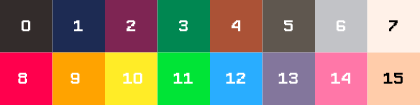
By default, retroPy uses PICO-8's 16 colour palette. Every number (0-15) represents a colour.
from retroPy import *

s = sprite("player.rs8")
s.draw(0, 40, 40, 0)   # frame 0 at (40, 40), no flip
disp.show()
For mono sprites:
m = sprite("font.rsm")
m.draw(0, 10, 10, 0, 15)
The last argument is the draw color for mono sprites.
buf = disp.get_buffer()
buf[0] = 8
disp.show()
disp.get_buffer() returns a bytearray by reference to the active framebuffer, so changes affect the live screen buffer directly.
from retroPy import *

c = canvas(width=64, height=64)
c.on()
draw.clear(0)
draw.filled_circle(32, 32, 12, 9)
c.off()

draw.clear(0)
c.draw(20, 20)
disp.show()
A canvas gives you a separate 8-bit drawing buffer. While it is turned on, the global draw target is redirected to the canvas buffer.
from retroPy import *

tb = textbox((20, 20), 120, 40)
tb.text = "Hello world"
tb.visible = True
tb.border_color = 15
tb.bg_color = 1
tb.text_color = 15

draw.clear(0)
tb.draw()
disp.show()from retroPy import *
print(dt())
print(dt_ms())
print(gTime())dt()returns gameplay delta time in seconds.dt_ms()returns gameplay delta time in milliseconds.gTime()returns gameplay time in seconds.- All three freeze while the active game loop is paused.
from retroPy import disp

disp.cam_mode(1)
disp.cam_pos(10, 20)
The current display module stores camera state globally. Most drawing functions and sprite methods apply world_to_screen(...) internally.
Some visible APIs are not fully ready yet:
disp.orientation()exists, but should be treated as experimental for now.- brightness functions exist, but do not yet appear to control hardware brightness in this file.
disp.scrollV()should be treated as internal or unfinished until it is completed.- some advanced draw and buffer helpers appear intended for engine-side or experimental use.