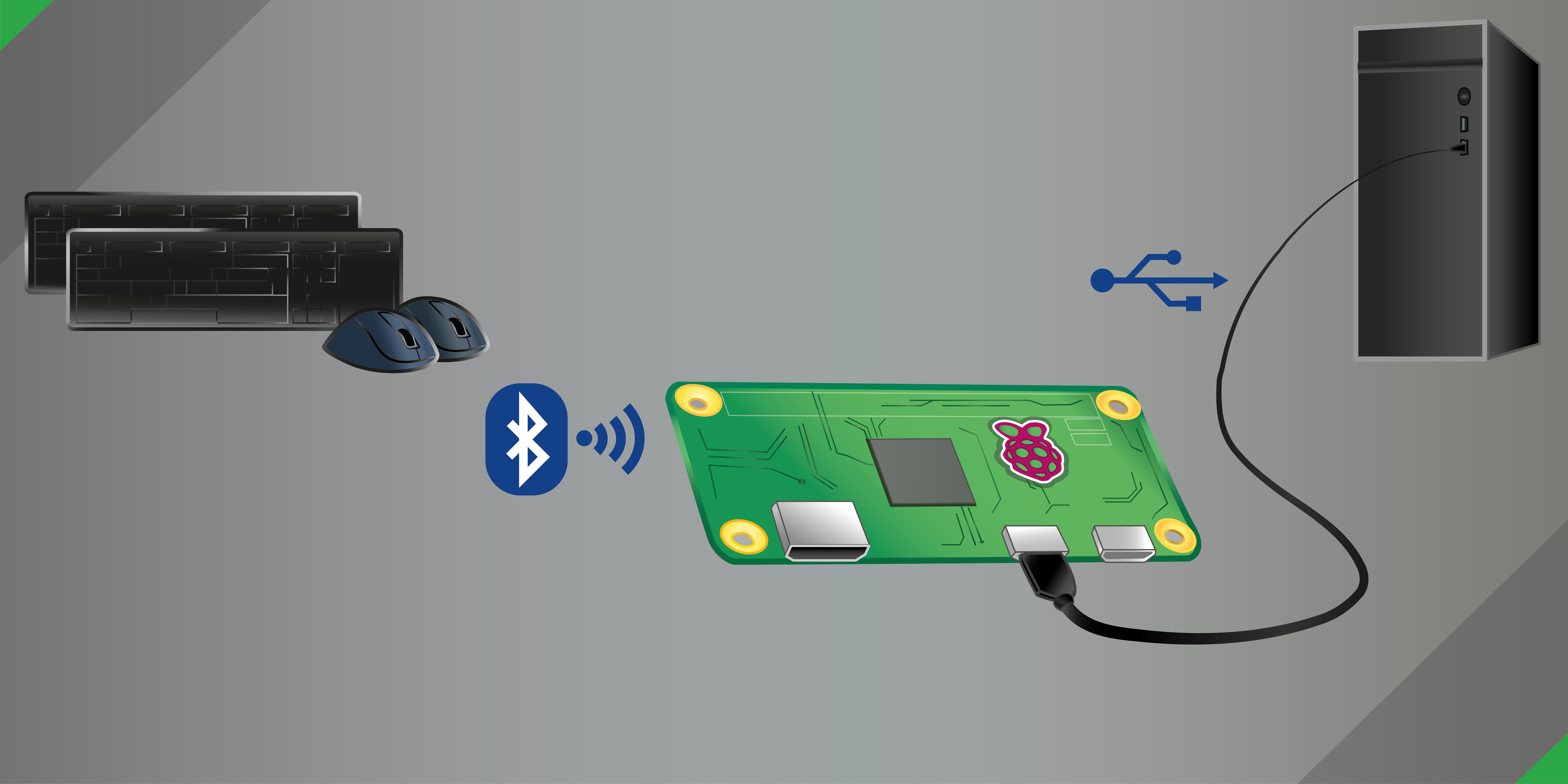
Use Bluetooth keyboards and mice in BIOS and boot menus, installers, kiosks, tablets, KVM setups, retro systems, consoles, and other hosts where Bluetooth is unavailable or inconvenient.
Bluetooth-2-USB (meaning Bluetooth to USB) turns a Raspberry Pi into a USB HID bridge for Bluetooth keyboards and mice. To the target host, the Pi appears as a standard wired USB keyboard and mouse.
That keeps the host side simple: no Bluetooth support, pairing flow, or special drivers are required on the target system.
This is the quickest supported path to a working setup.
sudo apt update && sudo apt install -y git
sudo git clone https://github.com/quaxalber/bluetooth_2_usb.git /opt/bluetooth_2_usbsudo /opt/bluetooth_2_usb/scripts/install.shsudo rebootbluetoothctl
power on
scan on
trust A1:B2:C3:D4:E5:F6
pair A1:B2:C3:D4:E5:F6
connect A1:B2:C3:D4:E5:F6
exitNote
Replace A1:B2:C3:D4:E5:F6 with your device's real Bluetooth MAC address.
Some devices trigger an interactive bluetoothctl authorization prompt
during pairing. Answer it immediately or BlueZ may cancel the request.
sudo /opt/bluetooth_2_usb/scripts/smoketest.sh- Pi 4B / 5: use the USB-C power port
- Pi Zero W / Zero 2 W: use the USB data port
- Raspberry Pi Zero W, Zero 2 W, 4B, or 5
- Raspberry Pi OS Bookworm or newer
- Internet access during installation
- Bluetooth keyboard, mouse, or both
- USB cable that supports data
Note
Pi 3 models include Bluetooth, but they do not expose a suitable device-mode port for this project. On Pi 4B and Pi 5, the OTG-capable port is the USB-C power port. On Pi Zero boards, the OTG-capable port is the USB data port, not the power-only port.
sudo /opt/bluetooth_2_usb/scripts/update.shsudo /opt/bluetooth_2_usb/scripts/uninstall.shFor most issues, start with the two built-in diagnostics:
sudo /opt/bluetooth_2_usb/scripts/smoketest.sh --verbose
sudo /opt/bluetooth_2_usb/scripts/debug.sh --duration 10
The smoketest is the quick health gate. debug.sh collects a fuller
redacted snapshot and can run a short bounded foreground debug session. If you
need the next steps after those checks, use
TROUBLESHOOTING.md.
For the supported appliance-style read-only workflow, use docs/persistent-readonly.md.
Wake-from-suspend support requires a patched Raspberry Pi kernel. For the validated custom-kernel workflow, use docs/remote-wakeup-kernel.md.
The service reads structured runtime settings from:
/etc/default/bluetooth_2_usbDefault content:
B2U_AUTO_DISCOVER=true
B2U_DEVICE_IDS=
B2U_GRAB_DEVICES=true
B2U_INTERRUPT_SHORTCUT=CTRL+SHIFT+F12
B2U_LOG_TO_FILE=false
B2U_LOG_PATH=/var/log/bluetooth_2_usb/bluetooth_2_usb.log
B2U_DEBUG=false
B2U_UDC_PATH=
Meaning:
B2U_AUTO_DISCOVER=trueis the easiest default. It relays all suitable readable input devices except known excluded platform devices.B2U_DEVICE_IDSpins the runtime to a specific set of event paths, Bluetooth MACs, and/or case-insensitive name fragments, for example/dev/input/event4,A1:B2:C3:D4:E5:F6,MX Keys.B2U_GRAB_DEVICES=truegrabs the selected input devices so the Pi stops consuming their local events. That is usually what you want for an appliance-like setup, but it also means the Pi will not keep using those inputs locally while they are grabbed.B2U_INTERRUPT_SHORTCUT=CTRL+SHIFT+F12defines a key chord that toggles relaying on and off.B2U_LOG_TO_FILE=falsedisables file logging by default.B2U_LOG_PATH=...controls the file path used when file logging is enabled.B2U_DEBUG=falsekeeps normal log verbosity.B2U_UDC_PATHis optional and only needed when you must pin UDC detection on a system with multiple gadget-capable controllers.
After editing the runtime config:
sudo systemctl restart bluetooth_2_usb.serviceNote
Despite the project name, broad auto-discovery can also relay other suitable Linux input devices that are visible on the Pi. The intended primary use case remains Bluetooth keyboard and mouse bridging.
| Argument | Explanation |
|---|---|
--auto_discover, -a |
Relay all suitable readable input devices automatically. This is the best default when you want the Pi to behave like a simple appliance. |
--device_ids DEVICE_IDS, -i DEVICE_IDS |
Pin the runtime to a specific comma-separated list of event paths, Bluetooth MACs, and case-insensitive name fragments. |
--grab_devices, -g |
Grab the selected input devices so the Pi no longer consumes their local events while they are being relayed. |
--interrupt_shortcut INTERRUPT_SHORTCUT, -s INTERRUPT_SHORTCUT |
Define a plus-separated key chord that toggles relaying at runtime. Example: -s CTRL+SHIFT+F12. |
--list_devices, -l |
List readable input devices and exit. Use this before setting B2U_DEVICE_IDS or --device_ids if you want to confirm the paths and names the runtime actually sees. |
--log_to_file, -f |
Add file logging in addition to stdout logging. |
--log_path LOG_PATH, -p LOG_PATH |
Override the path used with --log_to_file. |
--debug, -d |
Increase log verbosity for manual troubleshooting. |
--version, -v |
Print the installed version and exit. |
--validate-env |
Validate gadget runtime prerequisites and exit. On a normal non-gadget workstation this is expected to report missing prerequisites quickly. |
--output {text,json} |
Choose the output format for --list_devices and --validate-env. Use json for scripting or automation. |
--help, -h |
Show built-in CLI help and exit. |
Managed deployment scripts live in /opt/bluetooth_2_usb/scripts/ after
installation.
Apply the current checkout in /opt/bluetooth_2_usb to the managed install.
Use this after cloning into the supported install path.
Fast-forward the managed checkout and call install.sh only when the checkout
actually changed. This is the normal update path for an installed system.
Remove the managed system integration while leaving the checkout in place. Use this when you want to remove the service and wrapper without deleting the clone.
Fast health check for the supported managed deployment. Use this first when you want to confirm that the service, gadget path, and Bluetooth basics are healthy.
| Argument | Meaning |
|---|---|
--verbose |
Print fuller diagnostics, including the collected summary data. |
Collect a redacted diagnostics report and optionally run a bounded live
foreground debug session. Use this when the smoketest is not enough or when
you need a report to share.
| Argument | Meaning |
|---|---|
--duration DURATION_SEC |
Limit the live debug run. Omit it to keep the foreground session running until interrupted. |
Create temporary virtual input devices on the Pi and inject a deterministic test sequence into the running relay service. This is the Pi-side half of the loopback inject/capture harness.
Capture host-side gadget HID reports and verify that the relay emitted the expected sequence. This is the host-side half of the loopback inject/capture harness.
Windows PowerShell wrapper for the same host-capture flow.
Install the Linux host-side udev rule that grants hidapi access to the USB
gadget device nodes.
Prepare writable ext4-backed storage for /var/lib/bluetooth before enabling
persistent read-only mode.
Switch Raspberry Pi OS into the supported persistent read-only mode while keeping Bluetooth state on separate writable storage.
Return the system to normal writable mode while keeping the persistent Bluetooth-state configuration available.
| Path | Purpose |
|---|---|
/opt/bluetooth_2_usb |
Managed installation root |
/opt/bluetooth_2_usb/venv |
Managed virtual environment |
/etc/default/bluetooth_2_usb |
Structured runtime configuration |
/etc/default/bluetooth_2_usb_readonly |
Persistent read-only configuration |
/var/log/bluetooth_2_usb |
Script and report output |
/mnt/b2u-persist |
Default persistent mount target |
/mnt/b2u-persist/bluetooth |
Default persistent Bluetooth state directory |
/etc/systemd/system/bluetooth_2_usb.service |
Installed service unit |
- Contributor workflow: CONTRIBUTING.md
- Pi validation flow: docs/cli-service-test.md
- Loopback inject/capture harness: docs/host-relay-loopback.md
- Persistent read-only workflow: docs/persistent-readonly.md
- Doc consistency review: docs/doc-consistency-review.md
- Release tagging and versioning: docs/release-versioning-policy.md
This project is licensed under the MIT License.
The overview image is by Laura T. and is licensed under CC BY-NC 4.0.
- Mike Redrobe for the original Pi HID proxy idea
- HeuristicPerson for related prior art
- Georgi Valkov for
python-evdev - Adafruit for CircuitPython HID and Blinka, which helped make USB gadget access much smoother
- Everyone who tests the project on real hardware and reports what works, what fails, and how to improve it
Written by Eyes
Assisted by Technology and AI
Powered by Coffee
Developed with Love