roctop is a small AMD ROCm GPU monitor. It shows GPU VRAM usage,
utilization, type, temperature, fan, power, clocks, live system/GPU graphs,
and GPU processes in a refreshing terminal UI.
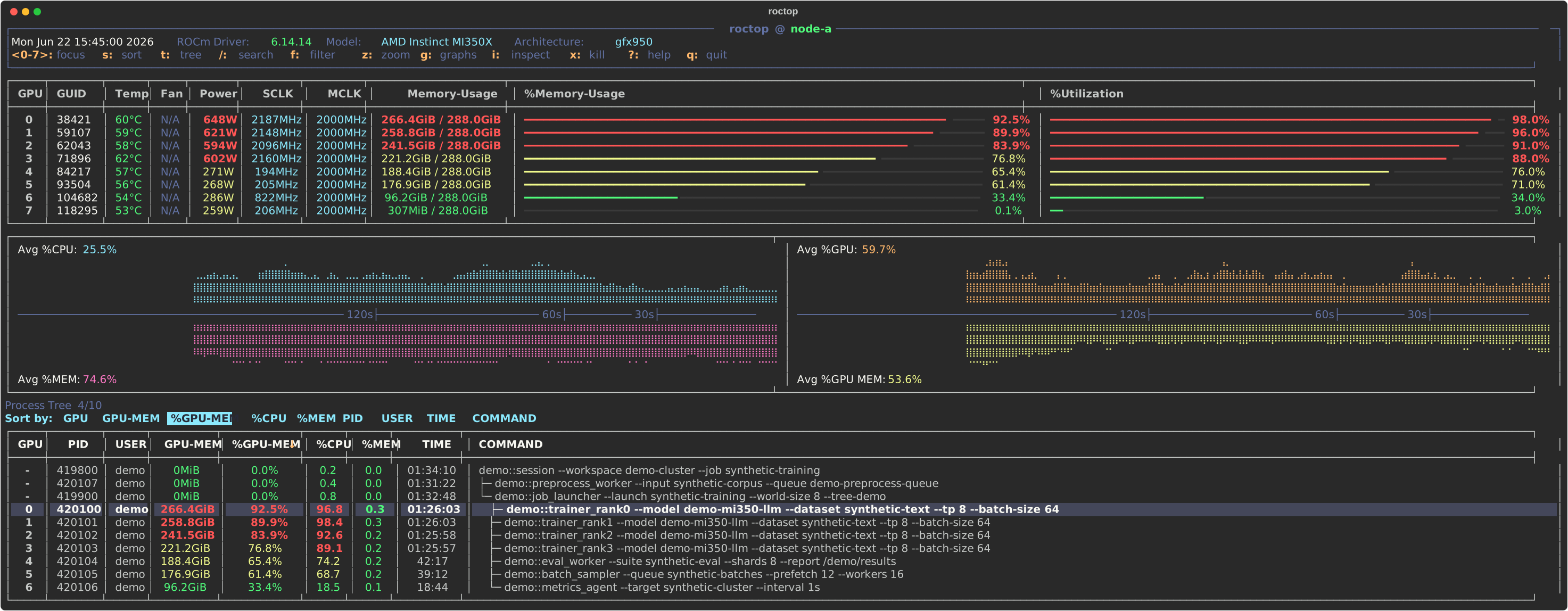
The demo is rendered from synthetic data; process names, PIDs, users, and metrics are placeholders.
- GPU overview: compact table for every ROCm GPU with GUID, standardized model, architecture, temperature, fan status, power draw, SCLK/MCLK clocks, VRAM usage, and utilization.
- Readable utilization bars: memory and GPU utilization are shown as inline bars with percentage labels and threshold colors, making idle, busy, and saturated devices easy to scan.
- Live history graphs: split graph panel tracks average host CPU, host memory, GPU utilization, and GPU memory usage over the recent refresh window.
- Process visibility: process table shows GPU index, PID, user, GPU memory, GPU memory percent, host CPU/memory percent, elapsed runtime, and full wrapped command lines.
- Interactive process navigation: move through processes with
j/kor arrow keys, page through long lists, select multiple process PIDs with Space, toggle process tree view, keep the selected process visible across refreshes, and sort by GPU, memory, CPU, PID, user, time, or command. - Inspect and help popups:
iinspects the selected process using the current snapshot and/proc, while?opens an in-app keybinding reference. Both popups support arrow keys andh/j/k/lnavigation. - Safe process actions:
xopens a high-contrast confirmation menu for the selected PID or all Space-selected PIDs, with Cancel, SIGTERM, and SIGKILL choices plus status messages for missing processes, permission errors, and other failures. - Robust data collection: combines
rocm-smiGPU snapshots,amd-smi processprocess memory data, andpsprocess metadata, with fallbacks when process-specific data is missing or malformed. - Script-friendly modes:
--oncerenders a single terminal snapshot,--jsonprints normalized snapshot data, and--intervalcontrols live refresh cadence.
roctop expects ROCm command-line tools on PATH: rocm-smi is required,
and amd-smi is used when available for richer per-process memory data.
From PyPI:
pip install roctopBuild from source:
git clone https://github.com/nrhevu/roctop.git
cd roctop
python3 -m venv .venv
.venv/bin/python -m pip install -e .
export PATH="$PWD/.venv/bin:$PATH"roctop
roctop --interval 0.5
roctop --once
roctop --json
roctop --version
python -m roctop --oncej/k or Up/Down move process cursor
PgUp/PgDn scroll processes
s open sort menu
t toggle process tree
p jump to parent process in tree view
h/Left, l/Right jump to previous/next sibling in tree view
/ search processes
n/N next/previous search match
f filter visible processes
i inspect selected process
Space select/deselect process
x kill selected/current process with confirmation
Esc clear selected processes or active filter
? open/close help
q or Ctrl-C quit
j/k or Up/Down      scroll help or inspect view
h/l or Left/Right   page help or inspect view
? or Esc            close help
i or Esc            close inspect view
h/l or arrows       move sort or kill menu selection
Enter               apply selected sort or kill option
y                   send SIGTERM in kill confirmation
Esc or q            cancel menus