Logs
The logging system in node-zigate can work in conjunction with any logging system of your choice.
trace, debug, info, warn, error
The logging is defined during the creation of the Zigate.Driver or the Zigate.Coordinator object:
const Zigate = require('node-zigate');
let driver = new Zigate.Driver({
   log: /* myLogChoiceHere */
});
or
const Zigate = require('node-zigate');
let driver = new Zigate.Coordinator({
   log: /* myLogChoiceHere */
});
... where myLogChoiceHere can be:
-
one of the following predefined string:
-
'nolog': no logs are produced at all (this is the default) -
'console'or'trace': all logs are written to the console -
'debug': only logs with level debug and above are written to the console -
'info': only logs with level info and above are written to the console -
'warn': only logs with level warn and above are written to the console -
'error': only logs with level error are written to the console
-
-
any object having (all) the following methods:
trace(),debug(),info(),warn(),error().
Example:
let driver = new Zigate.Driver({
    log: {
        trace: () => { console.log.bind  (console, '[TRACE '+((new Date()).getTime())+'] ', arguments); },
        debug: () => { console.debug.bind(console, '[DEBUG '+((new Date()).getTime())+'] ', arguments); },
        info: () =>  { console.debug.bind(console, '[INFO  '+((new Date()).getTime())+'] ', arguments); },
        warn: () =>  { console.warn.bind (console, '[WARN  '+((new Date()).getTime())+'] ', arguments); },
        error: () => { console.error.bind(console, '[ERROR '+((new Date()).getTime())+'] ', arguments); },
    }
});
-
any object having a method
getLogger(mystringLoggerName)which returns itself an object with methodstrace(),debug(),info(),warn(),error()- Zigate.Driver calls such method getLogger with parameter 'driver'
- Zigate.Coordinator makes use of any object having both trace, debug... methods + a getLogger method, which is called by sub-parts of the coordinator (driver, loadsave sub-module, device recognition sub-module, ...)
This is usefull if (like me) you use the module log4js-nested
-
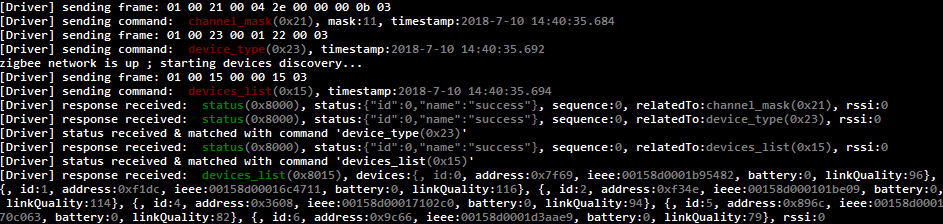
an extensive usage of the 'util.inspect()' feature is done, to expose usefull information when logging an object (driver commands, responses, coordinator devices & sub-components: clusters, attributes, values, ...)
-
the npm module colors is used to colorize the output
Resulting log look like: