ViewPoint is a math expression parser and evaluator that supports runtime data-type checking written in native JS. It allows you to evaluate mathematical expressions with ease while ensuring the correctness of the input data.
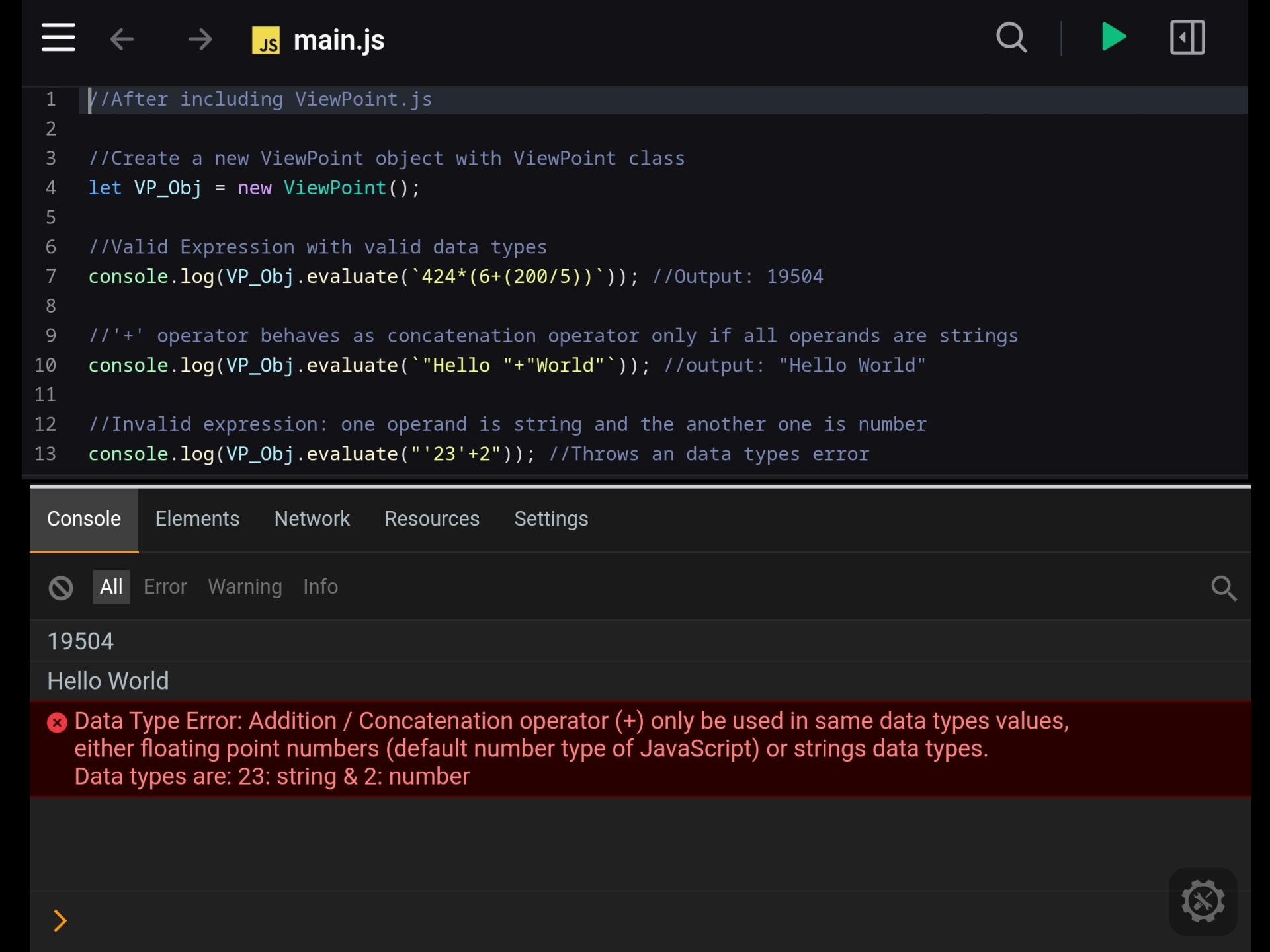
- Expression Evaluation:
- Parses and evaluates mathematical expressions like '5*52+285/2'
- Supports basic arithmetic operators (+, -, *, /,^, %). [Note: here % is implemented as modules / reminder operator]
- Supports nested expressions with parentheses (e.g. (36/2)-4)
- Allows complex expressions with multiple levels of nesting (e.g (52/8+2)+56*((25/2)*4+(8-2))
- Supports multiple datatypes e.g expressions with decimal / floating points numbers, BigInt, String, and Boolean datatype
- Data Type Validation:
- Validates data types during expression evaluation, throwing errors for invalid operations (e.g., attempting sum or multiplication between strings and numbers).
- Function(s) in the expression (added in v2.0.0):
- Function(s) can be used in the expression string for complex expression computing (e.g.
#and()function for using logical and to the expression or#if(condition, whatIfTrue, whatIfFalse)for using the 'if testing'). - It has various built-in function (e.g.
#max(),#min()etc...) - User can also add their own function using
.addFunc( )method
- Function(s) can be used in the expression string for complex expression computing (e.g.
- Expression Tokenization:
- It can tokenize a mathematical expression into individual tokens and can return tokenized expression as an array (e.g expression = "5 + 72+(85^2+1)", token = [5,'+',7,'',2,'+','(',85,'^',2,'+',1,')'])
- Infix to Postfix Conversion:
- It can convert infix expressions to postfix notation and return as an array
- JavaScript Variable Support:
- ViewPoint supports using of JavaScript variables in an expressions using
${}and backticks (`)
- ViewPoint supports using of JavaScript variables in an expressions using
- External Variable Support:
- Allows users to define external variables using the
.var()method
- Allows users to define external variables using the
- Operator Order Control:
- Follows PEMDAS (Parentheses, Exponents, Multiplication and Division, and Addition and Subtraction) order of operations by default
- Allows users to define their own custom order of operations (if needed)
- Customizable Operator Behavior:
- Allows users to re-define the math operator (e.g. '*' or '%') behavior to suit specific requirements (if needed)
To use this evaluator/library, firstly, you need to link ViewPoint.js to your project. You can do that by using two ways:
- Download/Clone and Use: Download or clone the repository and use the ViewPoint.js file in your project.
- Use via CDN:
- Use the library directly via CDN using the following script tag:
https://cdn.jsdelivr.net/gh/nirmalpaul383/ViewPoint/ViewPoint.js - For using it in browser/webpage you can use
<script src="https://cdn.jsdelivr.net/gh/nirmalpaul383/ViewPoint/ViewPoint.js"></script>
- Use the library directly via CDN using the following script tag:
- create a ViewPoint object using
new ViewPoint()keywords:
//Create a new ViewPoint object with ViewPoint class
let ViewPoint_obj = new ViewPoint();- Store your expression in string format:
//Sample Expression
const expresion = `((52/8+2)+56*((25/2)*4+(8-2)))*2`;- For evaluating an expression use
.evaluate()method:
//Expression evaluating
let output = ViewPoint_obj.evaluate(expresion);

//For output
console.log(output); //Output 6289 to the console//Create a new ViewPoint object with ViewPoint class
let ViewPoint_obj = new ViewPoint();
//Simple Expression evaluation
console.log(ViewPoint_obj.evaluate(`25+5*2`)); //Output 35 to the console
//Nested expression evaluation
console.log(ViewPoint_obj.evaluate(`((52/8+2)+56*((25/2)*4+(8-2)))*2`)); //Output 6289 to the console
//BigInt Expression evaluation
console.log(ViewPoint_obj.evaluate(`11n ^2n`)); //Output 121n to the console
//String concatenation: '+' Operator behaves as concatenation operator if all operands are string
console.log(ViewPoint_obj.evaluate(`"Hello " + "World"`)); //Output "Hello World" to the console
//Invalid Expression: One operand is a string and another one is number
console.log(ViewPoint_obj.evaluate(`"45" + 5`)); //Throws a datatype error
//Invalid Expression: One operand is a number and another one is boolean
console.log(ViewPoint_obj.evaluate(`45 * true`)); //Throws a datatype error
//Invalid Expression: unclosed quoted text
console.log(ViewPoint_obj.evaluate(`"Hello World `)); //Throws a error message for unclosed quoted text//Create a new expression evaluator object with ViewPoint class
let VP_Obj = new ViewPoint();
//Example 1:
//Expression 1 (simple expression with multiple layer of brackets and #max function):
//ViewPoint 's function must be started with "#" character
let expr1 = "2*(500-4*(25+ #max(8, (2*6))+45)) +39";
//Output to the console
console.log(VP_Obj.evaluate(expr1)); //Output 383
//Example 2:
//For creating 3 variables in our ViewPoint object
VP_Obj.var("Eng", 45); //Marks for english subject
VP_Obj.var("Math", 85); //Marks for math subject
VP_Obj.var("FA", 55); //Marks for financial accounting subject
VP_Obj.var("Pass", 35); //Passmark
//Expression 2 with advance function like #and and #if
let expr2 = "#if(#and(#>=(Eng,Pass) , #>=(Math,Pass), #>=(FA,Pass)), 'All Cleared', 'Fail')";
//Output to the console
console.log(VP_Obj.evaluate(expr2)); //Output 'All Cleared'//Create a new expression evaluator object with ViewPoint class
let VP_Obj = new ViewPoint();
//Example 1: adding 'sin()' function using JavaScript 's native Math object
//For defining and storing user-defining function to the ViewPoint object
VP_Obj.addFunc("sin", (input)=>{return Math.sin(input)});
//Using the custom function in expression
let expr3 = "4+ #sin(45) + 8"
//Output to the console
console.log(VP_Obj.evaluate(expr3)) //Output 12.8509....
//Example 2: adding 'greet()' function which return "Hello!" string
//For defining and storing user-defining function to the ViewPoint object
VP_Obj.addFunc("greet", ()=>{return "Hello!"})
//For defining and storing user-defining function to the ViewPoint object
VP_Obj.addFunc("myName", (name)=>{return String(name)})
//Using our custom function in expression
let expr4 = "#greet() + ` ` + #myName('Nirmal') " ;
//Output to the console
console.log(VP_Obj.evaluate(expr4)) //Output 'Hello! Nirmal'
//Example 3: adding 'am_I_Allowed_For_Driving' function which return message based on the age value
//For defining and storing user-defining function to the ViewPoint object
VP_Obj.addFunc("am_I_Allowed_For_Driving", (age) => {
if (typeof ((age) === "number") && (isNaN(age) === false)) {
if (age < 0) {
return "Age can not be a negative number"
}
else if (age < 18) {
return "You are under 18 years so you are not allowed for driving !!!";
}
else {
return "Congratulations! You can drive";
}
}
else {
return "Please enter a valid age"
}
});
//Using our custom function in expression and output to the console
console.log(VP_Obj.evaluate("#am_I_Allowed_For_Driving(4)")) //Output "You are under 18 years so you are not allowed for driving !!!"
console.log(VP_Obj.evaluate("#am_I_Allowed_For_Driving(21)")) //Output "Congratulations! You can drive"
ViewPoint has some built-in functions, here is a complete list
| Function Name | Details | Example |
|---|---|---|
| #max | #max() function returns the largest number of the provided numerical arguments | "#max(45,50,20, 4+9*(6+4))" //returns 94 |
| #min | #min() function returns the smallest number of the provided numerical arguments | "#min(45,50,20, 4+9*(6+4))" //returns 20 |
| #and or #&& |
#and() or #&& tests each of its arguments , if all are true then it will return true | "#and(true , true, false)" //returns false "#&&(true , true, false)" //returns false |
| #or or #|| |
#or() or #||() tests each of its arguments , if any of its arguments is true then it will return true | "#or(true , true, false)" //returns true "#||(true , true, false)" //returns true |
| #not or #! |
#not() or #!() changes 'true' value to a 'false' value and 'false' value to a 'true' value | "#not(true)" //returns false "#!(true)" //returns false |
| #greaterThan or #> |
#greaterThan() or #>() takes 2 parameters and compare if that the 1st parameter is greater than the second parameter or not | "#greaterThan(67 , 5)" //returns true "#>(67 , 5)" //returns true |
| #lessThan or #< |
#lessThan() or #<() takes 2 parameters and compare if that the 1st parameter is less than the second parameter or not | "#lessThan(67 , 5)" //returns false "#<(67 , 5)" //returns false |
| #isEqual or #== |
#isEqual() or #==() takes 2 parameters and compare if that the both parameter is same numerical value or not | "#isEqual(60 , 50+10)" //returns true "#==(60 , 50+10)" //returns true |
| #if | #if() takes 3 parameters. 1st parameter is a condition parameter, if the condition is true then it returns 2nd parameter otherwise it returns 3rd parameter (if the 3rd parameter is not specified then its default value false will be return) | "#if(true , 5, 80)" //returns 80 "#if(#<(50,100) , '50 is less than 100', '100 is less than 50')" //returns '50 is less than 100' |
//Create a new ViewPoint object with the viewpoint class
let ViewPoint_obj = new ViewPoint();

//Sample expression with number, operators, BigInt, parentheses, floating point number, quoted text, and white space
const expresion = `2 / 5.04 +5n +"Sample quoted text"  + (40*(45-2))`;

//For tokenization of expression and storing into the token array
let token_array = ViewPoint_obj.tokenize(expresion)

//For output the token array into the console
console.log(token_array)
/*
[ 2, '/', 5.04, '+', 5n, '+', 'Sample quoted text', '+', '(', 40, '\*', '(', 45, '-', 2, ')', ')' ]
*///Create a new ViewPoint object with viewpoint class
let VP = new ViewPoint();
//Sample expression
const expresion = `4+8*(5-1)`;
//For tokenization of expression and storing into the token array
let token_array = VP.tokenize(expresion)
//For converting an infix expression array to its equivalent postfix expression array and storing into the postfix array
let postFix_Array = VP.infix_to_postfix(...token_array)
//For output the postfix expression array into the console
console.log(postFix_Array) //Output: [ 4, 8, 5, 1, '-', '*', '+' ]//Create a new ViewPoint object with the ViewPoint class
let VP = new ViewPoint();
//Sample JavaScript variable
let a = 5;
//Sample expression with JavaScript variable
const expresion = `35 +(${a}*9)*2`;
//Expression evaluating and storing the result into the output variable
let output = VP.evaluate(expresion);
//For output the result
console.log(output); //Output: 125//Create a new ViewPoint object with viewpoint class
let ViewPoint_obj = new ViewPoint();
//Defining external variable with the name of "myVar"
ViewPoint_obj.var("myVar", 400);
//Sample expression with an external variable
const expresion = `35 *100 - myVar`;
//Expression evaluating and storing the result into the output variable
let output = ViewPoint_obj.evaluate(expresion);
//For output the result
console.log(output); //Output: 3100//Create a new ViewPoint object with viewpoint class
let ViewPoint_obj = new ViewPoint();
//Sample expression
const expresion = `4*2+1`;
//Expression evaluating with default operator precedence
let output = ViewPoint_obj.evaluate(expresion);
//Changing the default operator_precedence in the ViewPoint Obejct
//promote '+' and '-' operator to highest precedence
ViewPoint_obj.ViewPoint_math_def.operator_precedence = {
'^': 1,
'*': 1,
'/': 1,
'%': 1,
'+': 2,
'-': 2,
}
//Expression re-evaluating
let output2 = ViewPoint_obj.evaluate(expresion);
//For output the actual result
console.log(output); //Output: 9 (First * then +)
//For output the re-evaluating result (after changing the default operator_precedence)
console.log(output2); //Output: 12 (First + then *)//Create a new ViewPoint object with viewpoint class
let ViewPoint_obj = new ViewPoint();
//Sample expression
const expresion = `4*2`;
//Expression evaluating with default operator behavior
let output = ViewPoint_obj.evaluate(expresion);
//Override default behavior of multiplication ('*') operator in the ViewPoint object and redefine * operator to behave like '+' (addition) operator
ViewPoint_obj.ViewPoint_math_def.multiplication = function (val1, val2) {
return val1 + val2;
}
//Expression re-evaluating
let output2 = ViewPoint_obj.evaluate(expresion);
//For output the actual result
console.log(output); //Output: 8 (multiplication ('*') operator works as multiplication)
//For output the re-evaluating result (multiplication ('*') operator works as addition ('+'))
console.log(output2); //Output: 6This object is used for defining of some basic math logic and math operations for ViewPoint
| Name | Type | Details |
|---|---|---|
| operator_precedence | Object | This object contains the operator's precedence value according to the BODMAS or PEMDAS rule Default operator's precedence values: operator_precedence: {'^': 4, '*': 3, '/': 2, '%': 2,'+': 1,'-': 1} |
| exponents(value1, value2) | Method | Definition of Power(^) operator Behavior |
| multiplication(value1, value2) | Method | Definition of Multiplication(*) operator Behavior |
| division(value1, value2) | Method | Definition of Division(/) operator Behavior |
| modulus(value1, value2) | Method | Definition of Modulus(%) operator Behavior |
| addition(value1, value2) | Method | Definition of Addition(+) and concatenation(+) operator Behavior |
| subtraction(value1, value2) | Method | Definition of Subtraction(-) operator Behavior |
If you like this project please give a star to this project . This project is originally made by me(N Paul). My github profile , My youtube page , facebook page
This is an open-source program. You are welcome to modify it...
Thank you for trying it out!