Four Modules:
- Master
- Worker
- Comms (Socket communication library)
- Common
- Worker status and Job status enums
- Worker type and Job type enums
Gradle should handle everything.
I recommend using IntelliJ, as Gradle will download required dependencies on project import.
Modify properties in master/src/main/resources/nectarcloud_config - SAMPLE.json
  {
      "osTenantName": "",
      "osUsername": "",
      "credential": ""
  }
osTenantName
Is the NectarCloud Project Name
Credentials
Settings -> Reset Password
Then rename file to nectarcloud_config.json
In master/src/main/java/.../master/worker/JCloudsNova.java
NectarCloud Keypair name
DEFAULT_KEYPAIR_NAME = "KIT318";
Security Group
The security group must have inbound TCP traffic allowed for the post specified for the Master REST API (in Set Hostname/Port of Master).
As this port is used for the Java Socket server running on the Worker node.
Example Security Group
Egress	IPv6	Any	Any	        ::/0
Egress	IPv4	Any	Any	        0.0.0.0/0
Ingress	IPv4	TCP	22 (SSH)	0.0.0.0/0
Ingress	IPv4	TCP	80 (HTTP)	0.0.0.0/0
Ingress	IPv4	TCP	443 (HTTPS) 0.0.0.0/0
Ingress	IPv4	TCP	8081	    0.0.0.0/0
Ingress	IPv4	TCP	8443	    0.0.0.0/0
DEFAULT_SECURITY_GROUPS_NAME = "saas";
Default Image ID used when creating new instances
DEFAULT_IMAGE_ID = "210b3c59-3238-4abf-9447-dffbcca5cd1b";
There is an image on NectarCloud running Ubuntu preinstalled with Spark:
- Name: nfs-spark-02
- Image id: 210b3c59-3238-4abf-9447-dffbcca5cd1b
NECTAR_ENDPOINT = "https://keystone.rc.nectar.org.au:5000/v2.0/";
NectarCloud API Region
NECTAR_REGION = "Melbourne";
Default flavour to create
DEFAULT_FLAVOUR_NAME = "m2.small";
Largest flavour which can be created
LARGEST_FLAVOUR_NAME = "m2.large";
Default region where instances are launched
DEFAULT_AVAILABILITY_ZONE = "tasmania";
-
Worker:shadowJar- Builds a 'fat jar' of worker module, which contains dependencies needed (excluding Spark)
-
Worker:moveToPublicFolder- Moves the 'fat jar' to a public folder which is accessible from worker nodes.
- Newly created workers will download the latest jar from this location
-
Master:buildAllProducts- Builds all components of master module using Gretty plugin
- This includes web servlets, web server starter ...
- The Master server executables are located in
Master/build/output/masterstart.bat,start.shstop.bat,stop.sh...- all dependencies are included
-
Master:startInplace,Master:stopInplace, ...- Can be used for running Master in IDE
- The server will automatically update as changes are made to the code
The hostname and port of the master node must be set at the start of master/src/main/java/.../Master.java
public static final String HOSTNAME = "144.6.225.200";
public static final int PORT = 8081;
It must also be set in master/src/main/webapp/index.js for the web client
const MASTER_API_ROOTURL = "http://144.6.225.200:8081/api/client/";
The location of spark can be updated in worker/src/main/java/.../job/Job.java
Currently it is:
/opt/csiro.au/spark_batch_fsp/bin/spark-batch
Instances don't auto-delete.
Large file uploads using web client can timeout (without HTTP response). This is due to a bug in Jetty web server.
- NectarCloud defualt user is ubuntu
- Use PuttyGen to convert private key from .pem to .ppk
- Use WinSCP to transfer files
- SSH and SFTP on Mac:
https://stackoverflow.com/questions/3475069/use-ppk-file-in-mac-terminal-to-connect-to-remote-connection-over-ssh?utm_medium=organic&utm_source=google_rich_qa&utm_campaign=google_rich_qa
Four Modules
/master/src/main/java/au/edu/utas/lm_nfs_sg/saas/master
Main Master class
Handles:
- All Jobs and Workers are kept in List for reference
- Requests from RestAPI MUST pass through the Master class
- Job Scheduling
Used for testing purposes
Is the Worker Monitor in paper
Handles:
- Keeps track of
WorkerStatus - Instance creation/termination through
JCloudsNova - Communication with worker via socket
- Server to worker communication is via socket and most worker to server communication is via RestAPI
- Worker log output is send through socket
- Assigning jobs
- Deleting Jobs
- Server to worker communication is via socket and most worker to server communication is via RestAPI
- Keeps track of job queue on worker
Is the Cloud VM Monitor in paper.
Uses JClouds API to interact with NectarCloud through the OpenStack Nova API:
- Create instance
- Terminate instance
- Get instance status
- ...
Job Super class
Handles:
- File management:
- configDirectory
- resourcesDirectory
- resultsDirectory
- Keeps track of
JobStatus - Estimating time to execute job on different VMs
- Job to JSON Serialiser for web interface (i.e. job status, job id, ..., DOES NOT include job config)
- See
SparkJobclass for Spark XML to JSON converting
- See
Extends Job class
Handles:
- Converting unploaded Spark XML config to JSON for web interface
- Estimating time to execute Spark job
Used for testing purposes
Base class for Rest API
Registers 'Resource' files
Job API endpoints - for both Client and Worker
Not ideal - but will do for now...
	@Path("active")
	@GET
	@Produces(MediaType.APPLICATION_JSON)
	public Response getActiveJobs()

	@Path("inactive")
	@GET
	@Produces(MediaType.APPLICATION_JSON)
	public Response getInactiveJobs()

	@Path("{id}")
	@GET
	@Produces(MediaType.APPLICATION_JSON)
	public Response getJob(@PathParam("id") String jobId)

	@GET
	@Path("{id}/{folder}/{request}")
	@Produces(MediaType.APPLICATION_JSON)
	public Response getDirectoryDetails(
		@PathParam("id") String jobId,
		@PathParam("folder") String folder,
		@PathParam("request") String request)

	@Path("{id}/{folder}/file/{filename}")
	@GET
	@Produces(MediaType.APPLICATION_OCTET_STREAM)
	public Response getFile(
		@PathParam("id") String jobId,
		@PathParam("filename") String filename,
		@PathParam("folder") String folder)

	@Path("{id}/config/file")
	@GET
	@Produces(MediaType.APPLICATION_OCTET_STREAM)
	public Response getConfigFile(@PathParam("id") String jobId)

	@Path("{id}/resources/file")
	@POST
	@Consumes(MediaType.MULTIPART_FORM_DATA)
	public Response uploadSingleJobResourcesFile(@PathParam("id") String jobId,
		@FormDataParam("file") InputStream file,
		@FormDataParam("file") FormDataContentDisposition fileDisposition)

	// Job resources - Multiple File upload
	@Path("{id}/resources/files")
	@POST
	@Consumes(MediaType.MULTIPART_FORM_DATA)
	public Response uploadMultipleJobResourcesFiles(
		@PathParam("id") String jobId,
		@FormDataParam("files") List<FormDataBodyPart> bodyParts,
		@FormDataParam("files") FormDataContentDisposition fileDispositions)

	@POST
	@Path("{id}/resources/process_uploaded")
	@Produces(MediaType.APPLICATION_JSON)
public Response processUploadedFiles(@PathParam("id") String jobId)Job API endpoints exclusively for Client (web interface)
Base Path:
@Path("client/job") @POST
@Produces(MediaType.APPLICATION_JSON)
public Response createNewJob()
@Path("{id}")
@PUT
@Consumes(MediaType.APPLICATION_JSON)
public Response updateJob(@PathParam("id") String jobId, String jsonRequest)
@Path("{id}")
@DELETE
public Response deleteJob(@PathParam("id") String jobId)
@Path("{id}/launch")
@PUT
@Consumes(MediaType.APPLICATION_JSON)
public Response launchJob(@PathParam("id") String jobId, String jsonRequest)
@Path("{id}/stop")
@PUT
@Consumes(MediaType.APPLICATION_JSON)
public Response stopJob(@PathParam("id") String jobId)Job API endpoints exclusively for Worker node
- Update Job Status (from worker node):
- PUT worker/job/
$job_id/status:{"status": $new_job_status}
- PUT worker/job/
- Upload Job Result File (singular)
- POST worker/job/
$job_id/results/file:{"file": $file}
- POST worker/job/
- Upload Job Result Files (multiple)
- POST worker/job/
$job_id/results/files:{"files": $files}
- POST worker/job/
Worker Node API endpoints
- Update Worker Status (from worker node):
- PUT worker/
$worker_id/status:{"status": $new_job_status}
- PUT worker/
master/src/main/webapp
VueJS (somewhat), Axios and lots of vanilla JS, with pure CSS front-end.
master/worker/src/main/java/au/edu/utas/lm_nfs_sg/saas/worker
Main Worker class
Handles:
WorkerStatus- will also update on Master node through MasterRestClient- Job Queue
- Job assigning, launching, stopping
- Communication from master through
commclasses
Spark Job Class on Worker node
Handles:
- Downloading/uploading files through
MasterRestClient - Deleting files after completion
- Starting/Monitoring/Stopping Job Process (including StdOut and StdErr)
- All StdOut and StdErr messages are relayed to Master through socket (in main
Workerclass - see Worker.sendMessageToMasterSocket())
- All StdOut and StdErr messages are relayed to Master through socket (in main
Handles:
- Downloading job files (config, resources...) from master
- Uploading job results to master
- Get/Put JSON strings (i.e. updating
WorkerStatus)
comms/src/main/java/au/edu/utas/lm_nfs_sg/saas/comms
Socket communication library
Currently this library is only used for Master to Worker communication and for Worker logging (all worker logging messages are sent to master for debugging).
Handles Sending/Receiving messages with DataOutputStream/DataInputStream
Provides MessageReceivedListener and StatusChangeListener interface
Provides Socket Server with only 1 concurrent connection
Provides Socket Client
common/src/main/java/au/edu/lm_nf_sg/saas/common
- Worker status and Job status enums
- Worker type and Job type enums
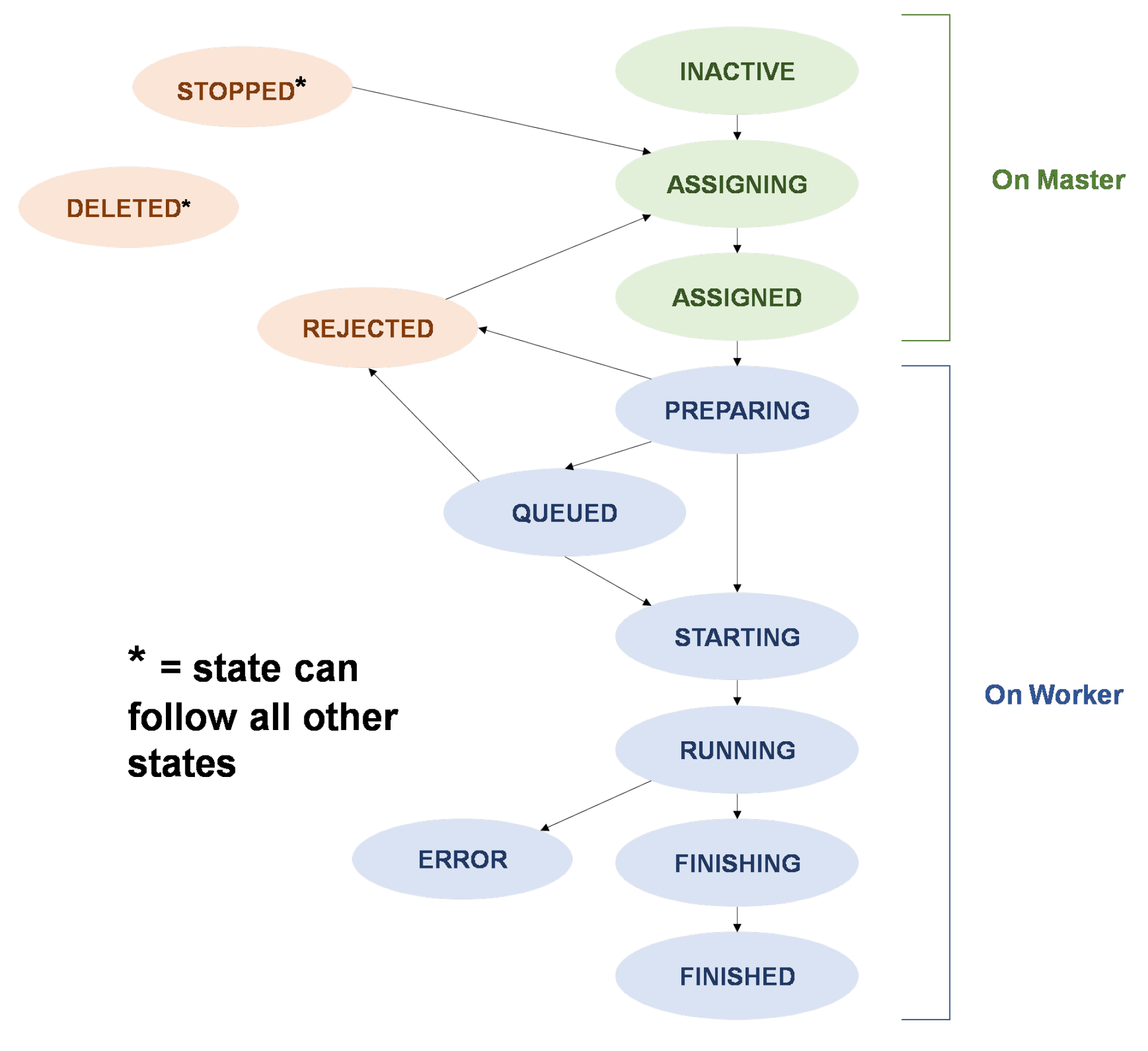
Note: All "On Worker" Job States are updated on Master through the REST Api (See rest/WorkerJobResource):
- PUT worker/job/
$job_id/status:{"status": $new_job_status}
Similarly, for Worker States see rest/WorkerResource