This desktop repo is a configuration menu app for you to customize the operation of your WeatherESPLite controller. After downloading the latest release, run the executable in a Unix operating system environment. If you wish download/run the source code yourself, please follow these steps:
- Clone this repo to your machine.
- Open up the pre-configured dev container in VSCode.
- Open a terminal, and type the following commands (the ./src... command runs the main application, the ./tst... command runs the unit tests):
cd buildcmake ..make all./src/Weatherlite_run./tst/Weatherlite_tst
- A basic home automation system to act as an all-in-one light/thermometer/status display using a development board
- Connects to the internet to retrieve current weather data which can be used to update lights/displays attached to the controller
- Uses a dimmable RGB LED to simulate a porch light, and a small LED display to project relevant weather info
- Has the ability to work with wifi or without using local temperature/light sensors
- Home owners who are looking for a smart home system for lighting/temperature sensing/weather info, but are not willing to spend the hundreds of dollars on a smart home lighting system like Phillips Hue, etc.
- Business owners who are looking for configurable exterior lighting/thermometer solutions that don’t require constant attention
- We want a cost-effective smart lighting solution for a home/business, but there are not many good ones on the market
- We want to customize our home lighting, but solutions such as Google Home don’t offer the customization that I am looking for
- Phillips Hue, Wyze, Lifx, overall smart home technologies such as Google Home
- Novel: cheap and simple, not too many unnecessary features as it is adaptable
- While primarily being a weather controlled light, it can be used for other features which can be easily configured in a desktop application
- Microcontrollers are more customizable, so homeowners and business owners alike can use this system in ways that Google Home or the competitors wouldn’t let you
Make it clear that the system can be built, making good use of the available resources and technology.
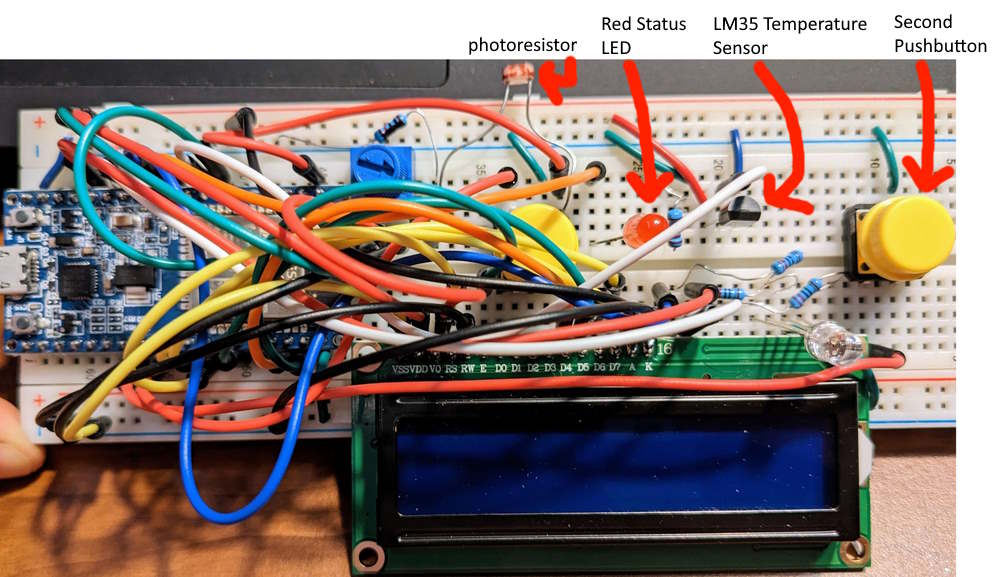
- A hardware prototype has already been built, meaning all components (such as the LED, display, buttons, relevant sensors) are already attached to the development board
- We are all computer/electrical engineering majors, and have good access to microcontroller electronics kits, breadboards, LEDs, etc.
- We will be programming the development board using Arduino C, which is comparable to C++ which we have all learned in class
- Our product is divided into two components, a hardware controller and a desktop CLI (command line interface) app that will produce a configuration file to be used with the controller
- The desktop app will use a menu system to ask the user relevant configuration parameters, such as:
- the location they will be installing the controller
- what mode they want the controller to run in
- what units (metric/imperial, temperature units)
- After the user enters all relevant configuration parameters, the desktop app will produce a JSON configuration file
- This JSON file will be used by the controller repo for configuration to produce a custom executable based on what the user entered
- At its core, the WeatherESPLite controller uses an ESP32
- Has plenty of analog/digital I/O and the capability to connect to the internet via WiFi
- Handles retrieving weather data from OpenWeatherMap API to set values for connected hardware components
- The additional hardware components include:
- A dimmable RGB LED light - Has configurable brightness and color
- A 16x2 character LCD display - Displays weather data (or other data as configured) in a readable format
- A red status LED - Provide additional information if controller is functioning/nonfunctioning
- Two pushbuttons - For input to the controller (if desired)
- An LM35 temperature sensor - Used to gather local temperature data
- A photoresistor - Used to gather local light data
- The method in which the controller is customized is quite unique, using a small desktop application to create configuration parameters
- The microcontroller is able to function in a variety of methods as selected by the user, but is able to be simply plug-and-play as well (if the user prefers the default configuration)
- This project is a way for us to penetrate the IoT/smart home market
- For programming the desktop application, we are using C++ inside a VSCode Dev Container with the following libraries:
- libcurl - For accessing the internet and sending HTTP requests
- JSON - For parsing JSON returned from HTTP requests, and generating JSON configuration file
- GoogleTest - For unit testing of desktop repo code
- For programming the controller application, we are using Arduino-C (C++ with hardware-specific features) and the PlatformIO IDE inside a VSCode Dev Container with the following libraries:
- Arduino - For accessing hardware-specific programming features
- LiquidCrystal - For interfacing with 16x2 LCD display
- WiFi - For connecting to the internet over WiFi using ESP32 hardware
- HTTPClient - For sending HTTP GET requests to OpenWeatherMap API
- ArduinoJson - For parsing JSON returned from HTTP requests, parsing "config.json" file
- SPIFFS - For generating a small filesystem, ability to store contents of "config.json" on controller
- Unity - For unit/on-board testing of controller repo code
- Lack of time commitment
- Members of our group are all full-time students, and may prioritize other coursework over development of our product
- We will use schedule weekly meeting times
- Will follow an agile methodology where issues are assigned at the start of a sprint and are expected to get done by the end of the sprint
- We want to create a basic home automation system using a microcontroller and a dimmable LED array
- We will use GPS and weather APIs to dim/brighten the light based on conditions in the area that the microcontroller is located in
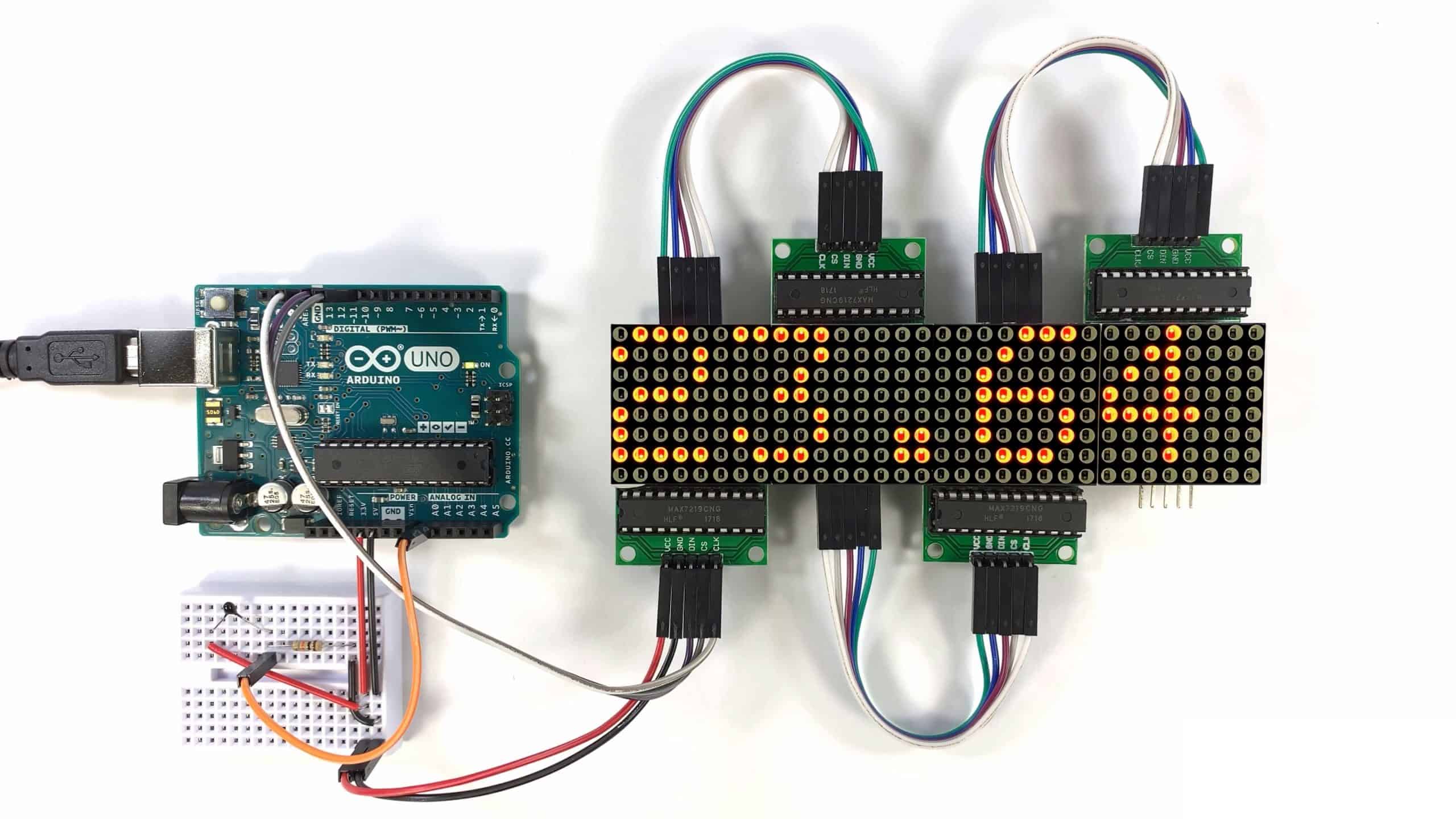
- As a stand-in for a fancy dimmable LED porch light, we will use an LED matrix that is included in almost all microcontroller kits
- There are opportunities for expandability, such as a proximity sensor, temperature sensor, etc.

- Home owners who are looking for a smart home system for lighting, but are not willing to spend the hundreds of dollars on a smart home lighting system like Phillips Hue, etc.
- Business owners who are looking for exterior lighting solutions that don’t require constant attention
- We want a cost-effective smart lighting solution for my home/business, but there are not many good ones on the market.
- We want to customize my lighting, but solutions such as Google Home don’t offer the customization that I am looking for.
- Phillips Hue, Wyze, Lifx, overall smart home technologies such as Google Home.
- Novel: cheap and simple, not too many unnecessary features as it is adaptable. Microcontrollers are more customizable, so homeowners and business owners alike can use this system in ways that Google Home or the competitors wouldn’t let you
Make it clear that the system can be built, making good use of the available resources and technology.
- Microcontroller & 8x8 LED matrix are easily accessible
- We are all computer/electrical engineering majors, and have good access to microcontroller electronics kits, breadboards, LEDs, etc.
- We will be programming the microcontroller using Arduino C, which is comparable to C++.
Describe at a very high level the system's architecture, identifying the components/modules that will interact.
- We will be using an ESP32 microcontroller
- We picked this microcontroller for it’s wifi and bluetooth functionality
- The additional hardware requirements include:
- Insulated Copper Wire
- LED matrix display
- Breadboard
- Potentially other sensors for design expansion of additional functionality
- What is interesting about this project from a technical point of view?
- At the end of our project, we will have a fully functioning physical prototype that can be demonstrated at a presentation
- This project is a way for us to penetrate the IoT/smart home market
- Optionally, what languages/toolkits do you propose to use for the
Development?
- The language will be Arduino C - C++ with additional hardware-specific libraries
- LED matrix libraries, ESP32 wifi libraries
- Arduino IDE 2.0.3 to flash executable to microcontroller
- Lead times in purchasing the hardware
- We will use hardware that we already have, and purchase other necessary components from Amazon early