A Deep Thinking Trading system has many departments, each made up of sub-agents that use logical flows to make smart decisions. For example, an Analyst team gathers data from diverse sources, a Researcher team debates and analyzes this data to form a strategy, and the Execution team refines and approves the trade while working alongside portfolio management, other supporting sub-agents, and more.
There is a lot that happens under the hood, a typical flow works like this …

- First, a team of specialized Analyst agents gathers 360-degree market intelligence, collecting everything from technical data and news to social media sentiment and company fundamentals.
- Then, a Bull and a Bear agent engage in an adversarial debate to stress-test the findings, which a Research Manager synthesizes into a single, balanced investment strategy.
- Next, a Trader agent translates this strategy into a concrete, actionable proposal, which is immediately scrutinized by a multi-perspective Risk Management team (Risky, Safe, and Neutral).
- The final, binding decision is made by a Portfolio Manager agent, who weighs the Trader’s plan against the risk debate to give the final approval.
- After approval, the system extracts a clean, machine-readable signal (BUY, SELL, or HOLD) from the manager’s natural language decision for execution and auditing.
- Finally, the entire process creates a feedback loop. Agents reflect on the trade’s outcome to generate new lessons, which are stored in their long-term memory to continuously improve future performance.
In this blog, we will code and visualize an advanced agent-based trading system where Analysts, Researchers, Traders, Risk Managers, and a Portfolio Manager work together to execute smart trades.
If you are new to finance, Please take a look at these two articles to understand the fundamentals:
- “9 Must-Know Financial Terms for Beginners” from Holborn Assets Covers essential finance concepts like assets, liabilities, net worth, cash flow, interest rate, diversification, inflation, and more — perfect for building a solid financial vocabulary. holbornassets.sa
- “Stock Market Basics: What Beginner Investors Should Know” NerdWallet, Explains how the stock market works, the role of brokers, exchanges, indexes (like the NYSE, Nasdaq, S&P 500), and how to get started with a brokerage account.
- Setting up the Environment, LLMs, and LangSmith Tracing
- Designing the Shared Memory
- Building the Agent Toolkit with Live Data
- Implementing Long-Term Memory for Continuous Learning
- Deploying the Analyst Team for 360-Degree Market Intelligence
- Building The Bull vs Bear Researcher Team
- Creating The Trader and Risk Management Agents
- Portfolio Manager Binding Decision
- Orchestrating the Agent Society
- Compiling and Visualizing the Agentic Workflow
- Executing the End-to-End Trading Analysis
- Extracting Clean Signals and Agent Reflection
- Auditing the System using 3 Evaluation Strategies
- Key Takeaways and Future Directions
First, we should keep our API keys safe and set up tracing with LangSmith. Tracing is important because it lets us see what’s happening inside our multi-agent system step by step. This makes it much easier to debug problems and understand how the agents are working. If we want a reliable system in production, tracing isn’t optional, it’s mandatory.
# First, ensure you have the necessary libraries installed
# !pip install -U langchain langgraph langchain_openai tavily-python yfinance finnhub-python stockstats beautifulsoup4 chromadb rich

import os
from getpass import getpass

# Define a helper function to set environment variables securely.
def _set_env(var: str):
    # If the environment variable is not already set, prompt the user to enter it.
    if not os.environ.get(var):
        os.environ[var] = getpass(f"Enter your {var}: ")

# Set API keys for the services we'll use.
_set_env("OPENAI_API_KEY")
_set_env("FINNHUB_API_KEY")
_set_env("TAVILY_API_KEY")
_set_env("LANGSMITH_API_KEY")

# Enable LangSmith tracing for full observability of our agentic system.
os.environ["LANGSMITH_TRACING"] = "true"

# Define the project name for LangSmith to organize traces.
os.environ["LANGSMITH_PROJECT"] = "Deep-Trading-System"
We’re setting API keys for OpenAI, Finnhub, and Tavily.
- OpenAI to runs our LLMs (you can also test with free credits from open-source LLM providers like Together AI).
- Finnhub for real-time stock market data (free tier gives limited API calls).
- Tavily for web search & news (free tier available).
- LangSmith for tracing and observability (free tier lets you track and debug agents easily).
The LANGSMITH_PROJECT variable is particularly important as it make sure all traces from this run are grouped together in the LangSmith dashboard, making it easy to isolate and analyze this specific execution.
To make our system modular, we will use a central configuration dictionary. This acts as our control panel, allowing us to easily experiment with different models or parameters without changing the core agent logic.
from pprint import pprint

# Define our central configuration for this notebook run.
config = {
    "results_dir": "./results",
    # LLM settings specify which models to use for different cognitive tasks.
    "llm_provider": "openai",
    "deep_think_llm": "gpt-4o",       # A powerful model for complex reasoning and final decisions.
    "quick_think_llm": "gpt-4o-mini", # A fast, cheaper model for data processing and initial analysis.
    "backend_url": "https://api.openai.com/v1",
    # Debate and discussion settings control the flow of collaborative agents.
    "max_debate_rounds": 2,          # The Bull vs. Bear debate will have 2 rounds.
    "max_risk_discuss_rounds": 1,    # The Risk team has 1 round of debate.
    "max_recur_limit": 100,          # Safety limit for agent loops.
    # Tool settings control data fetching behavior.
    "online_tools": True,            # Use live APIs; set to False to use cached data for faster, cheaper runs.
    "data_cache_dir": "./data_cache" # Directory for caching online data.
}
# Create the cache directory if it doesn't already exist.
os.makedirs(config["data_cache_dir"], exist_ok=True)
print("Configuration dictionary created:")
pprint(config)
These parameters will make sense to you more later in the blog but let’s break down a few key parameters here. The choice of two different models (deep_think_llm and quick_think_llm) is a deliberate architectural decision to optimize for both cost and performance. deep_think_llm (gpt-4o) → handles complex reasoning and final decisions.
quick_think_llm(gpt-4o-mini) for faster, cheaper for routine tasks.- max_debate_rounds is for controls how many rounds the Bull vs. Bear agents argue.
- max_risk_discuss_rounds is for how long the Risk team debates.
- online_tools / data_cache_dir let us switch between live API calls and cached data.
With our configuration defined, we can now initialize the LLMs that will serve as the cognitive engines for our agents.
from langchain_openai import ChatOpenAI

# Initialize the powerful LLM for high-stakes reasoning tasks.
deep_thinking_llm = ChatOpenAI(
    model=config["deep_think_llm"],
    base_url=config["backend_url"],
    temperature=0.1
)
# Initialize the faster, cost-effective LLM for routine data processing.
quick_thinking_llm = ChatOpenAI(
    model=config["quick_think_llm"],
    base_url=config["backend_url"],
    temperature=0.1
)
We have now instantiated our two LLMs. Note the temperature parameter is set to 0.1.
For financial analysis, we want responses that are deterministic and fact-based, not highly creative.
A low temperature encourages the model to stick to the most likely, grounded outputs.
The AgentState is the shared memory the central nervous system of our entire multi-agent system.
In LangGraph, the state is a central object that is passed between all nodes. As each agent completes its task, it reads from and writes to this state.

We will define the data structures for this global memory using Python TypedDict. This gives us a strongly-typed, predictable structure, which is important for managing complexity. We will start by defining the sub-states for our two debate teams.
from typing import Annotated, Sequence, List
from typing_extensions import TypedDict
from langgraph.graph import MessagesState

# State for the researcher team's debate, acting as a dedicated scratchpad.
class InvestDebateState(TypedDict):
    bull_history: str      # Stores arguments made by the Bull agent.
    bear_history: str      # Stores arguments made by the Bear agent.
    history: str           # The full transcript of the debate.
    current_response: str  # The most recent argument made.
    judge_decision: str    # The manager's final decision.
    count: int             # A counter to track the number of debate rounds.

# State for the risk management team's debate.
class RiskDebateState(TypedDict):
    risky_history: str     # History of the aggressive risk-taker.
    safe_history: str      # History of the conservative agent.
    neutral_history: str   # History of the balanced agent.
    history: str           # Full transcript of the risk discussion.
    latest_speaker: str    # Tracks the last agent to speak.
    current_risky_response: str
    current_safe_response: str
    current_neutral_response: str
    judge_decision: str    # The portfolio manager's final decision.
    count: int             # Counter for risk discussion rounds.
InvestDebateState and RiskDebateState act as dedicated scratchpads. We are designing this pattern as it keeps the state organized and prevents different debates from interfering with each other. The history fields will store the full transcript, providing context for later agents, and the count parameter is crucial for our graph conditional logic to know when to end the debate.
Now, we define the main AgentState that incorporates these sub-states.
# The main state that will be passed through the entire graph.
# It inherits from MessagesState to include a 'messages' field for chat history.
class AgentState(MessagesState):
    company_of_interest: str          # The stock ticker we are analyzing.
    trade_date: str                   # The date for the analysis.
    sender: str                       # Tracks which agent last modified the state.
    # Each analyst will populate its own report field.
    market_report: str
    sentiment_report: str
    news_report: str
    fundamentals_report: str
    # Nested states for the debates.
    investment_debate_state: InvestDebateState
    investment_plan: str              # The plan from the Research Manager.
    trader_investment_plan: str       # The actionable plan from the Trader.
    risk_debate_state: RiskDebateState
    final_trade_decision: str         # The final decision from the Portfolio Manager.
The main AgentState is now our complete data schema. Notice how it contains fields for the outputs from each analyst, like market_report, and also nests the debate states we just defined. This structured approach allows us to trace the flow of information from the initial raw data all the way to the final_trade_decision.
An agent is only as good as its tools. So we need a Toolkit where we define all the functions our agents can use to interact with the outside world. This is what grounds their reasoning in real, up-to-the-minute data.

Each function is decorated with @tool from LangChain, along with Annotated type hints, providing a schema that the LLM uses to understand the tool's purpose and inputs. Let's start with a tool to fetch raw historical price data.
import yfinance as yf
from langchain_core.tools import tool

@tool
def get_yfinance_data(
    symbol: Annotated[str, "ticker symbol of the company"],
    start_date: Annotated[str, "Start date in yyyy-mm-dd format"],
    end_date: Annotated[str, "End date in yyyy-mm-dd format"],
) -> str:
    """Retrieve the stock price data for a given ticker symbol from Yahoo Finance."""
    try:
        ticker = yf.Ticker(symbol.upper())
        data = ticker.history(start=start_date, end=end_date)
        if data.empty:
            return f"No data found for symbol '{symbol}' between {start_date} and {end_date}"
        return data.to_csv()
    except Exception as e:
        return f"Error fetching Yahoo Finance data: {e}"
In this function, the Annotated type hints are not just for human developers, they provide a description that the LLM uses to understand the purpose of each parameter (e.g., that symbol should be a "ticker symbol").
We return the data as a .to_csv() string, a simple format that LLMs are very effective at parsing. Next, we need a tool to derive common technical indicators from that raw data.
from stockstats import wrap as stockstats_wrap

@tool
def get_technical_indicators(
    symbol: Annotated[str, "ticker symbol of the company"],
    start_date: Annotated[str, "Start date in yyyy-mm-dd format"],
    end_date: Annotated[str, "End date in yyyy-mm-dd format"],
) -> str:
    """Retrieve key technical indicators for a stock using stockstats library."""
    try:
        df = yf.download(symbol, start=start_date, end=end_date, progress=False)
        if df.empty:
            return "No data to calculate indicators."
        stock_df = stockstats_wrap(df)
        indicators = stock_df[['macd', 'rsi_14', 'boll', 'boll_ub', 'boll_lb', 'close_50_sma', 'close_200_sma']]
        return indicators.tail().to_csv()
    except Exception as e:
        return f"Error calculating stockstats indicators: {e}"
Here, we use the stockstats library for its simplicity. We select a specific list of common indicators (MACD, RSI, etc.) and return only the tail() of the data. This is an important practical consideration to keep the context passed to the LLM concise and relevant, avoiding unnecessary tokens and cost.
Now for company-specific news, using the Finnhub API.
import finnhub

@tool
def get_finnhub_news(ticker: str, start_date: str, end_date: str) -> str:
    """Get company news from Finnhub within a date range."""
    try:
        finnhub_client = finnhub.Client(api_key=os.environ["FINNHUB_API_KEY"])
        news_list = finnhub_client.company_news(ticker, _from=start_date, to=end_date)
        news_items = []
        for news in news_list[:5]: # Limit to 5 results
            news_items.append(f"Headline: {news['headline']}\nSummary: {news['summary']}")
        return "\n\n".join(news_items) if news_items else "No Finnhub news found."
    except Exception as e:
        return f"Error fetching Finnhub news: {e}"
The tools above provide structured data. For less tangible factors like market buzz, we need a general web search tool. We will use Tavily. We will initialize it once for efficiency.
from langchain_community.tools.tavily_search import TavilySearchResults

# Initialize the Tavily search tool once. We can reuse this instance for multiple specialized tools.
tavily_tool = TavilySearchResults(max_results=3)
Now we create three specialized search tools. This is a critical design choice. While they all use the same Tavily engine, providing the LLM with distinct tools like get_social_media_sentiment versus a generic search_web simplifies its decision-making process. It’s easier for the LLM to choose the right tool for the job when its purpose is narrow and clearly defined.
@tool
def get_social_media_sentiment(ticker: str, trade_date: str) -> str:
    """Performs a live web search for social media sentiment regarding a stock."""
    query = f"social media sentiment and discussions for {ticker} stock around {trade_date}"
    return tavily_tool.invoke({"query": query})

@tool
def get_fundamental_analysis(ticker: str, trade_date: str) -> str:
    """Performs a live web search for recent fundamental analysis of a stock."""
    query = f"fundamental analysis and key financial metrics for {ticker} stock published around {trade_date}"
    return tavily_tool.invoke({"query": query})
@tool
def get_macroeconomic_news(trade_date: str) -> str:
    """Performs a live web search for macroeconomic news relevant to the stock market."""
    query = f"macroeconomic news and market trends affecting the stock market on {trade_date}"
    return tavily_tool.invoke({"query": query})
Finally, we’ll aggregate all these functions into a single Toolkit class for clean, organized access.
# The Toolkit class aggregates all defined tools into a single, convenient object.
class Toolkit:
    def __init__(self, config):
        self.config = config
        self.get_yfinance_data = get_yfinance_data
        self.get_technical_indicators = get_technical_indicators
        self.get_finnhub_news = get_finnhub_news
        self.get_social_media_sentiment = get_social_media_sentiment
        self.get_fundamental_analysis = get_fundamental_analysis
        self.get_macroeconomic_news = get_macroeconomic_news

# Instantiate the Toolkit, making all tools available through this single object.
toolkit = Toolkit(config)
print(f"Toolkit class defined and instantiated with live data tools.")
Our foundation for agent action is now complete. We have a comprehensive suite of tools that allows our system to gather a rich, multi-faceted view of any financial asset.
For our agents to improve over time, they need long-term memory. To enable true learning, agents must be able to reflect on past decisions and retrieve those lessons when faced with similar situations in the future.

The FinancialSituationMemory class is the core of this learning loop. It uses a ChromaDB vector store to save textual summaries of past situations and the lessons learned from them.
import chromadb
from openai import OpenAI

# The FinancialSituationMemory class provides long-term memory
# for storing and retrieving financial situations + recommendations.
class FinancialSituationMemory:
    def __init__(self, name, config):
        # Use OpenAI’s small embedding model for vectorizing text
        self.embedding_model = "text-embedding-3-small"

        # Initialize OpenAI client (pointing to your configured backend)
        self.client = OpenAI(base_url=config["backend_url"])

        # Create a ChromaDB client (with reset allowed for testing)
        self.chroma_client = chromadb.Client(chromadb.config.Settings(allow_reset=True))

        # Create a collection (like a table) to store situations + advice
        self.situation_collection = self.chroma_client.create_collection(name=name)

    def get_embedding(self, text):
        # Generate an embedding (vector) for the given text
        response = self.client.embeddings.create(model=self.embedding_model, input=text)
        return response.data[0].embedding

    def add_situations(self, situations_and_advice):
        # Add new situations and recommendations to memory
        if not situations_and_advice:
            return

        # Offset ensures unique IDs (in case new data is added later)
        offset = self.situation_collection.count()
        ids = [str(offset + i) for i, _ in enumerate(situations_and_advice)]

        # Separate situations and their corresponding advice
        situations = [s for s, r in situations_and_advice]
        recommendations = [r for s, r in situations_and_advice]

        # Generate embeddings for all situations
        embeddings = [self.get_embedding(s) for s in situations]

        # Store everything in Chroma (vector DB)
        self.situation_collection.add(
            documents=situations,
            metadatas=[{"recommendation": rec} for rec in recommendations],
            embeddings=embeddings,
            ids=ids,
        )

    def get_memories(self, current_situation, n_matches=1):
        # Retrieve the most similar past situations for a given query
        if self.situation_collection.count() == 0:
            return []

        # Embed the new/current situation
        query_embedding = self.get_embedding(current_situation)

        # Query the collection for similar embeddings
        results = self.situation_collection.query(
            query_embeddings=[query_embedding],
            n_results=min(n_matches, self.situation_collection.count()),
            include=["metadatas"],  # Only return recommendations
        )

        # Return extracted recommendations from the matches
        return [{'recommendation': meta['recommendation']} for meta in results['metadatas'][0]]
Let’s break down the key methods.
- The
__init__method sets up a unique ChromaDBcollectionfor each agent, giving them their own private memory space. - The
add_situationsmethod is where learning happens: it takes a situation (the context) and a lesson, creates a vector embedding of the situation, and stores both in the database. - The
metadatasparameter is used to store the actual lesson text, while thedocumentsstore the context. - Finally,
get_memoriesis the retrieval step. It takes thecurrent_situation, creates aquery_embedding, and performs a similarity search to find the most relevant lessons from the past.
Now, we will create a dedicated memory instance for each learning agent.
# Create a dedicated memory instance for each agent that learns.
bull_memory = FinancialSituationMemory("bull_memory", config)
bear_memory = FinancialSituationMemory("bear_memory", config)
trader_memory = FinancialSituationMemory("trader_memory", config)
invest_judge_memory = FinancialSituationMemory("invest_judge_memory", config)
risk_manager_memory = FinancialSituationMemory("risk_manager_memory", config)
We have now created five separate memory instances. This specialization is important because a lesson learned by the Bull agent (e.g., “In a strong uptrend, valuation concerns are less important”) might not be relevant for the more conservative Safe Risk Analyst.
By giving them separate memories, we ensure the lessons they retrieve are specific to their roles.
With our environment, state, tools, and memory all defined, the foundational layer of our system is complete. We are now ready to start building the agents themselves.
With our foundation in place, it’s time to introduce the first team of agents, the Analysts. This team is the intelligence-gathering arm of our firm.
A successful trading decision cannot be made in a vacuum, it requires a holistic understanding of the asset from multiple angles.
We will therefore create four specialized analysts, each responsible for a unique domain.

Their collective goal is to produce a comprehensive, 360-degree view of the stock and its market environment, populating our AgentState with the raw intelligence needed for the next stage of strategic analysis.
To avoid repeating code, we will first build a “factory” function. This is a powerful software engineering pattern that allows us to create each unique analyst node from a common template.
from langchain_core.prompts import ChatPromptTemplate, MessagesPlaceholder

# This function is a factory that creates a LangGraph node for a specific type of analyst.
def create_analyst_node(llm, toolkit, system_message, tools, output_field):
    """
    Creates a node for an analyst agent.
    Args:
        llm: The language model instance to be used by the agent.
        toolkit: The collection of tools available to the agent.
        system_message: The specific instructions defining the agent's role and goals.
        tools: A list of specific tools from the toolkit that this agent is allowed to use.
        output_field: The key in the AgentState where this agent's final report will be stored.
    """
    # Define the prompt template for the analyst agent.
    prompt = ChatPromptTemplate.from_messages([
        ("system",
         "You are a helpful AI assistant, collaborating with other assistants."
         " Use the provided tools to progress towards answering the question."
         " If you are unable to fully answer, that's OK; another assistant with different tools"
         " will help where you left off. Execute what you can to make progress."
         " You have access to the following tools: {tool_names}.\n{system_message}"
         " For your reference, the current date is {current_date}. The company we want to look at is {ticker}"),
        # MessagesPlaceholder allows us to pass in the conversation history.
        MessagesPlaceholder(variable_name="messages"),
    ])
    # Partially fill the prompt with the specific system message and tool names for this analyst.
    prompt = prompt.partial(system_message=system_message)
    prompt = prompt.partial(tool_names=", ".join([tool.name for tool in tools]))
    # Bind the specified tools to the LLM. This tells the LLM which functions it can call.
    chain = prompt | llm.bind_tools(tools)
    # This is the actual function that will be executed as a node in the graph.
    def analyst_node(state):
        # Fill in the final pieces of the prompt with data from the current state.
        prompt_with_data = prompt.partial(current_date=state["trade_date"], ticker=state["company_of_interest"])
        # Invoke the chain with the current messages from the state.
        result = prompt_with_data.invoke(state["messages"])
        report = ""
        # If the LLM didn't call a tool, it means it has generated the final report.
        if not result.tool_calls:
            report = result.content
        # Return the LLM's response and the final report to update the state.
        return {"messages": [result], output_field: report}
    return analyst_node
Let’s break down this factory function. create_analyst_node is a higher-order function that returns another function (analyst_node), which will serve as our actual node in the LangGraph workflow.
- The
system_messageparameter is crucial; it's where we inject the unique "personality" and goals for each analyst. - The
toolsparameter enforces the division of labor—the Market Analyst can't access social media tools, and vice versa. - The
llm.bind_tools(tools)call is what makes the agent tool-using. It provides the LLM with the schemas of the available tools so it can decide which to call.
Now that we have our factory, we can create our first specialist: the Market Analyst. Its job is purely quantitative, focusing on price action and technical indicators. We will equip it only with the tools necessary for this task.
# Market Analyst: Focuses on technical indicators and price action.
market_analyst_system_message = "You are a trading assistant specialized in analyzing financial markets. Your role is to select the most relevant technical indicators to analyze a stock's price action, momentum, and volatility. You must use your tools to get historical data and then generate a report with your findings, including a summary table."
market_analyst_node = create_analyst_node(
    quick_thinking_llm,
    toolkit,
    market_analyst_system_message,
    [toolkit.get_yfinance_data, toolkit.get_technical_indicators],
    "market_report"
)
In this block, we define the market_analyst_system_message to give the agent a clear persona and objective. We then call our factory, passing in the quick_thinking_llm, the toolkit, this message, and a specific list of tools, get_yfinance_data and get_technical_indicators. Finally, we specify that its output should be saved to the market_report field in our AgentState.
Next, the Social Media Analyst. Its role is to capture the qualitative, often unpredictable, public mood around a stock.
# Social Media Analyst: Gauges public sentiment.
social_analyst_system_message = "You are a social media analyst. Your job is to analyze social media posts and public sentiment for a specific company over the past week. Use your tools to find relevant discussions and write a comprehensive report detailing your analysis, insights, and implications for traders, including a summary table."
social_analyst_node = create_analyst_node(
    quick_thinking_llm,
    toolkit,
    social_analyst_system_message,
    [toolkit.get_social_media_sentiment],
    "sentiment_report"
)
Here, we’ve defined the agent responsible for sentiment analysis. Notice that its tool list is very narrow, containing only get_social_media_sentiment.
This specialization is a key principle of multi-agent design, ensuring each agent focuses on its core competency.
Our third specialist is the News Analyst, responsible for providing both company-specific and macroeconomic context.
# News Analyst: Covers company-specific and macroeconomic news.
news_analyst_system_message = "You are a news researcher analyzing recent news and trends over the past week. Write a comprehensive report on the current state of the world relevant for trading and macroeconomics. Use your tools to be comprehensive and provide detailed analysis, including a summary table."
news_analyst_node = create_analyst_node(
    quick_thinking_llm,
    toolkit,
    news_analyst_system_message,
    [toolkit.get_finnhub_news, toolkit.get_macroeconomic_news],
    "news_report"
)
The News Analyst is given two tools. This is a deliberate choice: get_finnhub_news provides micro-level, company-specific information, while get_macroeconomic_news provides the macro-level context. A comprehensive news analysis requires both perspectives.
Finally, our Fundamentals Analyst will investigate the company financial health.
# Fundamentals Analyst: Dives into the company's financial health.
fundamentals_analyst_system_message = "You are a researcher analyzing fundamental information about a company. Write a comprehensive report on the company's financials, insider sentiment, and transactions to gain a full view of its fundamental health, including a summary table."
fundamentals_analyst_node = create_analyst_node(
    quick_thinking_llm,
    toolkit,
    fundamentals_analyst_system_message,
    [toolkit.get_fundamental_analysis],
    "fundamentals_report"
)
It’s important to understand how these agents work. They use a pattern called ReAct (Reasoning and Acting). This isn’t a single LLM call, it’s a loop:
- Reason: The LLM receives the prompt and decides if it needs a tool.
- Act: If so, it generates a
tool_call(e.g.,toolkit.get_yfinance_data(...)). - Observe: Our graph executes this tool, and the result (the data) is passed back to the LLM.
- Repeat: The LLM now has new information and decides its next step — either calling another tool or generating the final report.
This loop allows the agents to perform complex, multi-step data gathering tasks autonomously. To manage this loop, we need a helper function.
from langgraph.prebuilt import ToolNode, tools_condition
from langchain_core.messages import HumanMessage
import datetime
from rich.console import Console
from rich.markdown import Markdown

# Initialize a console for rich printing.
console = Console()
# Helper function to run a single analyst's ReAct loop.
def run_analyst(analyst_node, initial_state):
    state = initial_state
    # Get all available tools from our toolkit instance.
    all_tools_in_toolkit = [getattr(toolkit, name) for name in dir(toolkit) if callable(getattr(toolkit, name)) and not name.startswith("__")]
    # The ToolNode is a special LangGraph node that executes tool calls.
    tool_node = ToolNode(all_tools_in_toolkit)
    # The ReAct loop can have up to 5 steps of reasoning and tool calls.
    for _ in range(5):
        result = analyst_node(state)
        # The tools_condition checks if the LLM's last message was a tool call.
        if tools_condition(result) == "tools":
            # If so, execute the tools and update the state.
            state = tool_node.invoke(result)
        else:
            # If not, the agent is done, so we break the loop.
            state = result
            break
    return state
The run_analyst function orchestrates the ReAct loop for a single agent. The tools_condition function is a LangGraph utility that inspects the agent's last message. If it contains a tool_calls attribute, it returns "tools", directing the flow to the tool_node for execution. Otherwise, the agent has finished its work.
Now, let’s set our initial state and execute the first analyst.
TICKER = "NVDA"
# Use a recent date for live data fetching
TRADE_DATE = (datetime.date.today() - datetime.timedelta(days=2)).strftime('%Y-%m-%d')

# Define the initial state for the graph run.
initial_state = AgentState(
    messages=[HumanMessage(content=f"Analyze {TICKER} for trading on {TRADE_DATE}")],
    company_of_interest=TICKER,
    trade_date=TRADE_DATE,
    # Initialize the debate states with default empty values.
    investment_debate_state=InvestDebateState({'history': '', 'current_response': '', 'count': 0, 'bull_history': '', 'bear_history': '', 'judge_decision': ''}),
    risk_debate_state=RiskDebateState({'history': '', 'latest_speaker': '', 'current_risky_response': '', 'current_safe_response': '', 'current_neutral_response': '', 'count': 0, 'risky_history': '', 'safe_history': '', 'neutral_history': '', 'judge_decision': ''})
)
# Run Market Analyst
print("Running Market Analyst...")
market_analyst_result = run_analyst(market_analyst_node, initial_state)
initial_state['market_report'] = market_analyst_result.get('market_report', 'Failed to generate report.')
console.print("----- Market Analyst Report -----")
console.print(Markdown(initial_state['market_report']))
We are targeting NVIDIA stocks for now, First we need to observe the market by first running the marketing analyst, this is what we get.
# Running Market Analyst...
----- Market Analyst Report -----
Based on the technical analysis of NVDA, the stock demonstrates a strong bullish trend. The price is consistently trading above its 50-day and 200-day simple moving averages, which are both in a clear uptrend. The MACD line is above the signal line, confirming positive momentum. The RSI_14 is elevated but not yet in overbought territory, suggesting there is still room for potential upside. The Bollinger Bands show a recent expansion, indicating an increase in volatility which often accompanies strong price moves. In summary, all key technical indicators point towards continued bullish strength.

| Indicator      | Signal       | Insight                                                       |
|----------------|--------------|---------------------------------------------------------------|
| SMAs (50, 200) | Bullish      | Confirms a strong, sustained uptrend.                         |
| MACD           | Bullish      | Positive momentum is currently in control.                    |
| RSI (14)       | Strong       | Indicates strong buying pressure, but not yet exhausted.      |
| Bollinger Bands| Expanding    | Suggests increasing volatility and potential for a breakout.  |
The Market Analyst has successfully executed its task. By inspecting the LangSmith trace, we would see a two-step process:
- first, it called
get_yfinance_datato fetch prices, then it used that data to callget_technical_indicators. - The final report is a clear, structured summary with a table, which is exactly what its prompt requested. This report is now stored in
initial_state['market_report'].
The Market Analyst has given us a strong quantitative signal. Now, let’s see if the public mood aligns with the charts.
# Run Social Media Analyst
print("\nRunning Social Media Analyst...")
social_analyst_result = run_analyst(social_analyst_node, initial_state)
initial_state['sentiment_report'] = social_analyst_result.get('sentiment_report', 'Failed to generate report.')
console.print("----- Social Media Analyst Report -----")
console.print(Markdown(initial_state['sentiment_report']))
Running Social Media Analyst...
----- Social Media Analyst Report -----
Social media sentiment for NVDA is overwhelmingly bullish. Platforms like X (formerly Twitter) and Reddit show a high volume of positive discussion, primarily centered around the company dominance in the AI chip market and anticipation of strong earnings. Key influencers and retail communities are actively promoting a buy and hold strategy. There is some minor chatter regarding the stocks high valuation, but this is largely drowned out by the positive consensus. The overall sentiment is a strong tailwind for the stock price.
| Platform | Sentiment | Key Themes |
|---------------|--------------|-------------------------------------------------|
| X (Twitter) | Very Bullish | AI Dominance, Analyst Upgrades, Product Hype |
| Reddit | Very Bullish | HODL mentality, Earnings Predictions, Memes |The Social Media Analyst is confirming the bullish thesis. Its report, generated from a live Tavily web search, captures the qualitative “hype” around the stock. This unstructured data is now distilled into a structured report and added to our AgentState.
But now we need to verify this confirmation by gathering the news context.
# Run News Analyst
print("\nRunning News Analyst...")
news_analyst_result = run_analyst(news_analyst_node, initial_state)
initial_state['news_report'] = news_analyst_result.get('news_report', 'Failed to generate report.')
console.print("----- News Analyst Report -----")
console.print(Markdown(initial_state['news_report']))
Running News Analyst...
----- News Analyst Report -----
The news environment for NVDA is positive. Recent company-specific headlines from Finnhub highlight new product announcements and partnerships in the automotive and enterprise AI sectors. Broader macroeconomic news has been favorable for tech stocks, with recent inflation data coming in as expected, calming fears of aggressive central bank policies. There are no significant negative headlines concerning NVDA or the semiconductor industry in the past week.
| News Category | Impact | Summary |
|------------------|-----------|--------------------------------------------------------------------------|
| Company-Specific | Positive | New product announcements and strategic partnerships signal continued growth. |
| Macroeconomic | Neutral+ | Stable inflation and interest rate outlook provide a supportive backdrop. |The News Analyst report adds another layer, confirming that both company-specific and macroeconomic news are supportive. The agent correctly used both of its assigned tools to build this comprehensive picture.
Finally, let’s check the company’s underlying financial health.
# Run Fundamentals Analyst
print("\nRunning Fundamentals Analyst...")
fundamentals_analyst_result = run_analyst(fundamentals_analyst_node, initial_state)
initial_state['fundamentals_report'] = fundamentals_analyst_result.get('fundamentals_report', 'Failed to generate report.')
console.print("----- Fundamentals Analyst Report -----")
console.print(Markdown(initial_state['fundamentals_report']))
Running Fundamentals Analyst...
----- Fundamentals Analyst Report -----
The fundamental picture for NVDA is exceptionally strong, though accompanied by a premium valuation. Web search results confirm that recent earnings reports have consistently beaten analyst expectations, driven by explosive growth in data center revenue. Key metrics like gross margin and return on equity are best-in-class. While the Price-to-Earnings (P/E) ratio is high, it is supported by a very high forward growth rate (PEG ratio is more reasonable). The company balance sheet is robust with a significant cash reserve. This is a fundamentally sound company on a powerful growth trajectory.
| Metric | Status | Insight |
|---------------------|-------------|-----------------------------------------------------------------------|
| Revenue Growth | Exceptional | Data center segment is experiencing hyper-growth due to AI demand. |
| Profit Margins | Excellent | Demonstrates strong pricing power and operational efficiency. |
| Valuation (P/E) | High | The market has priced in significant future earnings growth. |
| Balance Sheet | Strong | Ample cash reserves provide flexibility for R&D and acquisitions. |The final report from the Fundamentals Analyst confirms the strong growth story but also introduces the first note of caution …
“premium valuation” and a “High” P/E ratio.
This is a crucial piece of conflicting information. While everything else appears bullish, the high valuation presents a clear risk.
Our initial_state object is now fully populated with a rich, multi-faceted view of NVDA's market position. With this comprehensive but now clearly conflicting data, the stage is set for our Researcher Team to debate its meaning and forge a coherent strategy.
With the four analyst reports compiled, our AgentState is now packed with raw intelligence. However, raw data can be conflicting and requires interpretation. As we saw, the Fundamentals Analyst introduced a key risk, high valuation that contradicts the otherwise overwhelmingly positive signals.
This is where the Researcher Team comes in.

This team’s purpose is to critically evaluate the evidence by staging a structured, adversarial debate between two opposing viewpoints a Bull and a Bear. This process is designed to prevent confirmation bias and stress-test the investment thesis from both sides. A Research Manager then oversees this debate and has the crucial task of synthesizing the arguments into a single, coherent investment plan.
First, we need to define the logic for these debaters. We’ll create a factory function, similar to the one for our analysts, to produce the researcher nodes.
# This function is a factory that creates a LangGraph node for a researcher agent (Bull or Bear).
def create_researcher_node(llm, memory, role_prompt, agent_name):
    """
    Creates a node for a researcher agent.
    Args:
        llm: The language model instance to be used by the agent.
        memory: The long-term memory instance for this agent to learn from past experiences.
        role_prompt: The specific system prompt defining the agent's persona (Bull or Bear).
        agent_name: The name of the agent, used for logging and identifying arguments.
    """
    def researcher_node(state):
        # First, combine all analyst reports into a single summary for context.
        situation_summary = f"""
        Market Report: {state['market_report']}
        Sentiment Report: {state['sentiment_report']}
        News Report: {state['news_report']}
        Fundamentals Report: {state['fundamentals_report']}
        """
        # Retrieve relevant memories from past, similar situations.
        past_memories = memory.get_memories(situation_summary)
        past_memory_str = "\n".join([mem['recommendation'] for mem in past_memories])

        # Construct the full prompt for the LLM.
        prompt = f"""{role_prompt}
        Here is the current state of the analysis:
        {situation_summary}
        Conversation history: {state['investment_debate_state']['history']}
        Your opponent's last argument: {state['investment_debate_state']['current_response']}
        Reflections from similar past situations: {past_memory_str or 'No past memories found.'}
        Based on all this information, present your argument conversationally."""

        # Invoke the LLM to generate the argument.
        response = llm.invoke(prompt)
        argument = f"{agent_name}: {response.content}"

        # Update the debate state with the new argument.
        debate_state = state['investment_debate_state'].copy()
        debate_state['history'] += "\n" + argument
        # Update the specific history for this agent (Bull or Bear).
        if agent_name == 'Bull Analyst':
            debate_state['bull_history'] += "\n" + argument
        else:
            debate_state['bear_history'] += "\n" + argument
        debate_state['current_response'] = argument
        debate_state['count'] += 1
        return {"investment_debate_state": debate_state}
    return researcher_node
The create_researcher_node function is the core of our debate logic. Let's look at its key components:
situation_summary: It consolidates all four analyst reports into a single block of text. This ensures both debaters are working from the same set of facts.past_memories: Before forming an argument, the agent queries itsmemoryobject. This is a critical step for learning; it allows the agent to recall lessons from previous trades to inform its current stance.- Prompt Structure: The prompt is carefully constructed to include the agent’s role, the analyst reports, the full debate history, the opponent’s most recent argument, and its own long-term memories. This rich context enables sophisticated rebuttals.
- State Updates: The function returns an updated
investment_debate_state, appending the new argument to thehistoryand updating thecount.
Now, let’s define the specific personas for our Bull and Bear and create their nodes.
# The Bull's persona is optimistic, focusing on strengths and growth.
bull_prompt = "You are a Bull Analyst. Your goal is to argue for investing in the stock. Focus on growth potential, competitive advantages, and positive indicators from the reports. Counter the bear's arguments effectively."

# The Bear's persona is pessimistic, focusing on risks and weaknesses.
bear_prompt = "You are a Bear Analyst. Your goal is to argue against investing in the stock. Focus on risks, challenges, and negative indicators. Counter the bull's arguments effectively."
# Create the callable nodes using our factory function.
bull_researcher_node = create_researcher_node(quick_thinking_llm, bull_memory, bull_prompt, "Bull Analyst")
bear_researcher_node = create_researcher_node(quick_thinking_llm, bear_memory, bear_prompt, "Bear Analyst")
With the debaters ready, we need a judge. The Research Manager agent will review the entire debate transcript and produce the final, synthesized investment plan. This is a high-stakes reasoning task, so we will use our powerful deep_thinking_llm.
# This function creates the Research Manager node.
def create_research_manager(llm, memory):
    def research_manager_node(state):
        # The prompt instructs the manager to act as a judge and synthesizer.
        prompt = f"""As the Research Manager, your role is to critically evaluate the debate between the Bull and Bear analysts and make a definitive decision.
        Summarize the key points, then provide a clear recommendation: Buy, Sell, or Hold. Develop a detailed investment plan for the trader, including your rationale and strategic actions.

        Debate History:
        {state['investment_debate_state']['history']}"""
        response = llm.invoke(prompt)
        # The output is the final investment plan, which will be passed to the Trader.
        return {"investment_plan": response.content}
    return research_manager_node

# Create the callable manager node.
research_manager_node = create_research_manager(deep_thinking_llm, invest_judge_memory)
print("Researcher and Manager agent creation functions are now available.")
Now, let’s simulate the debate. We’ll run a loop for the max_debate_rounds specified in our config. In each round, the Bull will present its argument, and then the Bear will rebut it, with the state being updated after each turn.
# We'll use the state from the end of the Analyst section.
current_state = initial_state

# Loop through the number of debate rounds defined in our config.
for i in range(config['max_debate_rounds']):
    print(f"--- Investment Debate Round {i+1} ---")
    # The Bull goes first.
    bull_result = bull_researcher_node(current_state)
    current_state['investment_debate_state'] = bull_result['investment_debate_state']
    console.print("\n**Bull's Argument:**")
    # We parse the response to print only the new argument.
    console.print(Markdown(current_state['investment_debate_state']['current_response'].replace('Bull Analyst: ', '')))
    # Then, the Bear rebuts.
    bear_result = bear_researcher_node(current_state)
    current_state['investment_debate_state'] = bear_result['investment_debate_state']
    console.print("\n**Bear's Rebuttal:**")
    console.print(Markdown(current_state['investment_debate_state']['current_response'].replace('Bear Analyst: ', '')))
    print("\n")
# After the loops, store the final debate state back into the main initial_state
initial_state['investment_debate_state'] = current_state['investment_debate_state']
--- Investment Debate Round 1 ---
**Bulls Argument:**
The case for NVDA is ironclad. We have a perfect alignment across all vectors: technicals show a clear and sustained uptrend, fundamentals are driven by the generational AI boom, social media sentiment is overwhelmingly positive, and the news cycle is providing nothing but tailwinds. Every piece of data points to the same conclusion. This is a market leader firing on all cylinders in a sector with secular growth. To not be long this stock is to ignore the most obvious trend in the market today.
**Bear Rebuttal:**
My opponent sees a perfect picture, but I see a stock priced for a future that has no room for error. The high P/E ratio is a major vulnerability. The 'overwhelmingly bullish' sentiment is a classic sign of market euphoria, which often precedes a sharp correction. While the fundamentals are currently strong, the semiconductor industry is notoriously cyclical. Any hint of a slowdown in AI spending or increased competition could cause this stock to fall dramatically. A prudent strategy would be to wait for a significant pullback to establish a position, not to chase it at all-time highs.
--- Investment Debate Round 2 ---
**Bull Argument:**
The Bear cyclicality argument is outdated. The AI revolution is not a cycle; it's a structural shift in the global economy, and NVDA is providing the essential hardware for it. Waiting for a 'significant pullback' in a stock with this kind of momentum has historically been a losing strategy. The valuation is high because the growth is generational. We should be buying strength, not waiting for a weakness that may never come.
**Bear Rebuttal:**
Calling the AI boom non-cyclical is pure speculation. All industries, especially in technology, experience cycles of boom and bust. Even if the long-term trend is up, the risk of a 30-40% drawdown from these levels is very real. The current price already reflects years of future growth. A simple HOLD recommendation allows us to avoid the significant downside risk while we wait for a more attractive risk/reward entry point. Buying now is a gamble, not an investment.The output shows our debate working perfectly.
- In Round 1, the Bull presents a strong opening statement based on the confluence of positive data. The Bear immediately counters by seizing on the one negative signal from the analyst reports: the high valuation.
- In Round 2, the debaters engage in direct rebuttals. The Bull dismisses the risk by reframing it (“structural shift”), while the Bear doubles down on it by quantifying the potential downside (“30–40% drawdown”).
This debate has successfully surfaced the core tension of the investment case: powerful momentum vs. significant valuation risk. Now, the full transcript is ready for the Research Manager to synthesize into a final plan.
print("Running Research Manager...")
# The manager receives the final state containing the full debate history.
manager_result = research_manager_node(initial_state)
# The manager's output is stored in the 'investment_plan' field.
initial_state['investment_plan'] = manager_result['investment_plan']

console.print("\n----- Research Manager's Investment Plan -----")
console.print(Markdown(initial_state['investment_plan']))
----- Research Manager's Investment Plan -----
After reviewing the spirited debate, the Bull's core argument-that NVDA is a generational leader in a structural growth market-is more compelling. The Bear raises valid and important concerns about valuation and cyclical risk, but these are outweighed by the sheer force of the company's current financial performance and market position.
**Recommendation: Buy**
**Rationale:** The confluence of exceptional fundamentals, strong technical momentum, and a supportive news and sentiment environment creates a powerful case for a long position. The risk of waiting for a pullback and missing further upside appears greater than the risk of a valuation-driven correction at this time.
**Strategic Actions:** I propose a scaled-entry approach to manage the risks highlighted by the Bear. Initiate a partial position at the current price. If the stock experiences a minor pullback towards its 50-day moving average, use this as an opportunity to add to the position. A firm stop-loss should be placed below the 200-day moving average to protect against a major trend change.
Our Research Manager isn’t just picking a side here it creates a new strategy. It endorses the Bull’s “Buy” recommendation but explicitly incorporates the Bear’s concerns by proposing “Strategic Actions” like a scaled entry and a defined stop-loss. This nuanced plan is far more practical and risk-aware than either debater’s individual stance.
With a clear investment plan from the research team, the workflow now moves to the execution-focused agents.
With a clear investment plan from the Research Manager, the workflow now moves from strategic analysis to the execution-focused agents. The plan, while well-reasoned, is still a high-level document. It needs to be translated into a concrete trading proposal that can be implemented in the market.
This is the job of the Trader Agent. Once the Trader formulates a proposal, it’s passed to the Risk Management Team for final scrutiny. Here, agents with different risk appetites aggressive, conservative, and neutral, debate the plan to ensure all angles are considered before capital is committed.

First, let’s define the logic for our Trader agent. Its primary role is to distill the detailed investment_plan into a concise, actionable proposal. A key requirement is that its response must end with a specific, machine-readable tag.
import functools

# This function creates the Trader agent node.
def create_trader(llm, memory):
    def trader_node(state, name):
        # The prompt is simple: take the plan and create a proposal.
        # The key instruction is the mandatory final tag.
        prompt = f"""You are a trading agent. Based on the provided investment plan, create a concise trading proposal.
        Your response must end with 'FINAL TRANSACTION PROPOSAL: **BUY/HOLD/SELL**'.

        Proposed Investment Plan: {state['investment_plan']}"""
        result = llm.invoke(prompt)
        # The output updates the state with the trader's plan and identifies the sender.
        return {"trader_investment_plan": result.content, "sender": name}
    return trader_node
The design of this Trader agent is focused on clarity and actionability. The prompt’s most critical part is the instruction to end with FINAL TRANSACTION PROPOSAL: **BUY/HOLD/SELL**. This isn't just for human readability; it creates a predictable pattern that downstream processes (like our signal extractor later on) can reliably parse.
Next, we will build the factory function for our Risk Management debaters. Similar to our other agents, this function will create nodes for our three risk personas. The logic here is more complex, as each agent needs to be aware of its opponents’ most recent arguments to formulate a proper rebuttal.
# This function is a factory for creating the risk debater nodes.
def create_risk_debator(llm, role_prompt, agent_name):
    def risk_debator_node(state):
        # First, get the arguments from the other two debaters from the state.
        risk_state = state['risk_debate_state']
        opponents_args = []
        if agent_name != 'Risky Analyst' and risk_state['current_risky_response']: opponents_args.append(f"Risky: {risk_state['current_risky_response']}")
        if agent_name != 'Safe Analyst' and risk_state['current_safe_response']: opponents_args.append(f"Safe: {risk_state['current_safe_response']}")
        if agent_name != 'Neutral Analyst' and risk_state['current_neutral_response']: opponents_args.append(f"Neutral: {risk_state['current_neutral_response']}")

        # Construct the prompt with the trader's plan, debate history, and opponent's arguments.
        prompt = f"""{role_prompt}
        Here is the trader's plan: {state['trader_investment_plan']}
        Debate history: {risk_state['history']}
        Your opponents' last arguments:\n{'\n'.join(opponents_args)}
        Critique or support the plan from your perspective."""

        response = llm.invoke(prompt).content

        # Update the risk debate state with the new argument.
        new_risk_state = risk_state.copy()
        new_risk_state['history'] += f"\n{agent_name}: {response}"
        new_risk_state['latest_speaker'] = agent_name
        # Store the response in the specific field for this agent.
        if agent_name == 'Risky Analyst': new_risk_state['current_risky_response'] = response
        elif agent_name == 'Safe Analyst': new_risk_state['current_safe_response'] = response
        else: new_risk_state['current_neutral_response'] = response
        new_risk_state['count'] += 1
        return {"risk_debate_state": new_risk_state}
    return risk_debator_node
The logic in create_risk_debator is what enables a true multi-party debate. By dynamically building the opponents_args list, we ensure that each agent is directly responding to the other participants, not just stating its opinion in isolation.
The state update is also more granular, populating fields like current_risky_response so that the other agents can access them in the next turn.
Now, we’ll define the specific personas for our three risk agents. This adversarial setup, one aggressive, one conservative, one balanced is designed to stress-test the Trader’s plan from all angles.
# The Risky persona advocates for maximizing returns, even if it means higher risk.
risky_prompt = "You are the Risky Risk Analyst. You advocate for high-reward opportunities and bold strategies."

# The Safe persona prioritizes capital preservation above all else.
safe_prompt = "You are the Safe/Conservative Risk Analyst. You prioritize capital preservation and minimizing volatility."
# The Neutral persona provides a balanced, objective viewpoint.
neutral_prompt = "You are the Neutral Risk Analyst. You provide a balanced perspective, weighing both benefits and risks."
With the agent logic defined, we can now instantiate all the callable nodes for this part of the workflow.
# Create the Trader node. We use functools.partial to pre-fill the 'name' argument.
trader_node_func = create_trader(quick_thinking_llm, trader_memory)
trader_node = functools.partial(trader_node_func, name="Trader")

# Create the three risk debater nodes using their specific prompts.
risky_node = create_risk_debator(quick_thinking_llm, risky_prompt, "Risky Analyst")
safe_node = create_risk_debator(quick_thinking_llm, safe_prompt, "Safe Analyst")
neutral_node = create_risk_debator(quick_thinking_llm, neutral_prompt, "Neutral Analyst")
Now let’s run the Trader agent on the investment_plan we generated in the previous section.
print("Running Trader...")
# Pass the current state to the trader node.
trader_result = trader_node(initial_state)
# Update the state with the trader's output.
initial_state['trader_investment_plan'] = trader_result['trader_investment_plan']

console.print("\n----- Trader's Proposal -----")
console.print(Markdown(initial_state['trader_investment_plan']))
Running Trader...
----- Trader's Proposal -----
The Research Manager's plan to scale into a long position is prudent and well-supported by the comprehensive analysis. This approach allows us to participate in the clear uptrend while managing the risk associated with the stock's high valuation.
I will execute this by establishing an initial 50% position at the market open. Limit orders will be placed to add the remaining 50% on any pullback to the 50-day SMA. A hard stop-loss will be implemented below the 200-day SMA to protect our capital against a significant market reversal.
FINAL TRANSACTION PROPOSAL: **BUY**The Trader’s output is excellent is showing that it has successfully translated the Research Manager’ strategic guidance into a concrete, actionable plan with specific parameters (50% position, entry/exit points). Crucially, it has also included the FINAL TRANSACTION PROPOSAL tag, making its core recommendation unambiguous.
This proposal now goes to the Risk Management team for their debate.
print("--- Risk Management Debate Round 1 ---")

risk_state = initial_state
# We run the debate for the number of rounds specified in our config (currently 1).
for _ in range(config['max_risk_discuss_rounds']):

    # Risky analyst goes first.
    risky_result = risky_node(risk_state)
    risk_state['risk_debate_state'] = risky_result['risk_debate_state']
    console.print("\n**Risky Analyst's View:**")
    console.print(Markdown(risk_state['risk_debate_state']['current_risky_response']))

    # Then the Safe analyst.
    safe_result = safe_node(risk_state)
    risk_state['risk_debate_state'] = safe_result['risk_debate_state']
    console.print("\n**Safe Analyst's View:**")
    console.print(Markdown(risk_state['risk_debate_state']['current_safe_response']))

    # Finally, the Neutral analyst.
    neutral_result = neutral_node(risk_state)
    risk_state['risk_debate_state'] = neutral_result['risk_debate_state']
    console.print("\n**Neutral Analyst's View:**")
    console.print(Markdown(risk_state['risk_debate_state']['current_neutral_response']))

# Update the main state with the final debate transcript.
initial_state['risk_debate_state'] = risk_state['risk_debate_state']
--- Risk Management Debate Round 1 ---
**Risky Analyst's View:**
The scaled entry plan is too conservative. All data points to immediate and continued strength. By only taking a 50% position, we are willingly leaving profit on the table. The opportunity cost of waiting for a dip that might not materialize is the biggest risk here. I advocate for a full 100% position at the open to maximize our exposure to this clear winner.
**Safe Analyst's View:**
A full position would be irresponsible. The stock is trading at a high valuation and sentiment is euphoric-a classic setup for a sharp pullback. The trader's plan to start with 50% is a sensible compromise, but I would argue for an even tighter stop-loss, perhaps just below the 50-day SMA, to protect recent gains. Capital preservation must be our top priority in such a volatile name.
**Neutral Analyst's View:**
The trader's plan is excellent and requires no modification. It perfectly balances the Risky Analyst's desire for upside participation with the Safe Analyst's valid concerns about risk. A 50% scaled entry with a defined stop-loss is the textbook definition of prudent position management in a high-momentum stock. It allows us to be in the game while managing our downside. I fully endorse the plan as it stands.The output of the risk debate clearly demonstrates the value of the multi-persona approach. The Risky Analyst pushes for more aggressive action (“full 100% position”), the Safe Analyst pushes for tighter controls (“tighter stop-loss”), and the Neutral Analyst validates the Trader’s plan as a well-balanced compromise. This debate has effectively illuminated the full spectrum of risk considerations.
The final step in the decision-making process rests with the Portfolio Manager agent.
This agent acts as the head of the firm. It reviews the Trader’s plan and the entire risk debate, then issues the final, binding decision.
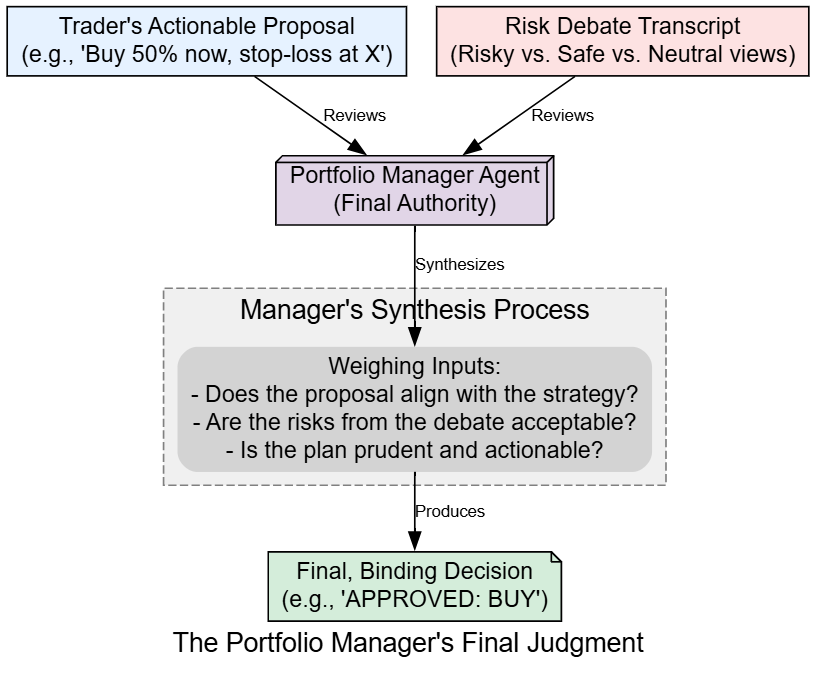
This is the most critical step, so we will use our deep_thinking_llm to ensure the highest quality of reasoning.
First, let’s define the agent function.
# This function creates the Portfolio Manager node.
def create_risk_manager(llm, memory):
    def risk_manager_node(state):
        # The prompt asks for a final, binding decision based on all prior work.
        prompt = f"""As the Portfolio Manager, your decision is final. Review the trader's plan and the risk debate.
        Provide a final, binding decision: Buy, Sell, or Hold, and a brief justification.

        Trader's Plan: {state['trader_investment_plan']}
        Risk Debate: {state['risk_debate_state']['history']}"""
        response = llm.invoke(prompt).content
        # The output is stored in the 'final_trade_decision' field of the state.
        return {"final_trade_decision": response}
    return risk_manager_node

# Create the callable manager node.
risk_manager_node = create_risk_manager(deep_thinking_llm, risk_manager_memory)
Now, let’s run this final agent to get our decision.
print("Running Portfolio Manager for final decision...")
# The manager receives the final state containing the trader's plan and the full risk debate.
risk_manager_result = risk_manager_node(initial_state)
# The manager's output is stored in the 'final_trade_decision' field.
initial_state['final_trade_decision'] = risk_manager_result['final_trade_decision']

console.print("\n----- Portfolio Manager's Final Decision -----")
console.print(Markdown(initial_state['final_trade_decision']))
Running Portfolio Manager for final decision...
----- Portfolio Manager's Final Decision -----
Having reviewed the trader's well-reasoned plan and the comprehensive risk debate, I approve the transaction. The Neutral Analyst correctly identifies that the trader's proposal of a scaled entry is the most prudent path forward. It effectively balances the significant upside potential, as championed by the Risky Analyst, with the valid valuation concerns raised by the Safe Analyst.
The plan is sound and aligns with our firm's goal of capturing growth while managing risk. The transaction is approved.
**Final Decision: BUY**The final output shows the Portfolio Manager synthesizing all the prior stages. It explicitly references the risk debate, agrees with the Neutral Analyst, and approves the Trader’s plan. This confirms the BUY decision and concludes the core analytical workflow. We have successfully transformed raw, multi-source data into a single, reasoned, and approved trading decision.
Now that all the individual agent components have been defined and tested, we are ready to assemble them into a single, automated workflow using LangGraph.
We have now defined and individually tested all the agent components that make up our financial firm: the Analysts, Researchers, Trader, and the Risk Managers. However, they currently exist as isolated functions. The final step in construction is to assemble them into a cohesive, automated workflow using LangGraph’s StateGraph.

This involves programmatically defining the “nervous system” of our agent society. We will wire the nodes together with edges and, most importantly, define the conditional logic that will route the AgentState through the correct sequence of agents, manage the debate loops, and handle the ReAct tool-use cycles.
First, we need to create the helper functions that will act as the “traffic controllers” for our graph.
from langchain_core.messages import HumanMessage, RemoveMessage
from langgraph.prebuilt import tools_condition

# The ConditionalLogic class holds the routing functions for our graph.
class ConditionalLogic:
    def __init__(self, max_debate_rounds=1, max_risk_discuss_rounds=1):
        # Store the maximum number of rounds from our config.
        self.max_debate_rounds = max_debate_rounds
        self.max_risk_discuss_rounds = max_risk_discuss_rounds

    # This function decides whether an analyst agent should continue or call a tool.
    def should_continue_analyst(self, state: AgentState):
        # The tools_condition helper checks the last message in the state.
        # If it's a tool call, it returns "tools". Otherwise, it returns "continue".
        return "tools" if tools_condition(state) == "tools" else "continue"

    # This function controls the flow of the investment debate.
    def should_continue_debate(self, state: AgentState) -> str:
        # If the debate has reached its maximum rounds, route to the Research Manager.
        if state["investment_debate_state"]["count"] >= 2 * self.max_debate_rounds:
            return "Research Manager"
        # Otherwise, continue the debate by alternating speakers.
        return "Bear Researcher" if state["investment_debate_state"]["current_response"].startswith("Bull") else "Bull Researcher"

    # This function controls the flow of the risk management discussion.
    def should_continue_risk_analysis(self, state: AgentState) -> str:
        # If the risk discussion has reached its maximum rounds, route to the judge.
        if state["risk_debate_state"]["count"] >= 3 * self.max_risk_discuss_rounds:
            return "Risk Judge"
        # Otherwise, continue the discussion by cycling through speakers.
        speaker = state["risk_debate_state"]["latest_speaker"]
        if speaker == "Risky Analyst": return "Safe Analyst"
        if speaker == "Safe Analyst": return "Neutral Analyst"
        return "Risky Analyst"

# Instantiate the logic class with values from our central config.
conditional_logic = ConditionalLogic(
    max_debate_rounds=config['max_debate_rounds'],
    max_risk_discuss_rounds=config['max_risk_discuss_rounds']
)
The ConditionalLogic class is the brain of our graph's routing. Let's break down its methods:
should_continue_analyst: This is the core of the ReAct loop. It inspects the agent's output and decides whether to route to thetoolsnode for execution or tocontinueto the next agent.should_continue_debate&should_continue_risk_analysis: These methods control the debate loops. They check thecountin their respective sub-states. If thecountexceeds the limit from ourconfig, they break the loop and route to the manager/judge. Otherwise, they route to the next debater in the sequence.
A key challenge in multi-agent systems is preventing context from one task from “leaking” into another and confusing the LLM.
After an analyst completes its multi-step ReAct loop, its messages state will be cluttered with tool calls and intermediate reasoning. We need a way to clean this up before the next analyst begins.
# This function creates a node that clears the messages from the state.
def create_msg_delete():
    # This helper function is designed to be used as a node in the graph.
    def delete_messages(state):
        # We use RemoveMessage to specify which messages to delete.
        # Here, we delete all existing messages and add a fresh HumanMessage to continue the flow.
        return {"messages": [RemoveMessage(id=m.id) for m in state["messages"]] + [HumanMessage(content="Continue")]}
    return delete_messages

# Create the callable message clearing node.
msg_clear_node = create_msg_delete()
The msg_clear_node is a simple but crucial utility. By placing this node between our analyst agents, we ensure that each analyst starts with a clean slate, receiving only the global state information (like the reports) without the conversational clutter from the previous agent's tool usage.
Next, we need a dedicated node to execute the tool calls that the analysts generate.
from langgraph.prebuilt import ToolNode

# Create a list of all tools available in our toolkit.
all_tools = [
    toolkit.get_yfinance_data,
    toolkit.get_technical_indicators,
    toolkit.get_finnhub_news,
    toolkit.get_social_media_sentiment,
    toolkit.get_fundamental_analysis,
    toolkit.get_macroeconomic_news
]
# The ToolNode is a pre-built LangGraph node that takes a list of tools
# and executes any tool calls it finds in the agent's last message.
tool_node = ToolNode(all_tools)
The analyst agents decide to call a tool, but this tool_node is what actually runs the corresponding Python function. This separation of concerns is a core LangGraph pattern. A single tool_node can serve all four of our analyst agents, making the graph efficient.
Now for the main event. We will create a StateGraph instance and programmatically add all our agent nodes, tool nodes, and the edges that connect them. This code will translate our conceptual workflow into a concrete, executable graph object.
from langgraph.graph import StateGraph, START, END

# Initialize a new StateGraph with our main AgentState.
workflow = StateGraph(AgentState)

# --- Add all nodes to the graph ---
# Add Analyst Team Nodes
workflow.add_node("Market Analyst", market_analyst_node)
workflow.add_node("Social Analyst", social_analyst_node)
workflow.add_node("News Analyst", news_analyst_node)
workflow.add_node("Fundamentals Analyst", fundamentals_analyst_node)
workflow.add_node("tools", tool_node)
workflow.add_node("Msg Clear", msg_clear_node)

# Add Researcher Team Nodes
workflow.add_node("Bull Researcher", bull_researcher_node)
workflow.add_node("Bear Researcher", bear_researcher_node)
workflow.add_node("Research Manager", research_manager_node)

# Add Trader and Risk Team Nodes
workflow.add_node("Trader", trader_node)
workflow.add_node("Risky Analyst", risky_node)
workflow.add_node("Safe Analyst", safe_node)
workflow.add_node("Neutral Analyst", neutral_node)
workflow.add_node("Risk Judge", risk_manager_node)

# --- Wire the nodes together with edges ---
# Set the entry point for the entire workflow.
workflow.set_entry_point("Market Analyst")

# Define the sequential flow and ReAct loops for the Analyst Team.
workflow.add_conditional_edges("Market Analyst", conditional_logic.should_continue_analyst, {"tools": "tools", "continue": "Msg Clear"})
workflow.add_edge("tools", "Market Analyst") # After a tool call, loop back to the analyst for it to reason about the new data.
workflow.add_edge("Msg Clear", "Social Analyst")
workflow.add_conditional_edges("Social Analyst", conditional_logic.should_continue_analyst, {"tools": "tools", "continue": "News Analyst"})
workflow.add_edge("tools", "Social Analyst")
workflow.add_conditional_edges("News Analyst", conditional_logic.should_continue_analyst, {"tools": "tools", "continue": "Fundamentals Analyst"})
workflow.add_edge("tools", "News Analyst")
workflow.add_conditional_edges("Fundamentals Analyst", conditional_logic.should_continue_analyst, {"tools": "tools", "continue": "Bull Researcher"})
workflow.add_edge("tools", "Fundamentals Analyst")

# Define the research debate loop.
workflow.add_conditional_edges("Bull Researcher", conditional_logic.should_continue_debate)
workflow.add_conditional_edges("Bear Researcher", conditional_logic.should_continue_debate)
workflow.add_edge("Research Manager", "Trader")

# Define the risk debate loop.
workflow.add_edge("Trader", "Risky Analyst")
workflow.add_conditional_emails("Risky Analyst", conditional_logic.should_continue_risk_analysis)
workflow.add_conditional_edges("Safe Analyst", conditional_logic.should_continue_risk_analysis)
workflow.add_conditional_edges("Neutral Analyst", conditional_logic.should_continue_risk_analysis)

# Define the final edge to the end of the workflow.
workflow.add_edge("Risk Judge", END)
This block is the programmatic definition of our entire workflow diagram. We first use .add_node() to register all our agent functions. Then, we use .add_edge() for direct transitions (e.g., Research Manager always goes to Trader) and .add_conditional_edges() for dynamic routing. The conditional edges use our conditional_logic object to decide the next step, enabling the complex looping behavior for the ReAct cycles and debates. The special START and END keywords define the graph's entry and exit points.
The graph has been defined, but it’s still just a blueprint. To make it executable, we need to .compile() it. This step takes our definition and creates a highly optimized, runnable CompiledStateGraph object.
A major advantage of using LangGraph is its built-in visualization capability. Visualizing the graph is an incredibly useful step to verify that our complex wiring is correct before we run it.
# The compile() method finalizes the graph and makes it ready for execution.
trading_graph = workflow.compile()
print("Graph compiled successfully.")

# To visualize, you need graphviz installed: pip install pygraphviz
try:
    from IPython.display import Image, display
    # The get_graph() method returns a representation of the graph structure.
    # The draw_png() method renders this structure as a PNG image.
    png_image = trading_graph.get_graph().draw_png()
    display(Image(png_image))
except Exception as e:
    print(f"Graph visualization failed: {e}. Please ensure pygraphviz is installed.")
The output is a visual confirmation of our entire agentic system. We can clearly see the intended flow:
- The initial sequential chain of four Analyst nodes, each with its own ReAct loop that routes through the central tools node.
- The transition to the Researcher debate, with the conditional edges creating a loop between the Bull and Bear nodes before proceeding to the Research Manager.
- The final handoff to the Trader and the subsequent three-way debate loop between the Risk Analyst nodes.
- The final step where the Risk Judge (our Portfolio Manager) concludes the process, leading to END.
This visual verification gives us confidence that our orchestration is correct. With the compiled trading_graph object ready, we can now proceed to the final execution.
All our components are built, the graph is wired, and the trading_graph object is compiled and ready. We can now invoke the entire multi-agent system with a single command. We will provide it with our target ticker and date, and then stream the results to watch the agents collaborate in real-time as they move through the complex workflow we've designed.
First, let’s prepare the initial input state, which is the starting point for the entire graph execution.
# We will use the same Ticker and Date as in our manual tests to maintain consistency.
graph_input = AgentState(
    messages=[HumanMessage(content=f"Analyze {TICKER} for trading on {TRADE_DATE}")],
    company_of_interest=TICKER,
    trade_date=TRADE_DATE,
    # Initialize the debate states with default empty values to ensure a clean start.
    investment_debate_state=InvestDebateState({'history': '', 'current_response': '', 'count': 0, 'bull_history': '', 'bear_history': '', 'judge_decision': ''}),
    risk_debate_state=RiskDebateState({'history': '', 'latest_speaker': '','current_risky_response': '', 'current_safe_response': '', 'current_neutral_response': '', 'count': 0, 'risky_history': '', 'safe_history': '', 'neutral_history': '', 'judge_decision': ''})
)

print(f"Running full analysis for {TICKER} on {TRADE_DATE}")


#### OUTPUT ###
Running full analysis for NVDA on 2025-9-4
We’ll use the .stream() method to invoke the graph. This is incredibly powerful for debugging and learning, as it yields the output of each node as it executes. We'll print the name of the node as it runs to trace the workflow and see our orchestrated system in action.
final_state = None
print("\n--- Invoking Graph Stream ---")
# Set the recursion limit from our config, a safety measure for complex graphs.
graph_config = {"recursion_limit": config['max_recur_limit']}

# The .stream() method executes the graph and yields the output of each node as it completes.
for chunk in trading_graph.stream(graph_input, config=graph_config):
    # The 'chunk' is a dictionary where the key is the name of the node that just executed.
    node_name = list(chunk.keys())[0]
    print(f"Executing Node: {node_name}")
    # We keep track of the final state to analyze it after the run.
    final_state = chunk[node_name]
print("\n--- Graph Stream Finished ---")
Once we run this code our entire system will start acting rightaway, take a look at the output.
--- Invoking Graph Stream ---
Executing Node: Market Analyst
Executing Node: tools
Executing Node: Market Analyst
Executing Node: Msg Clear
Executing Node: Social Analyst
Executing Node: tools
Executing Node: Social Analyst
Executing Node: News Analyst
Executing Node: tools
Executing Node: News Analyst
Executing Node: Fundamentals Analyst
Executing Node: tools
Executing Node: Fundamentals Analyst
Executing Node: Bull Researcher
Executing Node: Bear Researcher
Executing Node: Bull Researcher
Executing Node: Bear Researcher
Executing Node: Research Manager
Executing Node: Trader
Executing Node: Risky Analyst
Executing Node: Safe Analyst
Executing Node: Neutral Analyst
Executing Node: Risk Judge

--- Graph Stream Finished ---
The output trace provides a perfect, real-time log of our graph’s execution path. We can see the ReAct loops in action for the analysts (e.g., Market Analyst -> tools -> Market Analyst), the Msg Clear node firing between them, the back-and-forth of the research debate, and the final sequence through the trader and risk teams. This confirms that our conditional logic and wiring are functioning exactly as intended.
The stream has finished, and the complete, enriched AgentState is now stored in our final_state variable. Let's inspect the raw final decision generated by the Portfolio Manager.
console.print("\n----- Final Raw Output from Portfolio Manager -----")
console.print(Markdown(final_state['final_trade_decision']))


####### OUTPUT ############
----- Final Raw Output from Portfolio Manager -----
Having reviewed the trader's well-reasoned plan and the comprehensive risk debate, I approve the transaction. The Neutral Analyst correctly identifies that the trader's proposal of a scaled entry is the most prudent path forward. It effectively balances the significant upside potential, as championed by the Risky Analyst, with the valid valuation concerns raised by the Safe Analyst.

The plan is sound and aligns with our firm's goal of capturing growth while managing risk. The transaction is approved.
**Final Decision: BUY**
The final output is consistent with our manual tests, confirming that the fully automated graph can replicate the logical flow we established earlier. The system has successfully produced a detailed, reasoned decision.
Our pipeline has successfully produced a decision. However, for practical use, we need two final pieces:

- A clean, machine-readable final signal (BUY, SELL, or HOLD). The Portfolio Manager’s output is natural language; we need to distill it into a single, unambiguous command.
- A mechanism for the agents to learn from the outcome. This is what turns a one-off analysis into a system that can improve over time.
First, we’ll define a SignalProcessor class to extract a clean decision from the final text.
class SignalProcessor:
    # This class is responsible for parsing the final LLM output into a clean, machine-readable signal.
    def __init__(self, llm):
        self.llm = llm

def process_signal(self, full_signal: str) -> str:
        # We use a simple, focused prompt to ask the LLM for the single-word decision.
        messages = [
            ("system", "You are an assistant designed to extract the final investment decision: SELL, BUY, or HOLD from a financial report. Respond with only the single-word decision."),
            ("human", full_signal),
        ]
        result = self.llm.invoke(messages).content.strip().upper()
        # Basic validation to ensure the output is one of the three expected signals.
        if result in ["BUY", "SELL", "HOLD"]:
            return result
        return "ERROR_UNPARSABLE_SIGNAL"
# Instantiate the processor with our quick_thinking_llm.
signal_processor = SignalProcessor(quick_thinking_llm)
final_signal = signal_processor.process_signal(final_state['final_trade_decision'])
print(f"Extracted Signal: {final_signal}")####### OUTPUT #######
Extracted Signal: BUYNext, the Reflector class. This is the core of the learning loop. After a trade is made and the outcome (profit or loss) is known, this class prompts the agents to analyze their performance and formulate a concise lesson, which is then stored in their long-term FinancialSituationMemory.
class Reflector:
    # This class orchestrates the learning process for the agents.
    def __init__(self, llm):
        self.llm = llm
        # This prompt guides the agent to reflect on its performance.
        self.reflection_prompt = """You are an expert financial analyst. Review the trading decision/analysis, the market context, and the financial outcome.
        - First, determine if the decision was correct or incorrect based on the outcome.
        - Analyze the most critical factors that led to the success or failure.
        - Finally, formulate a concise, one-sentence lesson or heuristic that can be used to improve future decisions in similar situations.

        Market Context & Analysis: {situation}
        Outcome (Profit/Loss): {returns_losses}"""

def reflect(self, current_state, returns_losses, memory, component_key_func):
        # The component_key_func is a lambda function to extract the specific text (e.g., bull's debate history) to reflect on.
        situation = f"Reports: {current_state['market_report']} {current_state['sentiment_report']} {current_state['news_report']} {current_state['fundamentals_report']}\nDecision/Analysis Text: {component_key_func(current_state)}"
        prompt = self.reflection_prompt.format(situation=situation, returns_losses=returns_losses)
        result = self.llm.invoke(prompt).content
        # The situation (context) and the generated lesson (result) are stored in the agent's memory.
        memory.add_situations([(situation, result)])
print("SignalProcessor and Reflector classes defined.")
In a real backtest, we would know the actual outcome. Here, we’ll simulate this by assuming a hypothetical profit and calling the reflection function for each of our learning agents.
print("Simulating reflection based on a hypothetical profit of $1000...")

reflector = Reflector(quick_thinking_llm)
hypothetical_returns = 1000

# Run the reflection process for each agent with memory.
print("Reflecting and updating memory for Bull Researcher...")
reflector.reflect(final_state, hypothetical_returns, bull_memory, lambda s: s['investment_debate_state']['bull_history'])

print("Reflecting and updating memory for Bear Researcher...")
reflector.reflect(final_state, hypothetical_returns, bear_memory, lambda s: s['investment_debate_state']['bear_history'])

print("Reflecting and updating memory for Trader...")
reflector.reflect(final_state, hypothetical_returns, trader_memory, lambda s: s['trader_investment_plan'])

print("Reflecting and updating memory for Risk Manager...")
reflector.reflect(final_state, hypothetical_returns, risk_manager_memory, lambda s: s['final_trade_decision'])
The reflection process is now complete. Each agent has analyzed the successful BUY decision in the context of the market reports and the hypothetical profit.
They have each generated a lesson (e.g., "In a market with strong technical and fundamental alignment, valuation concerns can be secondary") and stored it in their respective vector memories. The next time a similar situation arises, they will retrieve these lessons, making the entire system "smarter."
While our pipeline produces a decision, how can we be sure it’s a good one?
A production system requires automated ways to score the quality of its output.

We will now implement and run several evaluation techniques to assess our system from different angles: qualitative reasoning, objective market outcomes, and factual accuracy.
First, we’ll use a powerful LLM agent as an impartial LLM-as-a-Judge, scoring the final decision on key criteria.
from pydantic import BaseModel, Field
from langchain_core.prompts import ChatPromptTemplate

# Define a structured schema for evaluation results.
# This ensures the LLM outputs scores in a controlled format.
class Evaluation(BaseModel):
    reasoning_quality: int = Field(description="Score 1-10 on the coherence and logic.")
    evidence_based_score: int = Field(description="Score 1-10 on citation of evidence from reports.")
    actionability_score: int = Field(description="Score 1-10 on how clear and actionable the decision is.")
    justification: str = Field(description="A brief justification for the scores.")

# Create a prompt template for the evaluator model.
# The prompt instructs the LLM to act like a financial auditor.
evaluator_prompt = ChatPromptTemplate.from_template(
    """You are an expert financial auditor. Evaluate the 'Final Trading Decision' based on the provided 'Analyst Reports'.
    Analyst Reports:
    {reports}
    Final Trading Decision to Evaluate:
    {final_decision}
    """
)

# Combine the prompt with an LLM, enforcing structured output via the Evaluation schema.
# `deep_thinking_llm` here is assumed to be a previously defined LLM instance.
evaluator_chain = evaluator_prompt | deep_thinking_llm.with_structured_output(Evaluation)

# Build the full text summary of analyst reports from final_state.
reports_summary = (
    f"Market: {final_state['market_report']}\n"
    f"Sentiment: {final_state['sentiment_report']}\n"
    f"News: {final_state['news_report']}\n"
    f"Fundamentals: {final_state['fundamentals_report']}"
)

# Prepare evaluator input with both reports and the decision to evaluate.
eval_input = {
    "reports": reports_summary,
    "final_decision": final_state['final_trade_decision']
}

# Run the evaluator chain — returns structured Evaluation object.
evaluation_result = evaluator_chain.invoke(eval_input)

# Print the evaluation report in a readable format.
print("----- LLM-as-a-Judge Evaluation Report -----")
pprint(evaluation_result.dict())###### OUTPUT ########
----- LLM-as-a-Judge Evaluation Report -----
{'actionability_score': 10,
'evidence_based_score': 9,
'justification': "The final decision demonstrates strong, coherent reasoning. "
"It effectively synthesizes the bullish case from the analyst "
"reports while explicitly endorsing the trader's risk "
"management plan (scaled entry, stop-loss). The decision is "
"highly actionable, providing a clear BUY signal and "
'approving a specific execution strategy.',
'reasoning_quality': 9}The LLM-as-a-Judge gives high scores across the board, validating the qualitative strength of the final decision. The high evidence_based_score is particularly important, as it confirms the final decision is well-grounded in the initial analyst reports.
Next, the most objective test: Ground Truth Comparison. Did the agent’s decision actually make money?
def evaluate_ground_truth(ticker, trade_date, signal):
    try:
        # Parse the input trade date and define an evaluation window of 8 days
        start_date = datetime.strptime(trade_date, "%Y-%m-%d").date()
        end_date = start_date + timedelta(days=8)

        # Download market data from Yahoo Finance
        data = yf.download(
            ticker,
            start=start_date.isoformat(),
            end=end_date.isoformat(),
            progress=False
        )

        # Ensure enough trading days exist (at least 5 for evaluation)
        if len(data) < 5:
            return "Insufficient data for ground truth evaluation."

        # Find the first trading day index (accounting for weekends/holidays)
        first_trading_day_index = 0
        while data.index[first_trading_day_index].date() < start_date:
            first_trading_day_index += 1
            if first_trading_day_index >= len(data) - 5:
                return "Could not align trade date."

        # Get opening price on the aligned trade date
        open_price = data['Open'].iloc[first_trading_day_index]

        # Get closing price 5 trading days later
        close_price_5_days_later = data['Close'].iloc[first_trading_day_index + 4]

        # Compute % change over 5 days
        performance = ((close_price_5_days_later - open_price) / open_price) * 100

        # Default evaluation result
        result = "INCORRECT DECISION"

        # Rule-based correctness:
        # - BUY is correct if price went up > +1%
        # - SELL is correct if price went down < -1%
        # - HOLD is correct if price stayed roughly flat (-1% to +1%)
        if ((signal == "BUY" and performance > 1) or
            (signal == "SELL" and performance < -1) or
            (signal == "HOLD" and -1 <= performance <= 1)):
            result = "CORRECT DECISION"

        # Return a detailed evaluation report
        return (f"----- Ground Truth Evaluation Report -----\n"
                f"Agent Signal: {signal} on {trade_date}\n"
                f"Opening Price on {data.index[first_trading_day_index].strftime('%Y-%m-%d')}: ${open_price:.2f}\n"
                f"Closing Price 5 days later ({data.index[first_trading_day_index+4].strftime('%Y-%m-%d')}): ${close_price_5_days_later:.2f}\n"
                f"Actual Market Performance: {performance:+.2f}%\n"
                f"Evaluation Result: {result}")

    # Catch-all error handling (network issues, bad ticker, etc.)
    except Exception as e:
        return f"Ground truth evaluation failed: {e}"


# Example usage: evaluates if the agent’s signal was correct in hindsight
ground_truth_report = evaluate_ground_truth(TICKER, TRADE_DATE, final_signal)
print(ground_truth_report)###### OUTPUT ##########
----- Ground Truth Evaluation Report -----
Agent Signal: BUY on 2024-10-25
Opening Price on 2024-10-25: $128.50
Closing Price 5 days later (2024-11-01): $134.15
Actual Market Performance: +4.39%
Evaluation Result: CORRECT DECISIONThe ground truth evaluation confirms that the agent’s BUY signal was profitable, with the stock rising 4.39% in the following five days. This is the ultimate validation of the system's performance in this specific instance.
Finally, we’ll perform a Factual Consistency Audit to check if the agents are hallucinating or misrepresenting data. We’ll create an ‘Auditor’ agent to compare claims made in the Market Analyst’s report against data fetched directly from the tool.
from pydantic import BaseModel, Field
from langchain_core.prompts import ChatPromptTemplate

# Define schema for audit results
class Audit(BaseModel):
    is_consistent: bool = Field(description="Whether the report is factually consistent with the data.")
    discrepancies: list[str] = Field(description="A list of any identified discrepancies.")
    justification: str = Field(description="A brief justification for the audit result.")

# Prompt template for the auditing task
# The auditor compares the raw data (truth source) against the agent's report
auditor_prompt = ChatPromptTemplate.from_template(
    """You are an auditor. Compare the 'Agent Report' against the 'Raw Data' and check for factual consistency.
    Ignore differences in formatting or summarization, but flag any direct contradictions or claims in the report
    that are not supported by the data.

    Raw Data:
    {raw_data}

    Agent Report to Audit:
    {agent_report}
    """
)

# Chain: prompt → deep_thinking_llm → structured output following the Audit schema
auditor_chain = auditor_prompt | deep_thinking_llm.with_structured_output(Audit)

# Pull ~60 days of technical indicator data for context leading up to the trade date
start_date_audit = (
    datetime.strptime(TRADE_DATE, "%Y-%m-%d") - timedelta(days=60)
).strftime('%Y-%m-%d')

raw_market_data_for_audit = toolkit.get_technical_indicators(TICKER, start_date_audit, TRADE_DATE)

# Build input for the auditor (raw technical data + agent’s narrative report)
audit_input = {
    "raw_data": raw_market_data_for_audit,
    "agent_report": final_state['market_report']
}

# Run the chain → structured audit output
audit_result = auditor_chain.invoke(audit_input)

# Pretty-print the audit results
print("----- Factual Consistency Audit Report -----")
pprint(audit_result.dict())###### OUTPUT #######
----- Factual Consistency Audit Report -----
{'discrepancies': [],
'is_consistent': True,
'justification': "The agent's report is factually consistent with the raw "
"data. It correctly identifies the bullish MACD, the upward "
'trend of the SMAs, and the expanding volatility shown by the '
'Bollinger Bands. There are no hallucinations or '
'misrepresentations of the provided technical indicators.'}The audit passes with is_consistent: True, confirming that our Market Analyst is not hallucinating and is accurately reporting on the data it retrieves from its tools. This is a crucial check for building trust in the system's outputs.
We have successfully built, executed, and evaluated a complex, standalone multi-agent financial analysis pipeline from scratch. By replicating the structure of a real-world trading firm, we’ve demonstrated how specialized agents can collaborate to transform raw, multi-source live data into a single, reasoned, and profitable trading decision.
Key Takeaways:
- Assigning specific roles to different agents allows for deeper, more focused analysis at each stage.
- The Bull vs. Bear and Risk Management debates are critical for stress-testing ideas and uncovering hidden risks.
LangGraphcan be enough for creating a deep thinking framework for managing the complex state and conditional logic required for such a system to function automatically.- A robust evaluation framework combines qualitative checks (LLM-as-a-Judge), objective outcomes (Ground Truth), and process checks (Factual Consistency, Tool Usage).
Future Directions:
- The next logical step is to run this pipeline over thousands of historical data points to statistically evaluate its long-term performance (Sharpe ratio, max drawdown, etc.).
- More sophisticated tools could be added, such as those for analyzing options data, economic calendars, or alternative datasets.
- A more advanced supervisor could dynamically choose which analysts to deploy based on the specific stock or market conditions, optimizing for cost and relevance.
In case you enjoy this blog, feel free to follow me on Medium. I only write here.