VS Code usage
Easily manage your Naftiko environment: for example, your capabilities files.
The Naftiko VS Code extension is not yet available on the market place. But you can easily install it yourself.
- Use VS Code as your code editor.
- Access to internet to download the extension.
- The Naftiko extension depends on the YAML Red Hat extension. So you must have this extension already installed. Don't worry, if that's not the case, its installation will be offered to you automatically.
-
- Download the extension
The Naftiko VS Code extension file is a vsix file you can download here: https://github.com/naftiko/fabric/releases/download/v1.0.0-alpha1/vscode-naftiko-1.0.0-alpha1.vsix
-
- Install the extension
Once you're in your VS Code editor, click on the extension icon (in the left bar menu Extensions). Then click on the button with three small dots in the top right corner. Finally, choose the Install from VSIX... option and select the Naftiko VSIX file you downloaded.
Nothing special to do. You will benefit from the extension's features with the only condition of your files end with the extension .naftiko.yaml or .naftiko.yml.
- Live validation of your Naftiko files structure.
- Live validation of the Naftiko rules for your files. Caution: due to performance optimization, when editing or changing file in VS Code, the validation is waiting for 3s before refreshing.
Messages are displayed inline inside the VS Code file editor, and also in the PROBLEMS bottom window.
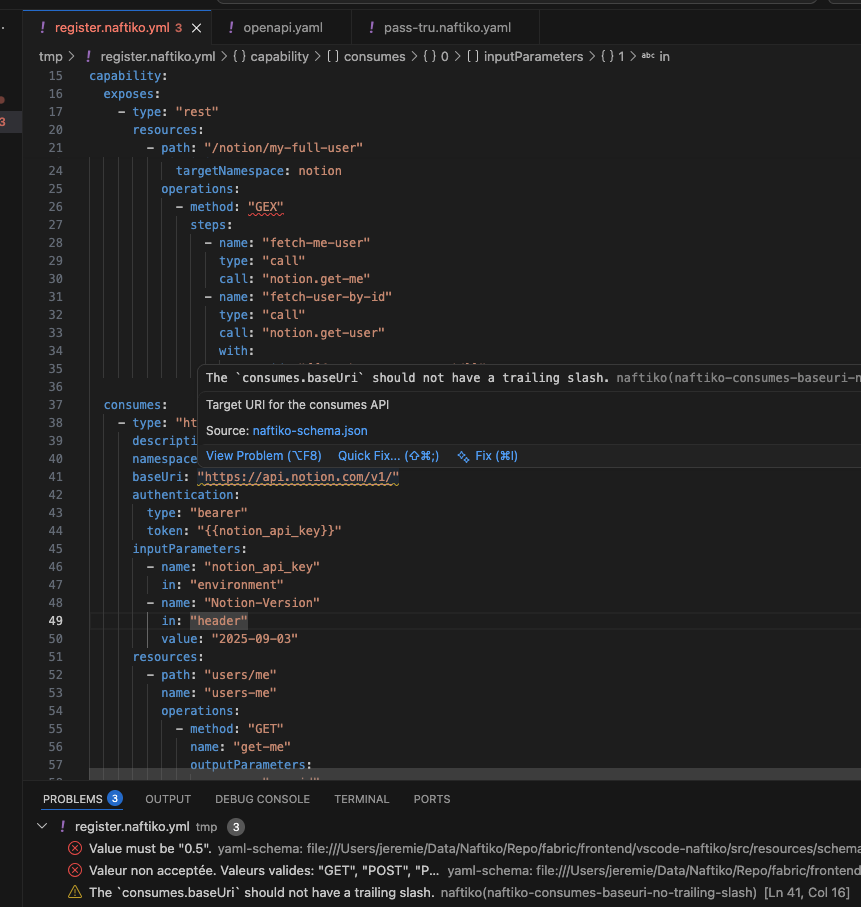
If you still wish to manually force validation on a particular file: open that file in VS Code and then execute the "Validate Capability File" palette command.
No specific settings needed.
Naftiko VS Code extension versions are aligned with those of Naftiko Framework.
Alpha version