Autonomous visual servoing package for a mobile robot. Implements ArUco marker detection, ID sorting, and target centering in Gazebo Harmonic with ROS 2 Jazzy.



This package provides a complete visual servoing pipeline for a mobile robot in a simulated environment. The system enables a differential drive robot to autonomously identify multiple ArUco markers, sort them by ID, and sequentially visit them. It utilizes a Proportional (P) controller for precise alignment and distance keeping, bridging the gap between perception (OpenCV) and actuation (ROS 2 Control).
Documentation: https://deepwiki.com/mohamedeyaad/aruco_visual_servoing
- Autonomous Exploration: Rotates to scan the environment and build a map of available ArUco markers.
- Sequential Chasing: Automatically sorts detected markers and visits them in ascending numerical order.
- Custom Simulation Environment:
- Generated 5 unique ArUco marker images.
- Created custom SDF models by mapping these textures onto box geometries to create distinct targets in Gazebo.
- Visual Servoing Control:
- Angular: Aligns the robot's heading to the marker's center.
- Linear: Approaches the target to a precise distance of 1.0 meter.
- Visual Feedback: Publishes a debug topic
/aruco_target_circledhighlighting the active target in real-time.
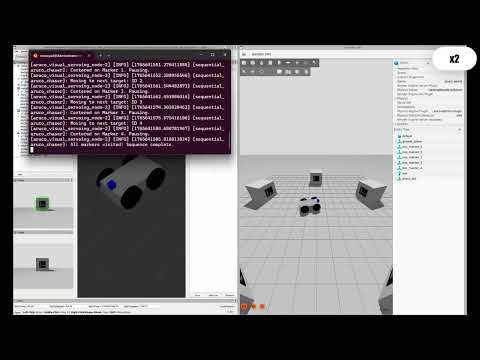
A comprehensive demonstration of the autonomous behavior in Gazebo Harmonic. This video showcases the modularity of the code by running it first on a Differential Drive robot and then on a Skid-Steer (4-wheel) variant.
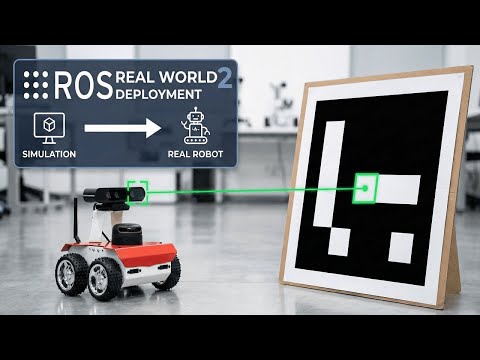
The control logic was successfully deployed on a physical Husarion ROSbot 2 to demonstrate Sim-to-Real transfer.
- Framework: ROS 2 Jazzy
- Simulation: Gazebo Harmonic (GZ Sim)
- Language: Python 3.10+
- Libraries:
opencv-python,cv_bridge - Middleware:
ros_gz_bridge
Ensure you have ROS 2 Jazzy and Gazebo Harmonic installed.
Clone this repository and build the workspace. Note that this repository contains two packages: the main aruco_visual_servoing and the custom message interface aruco_interfaces.
# Clone the repository
cd ~/ros2_ws/src
git clone https://github.com/mohamedeyaad/aruco_visual_servoing.git

# Build dependencies and source
cd ~/ros2_ws
colcon build --symlink-install
source install/setup.bashFor Gazebo to locate the custom ArUco marker models, you must strictly add the models directory to the GZ_SIM_RESOURCE_PATH.
Run this command in your terminal before launching the simulation (or add it to your ~/.bashrc):
export GZ_SIM_RESOURCE_PATH=/home/$USER/ros2_ws/src/aruco_visual_servoing/aruco_visual_servoing/modelsNote: Ensure the path points to the folder containing aruco_marker_0, aruco_marker_1, etc.
This project uses a custom message definition to handle detected marker data efficiently.
Package: aruco_interfaces
File: msg/ArucoMarkers.msg
std_msgs/Header header

int64[] marker_ids
geometry_msgs/Pose[] poses
This brings up the Gazebo environment, spawns the robot, and establishes the ROS-GZ bridges.
ros2 launch aruco_visual_servoing simulation.launch.pyStart the ArUco detector node, and the main visual servoing logic using the provided launch file:
ros2 launch aruco_visual_servoing servoing.launch.pyA simulation branch implementing 4-wheel skid-steer kinematics.
git checkout skid-steer
colcon buildA dedicated branch for deployment on the Husarion ROSbot 2. This branch features adapted topics and configurations specifically for the physical robot's hardware interface.
git checkout real-robot-deploy
colcon buildThe core logic (visual_servoing_node.py) implements a Finite State Machine (FSM):
- SEARCHING: The robot performs a 360° scan to populate a set of unique marker IDs.
- ALIGNING:
- Angular Control: Minimizes the horizontal error (x-offset) of the marker in the camera frame.
- Linear Control: Minimizes the depth error to maintain a 1.0m standoff distance.
- VISITING: The robot pauses at the target, verifies the ID, and creates a visual overlay before proceeding to the next target in the sequence.
| Topic | Type | Description |
|---|---|---|
/cmd_vel |
geometry_msgs/Twist |
Velocity commands sent to the robot controller |
/aruco_markers |
aruco_interfaces/msg/ArucoMarkers |
Detected marker poses and IDs (Custom Msg) |
/aruco_target_circled |
sensor_msgs/Image |
Processed camera feed with target highlights |
/camera/image_raw |
sensor_msgs/Image |
Raw camera stream from Gazebo |
aruco_visual_servoing/
├── aruco_interfaces/                # Custom Message Package
│   ├── msg/
│   │   └── ArucoMarkers.msg         # Custom marker definition
│   ├── CMakeLists.txt
│   └── package.xml
├── aruco_visual_servoing/           # Main Package
│   ├── aruco_visual_servoing/
│   │   ├── aruco_detector_node.py   # Custom ArUco detection logic
│   │   ├── aruco_generate_markers.py
│   │   ├── visual_servoing_node.py  # Main Control Node (FSM)
│   │   └── __init__.py
│   ├── config/
│   │   ├── aruco_params.yaml
│   │   └── ros_gz_bridge.yaml
│   ├── launch/
│   │   ├── servoing.launch.py
│   │   └── simulation.launch.py
│   ├── models/                      # Custom SDF models
│   │   ├── aruco_marker_0/
│   │   ├── aruco_marker_1/
│   │   └── ...
│   ├── rviz/
│   │   └── aruco_visual_servoing.rviz
│   ├── package.xml
│   └── setup.py