Conversation


README.md
Outdated
| **Let AI agents implement complex features end-to-end**. Give an agent a high-level task and it breaks the work into steps, edits multiple files, runs terminal commands, and self-corrects when it hits errors or failing tests. Agents excel at [building new features](https://code.visualstudio.com/docs/copilot/agents/overview), [debugging and fixing failing tests](https://code.visualstudio.com/docs/copilot/guides/debug-with-copilot), refactoring codebases, and [collaborating via pull requests](https://code.visualstudio.com/docs/copilot/agents/cloud-agents). Run multiple [agent sessions](https://code.visualstudio.com/docs/copilot/chat/chat-sessions) in parallel and manage them all from a central view. | ||
|
|
||
|  | ||
|  |
There was a problem hiding this comment.
Make sure to remove the image link
README.md
Outdated
|
|
||
| **Start an AI-powered coding session tailored to your workflow**. Copilot Edits allows you to quickly iterate on code changes directly in the editor, across multiple files using natural language. For a more autonomous peer programmer experience, | ||
| [agent mode](https://aka.ms/vscode-copilot-agent) performs multi-step coding tasks at your command. It automatically handles compile and lint errors, monitors terminal and test output, and iterates until the task is complete. [Edit mode](https://aka.ms/vscode-copilot-edit) offers a conversational, step-by-step coding experience. Engage in multi-turn chat conversations while Copilot applies edits directly to your codebase, allowing you to review changes in context and maintain full control. | ||
| **Let AI agents implement complex features end-to-end**. Give an agent a high-level task and it breaks the work into steps, edits multiple files, runs terminal commands, and self-corrects when it hits errors or failing tests. Agents excel at [building new features](https://code.visualstudio.com/docs/copilot/agents/overview), [debugging and fixing failing tests](https://code.visualstudio.com/docs/copilot/guides/debug-with-copilot), refactoring codebases, and [collaborating via pull requests](https://code.visualstudio.com/docs/copilot/agents/cloud-agents). Run multiple [agent sessions](https://code.visualstudio.com/docs/copilot/chat/chat-sessions) in parallel and manage them all from a central view. |
There was a problem hiding this comment.
In the overview I split out running agents anywhere you want and using your favorite agent harness/provider. Maybe mention that in combination with the parallel agents in a separate paragraph (with bold intro sentence)?
README.md
Outdated
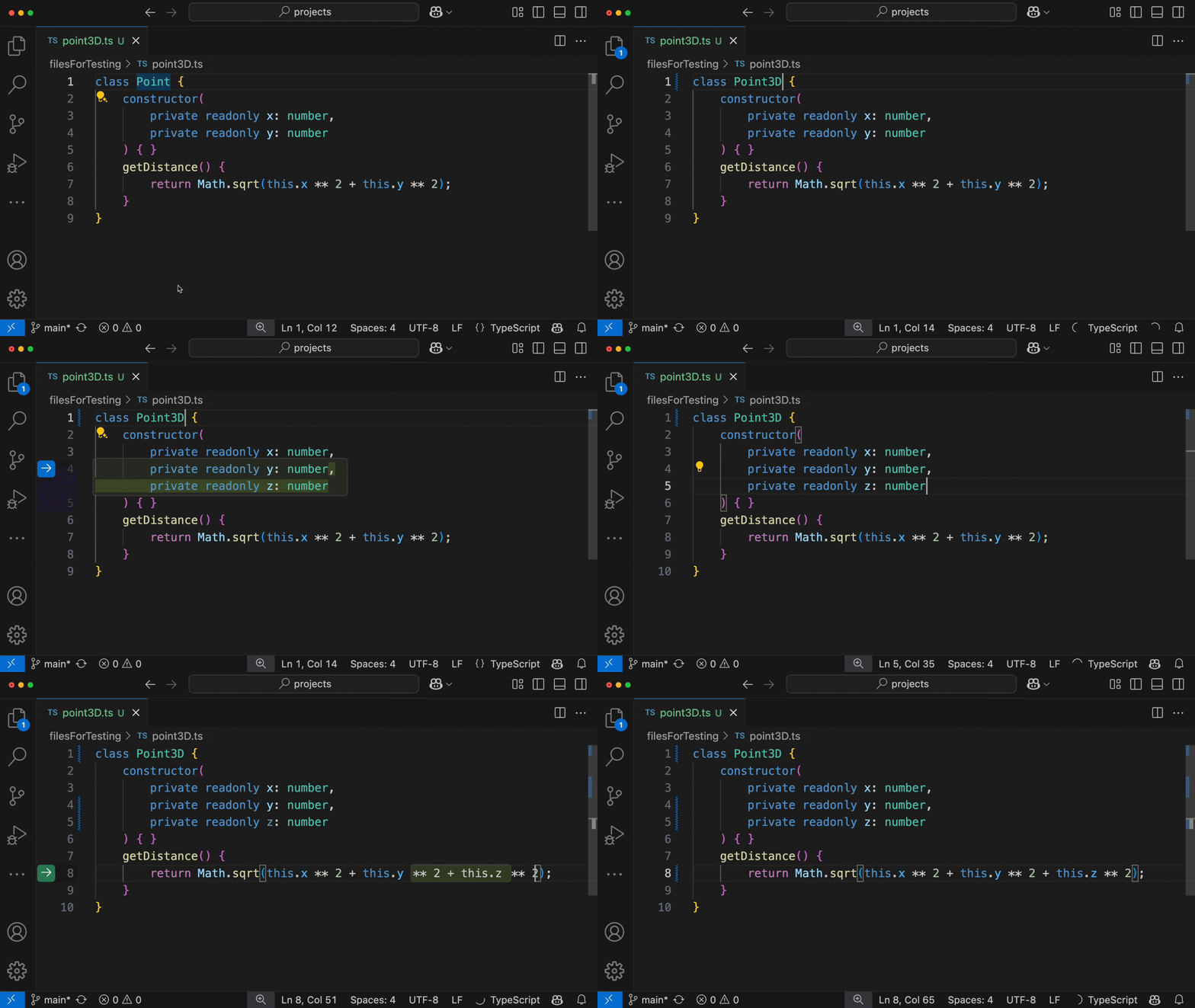
| **Automatically receive inline suggestions in the editor** from [ghost text suggestions](https://aka.ms/vscode-completions) and [next edit suggestions](https://aka.ms/vscode-nes) to help you write code faster. Ghost text suggestions provide suggestions at the current location, tailored to your coding style and your existing code. Copilot next edit suggestions (Copilot NES) takes it a step further and predicts what and where your next logical code change will be. Use the Tab key to navigate and accept changes in quick succession. | ||
|
|
||
|  | ||
| Use agents to [plan before you build](https://code.visualstudio.com/docs/copilot/agents/planning) with the Plan agent, which breaks tasks into structured implementation plans and asks clarifying questions. When your plan is ready, hand it off to an implementation agent to execute it. You can also [delegate tasks to cloud agents](https://code.visualstudio.com/docs/copilot/agents/cloud-agents) that create branches, implement changes, and open pull requests for your team to review. |
There was a problem hiding this comment.
Use a bold first sentence to make planning more discoverable?
README.md
Outdated
|  | ||
|
|
||
| **Apply Copilot's AI suggestions directly to your code** using [Inline chat](https://aka.ms/vscode-inline-chat), staying in the flow. Need help with refactoring a method, adding error handling, or explaining a complex algorithm - just launch Copilot in the editor! | ||
| **Use inline chat for targeted edits** by pressing `Ctrl+I` to open a chat prompt directly in the editor. Describe a change and Copilot suggests edits in place for refactoring methods, adding error handling, or explaining complex algorithms without leaving your editor. |
There was a problem hiding this comment.
Suggest we also mention Cmd+I for macOS
README.md
Outdated
|
|
||
|  | ||
|
|
||
| **Ask Copilot for help in the Chat view** by pressing `Ctrl+Alt+I`. Bring in code from your files and get answers relevant to your codebase using [chat participants](https://aka.ms/vscode-chat-participants), [variables](https://aka.ms/vscode-chat-variables), and [slash commands](https://aka.ms/vscode-chat-commands). |
There was a problem hiding this comment.
I don't think this item adds a lot of value. IMO, the chat view is more the "infrastructure" for the agentic experience, rather than a key element. But don't feel too strong about it.
README.md
Outdated
| @@ -63,7 +64,7 @@ To get the latest security fixes, please use the latest version of the Copilot e | |||
| * **Sign up for [GitHub Copilot Free](https://github.com/settings/copilot?utm_source=vscode-chat-readme&utm_medium=third&utm_campaign=2025mar-em-MSFT-signup)** | |||
There was a problem hiding this comment.
We should make these links more similar: link + description. Now they are formatted in different ways, which is distracting imo.
There was a problem hiding this comment.
What do you suggest for this?
There was a problem hiding this comment.
What about this:
* **[Sign up for GitHub Copilot Free](https://github.com/settings/copilot?utm_source=vscode-chat-readme&utm_medium=third&utm_campaign=2025mar-em-MSFT-signup)**: Explore Copilot's AI capabilities at no cost before upgrading to a paid plan.
   * If you're using Copilot for your business, check out [Copilot Business](https://docs.github.com/en/copilot/copilot-business/about-github-copilot-business) and [Copilot Enterprise](https://docs.github.com/en/copilot/github-copilot-enterprise/overview/about-github-copilot-enterprise).
* **[Copilot Quickstart](https://code.visualstudio.com/docs/copilot/getting-started)**: Discover the key features of Copilot in VS Code.
* **[Agents Tutorial](https://code.visualstudio.com/docs/copilot/agents/agents-tutorial)**: Get started with autonomous agents across different environments.
* **[VS Code on YouTube](https://www.youtube.com/@code)**: Watch the latest demos and updates on the VS Code channel.
* **[Frequently Asked Questions](https://code.visualstudio.com/docs/copilot/faq)**: Get answers to commonly asked questions about Copilot in VS Code.
* **[Provide Feedback](https://github.com/microsoft/vscode-copilot-release/issues)**: Send us your feedback and feature request to help us make GitHub Copilot better!
README.md
Outdated
|
|
||
| ## Customize AI for your workflow | ||
|
|
||
| **Agents work best when they understand your project's conventions and have the right tools**. Tailor Copilot so it generates code that fits your codebase from the start. Use [custom instructions](https://code.visualstudio.com/docs/copilot/customization/custom-instructions) to define project-wide coding conventions, [custom agents](https://code.visualstudio.com/docs/copilot/customization/custom-agents) to create specialized AI personas for specific tasks, and [agent skills](https://code.visualstudio.com/docs/copilot/customization/agent-skills) to teach Copilot specialized capabilities. Extend agents further with [MCP servers](https://code.visualstudio.com/docs/copilot/customization/mcp-servers) that integrate tools from external APIs and VS Code extensions. |
There was a problem hiding this comment.
Compared to the rest, this paragraph feels somewhat too text-heavy and risks to be overlooked. Maybe structure it like this:
Agents work best when they understand your project's conventions and have the right tools**. Tailor Copilot so it generates code that fits your codebase from the start.

**Project context.** Use [custom instructions](https://code.visualstudio.com/docs/copilot/customization/custom-instructions) to specify project-wide or task-specific context and coding guidelines.

**Add specialized capabilities**. Teach Copilot specialized capabilities with Agent Skills or define specialized personas with custom agents.

**Connect to external tools and services**. Extend agents further with tools from MCP servers and extensions to give Copilot a gateway to external data sources, APIs, or specialized tools.
There was a problem hiding this comment.
Pull request overview
This PR updates the README to shift focus from general Copilot Chat features to emphasizing autonomous AI agents as the primary workflow. The documentation is restructured to highlight agent-based development, multi-session management, and various agent types while repositioning inline suggestions and chat as secondary features.
Changes:
- Repositioned messaging to emphasize autonomous agents over conversational chat
- Reorganized content structure with agents first, followed by inline suggestions and customization
- Updated visual examples and links to align with agent-focused documentation
- Added new sections on agent sessions, planning, and workflow customization
Comments suppressed due to low confidence (3)
README.md:24
- The sentence structure is awkward with "and hand tasks off between agent types with context preserved all within the VS Code." This should be "all within VS Code" (remove "the") for proper grammar.
**Run agents with your preferred harness.** Use agents locally in VS Code, in the background via Copilot CLI, or Cloud via Copilot Coding Agent. You can also work with providers like Claude and Codex, and hand tasks off between agent types with context preserved all within the VS Code.
README.md:35
- Similar to line 26, this references an
.mp4video file which cannot be embedded or displayed inline in GitHub Markdown. This should be changed to a GIF format to be consistent with other visual examples in the README and to ensure it renders properly.

README.md:24
- The sentence "You can also work with providers like Claude and Codex" mentions "Codex" which may be outdated terminology. OpenAI's Codex model has been deprecated and replaced by GPT-3.5-turbo and GPT-4 series models. Consider updating this to reference current model providers or remove this specific example.
**Run agents with your preferred harness.** Use agents locally in VS Code, in the background via Copilot CLI, or Cloud via Copilot Coding Agent. You can also work with providers like Claude and Codex, and hand tasks off between agent types with context preserved all within the VS Code.
README.md
Outdated
| **Run agents with your preferred harness.** Use agents locally in VS Code, in the background via Copilot CLI, or Cloud via Copilot Coding Agent. You can also work with providers like Claude and Codex, and hand tasks off between agent types with context preserved all within the VS Code. | ||
|
|
||
| **Automatically receive inline suggestions in the editor** from [ghost text suggestions](https://aka.ms/vscode-completions) and [next edit suggestions](https://aka.ms/vscode-nes) to help you write code faster. Ghost text suggestions provide suggestions at the current location, tailored to your coding style and your existing code. Copilot next edit suggestions (Copilot NES) takes it a step further and predicts what and where your next logical code change will be. Use the Tab key to navigate and accept changes in quick succession. | ||
|  |
There was a problem hiding this comment.
The video file reference points to an .mp4 file in the GitHub repository. Markdown renderers (including GitHub's README viewer) cannot directly embed or play MP4 files inline. This should be either a GIF file (like other examples in this README) or use a different approach such as linking to the video hosted elsewhere with a thumbnail image.
This issue also appears on line 35 of the same file.

 ntrogh
left a comment
ntrogh
left a comment
ntrogh
left a comment
There was a problem hiding this comment.
@cwebster-99 Looks good. Just check the Markdown links to the videos.

|
@ntrogh updated video links and swapped another image! |
ntrogh
left a comment
ntrogh
left a comment
There was a problem hiding this comment.
@cwebster-99 Thank you so much for tackling this update! Much appreciated.
2 participants


Long overdue update to the README...