



The Generator is a Swift CLI tool that extracts device bezel (corner radius) data from iOS Simulators and writes the results into the BezelKit package resource.
It uses a SwiftUI app (FetchBezel) that reads the private UIScreen._displayCornerRadius API from within a simulator — keeping the public-facing package completely free of private API usage.
- macOS 13 or later
- Xcode with at least one iOS Simulator runtime installed
- Swift 5.10+
Pure Swift — no external toolchain required.
From the Generator/ directory:
swift buildDependencies are resolved automatically on first build.
Run from the Generator/ directory of the BezelKit repo:
swift run BezelGeneratorThis processes any devices listed in pending inside apple-device-database.json, boots the corresponding simulators, captures their bezel values, and updates both the cache database and the minified package resource.
| Command | Description |
|---|---|
generate (default) |
Process pending devices and update the database |
generate-docs |
Regenerate SupportedDeviceList.md from bezel.min.json |
test |
Test the full pipeline on one simulator without touching the database |
swift run BezelGenerator
# or explicitly:
swift run BezelGenerator generate| Option | Default | Description |
|---|---|---|
--database |
./apple-device-database.json |
Path to the device database JSON |
--project |
./FetchBezel/FetchBezel.xcodeproj |
Path to the FetchBezel Xcode project |
--scheme |
FetchBezel |
Xcode scheme name |
--bundle-id / -b |
com.markbattistella.FetchBezel |
App bundle ID |
--output |
../Sources/BezelKit/Resources/bezel.min.json |
Output path for the minified resource |
--app-output |
./output |
Xcode build output directory |
--verbose / --no-verbose |
enabled | Toggle terminal output |
swift run BezelGenerator test --name "iPhone 16 Pro"Boots the named simulator, reads its bezel value, and tears everything down — without reading or writing apple-device-database.json. Use this to verify the pipeline works for a specific device before adding it to pending.
| Option | Default | Description |
|---|---|---|
--name / -n |
(required) | Simulator display name to test |
--project, --scheme, --bundle-id, --app-output |
(same as generate) | Same options as generate |
swift run BezelGenerator generate-docsReads bezel.min.json and writes SupportedDeviceList.md in the repo root. This is also called automatically by the pre-push git hook.
| Option | Default | Description |
|---|---|---|
--input |
../Sources/BezelKit/Resources/bezel.min.json |
Path to the minified JSON |
--output |
../SupportedDeviceList.md |
Output path for the markdown file |
All device data lives in apple-device-database.json:
{
  "_metadata": { "Author": "...", "Project": "...", "Website": "..." },
  "devices": {
    "iPad":   { "iPad16,1":   { "bezel": 21.5, "name": "iPad mini (A17 Pro)" } },
    "iPhone": { "iPhone17,1": { "bezel": 62,   "name": "iPhone 16 Pro" } },
    "iPod":   {}
  },
  "pending": {
    "iPhone18,1": { "name": "iPhone 17 Pro" }
  },
  "problematic": {}
}| Section | Purpose |
|---|---|
devices |
Processed devices with confirmed bezel values, split by iPad, iPhone, and iPod |
pending |
Devices queued for processing on the next generate run |
problematic |
Devices that could not be processed (no simulator runtime available); automatically retried on every run |
-
Add the device identifier and its simulator display name to
pendinginapple-device-database.json:"pending": { "iPhone18,1": { "name": "iPhone 17 Pro" } }
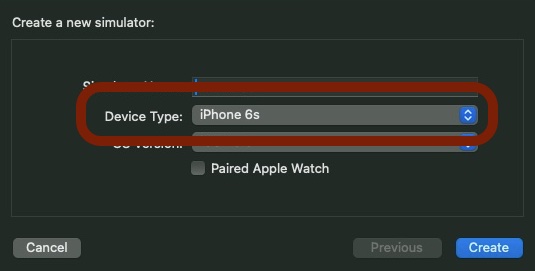
The name must match the Device Type shown in Xcode's Create New Simulator screen.
-
Run the generator:
swift run BezelGenerator
Identifiers that share the same simulator name (e.g. Wi-Fi and Cellular variants) are grouped and processed in a single simulator boot — the bezel value is written to all matching identifiers automatically.
| Outcome | Result |
|---|---|
| Simulator boots and returns data | Entry moves from pending → devices with the captured bezel value |
| No runtime available for the device | Entry moves from pending → problematic; retried automatically on future runs |
Contributions are welcome. If you find a bug or want to add device support, please open an issue or pull request.
Note
Pull request titles must follow this format:
YYYY-mm-dd - {title}
eg. 2025-03-01 - Add iPhone 17 series
Released under the MIT licence. See LICENCE for details.