Add functionality for time signal with Kanmusu Nendoroid. Read and play sound in microSD card using PIC16F1705.
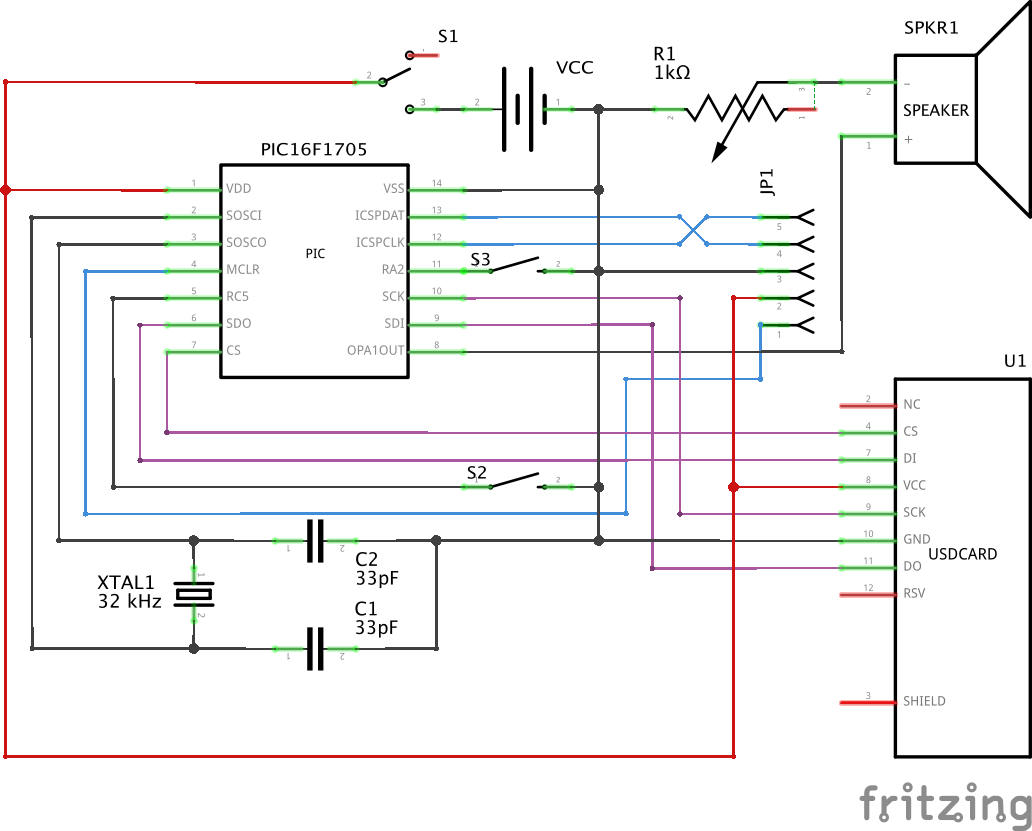
- Connect Pickit with
JP1
- Format SD card as FAT16
- Make directory named
KC-***(e.g.KC-i401,KC-suzuya) - Obtain Kanmusu's time signal sounds from the Internet
- Convert sounds to
WAV,22050 Hz,1 channel,8 bit depth - Put WAVs into the directory as
00.wav~23.wav
- Import project into MPLABX IDE
- Select PIC16F1705 in project property
- Run
- On the hour, turn on device
- Select current hour using
S2 - Select Kanmusu using
S3(switch theKC-***directory) - Put device into a head of Nendoroid
Then automatically plays WAV every 1 hour.
MIT