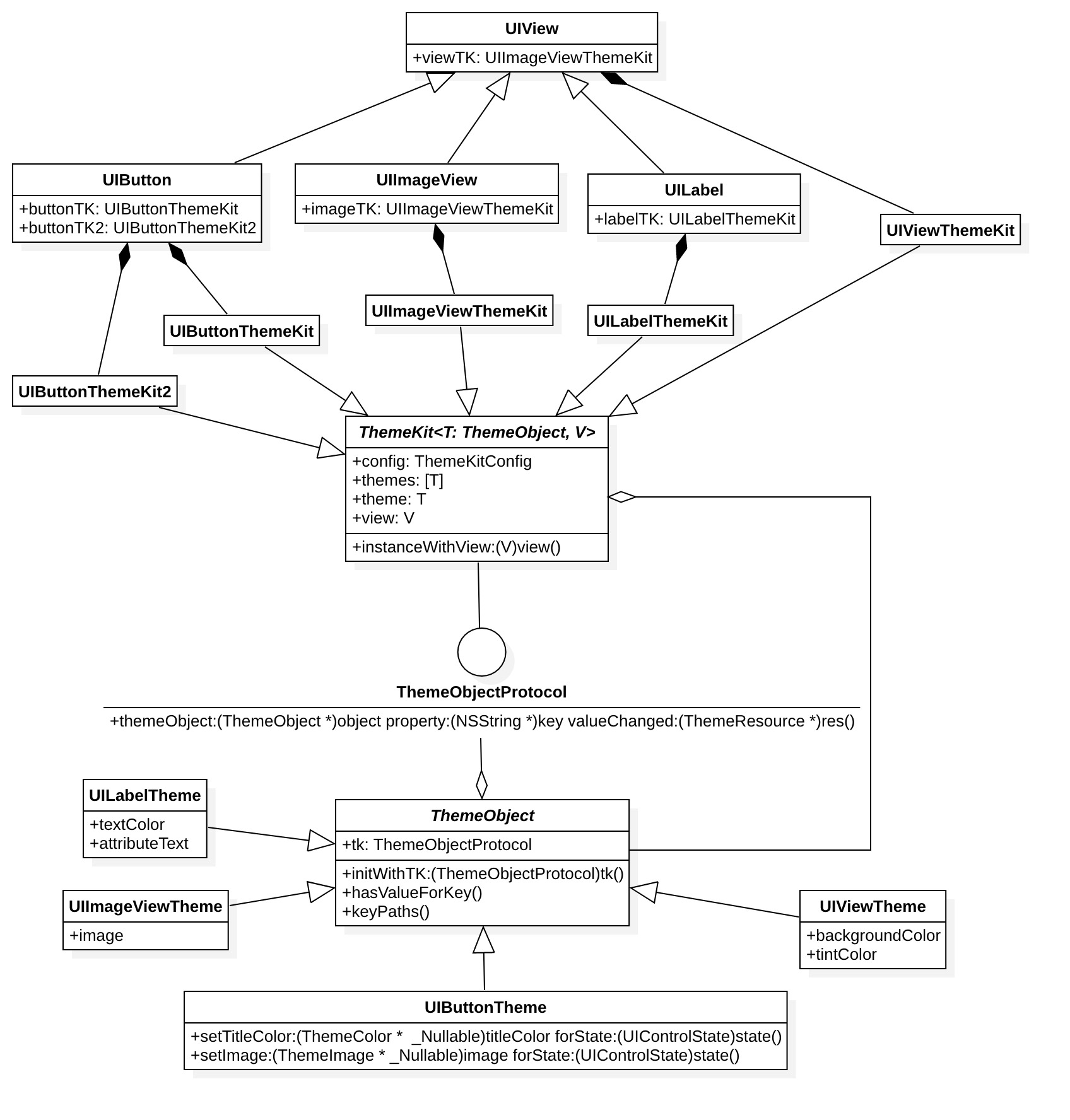
App 多区域皮肤 UIKit Category
LVThemeKit/ObjC 适用于 OC 项目
LVThemeKit/Swift 适用于 Swift 项目
- UIKit Category
- UIView
- UIImageView
- UILabel
- UIButton
- UISlider
- QuartzCore Category
- CALayer
- CAShapeLayer
- Resource
- LVThemeColor
- LVThemeImage
- LVThemeString
- LVThemeAttributedString
- 其他,可以很容易的扩展
- UIView
// OC
self.label.viewTK.theme.backgroundColor = [LVThemeColor background];
self.label.viewTK.other.backgroundColor = [LVThemeColor otherBackground];
// Swift
label.viewTK.theme.backgroundColor = LVThemeColor.background
label.viewTK.other.backgroundColor = LVThemeColor.otherBackground- UIButton
// OC
[self.button.buttonTK.theme setImage:[LVThemeImage image] forState:UIControlStateNormal];
// Swift
button.buttonTK.theme.setImage(LVThemeImage.image, for: .normal)- CALayer
// OC
self.layer.layerTK.theme.borderColor = [LVThemeColor background];
// Swift
layer.layerTK.theme.borderColor = LVthemeColor.backgroundLVThemeKitConfiggenerators: 监听主题变化的通知数组,根据配置的数量生成主题数量applyProperty: 当配置多套主题时,自定义应用顺序,默认是数组顺序
// OC
LVThemeKitConfig *conf = [[LVThemeKitConfig  alloc] init];
config.generators = @[[DayNightObserver class]];
LVThemeKit.config = conf;
// Swift
let conf = LVThemeKitConfig()
conf.generators = [DayNightObserver.self]
LVThemeKitConfig.config = conf- 扩展类,参考
UIView/CALayer - 扩展属性
- 支持
KVC,参考UIView.backgroundColor - 不支持
KVC,参考UIButton.setTitle:forState:
- 支持
- 替换已有的类,比如
UIView.viewTK,可以新加一个属性UIView.x_viewTK
LVThemeKit/ObjC- MultiThemesDemo: 多区域多主题,
OC项目 - DayNightDemo: 单主题(黑夜模式),
Swift项目
- MultiThemesDemo: 多区域多主题,
LVThemeKit/Swift- DayNightDemoSwift:单主题(黑夜模式),
Swift项目
- DayNightDemoSwift:单主题(黑夜模式),
pod 'LVThemeKit/ObjC'
或者
pod 'LVThemeKit/Swift'