


🌐 Project • 📄 Paper • 💻 LLM-in-Sandbox-RL • 🤗 Huggingface • 📦 Model & Data • 🎬 Youtube • 📽️ Slides • 🕶️ Awesome Computer-Use-Agent • 🦞 Scale-OpenClaw
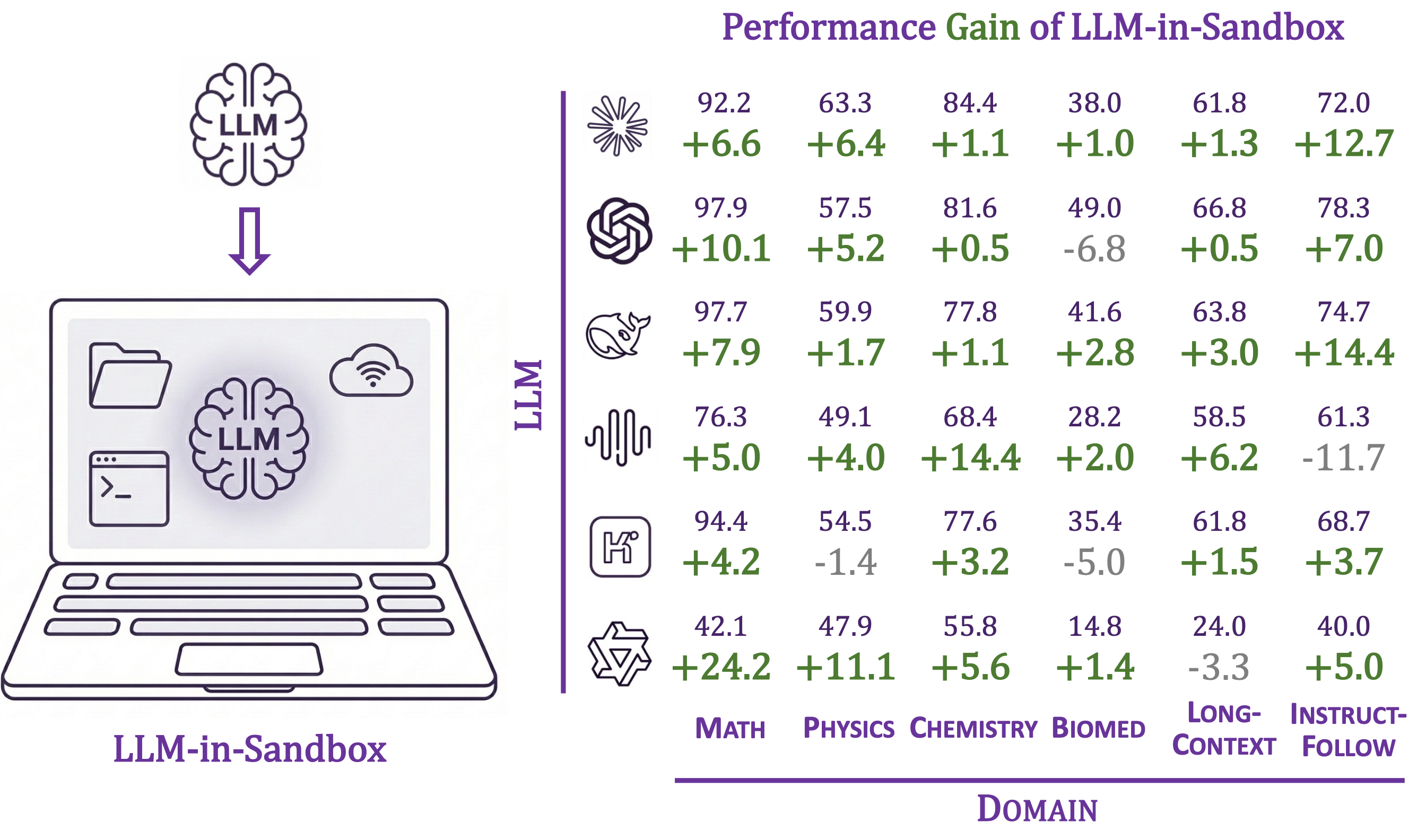
As vibe coding becomes common and 🦞 OpenClaw draws widespread attention, we present a systematic study to show that placing an LLM inside a code sandbox with basic computer functionalities lets it significantly outperform standalone LLMs across chemistry, physics, math, biomedicine, long-context understanding, and instruction-following with no extra training. RL further amplifies the gains.
- 📈 Consistent improvements across diverse non-code domains
- 🧠 File system as long-term memory, up to 8× token savings
- 🐳 Docker isolation for security (vs. unrestricted setups like 🦞 OpenClaw)
- 🔌 Works with OpenAI, Anthropic, vLLM, SGLang, etc.
Feel free to open an issue if you have any questions or run into any problems. We'd be happy to help!
- [2026-04-11] Released scale-openclaw — collect 🦞 OpenClaw trajectories at scale on a single machine, Docker-free.
- [2026-03-25] Released Awesome Computer-Use Agents, a curated list tracking the development of computer-use agents across terminal and GUI paradigms, with an accompanying overview report.
- [2026-03-20] Uploaded talk slides on "LLM-in-Sandbox: From Coding Agent to General Agent".
- [2026-02-12] Released code, model & data, and wandb log for LLM-in-Sandbox Reinforcement Learning at LLM-in-Sandbox-RL.
- [2026-02-11] v0.2.0: Added benchmark module for reproducing paper results, evaluating any LLM, and adding your own tasks.
- [2026-01-23] Released paper, project page, and code. Honored as #1 paper of the day on Hugging Face.
Requirements: Python 3.10+, Docker
Skip this if Docker is already installed.
curl -fsSL https://get.docker.com -o get-docker.sh && sh get-docker.sh
dockerd > /var/log/dockerd.log 2>&1 &
Or follow the official Docker docs.
pip install llm-in-sandboxOr install from source:
git clone https://github.com/llm-in-sandbox/llm-in-sandbox.git
cd llm-in-sandbox
pip install -e .
Docker Image
The default Docker image (cdx123/llm-in-sandbox:v0.1) will be automatically pulled when you first run the agent. The first run may take a minute to download the image (~400MB), but subsequent runs will start instantly.
LLM-in-Sandbox works with various LLM providers including OpenAI, Anthropic, and self-hosted servers (vLLM, SGLang, etc.).
llm-in-sandbox run \
    --query "write a hello world in python" \
    --llm_name "openai/gpt-5" \
    --llm_base_url "http://your-api-server/v1" \
--api_key "your-api-key"Using local vLLM server for Qwen3-Coder-30B-A3B-Instruct
1. Start vLLM server:
vllm serve Qwen/Qwen3-Coder-30B-A3B-Instruct \
    --served-model-name qwen3_coder \
    --enable-auto-tool-choice \
    --tool-call-parser qwen3_coder \
    --tensor-parallel-size 8  \
    --enable-prefix-caching
2. Run agent (in a new terminal once server is ready):
llm-in-sandbox run \
    --query "write a hello world in python" \
    --llm_name qwen3_coder \
    --llm_base_url "http://localhost:8000/v1"  \
    --temperature 0.7
Using local SGLang server for DeepSeek-V3.2-Thinking
1. Start sgLang server:
python3 -m sglang.launch_server \
    --model-path "deepseek-ai/DeepSeek-V3.2" \
    --served-model-name "DeepSeek-V3.2" \
    --trust-remote-code \
    --tp-size 8 \
    --tool-call-parser deepseekv32 \
    --reasoning-parser deepseek-v3 \
    --host 0.0.0.0 \
    --port 5678
2. Run agent (in a new terminal once server is ready):
llm-in-sandbox run \
    --query "write a hello world in python" \
    --llm_name DeepSeek-V3.2 \
    --llm_base_url "http://0.0.0.0:5678/v1" \
--extra_body '{"chat_template_kwargs": {"thinking": True}}'| Parameter | Description | Default |
|---|---|---|
--query |
Task for the agent | required |
--llm_name |
Model name | required |
--llm_base_url |
API endpoint URL | from LLM_BASE_URL env var |
--api_key |
API key (not needed for local server) | from OPENAI_API_KEY env var |
--input_dir |
Input files folder to mount (Optional) | None |
--output_dir |
Output folder for results | ./output |
--docker_image |
Docker image to use | cdx123/llm-in-sandbox:v0.1 |
--prompt_config |
Path to prompt template | ./config/general.yaml |
--temperature |
Sampling temperature | 1.0 |
--max_steps |
Max conversation turns | 100 |
--extra_body |
Extra JSON body for LLM API calls | None |
Run llm-in-sandbox run --help for all available parameters.
Each run creates a timestamped folder:
output/2026-01-16_14-30-00/
├── files/
│   ├── answer.txt      # Final answer
│   └── hello_world.py  # Output file
└── trajectory.json     # Execution history
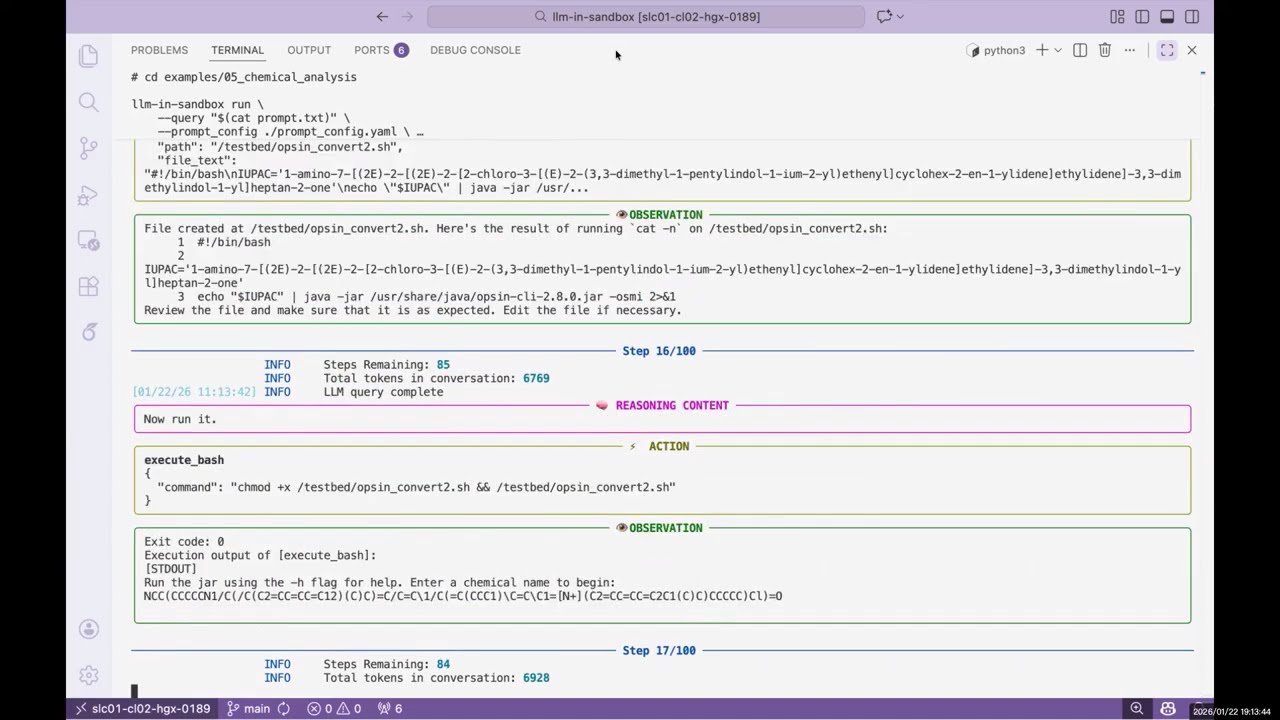
We provide examples across diverse non-coding domains: scientific reasoning, long-context understanding, instruction following, travel planning, video production, music composition, poster design, and more.
👉 See examples/README.md for the full list.
Reproduce our paper results, evaluate any LLM in the sandbox, or add your own tasks.
👉 See llm_in_sandbox/benchmark/README.md
Feel free to open an issue if you have any questions or run into any problems, we’d be happy to help! You can also reach us directly at daixuancheng6@gmail.com and shaohanh@microsoft.com.
We learned the design and reused code from R2E-Gym. Thanks for the great work!
If you find our work helpful, please cite us:
@article{cheng2026llm,
  title={Llm-in-sandbox elicits general agentic intelligence},
  author={Cheng, Daixuan and Huang, Shaohan and Gu, Yuxian and Song, Huatong and Chen, Guoxin and Dong, Li and Zhao, Wayne Xin and Wen, Ji-Rong and Wei, Furu},
  journal={arXiv preprint arXiv:2601.16206},
  year={2026}
}