Releases: laobamac/OCLP-Mod
3.1.9

3.1.8
OCLP-Mod 3.1.8
此版本未经广泛测试,仅请更新到macOS Tahoe 26.4.1 25E253的用户必须更新!
更新日志
- 尝试修复25E253上的KDK匹配错误
This version has not been extensively tested. Only users who have updated to macOS Tahoe 26.4.1 (build 25E253) must update!
Change Log
- Attempted to fix KDK matching error on build 25E253
3.1.7
OCLP-Mod 3.1.7
该版本为可选更新,仅在3.1.6基础上做一些可能出现的错误的规避
This version is an optional update, and only do some possible errors on the basis of 3.1.6.
更新日志
- 修复未来在 macOS 26.5 + 中可能出现的一些KDK匹配错误
Change log
- Fix some KDK matching errors that may occur in macOS 26.5 + in the future
Full Changelog: 3.1.5...3.1.7
Full Changelog: 3.1.6...3.1.7
3.1.6
3.1.5
OCLP-Mod 3.1.5
更新日志
说好了不再更新OCLP-Mod,还是没忍住更了一下。顺便祝大家新年快乐吧。
在26.4B1+自己的KDK发布前不要安装声卡补丁或旧版USB补丁!26.4B1+不兼容旧KDK!
3月12日已同步26.4B4 25E5233c 的KDK,可以正常安装声卡/旧版USB补丁了
- 沟槽的苹果在 macOS 26.4B1 把HFS+文件系统
删了弄出了重大Bug,此版本全部换用APFS来兼容新系统26.4B1。 - 依旧是沟槽的苹果在 macOS 26.4B1 把 hdutil 权限提高了,不给ro旧版ot不让挂载。此版本已修复。
Change log
Do not install the sound card patch or the old version of the USB patch before the release of 26.4B1+'s own KDK! 26.4B1+ is not compatible with the old KDK!
KDK of 26.4B4 25E5233c has been synchronized on March 12, and the sound card/old version of USB patch can be installed normally.
- Apple
deletedbroke the HFS+ file system in macOS 26.4B1, and this version is all replaced with APFS to be compatible with thenew system26.4B1. - Apple has increased the hdutil permission in macOS 26.4B1, and it is not allowed to mount without root. This version has been fixed.
3.1.4
OCLP-Mod 3.1.4
Note
此版本为基于V3.1.3的修复版本,优化体验和其他逻辑,可以自由选择是否更新
更新日志
- 添加OCLP-Mod Shim,现在你可以在 macOS Tahoe 的 Spotlight Plus 中找到并打开 OCLP-Mod 了!
- 修正了 无线网卡补丁 内错误的“需要下载KDK”设置
- 修正了部分未翻译的字符串
Change log
- Add OCLP-Mod Shim, and now you can find and open OCLP-Mod in Spotlight Plus of macOS Tahoe!
- Fixed the "need to download KDK" setting in the wireless network card patch
- Fixed some untranslated strings
What's Changed
- Update download URL for Universal-Binaries.dmg by @chris1111 in #61
- Update OC-Mod and OC-Patcher images in docs by @chris1111 in #66
Full Changelog: 3.1.3...3.1.4
Contributors

Assets 5
3.1.3
OCLP-Mod 3.1.3
3.1.3版本在之前有过一次错误推送。如果你在20260101 23:30前更新过此版本,请手动下载OCLP-Mod.pkg覆盖安装!
更新日志
- 修复了单独安装无线网卡补丁并重启后错误地显示“需要卸载补丁以继续”的问题
- 修改为使用UTC偏移量判断地区
Change log
- Fixed the problem that "need to uninstall the patch to continue" was incorrectly displayed after installing the wireless network card patch separately and restarting.
- Modified to use UTC offset to judge the area
Full Changelog: 3.1.2...3.1.3
3.1.2
OCLP-Mod 3.1.2
此版本在3.1.1基础上做更多修复和优化
查看英文版 / View English Version
OCLP-Mod 3.1.2
More fixes and optimizations based on version 3.1.1
Changelog:
- Updated OpenCore to
1.0.6 - Fixed the issue where the
populate_pci_pathmethod failed to obtain the correct PCI path on certain platforms (especially C612), causing crashes - Added
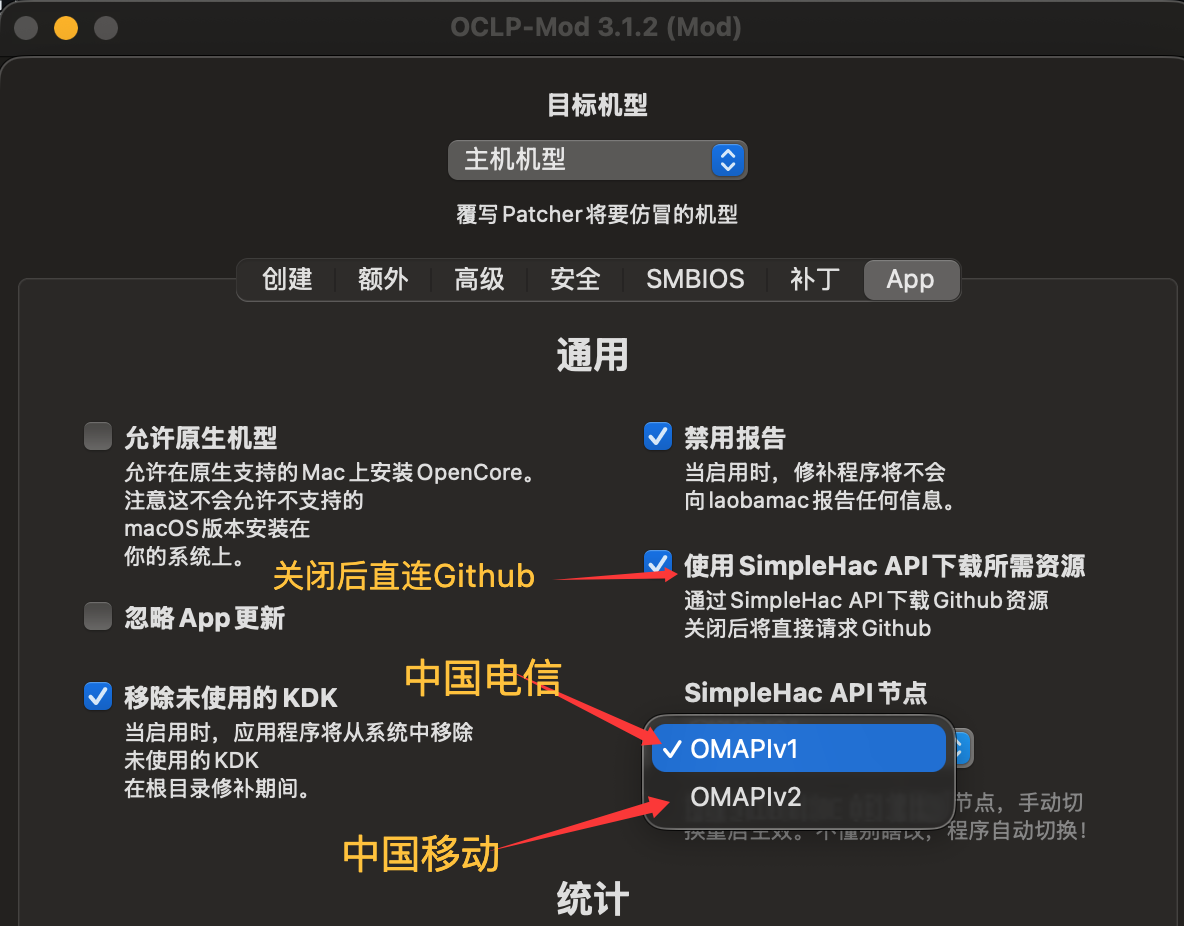
OMAPIv1andOMAPIv2mainland China nodes. If necessary, they can be switched under Settings → App - Automatically detects the current region (Mainland China / Hong Kong, Macao, Taiwan / Overseas) to select the default API node. Mainland China defaults to OMAPIv1, others directly connect to Github
Warning ⚠️
Please Read the Following Content Carefully!
Currently, OCLP-Mod has three connection routes: OMAPIv1 uses China Telecom nodes, OMAPIv2 uses China Mobile nodes, and Github is the original route.
OMAPIv1 and OMAPIv2 are SimpleHacAPI, maintained personally at my own expense. They handle all traffic and pressure for KDK downloads and Metallib downloads for users in mainland China.
In most cases, they are stable and available. In the event of an emergency where both OMAPI nodes crash simultaneously, please temporarily switch back to directly connecting to Github and wait patiently for repairs.
OMAPI does not throttle user speeds. Users in mainland China can generally use the default OMAPIv1. Unless your speed is unacceptably poor (e.g., China Broadcast Network, China Mobile, etc.), you may try OMAPIv2. However, I reiterate: I do not recommend manually changing the node selection! This may cause OCLP-Mod's automatic polling to fail.
Switching in settings as shown:
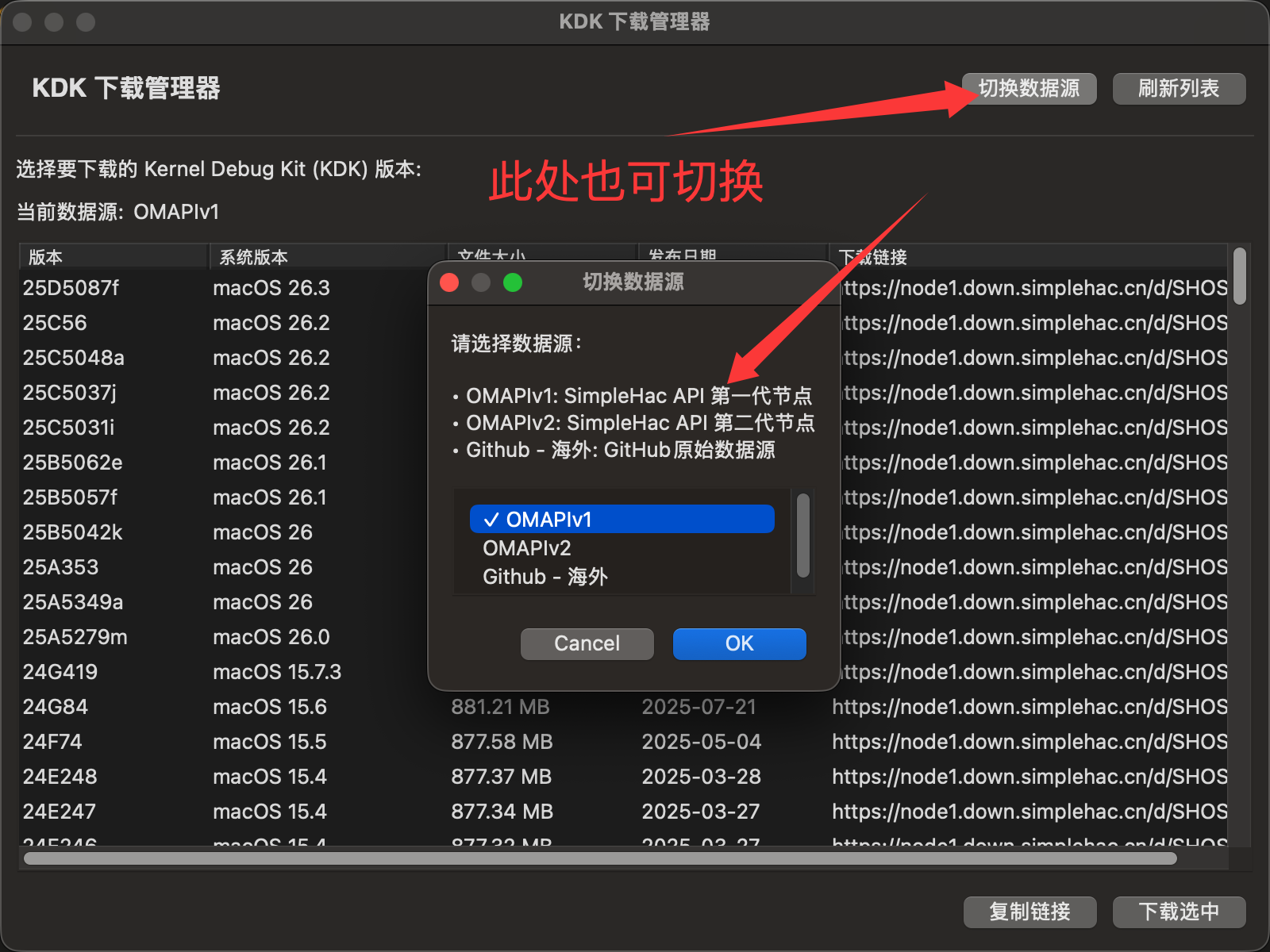
KDK Downloader and Metallib Downloader can also be switched individually:
更新日志:
- 更新 OpenCore 到
1.0.6 - 修复
populate_pci_path方法在部分平台(尤其是C612)上无法获取正确PCI路径导致崩溃的问题 - 增加了
OMAPIv1和OMAPIv2大陆节点,必要情况下可以在 设置->App 下更换。 - 自动检测当前地区(中国大陆/港澳台/海外)来选择默认API节点。中国大陆默认OMAPIv1,其余直连Github
警告⚠️
务必阅读以下内容!
当前OCLP-Mod有三种线路,OMAPIv1为中国电信节点,OMAPIv2为中国移动节点,Github为原始节点。
OMAPIv1和OMAPIv2 为SimpleHacAPI,由我个人自费维护,他们承担着所有大陆用户的KDK下载、Metallib下载的流量和压力。
在绝大多数情况下它们是稳定可用的,如遇突发状况,两个OMAPI同时崩溃,请暂时切回至直连Github耐心等待修复。
OMAPI不会对用户限速,中国大陆的用户大部分情况下使用默认的OMAPIv1即可,除非你的速度差到难以接受(比如中国广电、中国移动等)可以尝试OMAPIv2。但再次重申,我不建议你手动修改节点选择!这有可能导致OCLP-Mod自动轮询失效。
设置内切换如图:
KDK下载器、Metallib下载器也可单独切换
3.1.1
OCLP-Mod 3.1.1
更新日志
- 在macOS 26上运行时支持
Solarium 液态玻璃外观 。 - 在无网络状态下自动删除网络所需的补丁。如果没有网络连接,则允许先安装无线补丁。
- 提高kdk_handler和metallib_handler的稳定性。
- 改进API选择策略。
Change log
- Support
Solarium Liquid Glassstyle when running on macOS 26. - Automatically delete the patches required for the network when there is no network. If there is no network connection, it is allowed to install wireless patches first.
- Improve the stability of kdk_handler and metallib_handler.
- Improve the API selection strategy.
Full Changelog: 3.1.0...3.1.1
3.1.0
OCLP-Mod 3.1.0
重大更新👑👑👑👑
更新日志:
- 支持在
macOS Tahoe安装博通无线网卡/英特尔无线网卡的补丁,无需禁用AMFI,只需要正常加载AMFIPass.kext即可!(无法进入系统请添加启动参数-lilubetaall或者-amfipassbeta)
Major update👑👑👑👑
Update log:
- Support the installation of Broadcom wireless network card/Intel wireless network card patches in
macOS Tahoe, no need to disable AMFI, just load AMFIPass.kext normally! ( If you can't enter the system, please add the startup parameter-lilubetaallor-amfipassbeta)
Full Changelog: 2.6.9...3.1.0