
A lightweight, self-contained Linux system monitor that serves a real-time web dashboard over your local network. No installation required — just download and run a single binary.
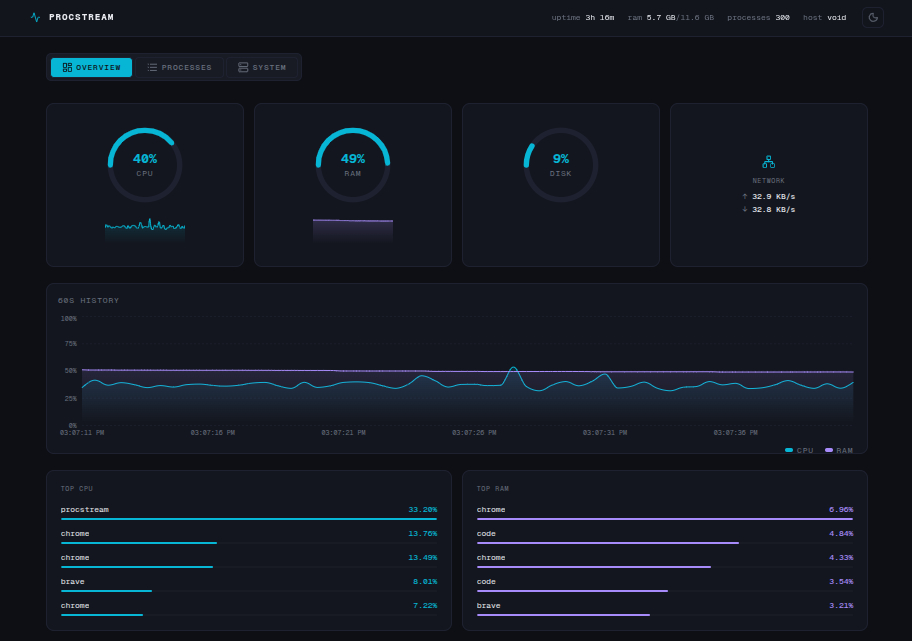
- Single binary — no Node.js, no Go, no dependencies. One file, run it anywhere.
- Real-time metrics — CPU, RAM, disk, and network I/O streamed over WebSocket at 500ms intervals.
- Process manager — sortable, searchable, virtualised process table with safe kill support.
- LAN accessible — binds to
0.0.0.0so you can open the dashboard on your phone or tablet over Wi-Fi. - Per-core CPU — individual core utilisation breakdown.
- 60s timeline — rolling history chart for CPU and RAM.
- Dark & light theme — clean terminal-inspired UI, toggleable at runtime.
- Permission-safe kills — only processes owned by the running user can be terminated. Root processes are always protected.
# amd64 (most desktops and servers)
curl -L https://github.com/knnedy/procstream/releases/download/v0.1.0/procstream_0.1.0_linux_amd64.tar.gz | tar -xz

# arm64 (Raspberry Pi, ARM servers)
curl -L https://github.com/knnedy/procstream/releases/download/v0.1.0/procstream_0.1.0_linux_arm64.tar.gz | tar -xzchmod +x procstream
./procstreamThen open your browser at:
http://localhost:8080
Or from another device on the same network:
http://<your-ip>:8080
Usage of procstream:
  -host string
        network interface to bind (default "0.0.0.0")
  -port int
        TCP port for the web server and WebSocket endpoint (default 8080)
  -interval duration
        metrics scrape and broadcast interval (default 500ms)
  -version
        print version and exit
# run with defaults
./procstream

# run on a custom port
./procstream -port 9090

# restrict to localhost only
./procstream -host 127.0.0.1

# increase scrape interval to reduce CPU overhead
./procstream -interval 1s

# check version
./procstream -version| Tab | Contents |
|---|---|
| Overview | CPU, RAM, disk and network gauges · 60s timeline chart · top 5 CPU and RAM processes |
| Processes | Full sortable, searchable process table with kill support |
| System | Hostname, OS, kernel, CPU model · per-core breakdown · disk and network I/O stats |
ProcStream enforces native Linux user-space permission boundaries without requiring sudo.
- Every process in the table has a
canKillflag determined server-side by comparing the process owner UID against the UID of the user running the binary. - The Kill button is only enabled for processes you own.
- Root and system processes (
UID 0) are always protected regardless of who runs the binary. - Kill requests are verified server-side on every request — the frontend flag is UX only.
Requirements
- Go 1.22+
- Node.js 18+
- pnpm
git clone https://github.com/knnedy/procstream.git
cd procstream
make build
./bin/procstreamcurl -L https://github.com/knnedy/procstream/releases/download/v0.1.0/checksums.txt -o checksums.txt
sha256sum -c checksums.txt| Layer | Technology |
|---|---|
| Backend | Go, net/http, coder/websocket, gopsutil/v4 |
| Frontend | Next.js 16, TypeScript, Tailwind CSS, shadcn/ui, Recharts |
| Distribution | Single binary via go:embed |