


[ English | Русский ]
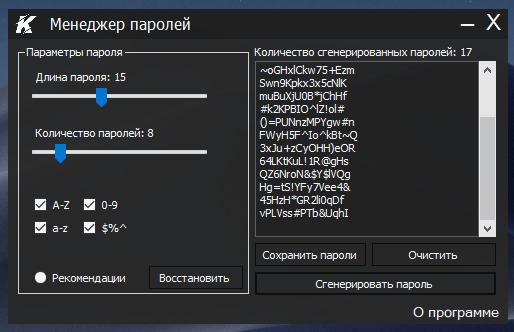
Secure open-source password manager for generating and storing strong passwords. Developed in C# with Windows Forms.
- Key Features
- Installation
- Usage Guide
- Technology Stack
- Development Roadmap
- Security Model
- Contributing
- Project Team
- Acknowledgments
- License
- Custom Password Length - Generate passwords from 8 to 64 characters
- Password Strength Analysis - Real-time strength evaluation
- Secure Storage - Save passwords to encrypted TXT files
- Usage Statistics - Track number of generated passwords
- Clipboard Integration - One-click copy to clipboard
- User-Friendly Interface - Intuitive Windows Forms GUI
- Clone repository:
git clone https://github.com/klondike0x/PasswordManager.git
- Open solution in Visual Studio:
- Open PasswordManager.sln
- Build solution:
- Press Ctrl + Shift + B or use Build menu
- Run application:
- Press F5 to start debugging
- Set desired password length using slider
- Click "Generate" to create new password
- View password strength indicator:
- 🔴 Weak (below 50 bits entropy)
- 🟠 Medium (50-80 bits entropy)
- 🟢 Strong (80+ bits entropy)
- Save password:
- Click "Save" and choose location
- Passwords stored in YYYY-MM-DD_passwords.txt format
- Copy to clipboard:
- Click "Copy" button (auto-clears after 30 seconds)
- Core Language: C# 12
- GUI Framework: Windows Forms
- Cryptography: System.Security.Cryptography
- Dependencies:
- Tools:
- Visual Studio 2022
- NuGet Package Manager
✅ Completed Features
- Custom password length selection
- Password strength analysis
- Save to TXT with timestamp
- Password generation counter
- AES-256 encryption for stored passwords
- Password categories (Social, Banking, Work)
- Import/export password database
- Automatic cloud backup
- Two-factor authentication support
- Browser extension integration
Current Implementation
- Secure RNG using RNGCryptoServiceProvider
- Password strength calculation based on entropy
- Clipboard auto-clear after 30 seconds
Future Security Enhancements
// Planned encryption implementation
using System.Security.Cryptography;

byte[] EncryptPassword(string password, byte[] key, byte[] iv) {
  using Aes aes = Aes.Create();
  aes.Key = key;
  aes.IV = iv;

  ICryptoTransform encryptor = aes.CreateEncryptor();
  return encryptor.TransformFinalBlock(
    Encoding.UTF8.GetBytes(password), 0, password.Length);
}- Master password protection
- PBKDF2 key derivation with 100,000 iterations
- Secure memory handling with SecureString
We welcome contributions! Please follow these steps:
- Fork the repository
- Create your feature branch:
git checkout -b feature/new-awesome-feature- Commit your changes:
git commit -m 'Add some awesome feature'- Push to the branch:
git push origin feature/new-awesome-feature- Open a pull request
Please adhere to our coding standards.
Core Developer

- Microsoft C# Documentation Team
- Open-source community contributors
Distributed under the MIT License. See LICENSE for more information.