Generate realistic iMessage and Address Book sqlite databases for mock testing and demo applications.
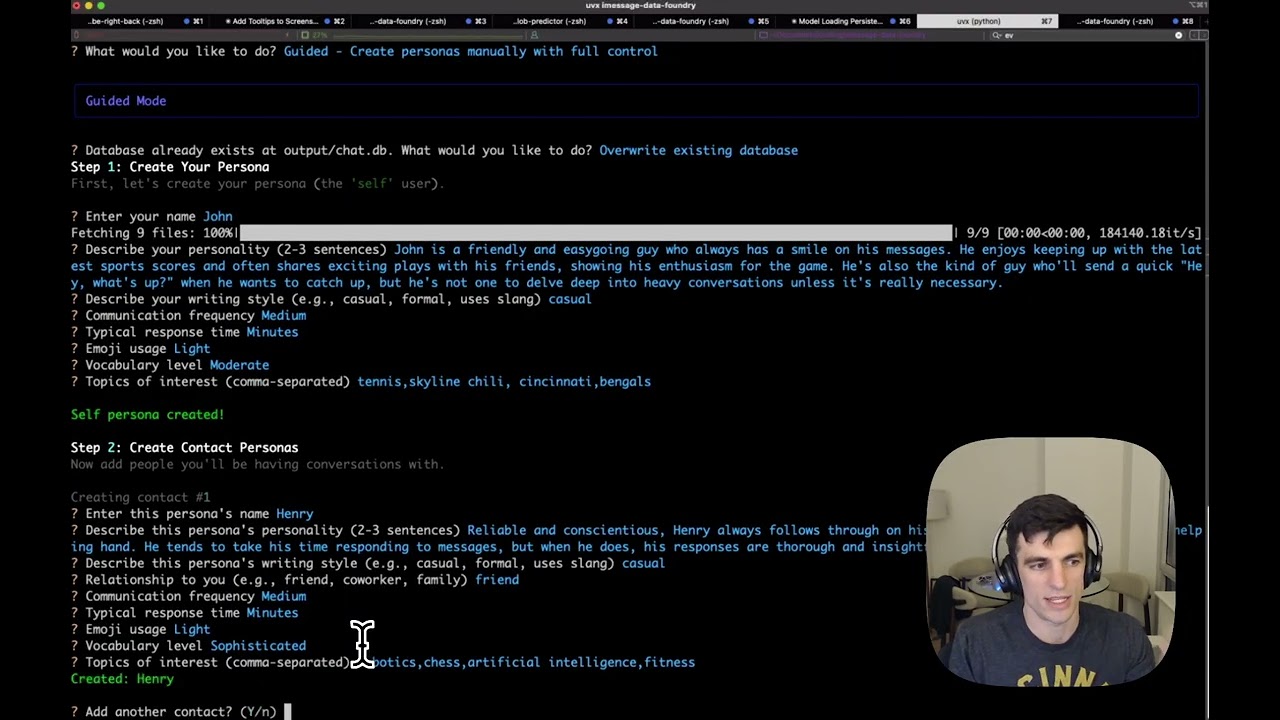
iMessage Data Foundry creates synthetic chat.db SQLite databases that exactly mirror the macOS iMessage schema. You have the option to use Ai to generate the personas and conversations. You can either use local models through mlx (note, really only for apple silicon though given the dependency on mlx-lm.), or OpenAI / Anthropic endpoints.
Good use cases for this synthetic data are:
- Testing iMessage analysis tools and exporters
- Development of applications that interface with iMessage data
- Demos and documentation requiring realistic message data
- Full Schema Replication — Exact match of macOS iMessage
chat.dbstructure - Multi-Version Support — Sonoma (14.x), Sequoia (15.x), and Tahoe (26.x)
- AI-Powered Personas — Generate realistic personas with distinct personalities
- Natural Conversations — LLM-generated messages that feel authentic
- Persona Library — Save and reuse personas across database generations
- Group Chats — Support for both 1:1 and group conversations
- Realistic Timestamps — Natural message timing with conversation batching
- Attachment Stubs — Placeholder attachments with proper database records
pip install imessage-data-foundryuvx imessage-data-foundrypipx install imessage-data-foundryuv tool install imessage-data-foundrygit clone https://github.com/johnlarkin1/imessage-data-foundry.git
cd imessage-data-foundry
pip install -e .# Launch the TUI
uvx imessage-data-foundry
# Or run directly
uv run python -m imessage_data_foundryimessage-data-foundry --help
imessage-data-foundry --version
imessage-data-foundry --output ~/Desktop/chat.db
imessage-data-foundry # interactive mode (this is the default)Select your preferred LLM provider from the Settings menu in the app. Available providers depend on which API keys you have configured.
Set API keys as environment variables before running the app:
export OPENAI_API_KEY="sk-..."
# or
export ANTHROPIC_API_KEY="sk-ant-..."For local inference on Apple Silicon, install mlx-lm:
pip install mlx-lmSettings are stored in ~/.config/imessage-data-foundry/foundry.db.
Personas can be created manually or generated by AI:
┌─ Create Persona ─────────────────────────────────┐
│                                                  │
│  Name: Sarah Chen                                │
│  Phone: +1 (555) 123-4567                        │
│  Relationship: Close friend from college         │
│                                                  │
│  Personality:                                    │
│  Outgoing, tech-savvy software engineer who      │
│  loves hiking and craft coffee. Quick to         │
│  respond with enthusiasm and emoji.              │
│                                                  │
│  [Generate with AI]  [Save]  [Cancel]            │
│                                                  │
└──────────────────────────────────────────────────┘
- Select personas to include
- Choose chat type (1:1 or group)
- Set message count target
- Optionally provide a conversation seed
- Generate!
The generated chat.db file can be used with any tool that reads iMessage databases:
# Example: Use with imessage-exporter
imessage-exporter -p ./output/chat.db -f html -o ./export/You'll need an API key from one of the supported providers:
| Provider | Get API Key |
|---|---|
| OpenAI | https://platform.openai.com/api-keys |
| Anthropic | https://console.anthropic.com/settings/keys |
imessage-data-foundry/
├── imessage_data_foundry/
│   ├── cli/               # CLI application and flows
│   ├── db/                # Database schema and building
│   ├── personas/          # Persona management
│   ├── conversations/     # Conversation generation
│   ├── llm/               # LLM provider integrations
│   ├── settings/          # Settings storage
│   └── utils/             # Utility functions
├── tests/                 # Test suite
└── docs/                  # Documentation
Generated databases are tested for compatibility with:
- Text-only focus — Reactions, read receipts, and message effects are not simulated
- Placeholder attachments — Attachments are stubs, not real media files
- macOS-centric — Schema targets macOS; iOS backup databases may differ slightly
# Install dev dependencies
uv sync --dev

# Run tests
uv run pytest

# Run type checking
uv run mypy src/

# Format code
uv run ruff format src/MIT License — See LICENSE for details.
- Schema research informed by imessage-exporter
- Built with Textual for the beautiful TUI