fix desktop switching on dvorak layouts #481
Conversation


|
Do other hot keys work correctly in the dvorak layout? |

|
Yes, other hotkeys work as they should. |
|
I think the problem not in JWM (without patch). I run command: Changing the desktop works. I using Archlinux. |
|
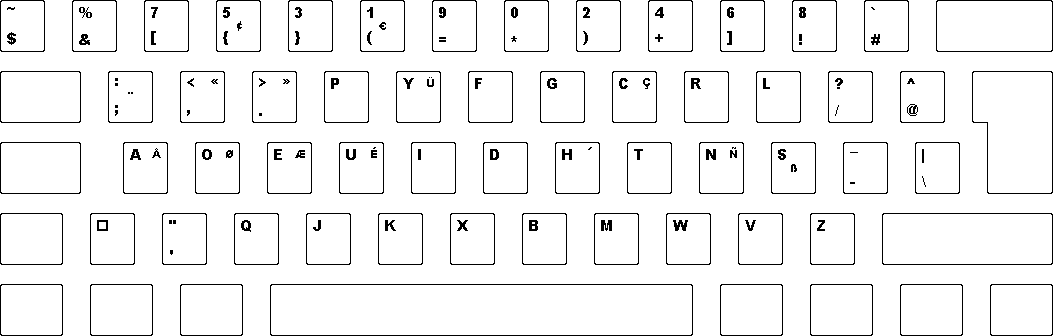
As I've said, problem is with classic and progremmer's dvorak variants. The problem arises because of non-standard layout of number keys: https://www.kaufmann.no/roland/dvorak/images/dvp1.png Try this |
|
I exec JWM by commands: I press the key CAPSLOCK The desktop is changing |
|
Yes, this works, but it's inconvenient to have to use caps lock to switch desktops. |
|
It works for me without CAPSLOCK. I suggested that you have a problem with this. PS: I also use a xorg-server 1.20.3 with a patch https://aur.archlinux.org/packages/xorg-server-bug865. Perhaps this will help when looking for a problem. |

2 participants


Binding
<Key mask="A" key="#">desktop#</Key>doesn't work correctly on some dvorak layouts, namely programmers dvorak and classic dvorak, since on these layouts keys that are typically number keys are used for other purpose and have different keysyms.
To work around this issue this patch uses keycodes (which are consistent between layouts) to get the correct keysym.