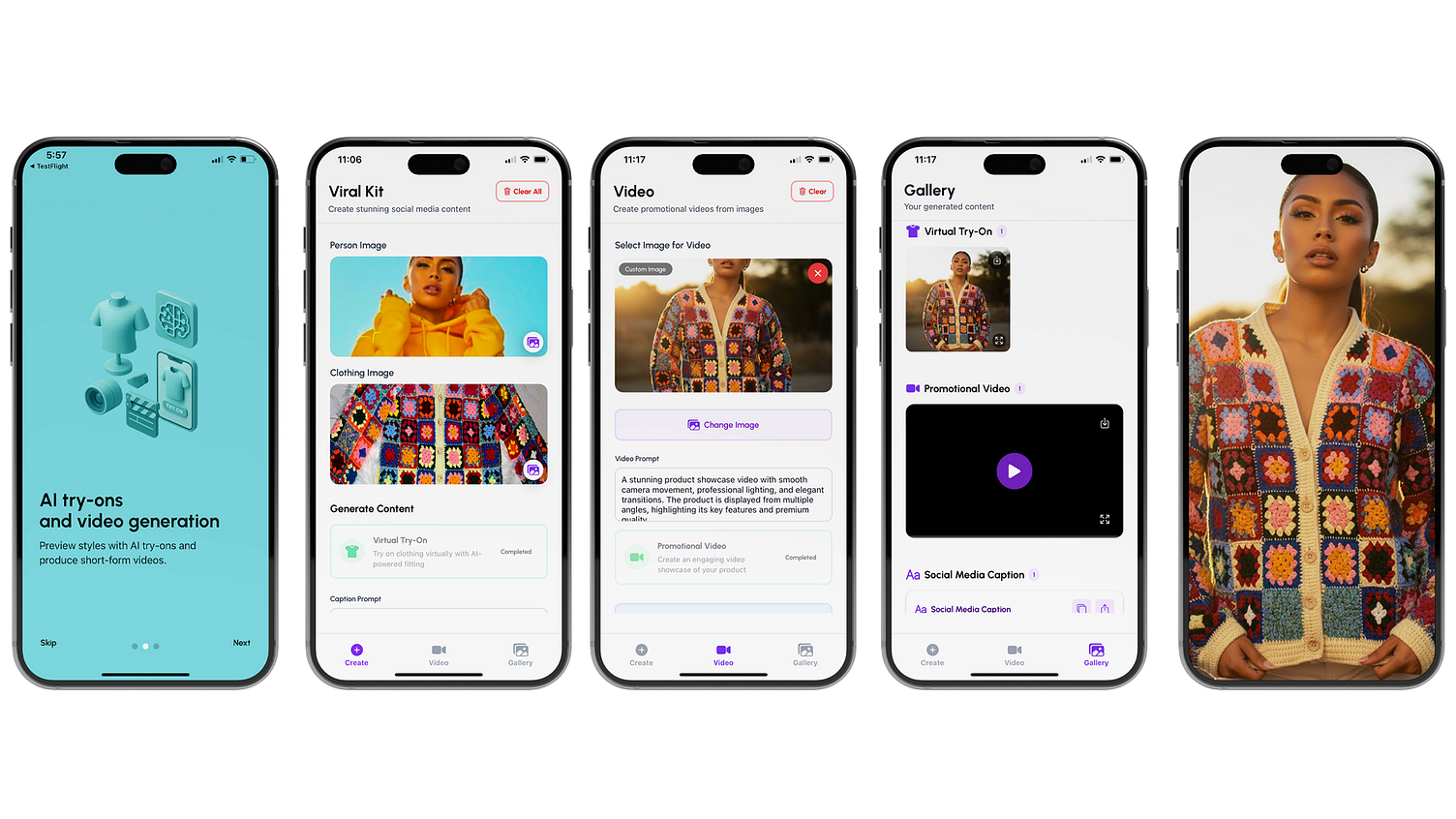
A complete React Native mobile app for creating social media content packages using Wiro AI APIs. Generate styled product photoshoots, promotional videos, and engaging captions - all from a single product image!
Perfect for e-commerce businesses, social media managers, and content creators who want to quickly generate professional marketing content.
- Product Photoshoots: Generate multiple styled product photos with different backgrounds (1-3 minutes)
- Video Generation: Create 4-5 second promotional videos using Sora 2 Pro AI (2-4 minutes)
- Caption Generation: Generate engaging social media captions with relevant hashtags (30 seconds)
- Real-time Polling: Automatic status updates for all generation tasks
- Local Storage: All generated content is stored locally on device
- Export & Share: Save images/videos to photo library and copy captions
- Beautiful UI: Modern design with NativeWind/TailwindCSS
- State Management: Zustand for efficient state handling
- Smart Caching: React Query for optimized API calls
- Framework: Expo React Native with TypeScript
- Routing: Expo Router (file-based)
- State Management: Zustand
- Data Fetching: TanStack React Query v5
- Styling: NativeWind v4 + TailwindCSS
- Animations: Reanimated v4
- UI Components: Custom components with Ionicons
- Image Handling: Expo Image Picker + Image Manipulator
- Video Playback: Expo AV
- API Authentication: HMAC SHA256 with crypto-js
viralkit/
├── app/                          # Expo Router screens (file-based routing)
│   ├── (tabs)/                   # Tab navigation group
│   │   ├── index.tsx            # Home - Upload & Generate
│   │   ├── gallery.tsx          # View Generated Content
│   │   ├── video.tsx            # Video generation screen
│   │   └── _layout.tsx          # Tab Navigator layout
│   ├── index.tsx                # Root redirect/entry point
│   ├── onboarding.tsx           # Onboarding flow
│   └── _layout.tsx              # Root Layout with Providers
├── components/                   # Reusable UI components
│   ├── ImageUploader.tsx        # Image selection & upload component
│   ├── GenerationCard.tsx       # Status card for each generation type
│   ├── VideoPlayer.tsx          # Custom video player component
│   ├── VideoViewerModal.tsx     # Full-screen video viewer modal
│   ├── CaptionDisplay.tsx       # Caption display with copy/share
│   └── ImageViewerModal.tsx     # Full-screen image viewer modal
├── services/                     # API & external service integrations
│   ├── wiro-api.ts              # Wiro API client & request handlers
│   └── signature.ts             # HMAC SHA256 signature generation
├── stores/                       # State management (Zustand)
│   └── content-store.ts         # Global state for content & generations
├── types/                        # TypeScript type definitions
│   └── index.ts                 # Shared types & interfaces
├── utils/                        # Utility functions & helpers
│   ├── constants.ts             # API config, endpoints, default settings
│   ├── image-utils.ts           # Image optimization & manipulation
│   ├── progress-parser.ts       # Task progress parsing utilities
│   ├── query-client.ts          # React Query configuration
│   └── use-generation.ts        # Custom hooks for generation & polling
├── assets/                       # Static assets (images, icons)
│   └── images/                  # App icons, splash screens, etc.
├── applesubmission/              # App Store submission assets
│   └── support/                 # Support page for App Store
│       └── page.tsx
├── app.config.js                 # Expo app configuration
├── babel.config.js              # Babel transpiler configuration
├── tailwind.config.js           # TailwindCSS configuration
├── tsconfig.json                 # TypeScript configuration
└── package.json                  # Dependencies & scripts
- Node.js 20.x or higher
- npm or yarn
- Expo CLI (
npm install -g expo-cli) - iOS Simulator (Mac) or Android Emulator
- A Wiro AI account with API access
- Clone the repository:
git clone <repository-url>
cd viralkit- Install dependencies:
npm install- Set up environment variables:
Create a .env file in the root directory:
EXPO_PUBLIC_WIRO_API_KEY=your_api_key_here
EXPO_PUBLIC_WIRO_API_SECRET=your_api_secret_here
How to get your API keys:
- Sign up or log in to Wiro AI Dashboard
- Navigate to your API settings/dashboard
- Generate or copy your API Key and API Secret
- Add them to your
.envfile (never commit this file to version control!)
Note: The app uses HMAC SHA256 authentication. Your API Secret is used to generate signatures for each request, so keep it secure.
- Start the development server:
npx expo start- Run on your preferred platform:
# iOS (requires Mac)
npm run ios

# Android
npm run android

# Web
npm run web- Users can upload a model image and also a product image from their photo library or take a photo with the camera
- Images are automatically optimized: resized to max 1920x1920, compressed to 80% quality, converted to JPEG
- App requires photo library and camera permissions (configured in
app.config.js)
Users can generate three types of content:
- Photoshoots: Multiple styled product photos with different backgrounds (1-3 minutes)
- Videos: 4-5 second promotional videos using Sora 2 Pro AI (2-4 minutes)
- Captions: Engaging social media captions with relevant hashtags (30 seconds)
- App polls the Wiro API every 3 seconds to check task status
- Maximum polling duration: 3 minutes (60 attempts)
- Progress is shown with loading indicators
- Toast notifications alert when content is ready
- Tasks can be cancelled if needed
- All generated content appears in the Gallery tab
- Images displayed in a responsive grid
- Videos with custom playback controls
- Captions with copy and share functionality
- Content is stored locally on device (can be exported to photo library)
This codebase is perfect for:
- E-commerce Apps: Generate product marketing content on-the-fly
- Social Media Tools: Create content packages for Instagram, TikTok, Facebook
- Content Creation Platforms: Build your own AI-powered content studio
- Learning Projects: Understand React Native, Expo, and AI API integration
- Custom Solutions: Fork and customize for your specific use case
The app demonstrates:
- React Native best practices with Expo Router
- HMAC authentication for secure API calls
- Real-time task polling with React Query
- Local state management with Zustand
- Image optimization and handling
- Modern UI/UX patterns
- Product Photoshoot -
/Run/wiro/product-photoshoot - Video Generation -
/Run/bytedance/image-to-video-seedance-lite-v1 - Caption Generation -
/Run/wiro/chat - Task Status -
/Task/Detail
Every API request includes HMAC SHA256 signature headers:
{
  "x-api-key": "YOUR_API_KEY",
  "x-nonce": "TIMESTAMP",
  "x-signature": "HMAC_SHA256_SIGNATURE"
}
The signature is regenerated for each request using:
HMAC - SHA256(API_SECRET + nonce, API_KEY);The app uses React Query's refetchInterval to poll task status every 3 seconds:
- Maximum 60 attempts (3 minutes)
- Automatic updates when tasks complete
- Error handling for timeouts and failures
Zustand store manages:
- Current uploaded image
- All content items (photoshoots, videos, captions)
- Status tracking (pending, processing, completed, failed)
Images are automatically:
- Resized to max 1920x1920
- Compressed to 80% quality
- Converted to JPEG format
API credentials are loaded from environment variables in development mode. The app reads from:
EXPO_PUBLIC_WIRO_API_KEY- Your Wiro API KeyEXPO_PUBLIC_WIRO_API_SECRET- Your Wiro API Secret
These are configured in utils/constants.ts and automatically loaded from your .env file during development.
Important:
- Never commit your
.envfile to version control - Add
.envto your.gitignorefile - For production builds, configure credentials through Expo's
app.config.jsor EAS Secrets
The base configuration is defined in utils/constants.ts:
export const WIRO_CONFIG = {
  API_KEY: apiKey, // Loaded from env
  API_SECRET: apiSecret, // Loaded from env
  BASE_URL: "https://api.wiro.ai/v1",
};You can customize generation settings in utils/constants.ts:
- Video Generation: Duration (5s), resolution (720p), watermark settings
- Caption Generation: Model selection, temperature, token limits
- Polling: Interval (3s), max attempts (60)
npm start- Start Expo development servernpm run android- Run on Androidnpm run ios- Run on iOSnpm run web- Run on webnpm run lint- Run ESLint
- API Errors: Ensure your API keys are correctly set in
.envand you have sufficient credits in your Wiro account - Generation Failures: Check your internet connection - AI processing requires stable connectivity
- Image Upload Issues: Verify photo library/camera permissions are granted in device settings
- Polling Timeouts: Increase
MAX_ATTEMPTSinutils/constants.tsif generations take longer
- Change API Endpoints: Modify
WIRO_ENDPOINTSinutils/constants.ts - Adjust Polling: Update
POLLING_CONFIGfor different intervals/attempts - Modify Video Settings: Edit
DEFAULT_VIDEO_CONFIGfor different durations/resolutions - Styling: Customize Tailwind classes or modify
tailwind.config.js
- Configure production API keys in
app.config.jsor use EAS Secrets - Update app version in
app.config.js - Build with EAS:
eas build --platform iosoreas build --platform android
This project is open source and available for developers to fork, customize, and build upon. Contributions are welcome!
MIT License - feel free to use this code for your own projects.
For questions or issues:
- Email: codeswithjoseph@gmail.coms
- Check the support page in the app for FAQs
- Wiro AI for the API services
- Expo team for the amazing framework
- React Native community for all the great libraries
Built with ❤️ using Expo and React Native