Helper module to manage RoboFont extension settings.
The SettingsWindow will show UI elements to edit values and save them under a given extension id. Currently float and bool values are supported. Float values will be shown as a slider, and bool values as a check box.
The values will be saved to the extension defaults when the window is closed. You can then load the values in your extension’s main script via mojo.extensions.getExtensionDefault().
This code:
from jkRFExtensionSettings.SettingsWindow import SettingsWindow

my_settings = SettingsWindow(extension_id="de.kutilek.test", name="My Settings", save_on_edit=False)
my_settings.add("mySlider", 0.0, "My Slider")
my_settings.add("myCheckbox", True)
my_settings.show()
will open this settings dialog:
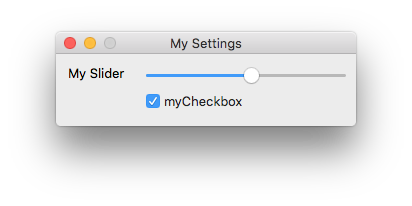
The values of the slider and checkbox will be stored under de.kutilek.test.mySlider and de.kutilek.test.myCheckbox respectively.
If save_on_edit is set, the settings will be saved each time a value is changed.