
"Now your backlog can have merge conflicts too."
An agent native kanban board for VS Code, backed by markdown files.










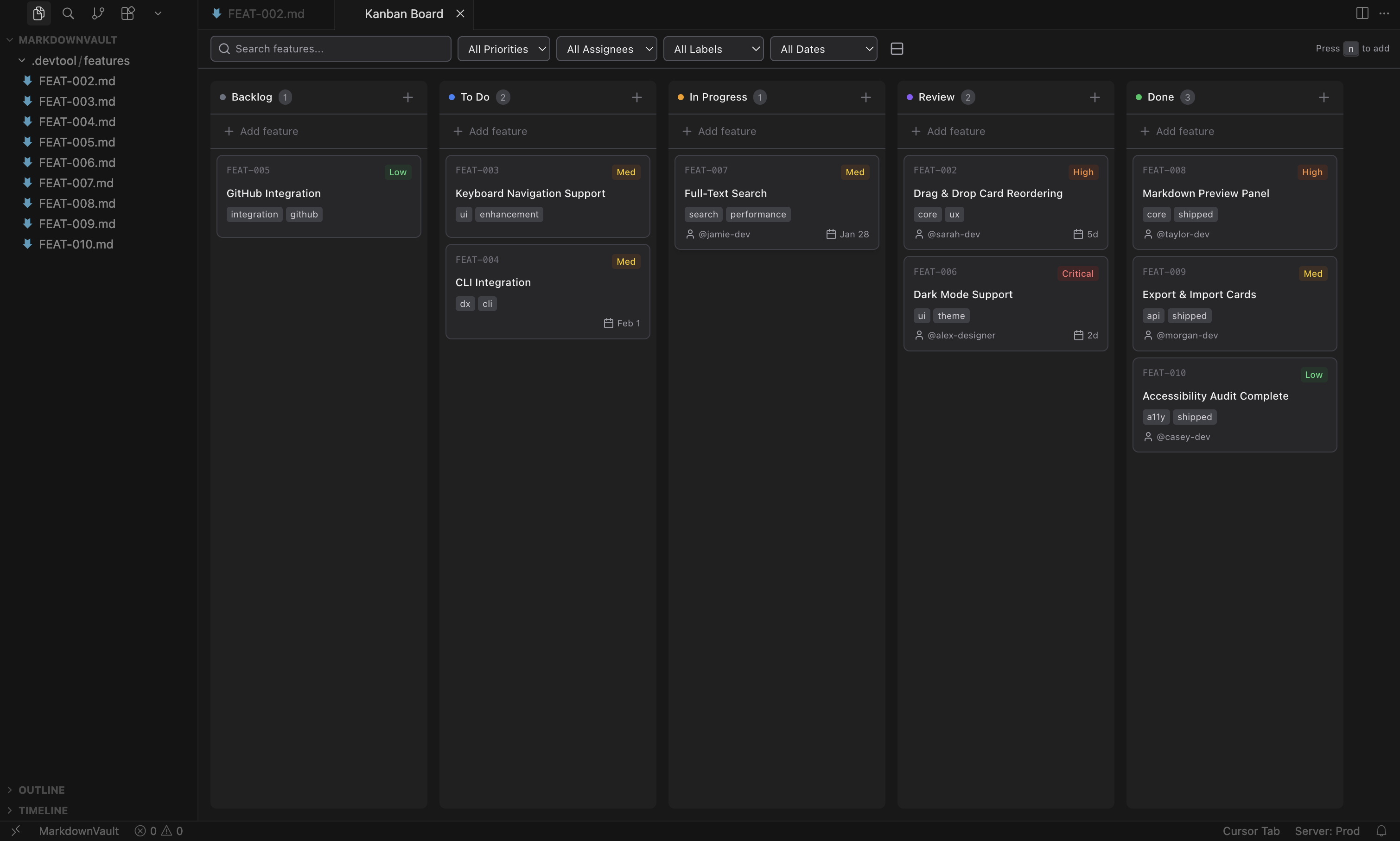
Features are stored as markdown files with YAML frontmatter — version-controllable, diffable, and editable outside the extension. No accounts, no external services.
- Install — search "Kanban Markdown" in the Extensions view (VS Marketplace / Open VSX)
- Open — run
Open Kanban Boardfrom the command palette (Cmd+Shift+P/Ctrl+Shift+P) - Create — press
Nto add your first feature card
- 5-column workflow — Backlog, To Do, In Progress, Review, Done (customizable)
- Drag-and-drop between columns and within columns
- Sidebar view from the activity bar
- Split-view editor — board on left, inline editor on right
- Horizontal and vertical layouts
- Compact mode for dense boards
- Keyboard shortcuts —
Nnew feature,Escclose dialogs,Cmd/Ctrl+Entersubmit
Each card is a markdown file with YAML frontmatter.
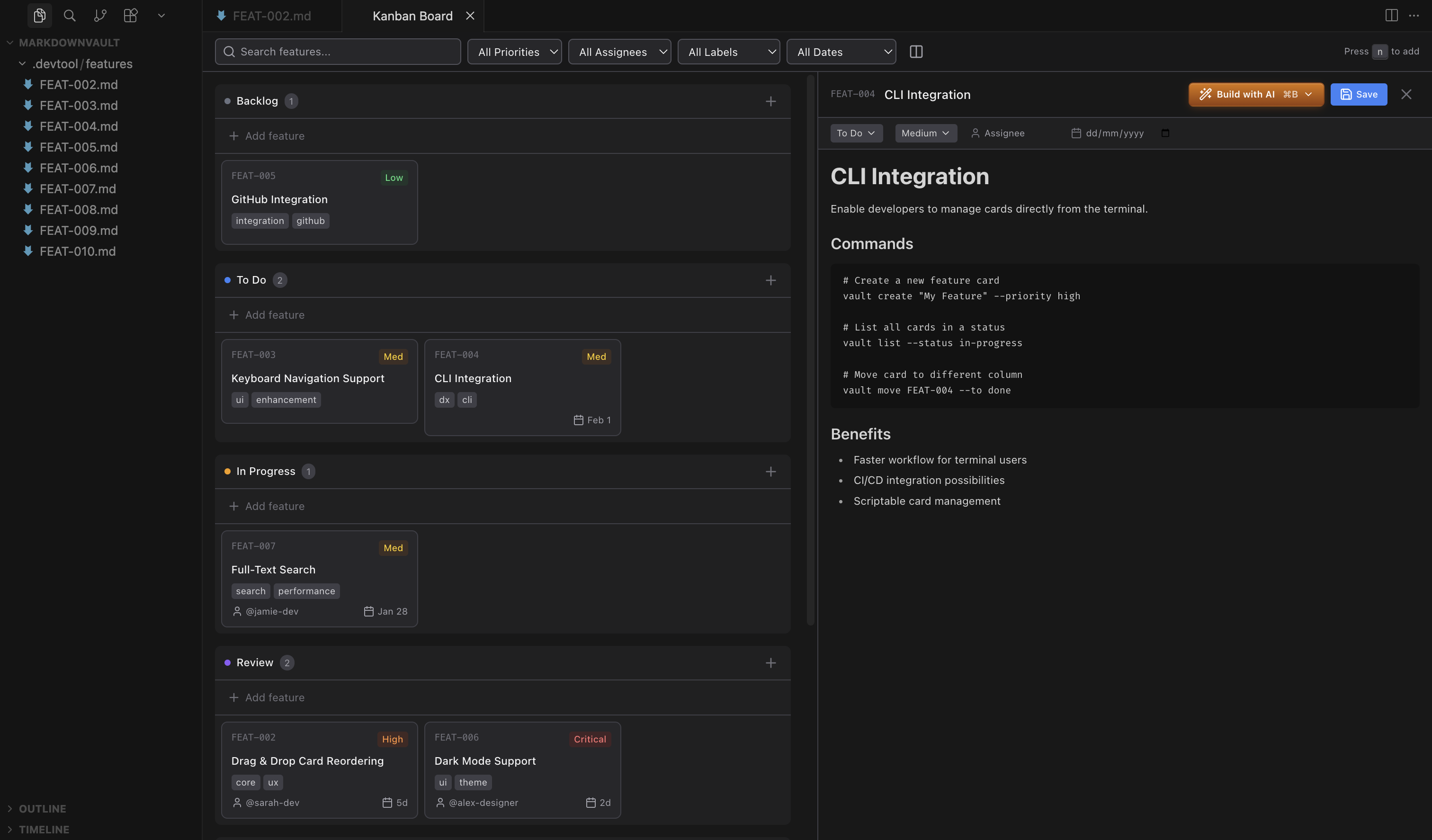
- Priority levels — Critical, High, Medium, Low with color-coded badges
- Assignees
- Due dates with smart formatting (Overdue, Today, Tomorrow, "5d", etc.)
- Labels — multiple per card, shows up to 3 with "+X more"
- Automatic created/modified timestamps
- Archive completed features to keep the board clean
- Full-text search across content, IDs, assignees, and labels
- Filter by priority, assignee, label, or due date
- Due date filters — overdue, today, this week, or no date
- Rich text editing with Tiptap
- Inline frontmatter editing — dropdowns for status/priority, inputs for assignee/due date/labels
- Auto-save on change
- Auto-refresh when files change externally
- Native markdown mode — open files in VS Code's built-in editor instead
- Follows your VS Code/Cursor theme (light & dark)
Cards include a "Build with AI" action that passes full feature context (title, priority, labels, description) to your preferred agent.
| Agent | Modes |
|---|---|
| Claude Code | Default, Plan, Auto-edit, Full Auto |
| Codex | Suggest, Auto-edit, Full Auto |
| GitHub Copilot | Default |
| OpenCode | Default |
Give agents read/write access to your board from the terminal:
npx skills add https://github.com/LachyFS/kanban-skillCompatible with Claude Code, Codex, OpenCode, and skills.sh-compatible agents. See kanban-skill for details.
Features live in .devtool/features/ by default, organized into subfolders by status.
---
id: "implement-dark-mode-toggle-2026-01-25"
status: "todo"
priority: "high"
assignee: "john"
dueDate: "2026-01-25"
created: "2026-01-25T10:30:00.000Z"
modified: "2026-01-25T14:20:00.000Z"
labels: ["feature", "ui"]
order: 0
---

# Implement dark mode toggle

Add a toggle in settings to switch between light and dark themes...Settings live under kanban-markdown.* in your VS Code/Cursor preferences.
| Setting | Default | Description |
|---|---|---|
featuresDirectory |
.devtool/features |
Directory for feature files (relative to workspace root) |
filenamePattern |
name-date |
Filename pattern for new cards (name-date, date-name, name-datetime, datetime-name) |
defaultPriority |
medium |
Default priority for new features |
defaultStatus |
backlog |
Default status for new features |
columns |
see below | Customize column IDs, names, and colors |
aiAgent |
claude |
AI agent for "Build with AI" (claude, codex, copilot, opencode) |
showPriorityBadges |
true |
Show priority badges on cards |
showAssignee |
true |
Show assignee on cards |
showDueDate |
true |
Show due date on cards |
showLabels |
true |
Show labels on cards and in editors |
showBuildWithAI |
true |
Show "Build with AI" button on cards |
showFileName |
false |
Show the source markdown filename on cards |
compactMode |
false |
Use compact card layout |
addNewCardsToTop |
false |
Add new cards to the top of the column |
markdownEditorMode |
false |
Open files in VS Code's native text editor instead of the inline rich-text editor |
Default columns:
[
  { "id": "backlog", "name": "Backlog", "color": "#6b7280" },
  { "id": "todo", "name": "To Do", "color": "#3b82f6" },
  { "id": "in-progress", "name": "In Progress", "color": "#f59e0b" },
  { "id": "review", "name": "Review", "color": "#8b5cf6" },
  { "id": "done", "name": "Done", "color": "#22c55e" }
]Install from the VS Code Marketplace or search "Kanban Markdown" in the Extensions view.
Install from Open VSX or search "Kanban Markdown" in the Extensions view.
- Download the
.vsixfrom Releases - In VS Code: Extensions >
...> Install from VSIX - Select the downloaded file
- Node.js 18+
- pnpm
pnpm install       # Install dependencies
pnpm dev           # Start development (watch mode)
pnpm build         # Build for production
pnpm typecheck     # Type checking
pnpm lint # Linting# Unit + component tests (fast, no VS Code host required)
pnpm test
# Watch mode
pnpm test:watch
# Integration tests (launches a real VS Code instance)
pnpm test:integrationUnit tests cover shared logic, extension utilities, and React components. Integration tests run inside a VS Code host using @vscode/test-electron and exercise the real file system and VS Code APIs.
act runs GitHub Actions workflows locally in Docker.
# Install (macOS)
brew install act

# Run the full CI test job
act push -j test --container-architecture linux/amd64
The first run downloads a VS Code binary (~160 MB) into .vscode-test/ which is cached for subsequent runs.
- Press
F5in VS Code to launch the Extension Development Host - Open the command palette and run "Open Kanban Board"
- Make changes and reload the window (
Cmd+R) to see updates
Extension: TypeScript, VS Code API, esbuild | Webview: React 18, Vite, Tailwind CSS, Zustand, Tiptap
See CONTRIBUTING.md for details.
- @luciopaiva — sidebar view and layout improvements
- @ungive — file organization and status subfolders
- @hodanli — label management enhancements
- @SuperbDotHub — compact mode and card display options