
This is a skeleton repo for building two bookdown books from one repository. The repo is based on two other bookdown demo repos:
You can view the two bookdown books here: dir1 & dir2
Forking or cloning this repo will give you structure to build your own books. Some files (like .travis.yml) may not copy over perfectly, so you may need to rebuild them (using file.create("FILENAME") in R and then pasting in the content or by using file-specific functions like devtools::use_travis()). I'm not sure which files are "problem files" but I can add that info here if someone tells me.
This repo also includes some extra files that are not necessary to the bookdowns:
- png's in the
docsfolder - dummy.txt in the
docsfolder (I used it originally to create thedocsfolder, which I think is required) - possibly others, but I'm not sure
If you have the repo connected to RStudio as a project (for example, via this guide), updating the book is easy! Just edit the *.Rmd, stage & commit the changes, and push to the online repository! Travis will do the rest.
But first, you have to make sure Travis is hooked up to your repo, which is a bit trickier.
Travis is used for "continuous integration" for R packages and in this case, books! It runs a series of checks to make sure the minimum requirements are met to make everything run smoothly and cohesively (read more in this Beginner's Guide to Travis-CI for R. In addition, you can tell it to complete additional tasks by editing the script section of the .travis.yml file. For example, in this repo, we use the following:
script:
  - Rscript -e 'xfun::in_dir("dir1", bookdown::render_book("index.Rmd", "bookdown::gitbook"))'
  - Rscript -e 'xfun::in_dir("dir2", bookdown::render_book("index.Rmd", "bookdown::gitbook"))'
This renders all the *.Rmd files in each of the two directories (dir1 and dir2) into a book, which is saved into the output_dir (specified in _bookdown.yml). In order to link the outputs of both files to GitHub Pages, I've set the output_dir as ../docs/dirX.
I'm not 100% on the order of the steps, but the following needs to happen:
Make an account if you haven't already. Otherwise, just head on over to https://travis-ci.org/profile/YOUR_USERNAME. You may have to sync your account if you made the new repo recently. Once it shows up in the repo list, just flip the switch to activate!

Click on Settings from the home page of your repo and scroll down to the GitHub Pages section. For the source, choose the gh-pages branch option. If you don't see it now, choose the master branch /docs folder to start and come back to change it after the next few steps. (That's what I had to do.)


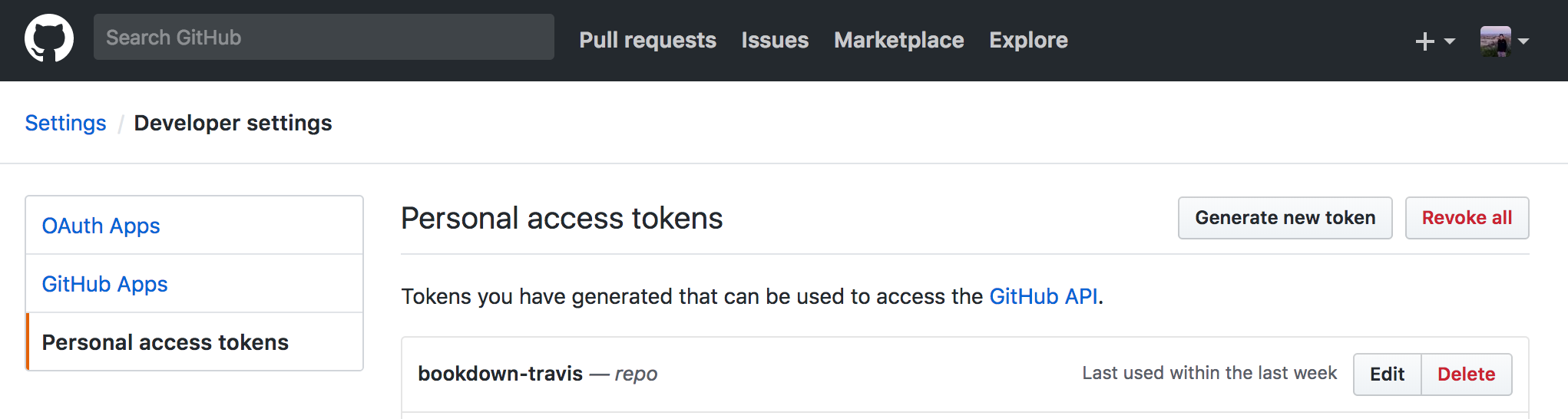
Navigate to your account settings (click your profile picture at the top-right corner of GitHub and then Settings). Under Developer settings, click Personal access tokens and then the Generate new token button. Add a token description and check the box next to repo under Select scopes. Scroll down and click Generate token when you finish. Copy the token to the clipboard (there's a handy button to make it super easy) and then go to Travis.

Navigate to your repo's Travis page (https://travis-ci.org/USERNAME/REPONAME) and select More options --> Settings. The Environmental Variables section is the one you need to change.

For the Name field in the Environmental Variables, enter GITHUB_TOKEN (or however you've defined it in the deploy section of .travis.yml). For the Value field, paste in the access token you copied from GitHub.

Go through the files and make sure you've edited them to make them specific to your repo.
.travis.yml: any changes to the directory names should be reflected in thescriptsection_bookdown.yml(insidedir1anddir2): the output directory should bedirX(where X is 1 or 2) or whatever you rename the directories to. Change the book filename as you see fit (not critical to Travis working)_output.yml: changes should not affect Travis (just don't mess with the gitbook section too much)
If everything is set up correctly, then Travis will be happy 💚. If not, check through your YML files and Travis/GitHub repo settings.
For example, I got this error while I was testing things out:

I fixed it by going through step 3 (again).
Another error I dealt with involved having an incomplete DESCRIPTION file. These are required for packages, so Travis checks that you meet the minimum requirements for them. Unless you use Travis, they aren't strictly required for bookdowns. I used the information here to fix the error.
Just update USERNAME and REPO_NAME and add this script to the top of your README file.
[](https://travis-ci.org/USERNAME/REPO_NAME)
Overall, I found Travis/YML/bookdown tricky to debug, but the solution is out there! You can check out more resources below:
- Bookdown: Authoring Books with R Markdown
- Blogpost: How to Start a Bookdown Book
- Blogpost: A Beginner's Guide to Travis
- Reference: GitHub Pages deployment via Travis
- Reference: Travis yml for R
- Reference: Requirements for the DESCRIPTION file