LabelV is a semi-automatic video annotation tool for computer vision training data generation
sudo apt install ffmpeg

pip install .
- clone this repository and from the root directory, install it and then run
labelv-service
- go to localhost:4711
There is a blog post describing how this is implemented using OpenCV and how it can be used in generating training data for object detection algorithms.
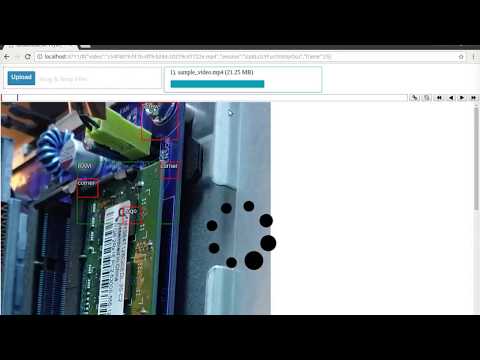
Conecpts:
- Session - a set of keyframes generated by a certain user for a certain video
- Frame - a video is theoretically made up of concecutive, numbered images
- Keyframe - a frame annotation created by a user containing labels
- Label - an object label for an object in the video, such as a chair, a lamp, a bike etc
- Bbox - a bounding box around an object in the video
- Title - a string describing a label
- Group - a label that contains other groups and labels. The bbox of a group always exactly contains all the bboxes of its children.
Whenever a video is uploaded it is saved under upload/video/VIDEO_ID.EXT where VIDEO_ID is a unique random string and EXT is the file format extension of your video.
Every time a user starts working with a video adding keyframes and labels, a session is created. The stored under upload/session/VIDEO_ID.EXT-SESSION_ID where SESSION_ID is a unique random string. This files contain a json object.
The session object contains a "keyframes" member whose keys are keyframe frame numbers (as strings due to the json format), and whose values are keyframe objects:
{"keyframes": {"14": KEYFRAME_OBJECT,
               "26": KEYFRAME_OBJECT,
               "200": KEYFRAME_OBJECT}}
Each keyframe object has a set of labels and a KEYFRAME_KEY. The KEYFRAME_KEY is a unique id use to identify this particular set of labels for this particular frame. If the user where to change the keyframe, a new key would be generated.
KEYFRAME_OBJECT = {"key": "KEYFRAME_KEY",
                   "data": {"label": ITEM}}
The keyframe labels reside under the key "labels" under the key "data" and is a recursively defined structure. At each level one of two possible objects can be present:
A label
ITEM = {"type": "Label",
        "args": {"bbox": [208,214,69,84],
                 "title": "The chair"}}
or a group
ITEM = {"type": "Group".
        "args": {"bbox": [208,214,69,84],
                 "children": [ITEM,ITEM,...],
                 "title": "Dining group"}}
When a user navigates to a non-keyframe, the tracker tracks the bboxes from the last keyframe before the current frame, and generates updated bboxes for all frames in between. These are stored under upload/tracker/VIDEO_ID.EXT/KEYFRAME_NUMBER/KEYFRAME_KEY/FRAME_NUMBER.json where FRAME_NUMBER is the frame number minus the keyframe frame number (so starts from zero). Each such file contains an ITEM as defined above encoded as json.