agentz is a desktop terminal workspace built around a live avatar strip that shows what each pane is doing at a glance while still giving you real PTY-backed terminals underneath.
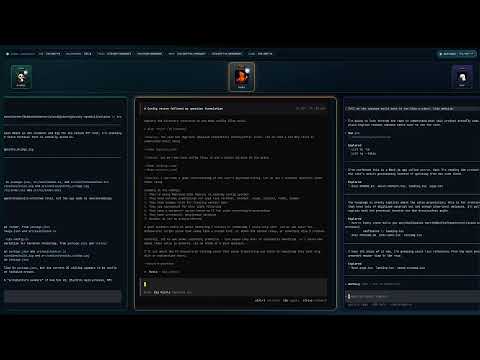
Watch the full demo on YouTube: https://youtu.be/K7V8-OH8DiE
The avatar strip is the main UI. Each pane gets an assigned avatar, and that avatar updates in real time to reflect pane activity:
idlewhen the pane is waitingworkingwhen the pane is actively running or streaming workquestionwhen the pane needs input or approvalcallingwhen the pane is delegating or using sub-agents
Under the strip, each avatar maps to a real terminal pane with native-style alternate-screen behavior for tools like nvim, less, tmux, and opencode.
Panes can also keep a stack of background terminals so you can cycle between the main session and layered side work without losing context.
- Live avatar strip that lets you scan pane activity without reading every terminal
- Real-time avatar state changes for idle, working, question, and calling states
- Stable avatar-to-pane mapping so each pane keeps a recognizable identity
- 10 named avatars to assign to panes: Marmalade, Nyx, Byte, Glimmer, Wisp, Rufus, Selene, Bamboo, Mochi, and Pyra
- Multiple real terminal panes in one desktop window
- Per-pane background terminal stacks you can cycle through without replacing the main session
- PTY-backed sessions, not fake terminal emulation shortcuts
- Native-style alternate-screen behavior through the Ghostty VT bridge
- Working mouse input for terminal TUIs like
nvim - Shell scrollback and prompt behavior that stays readable
- Resizable panes with drag handles
- Per-pane working directory tracking with automatic folder color assignments
- Inactive pane previews showing shell output when not focused
- Image paste support - paste images from clipboard directly into the terminal (writes to temp file and sends path)
- Settings modal for customization
- Fully customizable keyboard shortcuts
- Configurable default pane width
- Adjustable visible live pane count (1-9, odd numbers for best layout)
Latest release:
https://github.com/horvay/agentz/releases/latest
Release assets:
*.dmgfor macOS*.exefor Windows*.AppImagefor Linux
- Download the latest
*.dmg. - Install the app normally.
- Launch
agentz.
Use the .dmg release asset on macOS rather than a raw app bundle or zip export.
- Download the latest
*.exe. - Run the installer.
- Launch
agentz.
- Download the latest
*.AppImage. - Mark it executable.
- Run it.
chmod +x ./agentz-*.AppImage
./agentz-*.AppImageAll shortcuts are customizable in the Settings modal (Ctrl+Shift+P):
| Action | Default Shortcut |
|---|---|
| Add pane | Ctrl+Shift+N |
| Cycle pane terminals | Ctrl+B |
| Add background terminal | Ctrl+Shift+B |
| Focus previous pane | Ctrl+Shift+ArrowLeft |
| Focus next pane | Ctrl+Shift+ArrowRight |
| Move pane left | Ctrl+Alt+Shift+ArrowLeft |
| Move pane right | Ctrl+Alt+Shift+ArrowRight |
| Close pane | Ctrl+Shift+W |
| Open settings | Ctrl+Shift+P |
Shortcuts require at least one modifier key and are validated for conflicts.
bun install
bun run native:buildbun run devbun run scripts/web-dev.tsWeb mode stays local-only:
- UI:
http://127.0.0.1:5173 - RPC backend:
ws://127.0.0.1:4599
Remote/network access is intentionally disabled until that path is secured.
Web mode now requires a browser login backed by the machine account on the host OS:
- Linux: PAM-backed login using the same account you use to sign into the machine
- macOS: OpenDirectory-backed login using the same account you use to sign into the machine
- Windows: Win32
LogonUserlogin using the same account you use to sign into the machine
Linux-only option:
AGENTZ_PAM_SERVICEoverrides the PAM service name used for Linux authentication
# Start one pane with opencode
bun run dev:launch -- --pane-1-opencode

# Start multiple panes with different commands
bun run dev:launch -- --pane-1-opencode --pane-2-cmd=bash --pane-2-args=-lc,ls
Supported flags:
--pane-<n>-cmd=<command>--pane-<n>-args=<arg1,arg2,...>--pane-<n>-cwd=<path>--pane-<n>-opencode
Primary interactive validation target:
opencode
Manual validation workflow:
bun run devThen:
- open at least one terminal pane
- start
opencodeinside the pane - verify typing, submission, cursor redraw, resize behavior, and scrollback
- repeat with two panes to confirm session isolation
Build a local release artifact:
bun run release:stableCurrent packaged outputs:
- Linux:
AppImage - macOS:
dmg - Windows:
nsisinstaller
Packaged Linux AppImage, macOS, and Windows releases check GitHub Releases for updates, ask before downloading, and ask again before restarting to install.
Release publishing needs to include the updater feed files alongside those installers:
- Linux:
latest-linux*.yml - macOS:
zippluslatest-mac*.yml - Windows:
latest.yml
You can turn update prompts on or off in Settings under App Updates.
GitHub Releases should only publish macOS installers from a signed and notarized CI build.
Required repository secrets for the macOS release job:
CSC_LINKCSC_KEY_PASSWORDAPPLE_API_KEY_P8APPLE_API_KEY_IDAPPLE_API_ISSUER
For local development builds on macOS, Gatekeeper quarantine can block an unsigned app bundle. If you trust your own local build and need to test it manually:
xattr -dr com.apple.quarantine /path/to/agentz.appagentz stores its configuration at:
- Linux:
~/.config/agentz/config.json(XDG compliant, orXDG_CONFIG_HOME/agentz/config.json) - macOS:
~/.config/agentz/config.json - Windows:
%APPDATA%\agentz\config.json
The config file is created automatically on first run. You can edit it directly or use the Settings modal (Ctrl+Shift+P).
On some Linux/X11 setups, Electrobun may not forward keyboard input until the first pointer interaction. agentz applies a one-time startup nudge using xdotool to handle that automatically.
To disable it:
AGENTZ_DISABLE_X11_INPUT_NUDGE=1 bun run devsrc/main/main process, terminal manager, PTY sessions, RPC serversrc/ui/React UI, pane layout, xterm rendering, input handlingsrc/native/Zig native PTY host and Ghostty VT integrationdeps/ghostty/Ghostty source used for VT behavior research and bridge integrationscripts/smoke tests, screenshot tests, and packaging helpers