





A unified GDScript interface for scheduling local notifications on Android and iOS.
Features:
- Schedule local notifications with customizable titles, content, and delays.
- Schedule repeating notifications with intervals.
- Manage notification channels and badges.
- Handle permissions and user interactions via signals.
- Plugin handles system restart allowing scheduled notifications to survive device reboots
- Demo
- Installation
- Usage
- Signals
- Methods
- Error Codes
- Classes
- Classes
- Platform-Specific Notes
- Video Tutorials
- Links
- All Plugins
- Credits
- Contributing
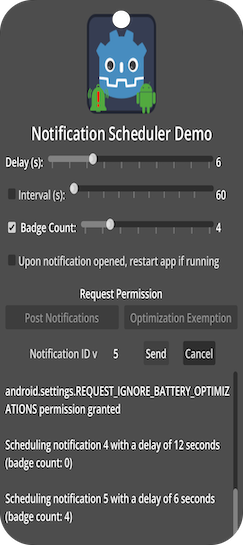
Try the demo app located in the demo directory.
Uninstall previous versions before installing. If using both Android & iOS, ensure same addon interface version.
Options:
- AssetLib
- Search for
Notification Scheduler - Click
Download→Install - Install to project root,
Ignore asset rootchecked - Enable via Project → Project Settings → Plugins
- Ignore file conflict warnings when installing both versions
- Search for
- Manual
- Download release from GitHub
- Unzip to project root
- Enable via Plugins tab
- Add a NotificationScheduler node to your scene.
- Connect signals:
initialization_completednotification_openednotification_dismissedpermission_grantedpermission_denied
- Check permission:
if not $NotificationScheduler.has_post_notifications_permission():
	$NotificationScheduler.request_post_notifications_permission()
- To send user to App Info (manual enable):
$NotificationScheduler.open_app_info_settings()
- Create a notification channel:
var res = $NotificationScheduler.create_notification_channel(
	 NotificationChannel.new()
		  .set_id("my_channel_id")
		  .set_name("My Channel Name")
		  .set_description("My channel description")
		  .set_importance(NotificationChannel.Importance.DEFAULT))
- Build & schedule notification:
var data = NotificationData.new()
	 .set_id(1)
	 .set_channel_id("my_channel_id")
	 .set_title("My Title")
	 .set_content("My content")
	 .set_small_icon_name("ic_custom_icon")
	 .set_delay(10)

var res = $NotificationScheduler.schedule(data)
initialization_completed(): Emitted when the plugin is initialized.post_notifications_permission_granted(permission_name: String): Emitted when notification permission is granted to app.post_notifications_permission_denied(permission_name: String): Emitted when notification permission is denied to app.notification_opened(notification_data: NotificationData): Emitted when user taps notification.notification_dismissed(notification_data: NotificationData): Emitted when user dismisses notification.
battery_optimizations_permission_granted(permission_name: String): Emitted when battery optimization exemption permission is granted to app.battery_optimizations_permission_granted(permission_name: String): Emitted when battery optimization exemption is denied to app.schedule_exact_alarm_permission_granted(permission_name: String): Emitted when permission to schedule exact alarms is granted to app.schedule_exact_alarm_permission_denied(permission_name: String): Emitted when permission to schedule exact alarms is denied to app.
initialize()- initialize plugincreate_notification_channel(NotificationChannel)- create a new notification channel with given dataschedule(NotificationData)- schedule a new notification with given datacancel(id)– cancel notification with given Id before opened/dismissedget_notification_id()– get ID of last opened notificationhas_post_notifications_permission()– returns true if app has already been granted permissions to post notificationsrequest_post_notifications_permission()– request permissions to post notifications from useropen_app_info_settings()- open the system settings screen for app
has_battery_optimizations_permission()– returns true if app has already been granted permissions to ignore battery optimizationsrequest_battery_optimizations_permission()– request permissions to ignore battery optimizations from userhas_schedule_exact_alarm_permission()– returns true if app has already been granted permission to schedule exact alarmsrequest_schedule_exact_alarm_permission()– request permission to schedule exact alarms rom user
set_badge_count(count)– show/hide app icon badge with count (on Android, useNotificationData'sset_badge_count()method)
| Constant | Value | Description |
|---|---|---|
ERR_ALREADY_EXISTS |
32 |
Channel ID already exists |
ERR_INVALID_DATA |
30 |
Invalid notification/channel data |
ERR_UNAVAILABLE |
2 |
Not supported on current platform |
ERR_UNCONFIGURED |
3 |
Plugin not initialized |
OK |
0 |
Success |
- Encapsulates data that defines the notification channel.
- Properties:
id,name,description,importance,badge_enabled
- Encapsulates data that defines the notification.
- Properties:
notification_id,channel_id,title,content,small_icon_name,large_icon_name,delay,deeplink,interval,badge_count,custom_data - Note:
small_icon_nameandlarge_icon_nameare only used on Android.
- Encapsulates extra data to be sent and received along with other notification data.
- Allows setting of any number of
bool,int,float, orStringproperties.
- Default icon:
ic_default_notificationinres://assets/NotificationSchedulerPlugin - Custom icon:
- Generate via Android Studio → Image Asset Studio → Notification Icons
- Copy generated drawables into
res://assets/NotificationSchedulerPlugin - Use
set_small_icon_name("icon_name")
- App Optimization:
- Check app optimization settings
- If app settings are set to
OptimizedorRestricted, notifications may not be delivered when app is not running
- MIUI:
request_post_notifications_permission()may not work reliably on Xiaomi devices to fully exempt an app from MIUI's custom battery management features.
- App Optimization and Exact Alarm:
- The plugin will schedule an exact alarm to deliver the notification if the
SCHEDULE_EXACT_ALARMpermission has been granted, else the plugin will fall back to non-exact scheduling. - Obtaining the
IGNORE_BATTERY_OPTIMIZATIONSpermission will also allow scheduling of exact alarms - additionally requestingSCHEDULE_EXACT_ALARMpermission is not necessary.
- The plugin will schedule an exact alarm to deliver the notification if the
- Troubleshooting:
- Logs:
adb logcat | grep 'godot'(Linux),adb.exe logcat | select-string "godot"(Windows) - No small icon error: ensure icons exist in assets directory.
- Battery restrictions: check Settings → Apps → Your App → Battery.
- Logs:
- Set notification icons in Project → Export → iOS.
- System limits:
- Max repeating notifications: 64
- Min interval: 60 seconds
- View XCode logs while running the game for troubleshooting.
- See Godot iOS Export Troubleshooting.
Notification Scheduler Plugin on Android -- by Code Artist
| ✦ | Plugin | Android | iOS | Latest Release | Downloads | Stars |
|---|---|---|---|---|---|---|
 |
Admob | ✅ | ✅ |   |
  |
 |
 |
Connection State | ✅ | ✅ |   |
  |
 |
 |
Deeplink | ✅ | ✅ |   |
  |
 |
 |
Firebase | ✅ | ✅ | - | - |  |
 |
In-App Review | ✅ | ✅ |   |
  |
 |
 |
Native Camera | ✅ | ✅ |   |
  |
 |
 |
Notification Scheduler | ✅ | ✅ |   |
  |
 |
 |
OAuth 2.0 | ✅ | ✅ |   |
  |
 |
 |
QR | ✅ | ✅ |   |
  |
 |
 |
Share | ✅ | ✅ |   |
  |
 |
Developed by Cengiz
Based on Godot Mobile Plugin Template v5
Original repository: Godot Notification Scheduler
See our guide if you would like to contribute to this project.
If this plugin has helped you, consider supporting its development! Every bit of support helps keep the plugin updated and bug-free.
| ✦ | Ways to Help | How to do it |
|---|---|---|
| ✨⭐ | Spread the Word | Star this repo to help others find it. |
| 💡✨ | Give Feedback | Open an issue or suggest a feature. |
| 🧩 | Contribute | Submit a PR to help improve the codebase. |
| ❤️ | Buy a Coffee | Support the maintainers on GitHub Sponsors or other platforms. |