Skip to content

Home Assistant Community Store support#1

Open
rsnodgrass wants to merge 14 commits into
gbealmer:masterfrom
homeassistant-projects:master
Open

Home Assistant Community Store support#1
rsnodgrass wants to merge 14 commits into
gbealmer:masterfrom
homeassistant-projects:master

Conversation

@rsnodgrass
Copy link
Copy Markdown

  • Added Home Assistant Community Store (HACS) support for installation and automatic updates
  • Updated README with HACS installation information, consistent titles, MIT license shield, etc

@rsnodgrass
Copy link
Copy Markdown
Author

This has also been updated to meet HA's new manifest requirements, and switch from the deprecated SwitchDevice.

@Scope666
Copy link
Copy Markdown

Thanks for doing this, was worried about this component breaking with upcoming versions of HA.

Copy link
Copy Markdown

@kunalkhosla kunalkhosla left a comment

Choose a reason for hiding this comment

The reason will be displayed to describe this comment to others. Learn more.

This would be really useful if merged.

@Godis1coolguy
Copy link
Copy Markdown

How do I install this through HACS? I can't get HACS to see it.

@rsnodgrass
Copy link
Copy Markdown
Author

@Godis1coolguy this has to be merged by @gbealmer for you to be able to add it. Then you just need to add the repository to HACS: https://github.com/gbealmer/pyecoplug

@zvaligura
Copy link
Copy Markdown

Hi! We've been working on getting this to work with 240v plug that runs on the IOS ECO Plugs app.

We used this git with both the HACS and Manual method but can't get it to show up as a device or integration on the integration page.

With the HACS method, we added the repo and installed the Ecoplugs, but nothing shows up after this.

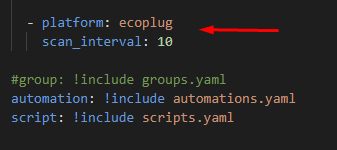
With the manual method, when we add the following the configuration.yaml, we get an error when request to restart the system that it cannot be restarted due to the ecoplugs integration.

`switch:

  • platform: ecoplug
    scan_interval: 10`

@IMNotMax
Copy link
Copy Markdown

IMNotMax commented May 1, 2023

Hi there, same here.
@zvaligura has the same issue I have.
Adding the repo using HACS. Reboot. Nothing happens.
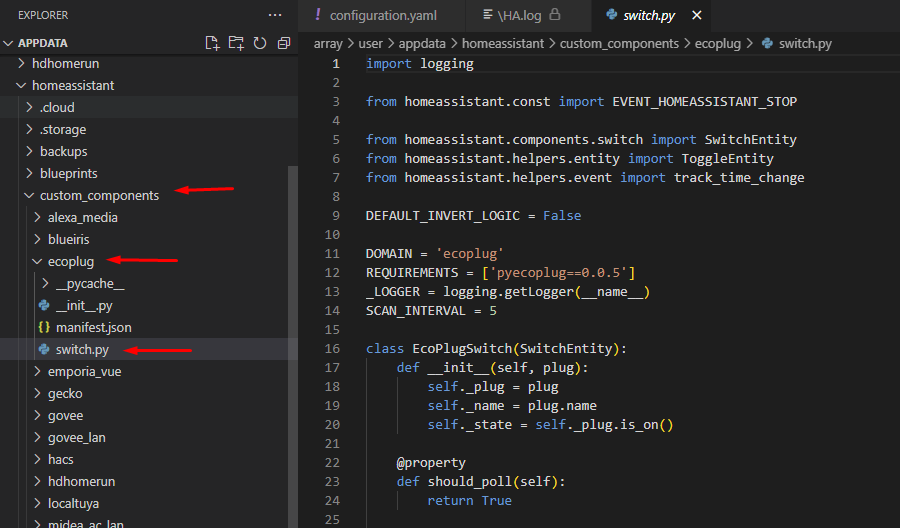
Checking the custom_component folder, everything is OK.
Adding
`switch:

platform: ecoplug
scan_interval: 10to config.yaml creates an issue : The system cannot restart because the configuration is not valid: Platform error switch.ecoplug - Integration 'ecoplug' not found.
Traceback (most recent call last):
File "/usr/src/homeassistant/homeassistant/components/websocket_api/commands.py", line 199, in handle_call_service
await hass.services.async_call(
File "/usr/src/homeassistant/homeassistant/core.py", line 1820, in async_call
task.result()
File "/usr/src/homeassistant/homeassistant/core.py", line 1857, in _execute_service
await cast(Callable[[ServiceCall], Awaitable[None]], handler.job.target)(
File "/usr/src/homeassistant/homeassistant/components/hassio/init.py", line 557, in async_handle_core_service
raise HomeAssistantError(
homeassistant.exceptions.HomeAssistantError: The system cannot restart because the configuration is not valid: Platform error switch.ecoplug - Integration 'ecoplug' not found.`

@cscoppafox
Copy link
Copy Markdown

cscoppafox commented May 1, 2023

I am running this version and it's working perfectly for me. (Pool is open so I can pull logs, compare setup, etc.)

https://github.com/rsnodgrass/pyecoplug

image

image

@IMNotMax
Copy link
Copy Markdown

IMNotMax commented May 1, 2023

Trying to delete the custom_component, reboot, re-install, reboot :) Old same way !
Will keep you posted

@IMNotMax
Copy link
Copy Markdown

IMNotMax commented May 1, 2023

No luck, clean install via HACS, nothing happens (no device detected) and adding this to configuration.yaml
switch:

  • platform: ecoplug
    scan_interval: 10

Block restart with this error

Logger: homeassistant.components.websocket_api.http.connection
Source: components/hassio/__init__.py:557
Integration: Home Assistant WebSocket API ([documentation](https://www.home-assistant.io/integrations/websocket_api), [issues](https://github.com/home-assistant/home-assistant/issues?q=is%3Aissue+is%3Aopen+label%3A%22integration%3A+websocket_api%22))
First occurred: 2:20:29 PM (1 occurrences)
Last logged: 2:20:29 PM

[547502415136] The system cannot restart because the configuration is not valid: Platform error switch.ecoplug - Integration 'ecoplug' not found.
Traceback (most recent call last):
  File "/usr/src/homeassistant/homeassistant/components/websocket_api/commands.py", line 199, in handle_call_service
    await hass.services.async_call(
  File "/usr/src/homeassistant/homeassistant/core.py", line 1820, in async_call
    task.result()
  File "/usr/src/homeassistant/homeassistant/core.py", line 1857, in _execute_service
    await cast(Callable[[ServiceCall], Awaitable[None]], handler.job.target)(
  File "/usr/src/homeassistant/homeassistant/components/hassio/__init__.py", line 557, in async_handle_core_service
    raise HomeAssistantError(
homeassistant.exceptions.HomeAssistantError: The system cannot restart because the configuration is not valid: Platform error switch.ecoplug - Integration 'ecoplug' not found.

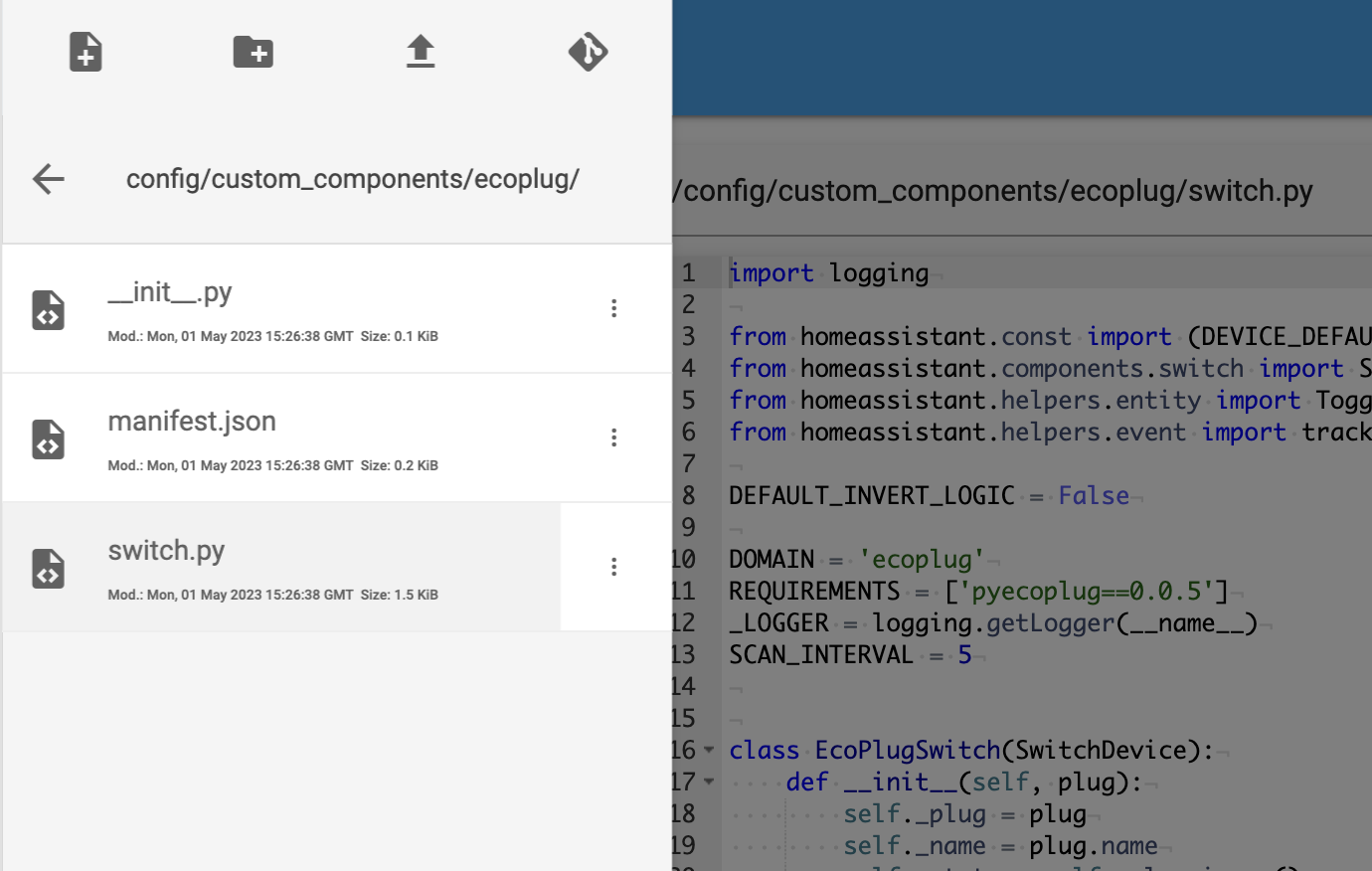
And all the files are in the directory.
image

I'm using HAS on a raspberrypi 4, latest version available
Home Assistant 2023.4.6
Supervisor 2023.04.1
Operating System 10.1
Frontend 20230411.1 - latest

@rsnodgrass
Copy link
Copy Markdown
Author

rsnodgrass commented May 1, 2023

NOTE: This is not supported by me. This needs to be merged by @gbealmer.

OR someone can do a new fork of this and start supporting it.

@IMNotMax
Copy link
Copy Markdown

IMNotMax commented May 1, 2023

I'll Open an issue.
Thanx

@cscoppafox
Copy link
Copy Markdown

cscoppafox commented May 1, 2023

I'll Open an issue. Thanx

Perhaps because you're on a Pi, I'm on Unraid running HA in Docker with a 64 bit CPU. Can maybe try this (shot in the dark)

root@CRAIG-PC:~# pip3 install pyecoplug
Collecting pyecoplug
Downloading pyecoplug-0.0.5-py2.py3-none-any.whl (4.8 kB)
Installing collected packages: pyecoplug
Successfully installed pyecoplug-0.0.5

EDIT: See comment below mine for a working fork. https://github.com/zvaligura/pyecoplug

@zvaligura
Copy link
Copy Markdown

I was able to fork off it and get it stable and working.

https://community.home-assistant.io/t/ecoplug-integration/83854/96

@cscoppafox
Copy link
Copy Markdown

zvaligura

Ah, I see what you did ... CLEVER!

homeassistant-projects/pyecoplug@master...zvaligura:pyecoplug:master

@IMNotMax
Copy link
Copy Markdown

IMNotMax commented May 2, 2023

Just a question, where the packages are installed ?
I tried with the fork from @zvaligura and I don't have error messages (yeaah) but no device showed. On every other integration import scripts are in the same directory. This fork uses a package located elsewhere to make the discovery. And I think it's the root of my issue.
do you think it's a clue ? Or I'm more than noob (I am btw :) )

@IMNotMax
Copy link
Copy Markdown

IMNotMax commented May 2, 2023

zvaligura

Ah, I see what you did ... CLEVER!

rsnodgrass/pyecoplug@master...zvaligura:pyecoplug:master

BTW, if in the switch.py script, calling discovery function is by importing this :
from pyecoplug import EcoDiscovery

Shoulnd'nt have been the same in the discovery.py to import EcoPlug?
This from pyecoplug import EcoPlug instead of from .plug import EcoPlug ?

just saying ;)

@cscoppafox
Copy link
Copy Markdown

cscoppafox commented May 2, 2023

Just a question, where the packages are installed ? I tried with the fork from @zvaligura and I don't have error messages (yeaah) but no device showed. On every other integration import scripts are in the same directory. This fork uses a package located elsewhere to make the discovery. And I think it's the root of my issue. do you think it's a clue ? Or I'm more than noob (I am btw :) )

In my Home Assistant Docker container:

# find . -name pyecoplug
/usr/local/lib/python3.10/site-packages/pyecoplug
 # 

@zvaligura
Copy link
Copy Markdown

Just a question, where the packages are installed ?
I tried with the fork from @zvaligura and I don't have error messages (yeaah) but no device showed. On every other integration import scripts are in the same directory. This fork uses a package located elsewhere to make the discovery. And I think it's the root of my issue.
do you think it's a clue ? Or I'm more than noob (I am btw :) )

I’m a total noob as well. I had to add in the config.yaml lines, (platform: switch etc) to get it to load each time my rasp pi started up. The switch just showed up in my entities with the name I set in the eco plug app itself (iOS).

@IMNotMax
Copy link
Copy Markdown

IMNotMax commented May 2, 2023

I will try to merge some code and give feedback here.
Testing is one off the best way to learn they say :)

@IMNotMax
Copy link
Copy Markdown

IMNotMax commented May 3, 2023

Ok, I don't know how, but after multiple test, install uninstall, change code, reboot... I found some answers and automagically my eco plug devices appeared with @zvaligura code https://github.com/zvaligura/pyecoplug .

below what I understood.
I found in HASSIO how to SSH the supervisor and I found out why having a python package is important.
Links To SSH the root to format ext4 USB Drive and name it CONFIG

`most of linux formatted HD are with ext3, ext4 . thus,

check the lable first sudo e2label <device> and rename sudo e2label <device> <label>. Note: 16 characters maximum.`

The python package is outside the docker container, thus there is no network interface between the py package and the eco plug switches. Inside the docker container, the docker networking should block the discovery (not the same subnet). That's why you need the package basically.

Made some tests to import correctly the plug.py in the discovery.py without success. @zvaligura, you have a good workaround by merging the 2 files.

I have Eco Plug TM-050B devices, and now they are manageable in HomeAssistant and in HomeKit

Sign up for free to join this conversation on GitHub. Already have an account? Sign in to comment

Labels

None yet

Projects

None yet

Development

Successfully merging this pull request may close these issues.

7 participants